Short answer: the best Figma Make alternative depends on what you want at the end. For a running app, pick Lovable, v0 or Bolt. For a prototype, Claude Design, Google Stitch, Magic Patterns or Uizard. For a website, Framer. For a design file your team and your own agent keep editing, with no AI credits, Kite (kite.new). Prices were checked on each vendor's own page on October 28, 2026.
Key takeaways
- Figma Make spends AI credits on every prompt; Figma's own estimate for generating an app from scratch is about 100 credits or more, against 500 a month on the free plan.
- Lovable, v0 and Bolt build running apps; Claude Design, Stitch, Magic Patterns and Uizard make prototypes; Framer makes websites.
- Lovable, v0 and Magic Patterns let your agent in over MCP, but it prompts their AI; Lovable and Magic Patterns bill those calls in their credits.
- Figma Make does export code, as a .zip or to GitHub; what doesn't sync back is the Figma copy.
We make Kite, and it is on this list. It isn't an app builder, and we say plainly when one of the others is the better pick.
Pick by what you want back
| Pick | If you want |
|---|---|
| Lovable | A running web app with a backend and a live address |
| v0 | Next.js and React code you will deploy yourself |
| Bolt | An app with hosting, on a small budget |
| Claude Design | A prototype inside the Claude plan you already pay for |
| Google Stitch | Quick UI ideas from a prompt |
| Magic Patterns | Prototypes you can send back to Figma |
| Uizard | Quick mockups, without being a designer |
| Framer | A marketing website live today |
| Kite | Designs your own agent draws and your team edits, with no AI credits |
If you already have a Full seat on a paid Figma plan and its monthly credits comfortably cover your work, staying on Figma Make is the simplest choice, because your designs and libraries are already there.
What Figma Make is, and what it costs
Figma calls Make “an AI-driven, prompt-to-app tool” that turns ideas and existing designs into prototypes, web apps and interactive UI, per its Figma Make FAQs. It is available on Full seats on paid plans, and listed at $16 a month for a Full seat on Professional on Figma's pricing page. The free Starter plan lets you try it.
Every prompt spends AI credits. Starter gets 150 a day, up to 500 a month; a Professional Full seat gets 3,000 a month. Credits reset monthly and don't roll over, per how Figma AI credits work. Figma's own guide puts generating an app from scratch at about 100 credits or more, and undoing an AI action doesn't refund them, per the same credits guide.
A Make file publishes to a figma.site address. Figma says it isn't indexed by search engines by default and offers no SEO controls yet, and deleting the file unpublishes it, per its Make FAQs.
Why people look for a Figma Make alternative
- Credits spent on rework. One designer in a Reddit r/FigmaDesign thread said it “eats up a lot of credits”, and since an undo doesn't refund them, every retry of a weak draft costs again.
- Work that feels stuck. The same thread asks why it's impossible to export. It isn't: Make downloads the code as a .zip or pushes it to GitHub. What doesn't sync is the Figma side: a preview copied into Figma Design becomes layers that don't update the Make file.
- A different end product. Some teams want a real app with logins and a database; others only want the design, edited by the people and agents they already work with.
Figma Make alternatives at a glance
Prices are the cheapest paid plan, from each vendor's pricing page on October 28, 2026. Where a page doesn't say whether a price is billed monthly or yearly, we write “listed at”.
| Tool | What you get | Free plan | Cheapest paid | What it meters |
|---|---|---|---|---|
| Figma Make | Prototypes and web apps | Trial, 500 credits a month | Full seat, listed at $16 | AI credits |
| Lovable | Full-stack web apps | 5 credits a day, up to 30 a month | Pro $25 monthly, $21 yearly | Credits |
| v0 | Next.js and React apps | 7 messages a day | Plus, listed at $30 a user | Credits, priced by tokens |
| Bolt | Websites and apps, hosted | 1M tokens a month | Pro $18, billed yearly | Tokens |
| Claude Design | Designs, prototypes, decks | On Claude's plans, Free included | Your Claude plan | Claude plan usage |
| Google Stitch | UI designs and prototypes | Not shown on pages we could read | Not stated | Not stated |
| Magic Patterns | Prototypes | Free monthly credits | Starter, listed at $17 a seat | Credits |
| Uizard | Mockups and prototypes | 3 generations a month | Pro $12, billed yearly | Generations |
| Framer | Marketing websites | Yes, 500 AI credits to try | Basic, listed at $10 | AI credits |
| Kite | Design files, as HTML and CSS layers | 3 files, 200 agent actions a day | Pro $20 monthly, $16 yearly | No AI credits |
The 9 best Figma Make alternatives
The nine are grouped by what you get back at the end: running apps first, then prototypes and generated screens, then websites, and finally design files your team keeps editing.
1. Lovable
Lovable is an app builder that turns a prompt into a full-stack web app, with a backend, hosting on a lovable.app address, and Git sync on every plan.
- Fits: founders and product teams who want a working app with logins and a database, rather than a design to hand to engineers.
- Price: free with 5 build credits a day up to 30 a month. Pro is $25 a month, or $21 billed yearly, per workspace, per Lovable's pricing page.
- Figma and agents: takes Figma designs in through a plugin, per its Figma docs. Its MCP server lets your agent prompt Lovable, and standard Lovable credits apply.
2. v0
v0 is Vercel's app builder: it writes apps in Next.js, React and Tailwind, keeps them in sync with GitHub, and deploys them to Vercel.
- Fits: developers who want production code they will keep in their own repository and ship on Vercel.
- Price: free with 7 messages a day. Plus is listed at $30 a user a month, per v0's pricing page.
- Figma and agents: takes screenshots, mockups and Figma designs. Its MCP server lets your agent start chats and send messages to v0.
3. Bolt
Bolt is an app builder that makes websites and apps from a prompt and hosts them on every plan, with your own domain from Pro.
- Fits: small teams that need an app online quickly, with the building and the hosting in one place.
- Price: free with 1 million tokens a month. Pro is $18 a month billed yearly, per Bolt's pricing page.
- Figma: one frame at a time, by its link, through Anima, per its Figma guide.
4. Claude Design
Claude Design is Anthropic's design product inside Claude: it makes designs, interactive prototypes and decks, and hands the work to Claude Code when it's time to build. It comes with Claude's plans, per Anthropic's getting-started guide.
- Fits: people who already pay for Claude and want an interactive prototype without adding another subscription or another credit meter.
- Note: the standalone Claude Design site closes on December 14, 2026, per the same guide. Usage limits are not stated.
5. Google Stitch
Google Stitch is a Google Labs design canvas where Gemini drafts UI and prototypes from a prompt. It can paste designs into Figma, per Google's launch post, and has an MCP server and SDK.
- Fits: fast first drafts of screens, when you want to explore several directions before committing to one.
- Price: not shown on the pages we could read on October 28, 2026. How it compares with Kite is in Kite vs Google Stitch.
6. Magic Patterns
Magic Patterns makes prototypes from prompts or screenshots, and can export them back to Figma on paid plans, per its export docs.
- Price: free monthly credits. Starter is listed at $17 a seat a month, per Magic Patterns' pricing page.
- Agents: an MCP server on paid plans, billed in its credits.
7. Uizard
Uizard is a mockup tool that turns prompts into multi-screen designs and clickable prototypes, made for people who aren't designers.
- Price: free with 3 generations a month and 2 projects. Pro is $12 a month billed yearly, per Uizard's pricing page.
- Agents and Figma: an MCP server and Figma support are not stated on its pricing page.
8. Framer
Framer is a website builder with its own design agent: you design a page and publish it, with hosting and custom domains on paid plans.
- Price: a free plan with 500 AI credits to try. Basic is listed at $10 a month, per Framer's pricing page. Its MCP server is in preview.
9. Kite (kite.new)
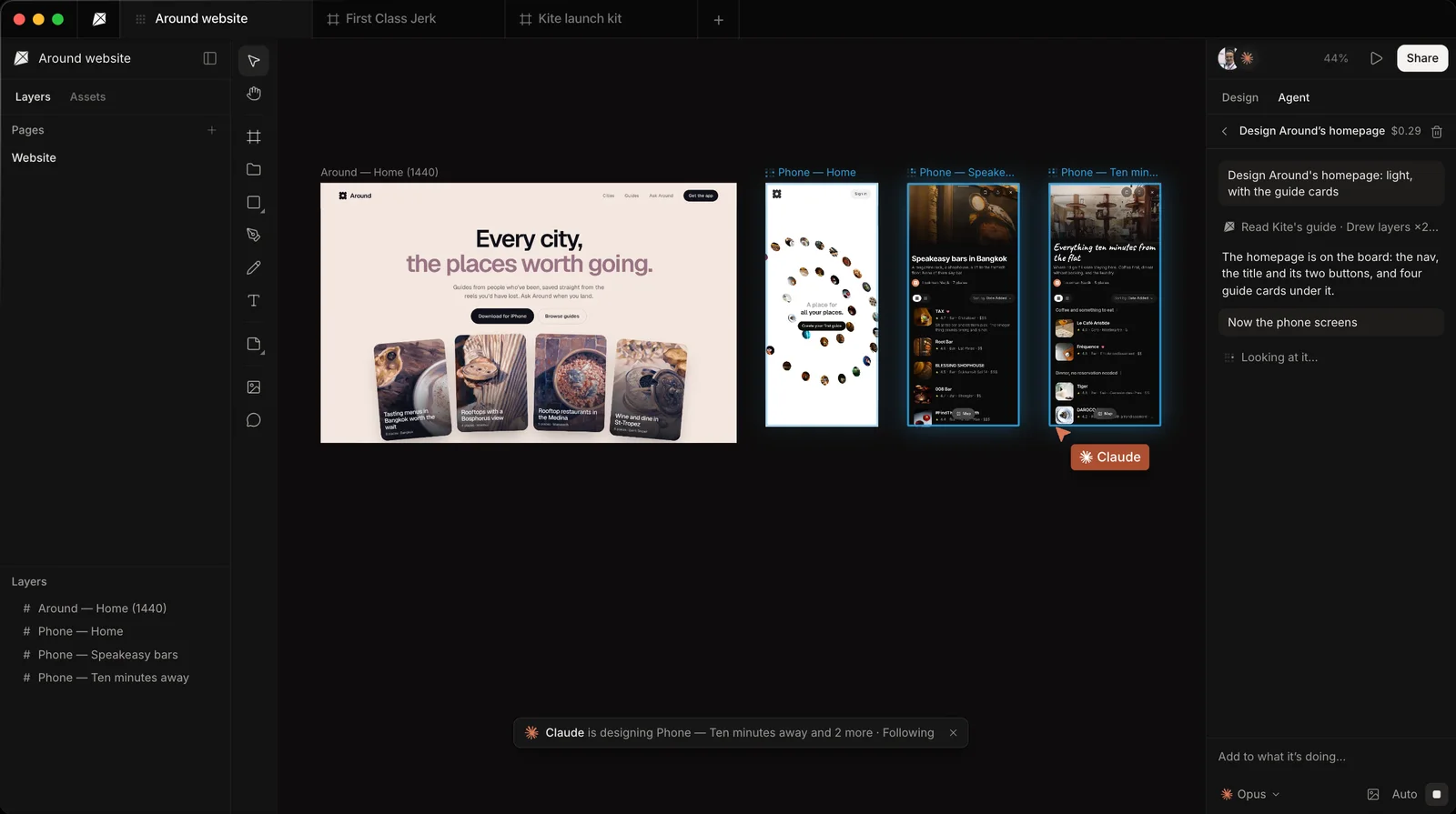
Our tool. Kite is a design tool where your own agent, such as Claude, ChatGPT, Cursor or Codex, draws real HTML and CSS layers in a file your team edits and comments on. There is no chat that hands back a generated app, and no AI credits.
- Fits: people who used Make mainly to design, and would rather have their own agent draw editable layers than pay credits for generated drafts.
- Not for: anyone who needs a running app, hosting or a clickable prototype. Lovable, v0, Bolt or Claude Design serves those better.
- Price: free with unlimited editors and viewers, 3 files and 200 agent actions a day. Pro is $20 an editor a month, or $16 billed yearly (see pricing).
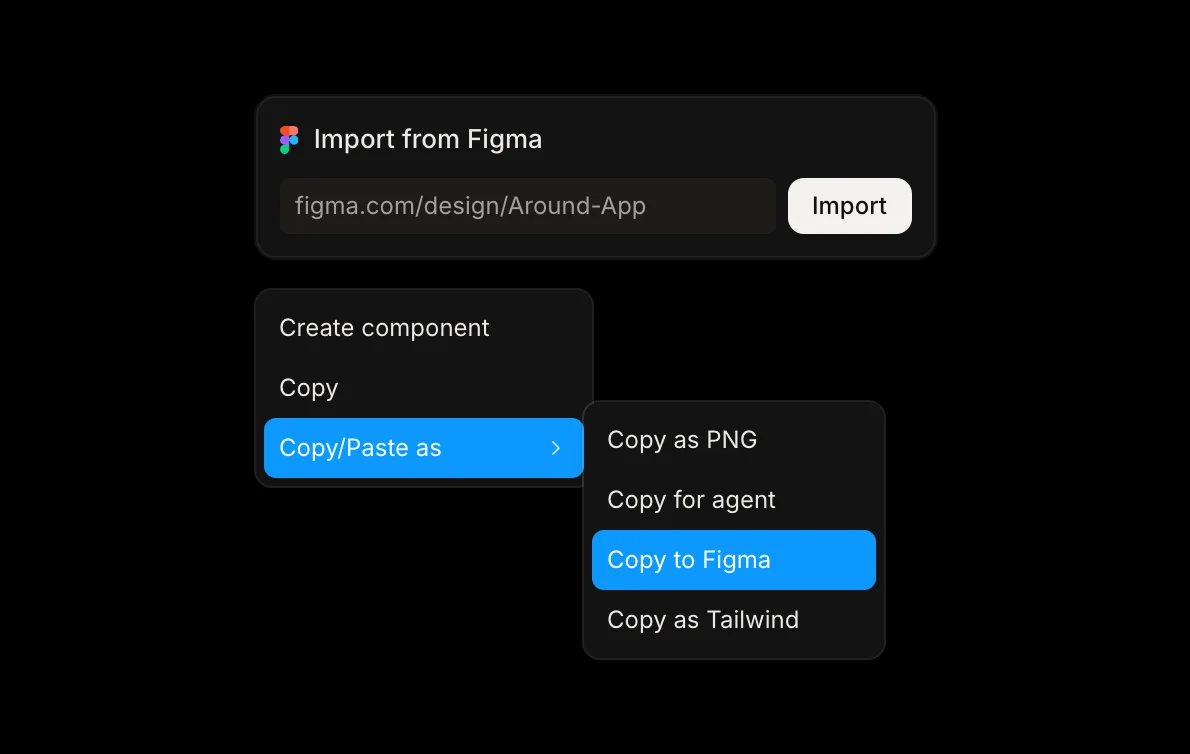
- Getting work out: copy a finished design as HTML, React or Tailwind for your codebase, or paste it into Figma as editable layers with Copy to Figma.
Can your own AI agent do the work instead?
Several of these tools let an agent such as Claude or Cursor in over MCP. What the agent can do differs:
| Tool | What your agent does there | Billed in, or limit |
|---|---|---|
| Figma Make | Edits Make files through Figma's MCP server | 20 calls a month on Starter |
| Lovable | Sends prompts to Lovable's AI | Lovable credits |
| v0 | Starts chats and sends messages to v0 | Not stated |
| Magic Patterns | Creates designs and sends prompts | Magic Patterns credits |
| Google Stitch | Uses its MCP server and SDK | Not stated |
| Kite | Draws and edits the layers itself | Nothing: 200 actions a day free, unlimited on Pro |
For design tools where your agent works in the file, see Figma MCP alternatives.
Getting Figma designs in and out
- Figma Make: starts from Figma designs, and copies a preview back into Figma as layers that don't sync.
- Lovable and v0: take Figma designs in; sending work back to Figma is not stated.
- Bolt: one frame at a time, through Anima.
- Magic Patterns: paste from Figma, and export back to Figma on paid plans.
- Google Stitch: pastes designs into Figma.
- Kite: paste frames or import a whole file by its link, and send frames back with Copy to Figma.
If you're leaving Figma itself, not only Make, see the best Figma alternatives.
How we checked
Every fact about another tool comes from that tool's own pricing page, docs or announcement, opened on October 28, 2026 and linked where it is used. Where a vendor doesn't say something, we write “not stated” rather than guess. Facts about Kite come from Kite's pricing and docs. We check this page again every quarter.
Questions
- Is Figma Make free?
- You can try it on Figma's free Starter plan, with 150 AI credits a day up to 500 a month, and public publishing only if you also publish to the Figma Community. It is included with Full seats on paid plans; Professional lists a Full seat at $16 a month.
- What is the best free alternative to Figma Make?
- It depends on what you want back. Lovable's free plan has 5 build credits a day up to 30 a month, v0's has 7 messages a day, and Bolt's has 1 million tokens a month. Claude Design comes with Claude's plans, including Free. Kite is free with 3 files and 200 agent actions a day, and no AI credits at all.
- Can I export code from Figma Make?
- Yes. You can download the code as a .zip file or push it to GitHub. Changes you make to the downloaded code don't flow back into Figma Make, and a preview copied into Figma Design doesn't stay in sync with the Make file.
- Which Figma Make alternative works with Claude or Cursor?
- Lovable, v0 and Magic Patterns have MCP servers, but your agent uses them to prompt their AI; Lovable and Magic Patterns bill those calls in their credits. Google Stitch has an MCP server and SDK. In Kite, your own agent draws and edits the design itself, with no credits.
- Is Kite an app builder like Figma Make?
- No. Kite is a design tool: it doesn't build apps, host sites or make prototypes. Your agent designs there, and you copy the result as HTML, React or Tailwind, or into Figma. Kite is free to start; Pro is $20 per editor a month, or $16 billed yearly.