Short answer: the best paper.design alternative depends on the gap: Kite for a hosted MCP server and components, Penpot for open source, pen.dev for design files in Git, Figma if your team already works there, and Framer for websites. Stay on paper.design if your agents run on the same computer as its desktop app and you love its HTML canvas.
Key takeaways
- paper.design is a strong HTML and CSS canvas with free editors, but its MCP server runs on your computer and components are still listed as coming soon.
- Kite and Framer have hosted MCP servers with OAuth sign-in. Penpot has a hosted server that uses a personal key. Google Stitch has a cloud server with an API key or OAuth.
- Penpot is the open-source pick, pen.dev the pick for design files in your repo, and Figma the pick for teams already there.
- Entry paid plans run from $7 (Penpot) to $20 (paper.design, Kite) a month per editor (Framer prices per site), and every tool except the Google Stitch beta lists a free plan.
A note on the search: this page is about paper.design, the design tool, not about paper. Facts about each product come from its own site, checked on October 28, 2026.
What paper.design is good at
paper.design is a design tool whose canvas is built on HTML and CSS, made for teams that design with AI agents. Its MCP docs make the case plainly: because the canvas is HTML and CSS, which language models already know, agents tend to be more accurate there. It is a serious product: the company says on its home page that it raised a $34M Series A from Accel and ICONIQ.
What it does well, as of October 28, 2026:
- An agent loop on your computer. The desktop app connects Claude, Codex, Cursor, OpenCode, Antigravity, GitHub Copilot and VS Code in one click, per its setup guide. Agents can work across several open files at once, even in background tabs.
- Free teamwork. Its pricing page gives the free plan unlimited editors and viewers. Comments arrived in August 2026, per its build log.
- Visual craft. Its build log features a “shader of the month”, plus a pen tool, design tokens in the app, and “image generation via the MCP”.
- Ways in. Snapshot copies any web page onto the canvas as editable layers, and you can paste from Figma, both added this year per the build log.
If that list is the job, stay. Switching costs time, and none of the tools below beats paper.design at all of it.
Why people look for an alternative
Four gaps send teams looking. paper.design lists two of them itself as coming soon:
- No hosted MCP server yet. Its docs start the server from the desktop app on your computer, and the September 2026 build log lists a remote MCP server under “Coming soon”. An agent in the cloud, or a teammate's agent on another computer, has no address to reach. The same build log says its browser app now supports WebMCP, for agents that run inside the browser.
- No components yet. The same build log lists components as coming soon, alongside permissions per file. Teams with a component library feel this first.
- Call limits on the free plan. Free includes 100 MCP tool calls a week; Pro raises that to 1 million for $20 per editor a month, or $16 billed yearly.
- Other needs. Some teams want open source or their own servers. Others want the design to become a live website without a hand-off.
For the two MCP servers compared call by call, read Figma MCP vs paper.design MCP.
The shortlist
Six tools, each described the same way: who it fits, how agents connect to it, the price to start, and how a team collaborates in it. We make Kite, so it comes first; the others follow in no particular order, and we say where paper.design or another tool is the better choice.
Kite
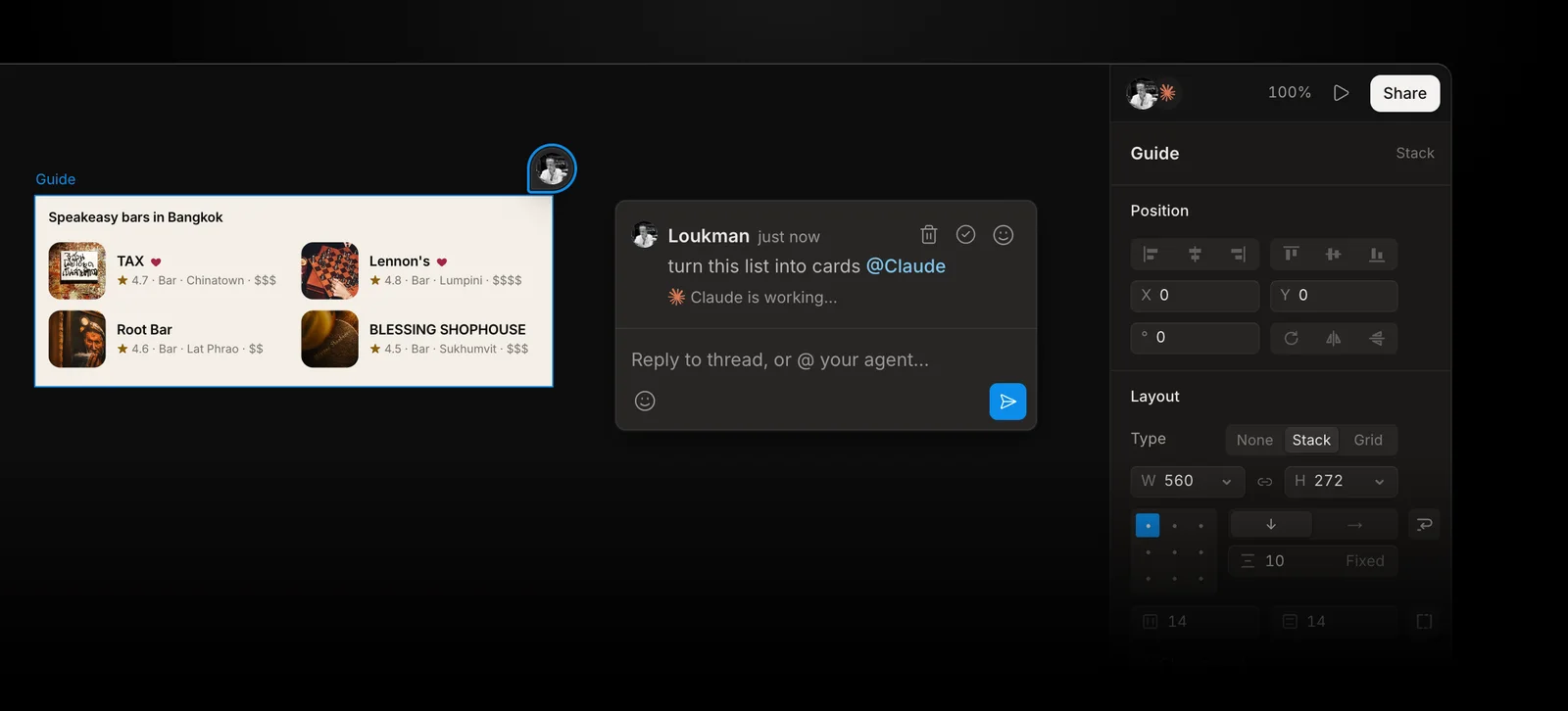
Kite is a design canvas that your own AI agents work in over MCP. It has no AI of its own: Claude, ChatGPT, Cursor or Codex draws real layers in a file your team edits.
- Fits: teams who want agents from anywhere drawing in a shared file, with a design system the agent reads first.
- Agents: a hosted streamable HTTP server with OAuth sign-in, so there is no key to copy and no app to keep open. Kite has setup guides for 12 clients, including Claude, ChatGPT, Cursor, Codex and VS Code. Its server has 59 tools, and Kite for Mac adds a local server. The details are in Kite's MCP docs.
- Price to start: free, with unlimited editors and viewers, 3 files and 200 agent actions a day. Pro is $20 per editor a month, or $16 billed yearly, with unlimited agent actions (see pricing). There are no AI credits.
- Teamwork: components with variants, variables with modes such as Light and Dark, and comments that hand work to an agent. Frames go to Figma with Copy to Figma, and Figma files come in by link.
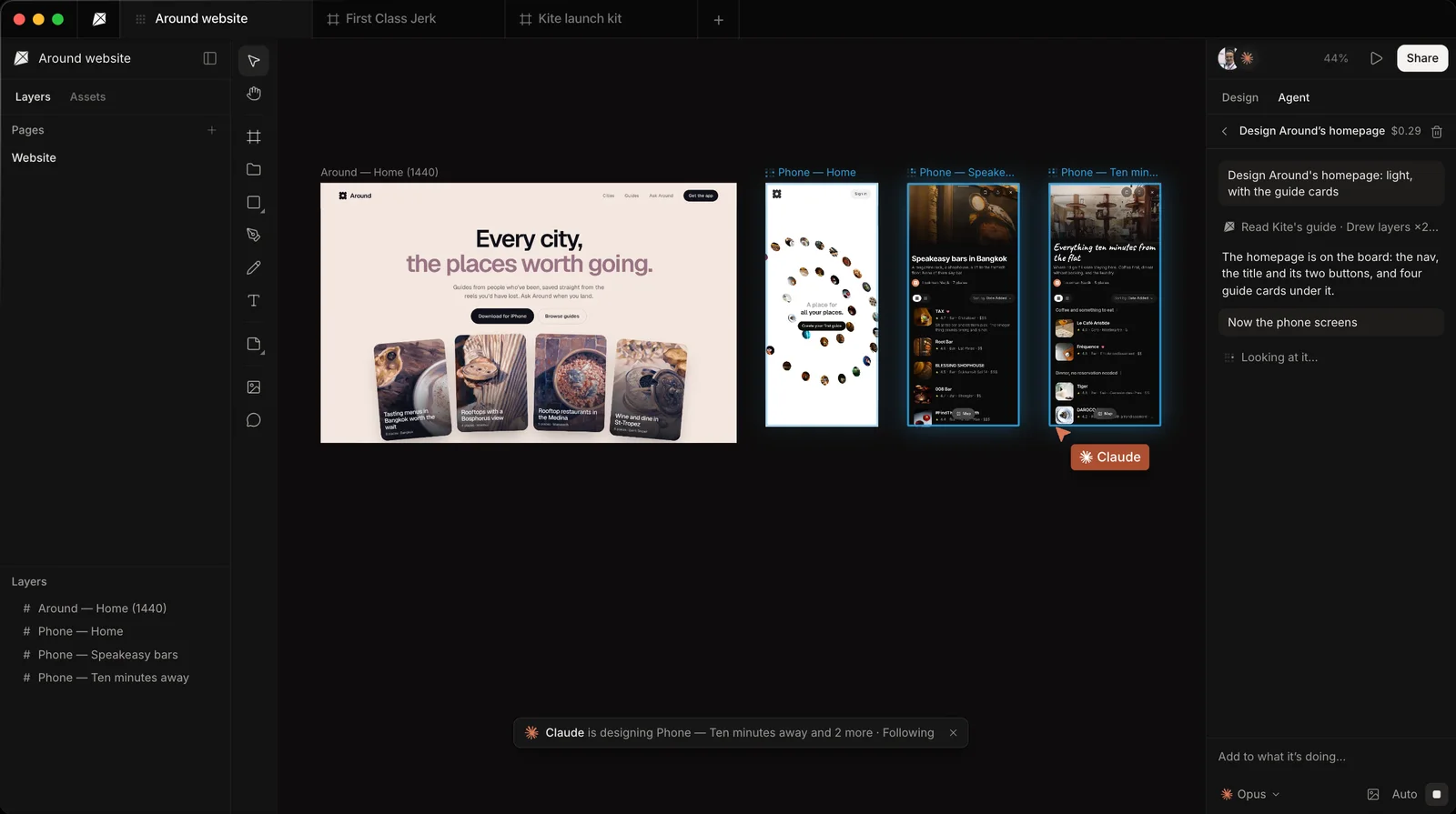
Where paper.design is ahead: “image generation via the MCP”, as its build log puts it, where Kite has no AI of its own. Kite also caps free files at 3, where paper.design's pricing page names no file limit. Both have shaders and a way to copy a web page in as layers (in Kite, the Kite Capture extension). The full one-to-one is Kite vs paper.design.
Figma
- Fits: teams whose files, libraries and developers already live in Figma.
- Agents: a remote server at
https://mcp.figma.com/mcp. Writing to files withuse_figmais in beta, only through that remote server, on Professional, Education, Organization and Enterprise plans, with edit access, per Figma's developer docs. Only clients in Figma's MCP catalog can connect, such as Claude Code, Cursor, Codex and VS Code. - Price to start: the Starter plan is free, but Figma's rate limits give View and Collab seats up to 20 MCP calls a month. A Professional Full seat is $16 a month billed yearly, or $20 billed monthly, on Figma's pricing page, with up to 200 calls a day. Writing is free during the beta and will become “a usage-based paid feature”.
- Teamwork: the most complete of the group: multiplayer editing, team libraries, variables with modes and Dev Mode.
More options built around Figma are in Figma MCP alternatives.
pen.dev
- Fits: developers who want designs as files in the repo. Its
.penformat is “just a JSON file” with an open schema, per pen.dev's home page. - Agents: a built-in agent that can use your ChatGPT or Claude subscription, or hosted models. Outside clients such as Claude Code, Codex and Cursor connect over a local server to the running desktop app or IDE extension, per its AI docs. There is also a CLI for working without the app.
- Price to start: free, with 5 days a month of designing with an agent, one agent at a time. Pro is $16 per user a month billed yearly, or $20 billed monthly, with up to 3 agents in parallel, per pen.dev's pricing.
- Teamwork: components, variables, themes and shared UI libraries, plus sharing by link, comments and versions. Team workspaces with roles come with its Ultra plan, $48 per user a month billed yearly.
Penpot
- Fits: teams who want open source, their own servers, or no lock-in.
- Agents: an official MCP server that Penpot calls “free and open” on its MCP page. Use the hosted one, whose address carries your personal MCP key, or run it yourself. Agents read and change components, styles, tokens, pages and layers. Per Penpot's help centre, they act on the page in focus, and the Penpot tab has to stay open and awake.
- Price to start: the Professional cloud plan is $0. Unlimited is $7 per editor a month, capped at $175 a month, per Penpot's pricing.
- Teamwork: shared files and libraries in the browser, with unlimited teams on every plan.
Google Stitch
- Fits: fast first ideas. You describe a screen, or show a sketch, and Stitch generates the UI. Google calls it “vibe design” in its March 2026 post, which also adds DESIGN.md, a markdown file for design rules.
- Agents: a remote MCP server in the cloud that signs in with an API key or OAuth, with setup for Gemini CLI, Cursor, Antigravity, VS Code and Claude Code in Stitch's docs. Your agent asks Stitch to generate or edit a screen with a prompt and gets back its HTML and a screenshot, per Google's Stitch SDK. Stitch's own model draws, not your agent.
- Price to start: a beta from Google Labs that you sign in to with a Google account, per Google's Stitch codelab.
- Teamwork: an agent manager for exploring several ideas in parallel, and exports to developer tools.
How it differs from Figma's server: Stitch MCP vs Figma MCP.
Framer
- Fits: people whose paper.design work is a marketing site they want live. Framer builds and hosts websites, which makes it a narrower pick for app screens.
- Agents: an official server at
https://mcp.framer.com/mcp, streamable HTTP with OAuth. Per Framer's help centre, ChatGPT, Codex, Claude, Cursor and Grok Bot can create pages, edit layouts, update the CMS and publish, even with the editor closed. - Price to start: the free plan includes the MCP server, which is in preview and free during it, and 500 AI credits to try. Paid site plans start at $10 a month billed yearly, and extra editors are $20 a month each, per Framer's pricing.
- Teamwork: live collaboration, free viewers who can comment, and roles for who can edit, design and publish.
Side by side
As of October 28, 2026, from each product's own pages linked above. “Hosted” means the server runs in the cloud, so an agent on any computer can reach it. For more on that, see hosted design MCP servers.
| Tool | How agents connect | Who draws | Free plan | Paid from | Components |
|---|---|---|---|---|---|
| paper.design | Local, through the desktop app; WebMCP in the browser | Your agent | Unlimited editors, 100 MCP calls a week | $20 per editor a month ($16 yearly) | Coming soon |
| Kite | Hosted, OAuth; local with Kite for Mac | Your agent | Unlimited editors, 3 files, 200 agent actions a day | $20 per editor a month ($16 yearly) | Yes, with variants |
| Figma | Hosted, catalog clients only; writing in beta | Your agent, on paid plans | 20 MCP calls a month | $16 a month per Full seat, billed yearly ($20 monthly) | Yes |
| pen.dev | Local, through the app or IDE extension | Your agent or its own | 5 agent days a month, 1 agent at a time | $16 per user a month, billed yearly ($20 monthly) | Yes |
| Penpot | Hosted with a personal key, or self-hosted; Penpot tab open | Your agent | Professional plan, $0 | $7 per editor a month | Yes |
| Google Stitch | Hosted, API key or OAuth | Stitch's model, from your agent's prompt | Beta from Google Labs | Beta; check its site | Not listed (design rules in DESIGN.md) |
| Framer | Hosted, OAuth; in preview | Your agent | MCP server and 500 AI credits to try | $10 a month per site (yearly) | Yes |
Limits are counted in different units: paper.design and Figma count MCP calls, pen.dev counts days with an agent, and Kite counts agent actions. On Pro, Kite has unlimited agent actions.
How to choose
Start from the gap that sent you looking:
- “My agent isn't on this computer.” Choose a hosted server: Kite or Framer with OAuth, Penpot with a key (with a Penpot tab open), or Figma (writing on paid plans).
- “We need components and a real design system.” Kite, Figma, pen.dev and Penpot all have components today, along with variables or design tokens your agent can apply.
- “It has to be open source.” Choose Penpot, the only open-source option on this list, which you can also host on your own servers.
- “Designs should live in Git.” Choose pen.dev, whose
.penfiles are JSON that your repository can version and review. - “The team is already in Figma.” Stay in Figma and add its MCP server, or let agents draw in Kite and paste the frames into Figma.
- “It's a website.” Choose Framer, which builds, hosts and publishes the site, so there is no hand-off to developers.
- “I want ideas fast and don't mind a generator drawing them.” Google Stitch.
Moving existing work
Kite has no paper.design importer. What Kite documents is a whole Figma file brought in by its link, web pages through the Kite Capture extension, pasted HTML that becomes layers, and SVG files that become vector layers (see Bring work in). On the way out, paper.design's build log documents copying a selection as React, CSS or Tailwind code or as a PNG, and exporting frames as PDFs, while pen.dev's home page documents .fig import and Figma paste.
Test two in an afternoon
A comparison table only goes so far. Run the same small job in paper.design and in one alternative, using the same agent and the same instructions:
- Connect the agent you already use to both tools.
- Ask both for the same thing, such as a pricing page in your brand colours.
- Quit the design app on your computer and ask for a change. Does the agent still reach the file?
- Ask a teammate to edit what the agent drew, then ask the agent for a dark version and a reusable button component.
- Ask both for a hero with a generated image, which paper.design makes through its MCP server and Kite does not.
- Write down what the test cost you: seats, MCP calls or agent actions, and any separate AI credits.
If paper.design passes every step for your team, keep it. If it fails step 3 or 4 and those are the job, you have your reason to switch. If step 5 matters most, paper.design is the stronger pick. Kite's free plan is enough to run this test.
Methodology: on October 28, 2026 we checked every paper.design, Figma, pen.dev, Penpot, Google Stitch and Framer fact above on that company's own site, docs, pricing page or build log, linked in place. We checked every Kite fact against Kite's own docs and pricing. We make Kite. These products change monthly, so we check this page again each quarter.
Questions
- What is the best paper.design alternative?
- It depends on what you are missing. Kite fits teams that want a hosted MCP server any MCP client can reach, components with variants and design-system modes. Penpot fits teams that want open source and self-hosting. pen.dev fits developers who want design files in their repo. Figma fits teams already working there. Framer fits people designing a website they will publish.
- Does paper.design have a remote MCP server?
- Not yet, as of October 28, 2026. Its MCP server runs on your computer through the paper.design desktop app, and its September 2026 build log lists a remote MCP server as coming soon. Its browser app supports WebMCP for agents that run inside the browser.
- Is paper.design free?
- Yes, to start. The free plan has unlimited editors and viewers and 100 MCP tool calls a week. Pro is $20 per editor a month, or $16 billed yearly, with 1 million MCP tool calls a week.
- Is there a free, open-source alternative to paper.design?
- Penpot. It is open source, its Professional cloud plan costs $0, you can host it yourself, and its official MCP server is free. Your agent works on the page you have open in a Penpot browser tab, so that tab has to stay open.
- Which paper.design alternative works with ChatGPT on the web?
- One with a hosted server that signs in with OAuth. Kite has a setup guide for ChatGPT, and Framer lists ChatGPT in its MCP setup. paper.design's server runs on your own computer, so it reaches the agents installed there.
- How much does Kite cost?
- Kite is free to start: unlimited editors and viewers, 1 workspace with 3 files, and 200 agent actions a day. Pro is $20 per editor a month, or $16 a month billed yearly, with unlimited agent actions. There are no AI credits: your agent runs on the plan you already pay for.