Short answer: paper.design's MCP is a local server inside paper.design's desktop app that lets agents like Claude Code, Codex and Cursor read and write an HTML and CSS design, with 100 tool calls a week free. Figma's MCP is a hosted server that mainly reads Figma files for code, and on paid plans can now draw in them too, in beta.
Key takeaways
- paper.design's server runs on your computer, with the desktop app open. A remote server is listed as coming soon.
- Figma's server is hosted, and drawing works only on that remote server, on paid plans, in beta.
- Free use differs a lot: 100 tool calls a week on paper.design, 20 calls a month on Figma's Starter plan or a View or Collab seat.
- An independent test in July 2026 found the two about even on quality, with paper.design cheaper and steadier.
- Kite is a third option: a hosted server any MCP client can use, where agents draw real layers in a file your team shares.
What a design MCP server is
MCP (Model Context Protocol) is an open standard that lets an AI assistant use outside tools and data. Anthropic open-sourced it in November 2024, and its own site calls it “a USB-C port for AI applications”.
A design MCP server is a design tool's doorway for agents, through which an agent can look at a design file, read its layers and styles, and in some tools draw new ones. Two things decide what it is like to use: where the server runs, and whether the agent may write. Figma and paper.design answer both differently.
What paper.design's MCP does
paper.design is a design tool whose canvas is HTML and CSS. Its MCP docs say agents can read and write your files through it: generate a layout, pull in real content, or turn a selected frame into code. Because the canvas is already web code, paper.design argues its MCP is usually faster and uses fewer tokens than other design tools.
How you connect it
The server lives in paper.design's desktop app, which runs on macOS, Windows and Linux (see paper.design's downloads). Opening the app starts the server in the background and installs a command-line tool. In the editor, Connect your agent adds it to your tool in one click. As of October 28, 2026 the docs list:
- Claude and Claude Code, as an extension and a plugin.
- Codex, which also covers the Codex tab in ChatGPT's app.
- Cursor, from its marketplace.
- OpenCode, Antigravity, the GitHub Copilot app and VS Code.
- Any other agent, as a local stdio server.
Everything runs locally: the new setup talks to the app through paper mcp, and older setups used a localhost address, http://127.0.0.1:29979/mcp, that still works while a file is open. Reads and writes go to the file open in the desktop app, so the app has to be running. paper.design's troubleshooting page says the same: keep the app open with a file loaded.
Two changes are worth knowing: paper.design's September 2026 build log lists remote MCP as coming soon, and says its browser app now supports WebMCP, so agents that run in the browser can use it there.
What the agent can do
The agent reads and writes, and according to paper.design's docs and build log it can:
- Draw layouts in the open file, and change layer order or move layers into new parents.
- Create and open files, and switch pages.
- Add tokens from your code's CSS variables or an existing design.
- Generate images.
- Read a frame back as code to build it, alongside Copy as React or Tailwind.
Comments arrived in August 2026, and the build log says they are for talking with “your teammates and your agents”. Components are not there yet: the build log lists them as coming soon.
paper.design's plans and limits
paper.design counts MCP tool calls by the week. As of October 28, 2026, its pricing page lists:
- Free: unlimited viewers and editors, 100 MCP tool calls a week, limited image generation.
- Pro: $20 per editor a month, or $16 billed yearly, with 1M MCP tool calls a week and video export.
- Organizations: Pro plus SAML, SSO and admin controls, on a custom contract.
Every read, edit or check the agent makes is a tool call, so 100 a week suits a trial more than daily work.
What Figma's MCP does
Figma's MCP server was built to take designs into code. Its read tools, such as get_design_context, get_metadata, get_screenshot and get_variable_defs, give an agent a frame's structure, a picture of it and its variables. Code Connect maps Figma components to the ones in your codebase. The full list is in Figma's tools and prompts.
The remote server lives at https://mcp.figma.com/mcp, and you sign in with your Figma account. Only clients in Figma's MCP catalog can connect, such as Claude Code, Cursor, Codex and VS Code (see Figma's setup page). There is also a desktop server, but Figma's help centre says it can't write to the canvas.
Drawing in Figma, in beta
Since March 2026 an agent can draw in Figma with the use_figma tool, which runs code through Figma's Plugin API. It builds frames, components, variants, variables and auto layout, using your team's own components. Figma's write to canvas docs set the rules:
- Only through the remote server.
- On Professional, Education, Organization and Enterprise plans.
- With edit access to the file.
- In beta: free for now, later “a usage-based paid feature”.
While it is in beta, Figma suggests testing on a copy of your library or on a draft file.
Figma's plans and limits
Figma's rate limits depend on the plan and the seat. As of October 28, 2026:
- View and Collab seats, and the Starter plan: up to 20 calls a month.
- Full and Dev seats on Professional: up to 200 a day and 10 a minute.
- Organization: 200 a day and 15 a minute. Enterprise: 600 a day and 20 a minute.
Those limits count reads, and tools that write to Figma files are exempt. A Full seat on the Professional plan is listed at $16 a month on Figma's pricing page, as of October 28, 2026.
Figma MCP vs paper.design MCP vs Kite, side by side
The table sums up the facts above, as of October 28, 2026, with Kite as a third column.
| Figma's MCP | paper.design's MCP | Kite | |
|---|---|---|---|
| Where the server runs | Hosted, plus a desktop server | On your computer, inside the desktop app | Hosted; Kite for Mac adds a local one |
| Can the agent draw? | Yes, in beta, on paid plans, remote server only | Yes, in the file open in the app | Yes, on every plan, including free |
| What a design is made of | Figma's own format | HTML and CSS | HTML and CSS |
| Which agents | Clients in Figma's catalog | Claude, Codex, Cursor and others on the same computer | Any MCP client with sign-in; guides for 12 |
| Components | Builds with your Figma components | Coming soon | Components with variants |
| Free use | 20 calls a month, no drawing | 100 tool calls a week | 200 agent actions a day, 3 files |
| Paid use | 200 reads a day on a Professional Full seat; writes exempt | Pro $20 per editor a month: 1M tool calls a week | Pro $20 per editor a month: unlimited agent actions |
We make Kite. One Kite agent action is one tool call, so the rows count the same thing. Kite's column comes from Kite's pricing and its list of MCP tools. For Kite against each tool on its own, see Kite vs Figma and Kite vs paper.design.
What an independent test found
In July 2026, Jess Wang at Braintrust compared the two servers. Claude Code, on Claude Sonnet 5, had to recreate webpages from screenshots, building each one in the design tool first, and each run saw only one of the two servers. The simple pages came from Design2Code, a screenshot-to-code benchmark of real webpages published by researchers in 2024.
- On 40 simple pages, visual similarity was 0.741 for paper.design and 0.744 for Figma: a tie.
- On 27 complex designs, paper.design scored 0.716 and Figma 0.679, a gap the study calls not significant.
- On the complex designs, Figma's results varied about 1.9 times as much from run to run. Its runs took 42% longer and cost 32% more per point of visual quality: $3.73 against $2.82 per point, or $2.53 against $2.02 per run (Braintrust, July 2026).
So the server matters less for how good a page looks than for how steady and cheap the runs are. The test measured one task, recreating a page, and it did not include Kite.
When each one fits
Choose Figma's MCP when your designs and design system already live in Figma. The agent reads the real file, Code Connect ties it to your code, and on a paid plan it can draw with your own components. Expect beta rough edges when it writes, and a tight cap on View and Collab seats.
Choose paper.design when your agent runs on your own computer and you want a free HTML canvas, with unlimited editors for the team. Its shaders, P3 colour and CSS filters, set out on its comparison with Figma, suit visual work, and the agent writes code-shaped designs. Skip it for now if you need components, or an agent that runs on another machine, such as a cloud agent.
Use both if you are moving from Figma. paper.design's MCP docs include a guide, “Syncing tokens from Figma”, where one agent reads colours and text styles through Figma's server, then writes them into a paper.design file as tokens.
If neither fits, the next section covers a hosted option, and hosted design MCP servers lists more. For a wider list, see paper.design alternatives.
A third option: Kite
Kite is a design canvas built for agents, made of HTML and CSS like paper.design, with a hosted server like Figma. Its address for agents is https://kite.new/api/mcp. It is a streamable HTTP server that signs in with OAuth: your tool opens a browser window, you sign in and click Allow, with no key to copy and nothing to install.
How agents connect to Kite
Because it is hosted, any MCP client that supports sign-in can connect, from any computer. Kite has setup guides for Claude, Claude Code, ChatGPT, Codex, Cursor, VS Code, GitHub Copilot CLI, Grok, Manus, v0, Antigravity and Muse. Kite for Mac adds a local server for agents on your machine. Kite's MCP docs have the details.
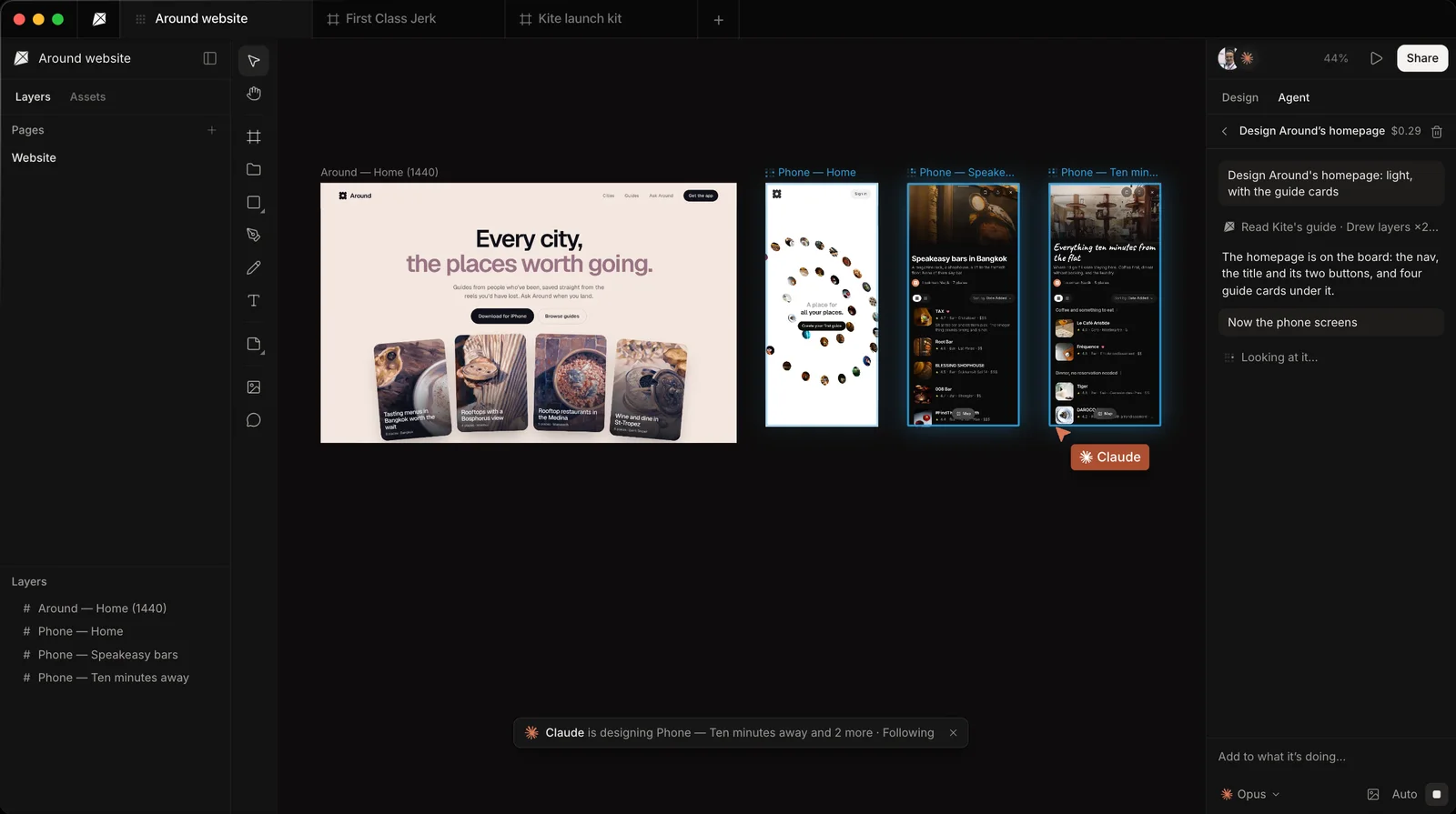
The agent gets 59 tools to read the file, draw, edit and check its own work as a picture. It reads the file's design system first and draws with its variables, components and skills, and what it draws is ordinary layers in a shared file, so your team can select them, change them or undo them while it works.
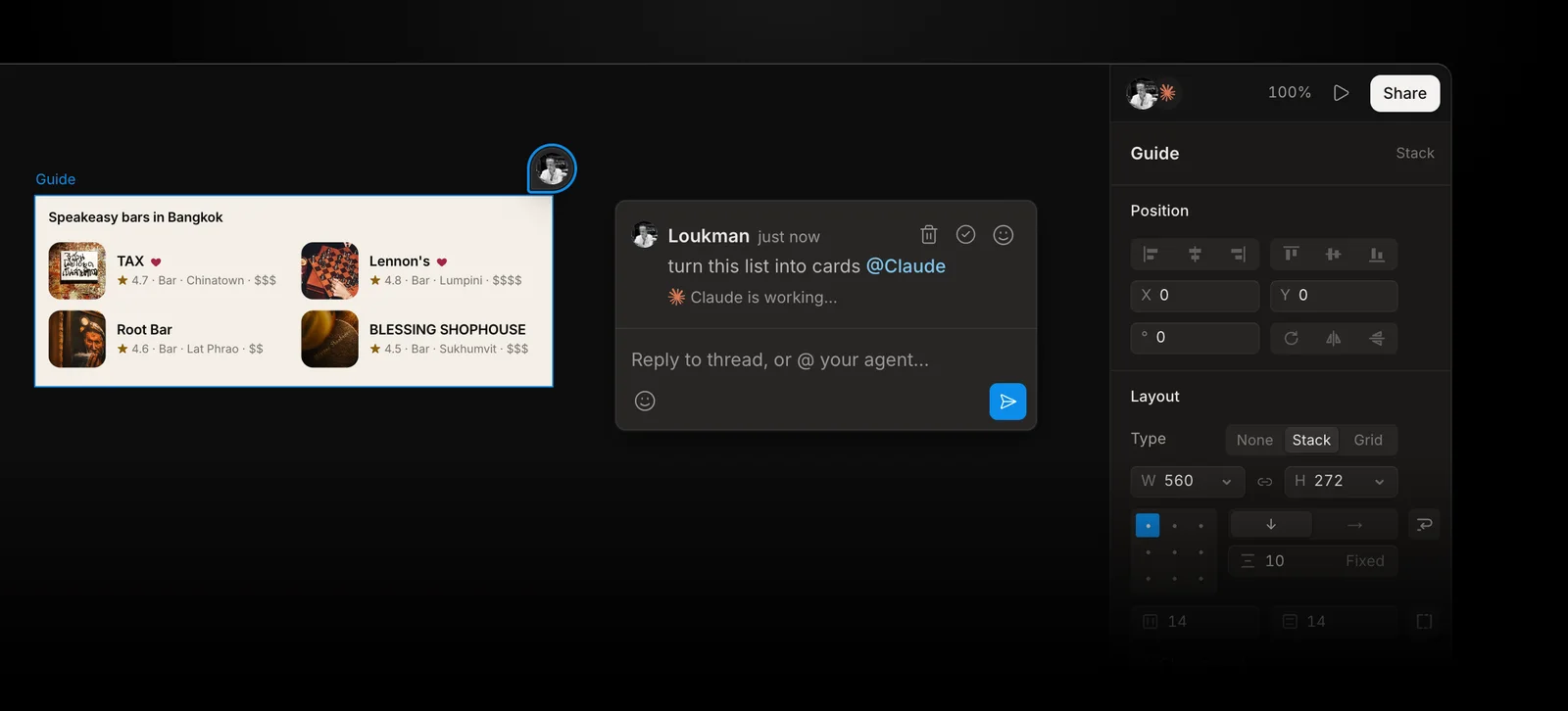
You can also hand work to an agent in a comment. Mention it as you would a teammate, such as “@Claude make this card denser”, and the comment shows when it is waiting, working and done. In a browser, the request waits until you tell your agent “do my Kite requests”. Only Kite for Mac starts Claude Code or Codex on it straight away.
Kite's plans
Kite's free plan has unlimited editors and viewers, one workspace with 3 files, and 200 agent actions a day. Pro is $20 per editor a month, or $16 billed yearly, with unlimited agent actions. There are no AI credits: your agent runs on the plan you already pay for. When the team needs the work in Figma, Copy to Figma pastes the frames there as layers. To get started, follow how to design with your agents.
Kite is not the pick for everyone: if your team's library and reviews live in Figma, Figma's own server keeps the agent in that file. If you want shaders and a free HTML canvas with your agent on your own computer, paper.design does that well.
Methodology: on October 28, 2026 we checked every paper.design fact against paper.design's own docs, build log and pricing page. We checked every Figma fact against Figma's developer docs and help centre, and the test results against Braintrust's published study. All are linked in place. Kite's facts come from Kite's own docs and pricing. Both rival servers change month to month, so this page is checked again each quarter.
Questions
- What is the paper.design MCP?
- It is the MCP server built into paper.design's desktop app for macOS, Windows and Linux. Opening the app starts the server, and agents such as Claude Code, Codex and Cursor can then read and write the file you have open, which is HTML and CSS. It can also create files, add tokens and generate images.
- Is paper.design's MCP free?
- Yes, with a weekly cap. As of October 28, 2026, paper.design's free plan includes 100 MCP tool calls a week and unlimited editors. Pro is $20 per editor a month, or $16 billed yearly, and raises the cap to 1M tool calls a week.
- Does paper.design have a hosted or remote MCP server?
- Not yet. The server runs on your computer inside paper.design's desktop app, and paper.design's September 2026 build log lists remote MCP as coming soon. Its browser app supports WebMCP for agents that run in the browser. If you need a hosted server today, Figma's remote server and Kite are both hosted.
- Can Figma's MCP server draw in Figma?
- Yes, in beta. Figma's use_figma tool lets an agent create and edit frames, components, variables and auto layout. It works only through the remote server, on Professional, Education, Organization and Enterprise plans, with edit access to the file. It is free during the beta and will later be usage-based.
- Which is better, Figma MCP or paper.design MCP?
- It depends where your team works. In Braintrust's July 2026 test, both produced pages of about the same quality, while paper.design's runs were steadier and cost less per point of visual quality. Pick Figma's MCP if your designs and design system live in Figma. Pick paper.design for a free HTML canvas on your own machine.
- Can I use Figma's MCP and paper.design's MCP together?
- Yes. Both can be connected to the same agent, and paper.design's docs have a guide that uses Figma's server to read colours and text styles from a Figma file, then writes them into a paper.design file as tokens.