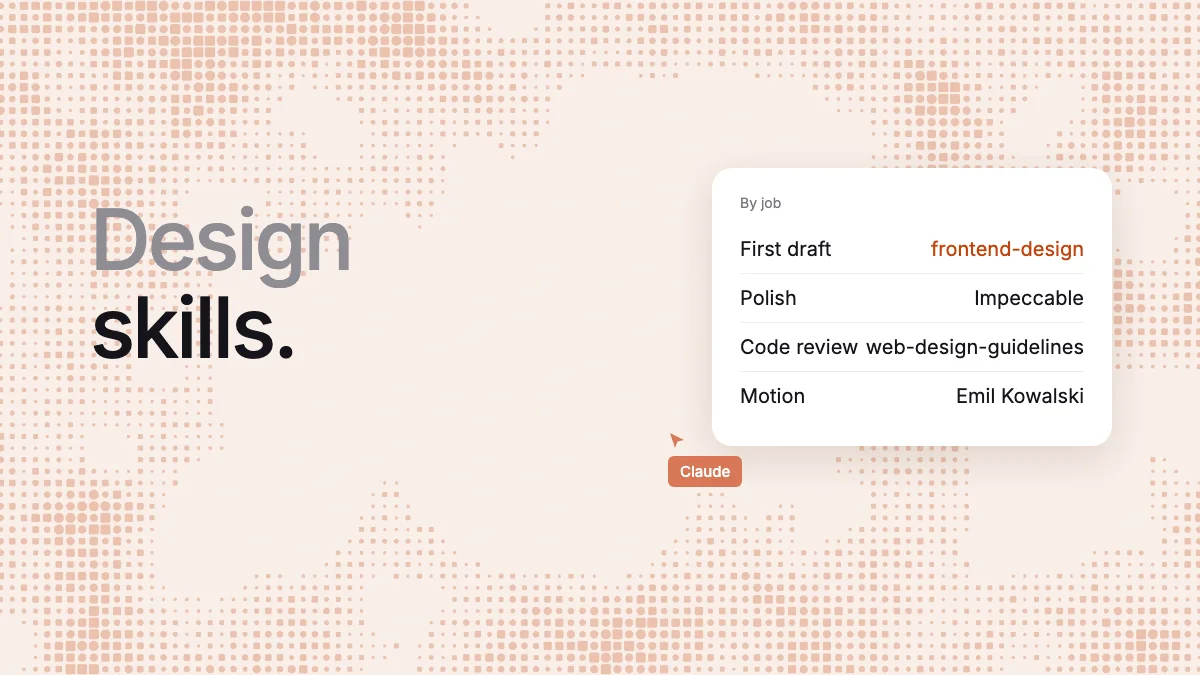
Short answer: start with Anthropic's frontend-design. It's one small file, it makes your agent plan a look before writing code, and it installs in both Claude Code and Codex. Add Impeccable for critique and polish, web-design-guidelines to review the code, and Emil Kowalski's skills for motion. A skill changes how your agent works, not where the work lands, so to get a design your team can edit, connect the agent to a canvas such as Kite (kite.new) or Figma.
Key takeaways
- We read 14 design skills on November 5, 2026, from 3 KB of rules to a 36 MB folder, and ran the top pick four ways.
- Claude Code and Codex share the skill format but not the folder.
npx skillsinstalls to both, and we saw it work. - Install counts are a poor guide: one skill from a 26-star repository shows more installs than Anthropic's.
- Some pages are out of date. frontend-design no longer bans Inter or Roboto, and OpenAI removed its
frontend-skillin April. - Most of these end in code, or a flat PDF or PNG. Only Figma's and Stitch's reach a design tool, and each needs that tool's own MCP server.
We make Kite, which isn't ranked here. It does compete with Figma and Stitch, whose skills are listed, and our runs drew in Kite. We say where Kite comes in at the end. Everything about the skills comes from their own files and docs, linked in place.
What a design skill is, and what it isn't
A design skill is a folder with a SKILL.md file that teaches a coding agent how to do design work. The format is the Agent Skills standard, “originally developed by Anthropic” and now open, and both Claude Code and Codex build on it. The agent sees each skill's name and description all the time, and reads the full file when a task fits.
Three things get mixed up in this search:
| Thing | What it gives your agent | Example |
|---|---|---|
| A skill | How to work: rules, a process, reference files | frontend-design, Impeccable |
| A DESIGN.md file | What your product looks like: colours, type, spacing | Google's format, still marked alpha |
| An MCP server | Tools it can call in another product | Kite, Figma, Stitch |
Anthropic's docs draw the same line: “MCP connects Claude to external services. Skills extend what Claude knows”. So does Figma, which says skills don't replace MCP connections. “Claude Design skill” is a separate thing again: /design is a skill bundled with Claude Code that publishes to Claude Design. You can't install it in Codex; see our Claude Design review.
The skills at a glance
Size is the SKILL.md alone, the part that stays in your agent's context once it loads. “Looks at the result” is what its file tells the agent to do, because a skill that can't see the page can only guess.
| Skill | Best for | Size | Looks at the result? | Codex route |
|---|---|---|---|---|
| frontend-design | A better first draft, for anyone | 9.4 KB | If your agent can take screenshots | npx skills; we ran it |
| Impeccable | Critique and polish commands | 12 KB, plus reference files per command | Yes, and it has a detector | Its installer or plugin |
| UI UX Pro Max | Picking a style, palette and fonts by industry | 16.6 KB, plus searchable data | No step for it | Its CLI |
| taste-skill | Marketing sites in one strong look | 21 KB, in a 36 MB folder | Yes, a checker in a real browser | Its plugin |
| web-design-guidelines | Reviewing code against 100+ rules | 1.2 KB, fetches 8 KB | No, it reads code | npx skills |
| baseline-ui | A short rule list for Tailwind projects | 3.4 KB | Not checked | npx skills lists it; not run |
| Anthropic's design plugin | Critique, handoff and research notes | 7 skills, 1.8 to 5.6 KB | Not its job | Not stated |
| emil-design-eng, apple-design | How interfaces move and feel | 27.5 KB, 23 KB | Not in the parts we read | npx skills |
| motion-design | Motion principles, in any tool | 12.6 KB, plus 44 KB of references | No, it's principles | npx skills |
| shadcn | Projects built on shadcn/ui | 21.6 KB | Not in what we read | npx skills |
| Figma's skills | Agents writing into Figma | 74.8 KB for one visible change | Not checked | OpenAI ships smaller copies |
| Stitch skills | Teams already on Google Stitch | 16 skills, 3.1 to 14 KB | Not checked | Its plugin |
| frontend-app-builder | Codex building from a generated image | 31.8 KB | Yes, handoff is blocked until it does | OpenAI's own plugin |
| canvas-design | Posters and art as PDF or PNG | 11.9 KB | Not checked | npx skills; not run |
Skills that set the look
frontend-design (Anthropic): the one to start with
frontend-design is a single file with no scripts. It makes the agent act as “the design lead at a design studio”, write a plan with named colours, type roles and a layout idea, check that plan against the brief, and only then write code. Its weak spots are that the plan isn't saved, so each run starts again, it never mentions a design system, and it only reviews screenshots “if your environment supports it”.
It changed on September 3, 2026, and many pages haven't caught up. It no longer bans Inter or Roboto. It now names five looks AI tends to fall back on, such as cream with serif and terracotta, or near-black with one acid accent. It even flags #D97757 as “Anthropic's own Claude-interaction accent”, so Claude stops reaching for it.
UI UX Pro Max: a catalogue to choose from
UI UX Pro Max is a searchable database plus rules: 80 styles, 192 palettes and 74 font pairings, queried by a Python script so the data doesn't fill your context. It suits someone who wants a starting point by industry and has no opinion yet. Those choices come from a lookup table, so results can feel familiar. Its file has no step that looks at the page, and logos, brand identity and banners sit on the paid side.
taste-skill: websites in one strong look
taste-skill builds company websites and enforces its look with a checker in a real browser, which needs Node 22 and Chrome, Edge or Chromium. It's the heaviest here: the folder holds 1,617 files and weighs 36 MB. It has a narrow aim, and on skills.sh one of its audits shows a Fail and another a Warn, without a reason in what we could read. Read it before you install it.
Skills that review and fix
Impeccable: commands for each design move
Impeccable “started from Anthropic's frontend-design skill” and grew into 24 commands, such as critique, polish, bolder and distill. It goes further than text: 62 fixed rules that need no AI, a hook that scans each edited file, and a live mode that swaps variants in your running page. It also tells the agent to look at the rendered result. The price is more moving parts: it downloads an engine binary, one deep command can pull in tens of KB, and JSX files get pattern rules only, so contrast checks need a rendered address.
web-design-guidelines (Vercel): a last check of the code
web-design-guidelines only reviews. The skill is a small pointer that fetches 100+ rules on accessibility, forms, focus and motion, reads your files and reports each problem by file and line. Use it after the design is done. It checks correctness rather than taste, it never sees the page, and it needs the network on every run.
UI Skills: a short list and a directory
UI Skills is two things. Its repository has nine small skills, and baseline-ui is 3.4 KB of firm rules, such as “MUST use Tailwind CSS defaults”, so it only fits a project on that stack. ui-skills.com is a directory of 620 skills, most of them other people's, which is useful for browsing and has little method of its own.
Anthropic's design plugin: the paperwork
This plugin has seven small skills for accessibility reviews, critique, handoff and research notes. It's “primarily designed for Cowork” and also works in Claude Code. It helps a designer write things up. It won't draw or set a look.
Skills for motion
Emil Kowalski's skills are the ones to try if your interface feels stiff. There are 17, drawn from his work at Vercel and Linear. apple-design covers springs, gestures and momentum and comes from Apple's WWDC talks, but it isn't by Apple, and neither is dickwu's skill of the same name, a review skill based on Apple's guidelines. Emil's cover movement and feel, not layout or colour, and the two biggest design skills run to 50 KB together.
motion-design from LottieFiles is plain principles, timing, easing and choreography, in any tool. Motion's AI Kit pairs a skill with an MCP server, with best practices free and its deeper tools on paid Motion+.
Skills tied to one tool
These are built around their own product, and of little use without it.
- shadcn: reads your project, then uses the shadcn CLI to find and add components. It's about putting existing parts together, not taste, so the result looks like shadcn until you restyle it.
- Figma's skills: 16 skills that teach an agent Figma's MCP server.
figma-useis a “mandatory prerequisite” before each write, and withfigma-generate-designthat comes to 74.8 KB for one visible change, the biggest pair here. Figma says writing to the canvas will eventually be a usage-based paid feature, free during the beta. - Stitch skills: 16 skills from Google Labs, “designed to work with the Stitch MCP server”.
design-md,enhance-promptandshadcn-uishowed the most installs we recorded. - frontend-app-builder: OpenAI removed its
frontend-skillon April 23, 2026, though lists still recommend it. This is the nearest we found, and OpenAI doesn't call it the replacement. It starts from a generated image and codes from that, so it leans on Codex's image and browser tools. - canvas-design: not product UI. It writes a “design philosophy” and expresses it as a poster, in “only .md files, .pdf files, and .png files”. You get nothing to edit as layers.
Looking for more? awesome-design-skills is 67 short style presets, all from one registry. designer-skills is a large set on process more than look. skills.sh has a design topic page.
Install one in both agents
Claude Code reads .claude/skills/ and Codex reads .agents/skills/. The skills command writes to either from one copy. We ran this on November 5, 2026, and the file landed in the right folder each time:
npx skills add https://github.com/anthropics/skills --skill frontend-design -a claude-code
npx skills add https://github.com/anthropics/skills --skill frontend-design -a codex
In Claude Code you can also run claude plugin install frontend-design@claude-plugins-official. Then ask with /frontend-design in Claude Code or $frontend-design in Codex, or just describe the job and let the agent match it. The others have their own routes:
| Skill | Command |
|---|---|
| Impeccable | npx impeccable install, then /impeccable init or $impeccable init |
| UI UX Pro Max | npm install -g ui-ux-pro-max-cli, then uipro init --ai claude or --ai codex |
| web-design-guidelines | npx skills add vercel-labs/agent-skills --skill web-design-guidelines |
| Emil Kowalski's skills | npx skills@latest add emilkowalski/skills |
| shadcn | npx skills add shadcn/ui |
Those commands are as each maintainer documents them, and we ran only the first. Sharing a format doesn't mean every skill behaves the same in both. Claude-only features are the risk: shadcn's file runs a command as it loads, and Codex's docs don't say how they treat that. Impeccable keeps 20 tool-specific copies of its skill, a sign the differences are real.
Read a skill before you install it, because it runs with your agent's permissions. A January 2026 study on arXiv scanned 31,132 skills of every kind from two marketplaces and flagged at least one vulnerability in 26.1% of them, with skills that bundle scripts 2.12 times as likely to be flagged. Its detector isn't perfect, at 86.7% precision by the paper's own figure, and it says nothing about these particular skills. It's still a reason to prefer a plain file such as frontend-design when that will do.
What a skill costs you
A skill isn't free to keep. Claude Code's docs say “every skill in the skill listing adds to your context on every turn”, and once one loads, “every line is a recurring token cost”. In Codex, the first list takes “at most 2%” of the context window. The standard recommends under 5,000 tokens and 500 lines, which at the common rule of four bytes a token is about 20 KB, an estimate we didn't measure.
By that yardstick, frontend-design at 9.4 KB and Impeccable at 12 KB sit comfortably inside it. shadcn, taste-skill and apple-design sit near the line, and figma-use at 35 KB is well over it. In Claude Code, /skill-doctor shows what each one costs you. Install what you'll use this month and remove the rest.
Don't pick by install count
Some lists rank by installs, and skills.sh publishes a count. On November 5, 2026 it showed about 1.1 million for frontend-design, 830,000 for web-design-guidelines, 440,000 for UI UX Pro Max and 390,000 for Impeccable. Treat those loosely, for three reasons:
- They come from anonymous telemetry on the
npx skillscommand, so plugin installs seem to be left out. - They can look inflated. A skill from a repository with 26 stars, first seen in September, showed 1.2 million installs, more than Anthropic's. We don't know why.
- The same skill can show two numbers. shadcn showed 407,789 in the directory's API and 136.9K on its page that day.
GitHub stars don't help much either, as they count the whole repository: Anthropic's 187,000 and shadcn's 127,000 say little about one skill. Reading the SKILL.md takes two minutes and tells you more.
What we saw in our runs
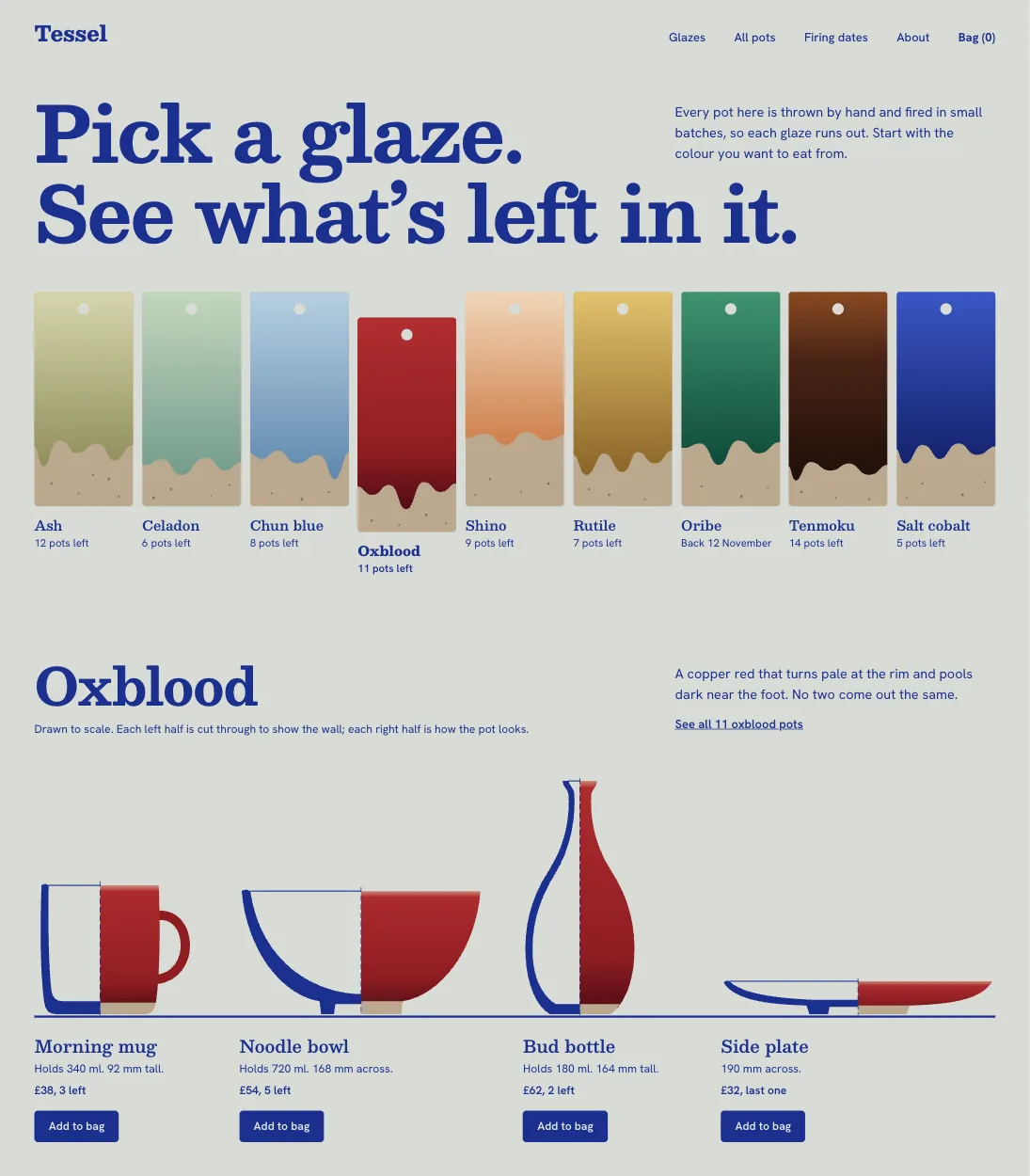
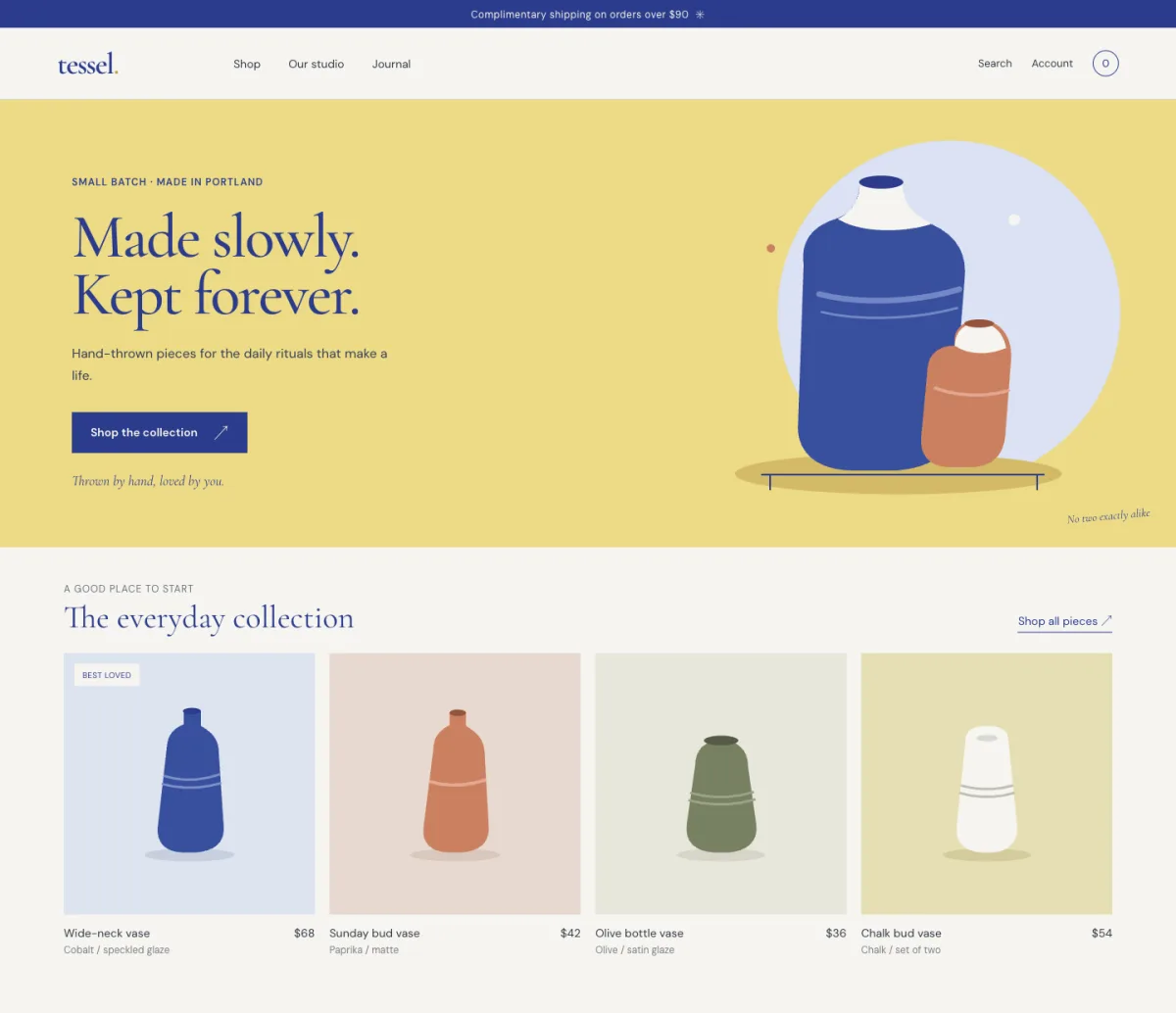
We tested frontend-design with one brief on November 5, 2026: “Design the home page of Tessel, a small online shop for hand-thrown ceramics, in a new Kite file. One desktop frame, 1440 wide.” We ran it four ways, once each, on Codex CLI 0.164.0 and Claude Code with Opus 5.5.
| Run | Time | Calls to Kite | What came back |
|---|---|---|---|
| Codex, no skill | 6 min 50 s | 33 | A calm studio page with stock photos: “A little more meaning in the everyday.” |
| Codex, skill installed | 7 min 25 s | 35 | Much the same page, with the same lead photo: “A little more ritual in the everyday.” |
| Codex, skill kept in the Kite file | 2 min 45 s | 16 | A yellow hero with vases drawn as shapes: “Made slowly. Kept forever.” |
| Claude Code, skill installed | 5 min 17 s | 21 | A shop by glaze, with test tiles showing the pots left: “Pick a glaze. See what's left in it.” |
Three things stood out. The skill installs in Codex, and Codex said it was using it, which no maintainer page told us for this one. Installing it barely moved Codex's page in this run, while Claude Code with it came up with an actual idea, and Codex's run from the Kite file differed again, so one try can't separate agent, skill and chance. And Codex read the copy kept in the Kite file with nothing installed on its side; Claude Code put the skill in that file first. Each was one try, a second might look different, and the Claude run has no skill-free run beside it, so read this as what happened rather than a benchmark.
Where a skill stops, and where Kite comes in
A skill changes how your agent works. It doesn't change what you get back, which from most of these is code, or from canvas-design a flat PDF or PNG. If your designer wants to move a button, or your team wants to comment on the hero, there's no file for that.
Kite (kite.new) is a design canvas your agent connects to over MCP. It writes HTML and CSS, and Kite turns that into layers your team can select and retype, with Claude, Codex, Cursor or ChatGPT on the plan you already pay for. Kite's guide tells it to check a picture of its work before it finishes. Kite is a tool to draw with, not a replacement for what's above, so a skill and Kite work together.
Kite also keeps skills of its own, in a design system or in one file. The agent sees each one's name and first line and follows those that fit, so it travels with the work: anyone's agent reads the same rules, with nothing to install in two folders. Import reads a Claude SKILL.md or a Cursor rule, and Download as .md saves one back. Keep what a variable can't hold there, such as “one primary button per screen”, and your colours and type in the system's variables, which also read and write DESIGN.md.
Kite has limits here. It doesn't run scripts from a skill, so a skill's database or checker stays with your agent, and it doesn't build or run your app, so you copy a frame as HTML, React or Tailwind when it's time to build. Kite is free with unlimited editors, 3 files and 200 agent actions a day. Pro is $20 an editor a month, or $16 billed yearly, with unlimited agent actions. There are no AI credits on either.
How we checked
Methodology: on November 5, 2026, we read each skill's SKILL.md and README in its own repository and measured its size from GitHub's file list. Install counts come from skills.sh and stars from GitHub, both that day. Claude Code's, Codex's and the standard's behaviour come from their own docs. We ran only frontend-design, in the four runs above, so every other skill here is what its files say, not a test of its results. “Not checked” means we didn't read far enough to say. Kite facts come from Kite's own docs. We check this page every quarter, because these skills change fast.
Questions
- What is the best design skill for Claude Code?
- For most people, Anthropic's frontend-design: one 9 KB file that makes the agent plan a look before it writes code, with nothing else to set up. Add Impeccable when you want commands for critique and polish, and Vercel's web-design-guidelines for a last check of the code.
- Do Claude Code skills work in Codex?
- The format is shared, because both follow the Agent Skills standard, but the folders differ: Claude Code reads .claude/skills and Codex reads .agents/skills. The npx skills command can install to both from one copy. A skill that relies on Claude-only features may behave differently, and Codex's docs don't say how it treats them.
- What is the difference between a skill and an MCP server?
- A skill is instructions an agent reads, and an MCP server is a connection that gives it tools. Anthropic's docs put it as "MCP connects Claude to external services. Skills extend what Claude knows". They work together: a design skill can say how a page should look, and an MCP server such as Kite gives the agent a canvas to draw it on.
- Is a DESIGN.md file a skill?
- No. A skill tells an agent how to work, and a DESIGN.md says what your product looks like: its colours, type and spacing, with the reasons in plain words. Google's format is still marked alpha. You can use both, and Kite reads and writes DESIGN.md.
- Can I use more than one design skill at once?
- Yes, but keep the list short. Claude Code's docs say every skill in the listing adds to your context on every turn, and a skill's whole body stays once it has loaded. Several of these overlap too: Impeccable started from frontend-design, so the two pull in the same direction.
- Are design skills safe to install?
- Read one before you install it. The skills command itself warns that they "run with full agent permissions", and some carry scripts. skills.sh shows third-party audits on each skill's page: on November 5, 2026, taste-skill showed a Fail on one audit and a Warn on another, and Vercel's, Impeccable and shadcn each showed a Warn. It doesn't explain why in the parts we read.