Short answer: Google Stitch is a free AI design canvas from Google Labs, where Gemini turns a prompt into screens and code. The best alternative depends on what you need next: UX Pilot for the closest like-for-like generator, v0 or Lovable for a working app, Figma Make inside Figma, and Kite (kite.new) when Claude, ChatGPT or Cursor should design in a file your team keeps editing. Prices were checked on each vendor's own page on October 28, 2026.
Key takeaways
- Google Stitch is free on a daily credit limit that resets at midnight UTC; Google doesn't publish the number, and lists no paid plan.
- The alternatives split three ways: another generator, a generator your agent drives over MCP, or a canvas your own agent designs in.
- Most paid plans start between $7 and $30 a month per seat, and most meter AI in credits.
- Stitch exports to Figma and to HTML with Tailwind; several alternatives export to Figma and code on paid plans.
We make Kite, and it is on this list. It has no model of its own, and we say plainly when Stitch or another tool is the better pick.
What Google Stitch does, and where it stops
Google Stitch is an AI design canvas from Google Labs that turns prompts, sketches or screenshots into editable screens and front-end code. Google rebuilt it in March 2026 with an infinite canvas, a design agent, voice and interactive prototypes, per its March announcement. Its agent can use Gemini 3 Flash or Gemini 3.1 Pro, per the Stitch MCP reference.
Google's Stitch FAQ says it is free on a daily credit limit that resets at midnight UTC, and that it exports to Figma with auto layout and named layers, and to HTML and CSS with Tailwind. Designs can also go to AI Studio and Antigravity, per Google's May 2026 update. A DESIGN.md file carries your design rules in and out, per the DESIGN.md docs.
Some things Google's pages don't state: a credit number, a paid plan or a team plan. Stitch is still a Labs product. And when your agent connects to its MCP server, the agent writes the prompt and Gemini draws. How that compares with an agent drawing itself is covered in Stitch MCP vs Figma MCP.
Three kinds of Stitch alternative
The tools below split by who does the designing, which decides what you pay for and what you keep:
| Kind | Who designs | Tools |
|---|---|---|
| Another generator | The tool's own model, from your prompt | Uizard, Figma Make, Banani |
| A generator your agent drives | The tool's model, prompted by your agent over MCP | UX Pilot, Magic Patterns, v0, Lovable |
| A canvas your agent designs in | Your own agent, such as Claude, ChatGPT or Cursor | Kite, MagicPath |
Google Stitch alternatives at a glance
Prices are the cheapest paid plan, per seat or editor a month, from each vendor's own page on October 28, 2026. Where a page doesn't say whether a price is billed monthly or yearly, we write “listed at”.
| Tool | Free plan | Cheapest paid | AI meter | Figma |
|---|---|---|---|---|
| Google Stitch | Free, daily credit limit | None listed | Daily credits | Exports to Figma |
| UX Pilot | 80 credits a day, 1 project | Pro $19 yearly, $29 monthly | Credits | Import; export (paid) |
| Kite | 3 files, 200 agent actions a day | Pro $20 monthly, $16 yearly | No AI credits | Import, and Copy to Figma |
| Banani | 12 monthly + 3 daily credits | Plus $12 yearly, $20 monthly | Credits | Export (paid) |
| Magic Patterns | Free monthly credits | Starter, listed at $17 | Credits | Export (paid) |
| MagicPath | 20 credits a day | Builder $7, billed yearly | Credits; your agent bills separately | Import and export, with caps |
| Uizard | 3 generations a month | Pro $12, billed yearly | Generations | Not stated |
| Figma Make | Trial, 500 credits a month | Full seat, listed at $16 | AI credits | Native |
| v0 | 7 messages a day | Plus, listed at $30 | Credits | Not stated |
| Lovable | 5 credits a day, up to 30 a month | Pro $25 monthly, $21 yearly | Credits | Not stated |
The 9 best Google Stitch alternatives
Each entry covers what its vendor documents: what the tool makes, what it costs, how agents connect, and how Figma fits in.
1. UX Pilot
UX Pilot is an AI design tool that generates high-fidelity UI, wireframes and flows from prompts, documents or screenshots, with its own model. It's the closest like-for-like swap for Stitch.
- Price: free with 80 credits a day for one project. Pro is $19 a month billed yearly, or $29 monthly, per UX Pilot's own guide.
- Agents and Figma: a hosted MCP server lets your agent drive UX Pilot's generation. It imports Figma components and exports to Figma on paid plans.
2. Kite (kite.new)
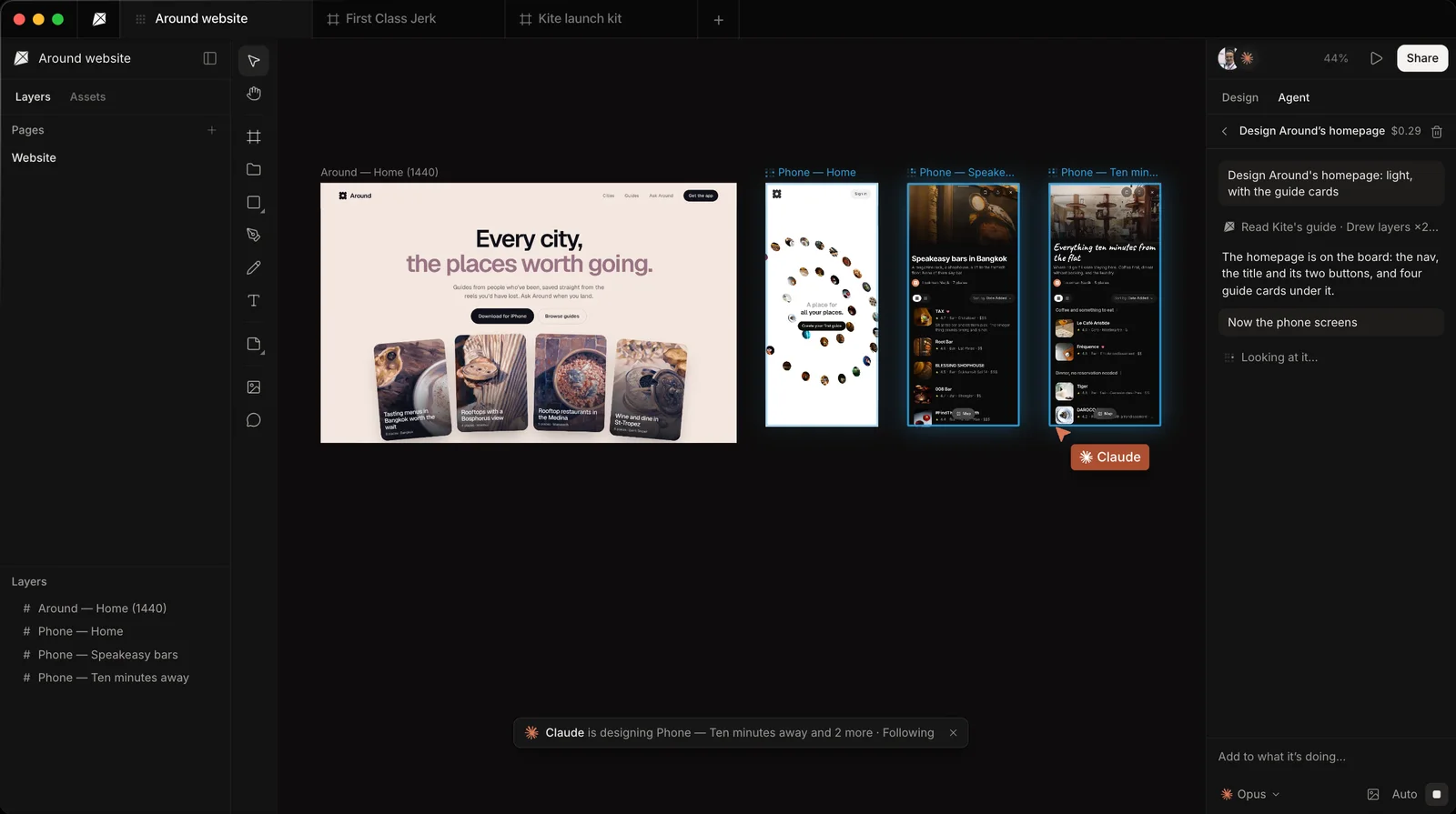
Our tool. Kite is a design tool where your own agent, such as Claude, ChatGPT or Cursor, draws real HTML and CSS layers in a shared file that your team edits and comments on. It has no model of its own, so there are no AI credits to buy.
- Fits: teams that already pay for an agent and want its work in a file they keep editing together, with components, variables and comments.
- Not for: anyone who wants a generator that designs on its own, a clickable prototype or a published site. Stitch, v0 or Lovable serves that better.
- Price: free with unlimited editors and viewers, 3 files and 200 agent actions a day. Pro is $20 an editor a month, or $16 billed yearly (see pricing).
- Agents and Figma: a hosted server any client signs in to with OAuth; an agent can also take a job from a comment. Figma files come in by paste or link, and frames go back with Copy to Figma.
The full row-by-row comparison is Kite vs Google Stitch.
3. Banani
Banani is a UI generator that makes multi-screen designs from text, screenshots or Figma links.
- Price: free with 12 monthly plus 3 daily credits. Plus is $12 a month billed yearly, or $20 monthly, per Banani's pricing page.
- Agents and Figma: every plan includes MCP, which hands designs to your coding agent to build. Figma export is on paid plans.
4. Magic Patterns
Magic Patterns is a prototyping tool that makes interactive prototypes from prompts, with GitHub sync.
- Price: free monthly credits. Starter is listed at $17 a seat a month, with 1,000 credits, per Magic Patterns' pricing page.
- Agents and Figma: an MCP server where your agent creates designs and sends prompts, and Figma export, both from Starter up.
5. MagicPath
MagicPath is a shared canvas for people and agents: it has its own AI, and Claude Code, Codex or Cursor can work on the canvas too, billed by your agent's own provider. Of the tools here, it is the closest to Kite's approach.
- Price: free with 20 credits a day and 50 outside agent calls a week. Builder is $7 a month, billed $84 a year, with unlimited agent calls, per MagicPath's pricing page.
- Figma: imports and exports. Free caps both; Builder caps imports at 25 a month.
6. Uizard
Uizard is a mockup tool that turns prompts into multi-screen designs and clickable prototypes, made for people who aren't designers.
- Price: free with 3 generations a month and 2 projects. Pro is $12 a month billed yearly, per Uizard's pricing page. An MCP server and Figma support are not stated there.
7. Figma Make
Figma Make is Figma's prompt-to-app tool, for teams whose files and libraries already live in Figma. You can try it on the free plan with 500 AI credits a month; it is included with Full seats, listed at $16 a month on Professional on Figma's pricing page. Our Figma Make alternatives covers it in depth.
8. v0
v0 is Vercel's app builder: it writes web apps and UI as code, syncs them with GitHub and deploys them on Vercel. It's free with 7 messages a day; Plus is listed at $30 a user a month, per v0's pricing page. Its MCP server lets your agent drive v0's builds.
9. Lovable
Lovable is an app builder that makes full web apps by chat and hosts them. It's free with 5 build credits a day up to 30 a month; Pro is $25 a month, or $21 billed yearly, per Lovable's plans page. Its MCP server lets your agent create and change Lovable projects, on Lovable credits.
Which alternatives work with Claude, ChatGPT or Cursor?
Most of these tools now have MCP servers, so connecting an agent is no longer the difference. What matters is who designs, and who you pay for the AI:
- Your agent drives their generator: Stitch, UX Pilot, Magic Patterns, v0 and Lovable. Your agent writes the prompt and their model makes the design; Lovable, for one, bills those calls in its credits, per its MCP docs.
- Your agent picks up finished designs: Banani's MCP hands its designs to your coding agent to build.
- Your agent designs itself: Kite and MagicPath. The agent places the layers, and the AI is billed by the agent you already pay for.
For more design tools where your agent works in the file, see Figma MCP alternatives.
When to keep using Stitch
Keep Stitch for fast, free concepts. It needs no setup, gives several directions in minutes, and has voice and clickable prototypes that Kite doesn't. A good pairing is to draft in Stitch, export to Figma, then bring those frames into Kite by paste or by importing the file for your team and agents to finish. Nothing syncs back automatically.
Other options
Visily is a wireframing and UI tool for non-designers; its pages couldn't be read on October 28, 2026, so we left its prices out. paper.design and pen.dev are canvases your agent draws in from your own computer. For broader lists, see the best AI design tools and the best Figma alternatives.
How we checked
Every fact about another tool comes from that tool's own pricing page, docs or announcement, opened on October 28, 2026 and linked where it is used. Stitch's FAQ was read from Google's own site. Where a vendor doesn't say something, we write “not stated” rather than guess, and we leave out numbers we couldn't read on the vendor's page. We check this page again every quarter.
Questions
- Is Google Stitch free?
- Yes, for now. Google's FAQ says Stitch is provided free of charge on a daily credit limit that resets at midnight UTC. Google doesn't publish how many credits that is, and no paid plan is listed.
- What is the best free alternative to Google Stitch?
- It depends on the job. UX Pilot's free plan has 80 credits a day for one project, MagicPath's has 20 credits a day, and Banani's has 12 monthly plus 3 daily credits. Kite is free with unlimited editors and viewers, 3 files and 200 agent actions a day, with no AI credits.
- Which Stitch alternatives work with Claude, ChatGPT or Cursor?
- Many have MCP servers now. With UX Pilot, Magic Patterns, v0 and Lovable, your agent drives their generator, so their model does the designing. Banani's MCP hands finished designs to your coding agent. With Kite and MagicPath, your own agent does the designing, and the AI is billed by the agent you already pay for.
- Can Google Stitch export to Figma?
- Yes. Google says Stitch exports to Figma with auto layout, named layers and editable text. UX Pilot, Banani and Magic Patterns export to Figma on paid plans, MagicPath exports too (capped on its free plan), and Kite sends frames to Figma with Copy to Figma.
- Is Kite a UI generator like Stitch?
- No. Kite has no model of its own: your own agent, such as Claude, ChatGPT or Cursor, designs in a file your team edits. It doesn't make clickable prototypes or publish sites. Kite is free to start; Pro is $20 per editor a month, or $16 billed yearly.