One agent. Four briefs. Eight design tools. Which one costs your agent the least?
- 29,900
 Kite
- 60,900
 Magic Patterns
- 71,600
 paper.design
- 77,400
 Doop
- 82,600
 Wonder
- 84,700
 pen.dev
- 96,700
 Google Stitch
- 102,400
 Figma
Tokens the tool's calls sent and returned, all four briefs, each the median of three runs; lower is better. Claude Opus 5.5. paper.design: three runs of the pricing section and the rebrand, one of the onboarding and two of the music app.
~29,900
Tokens in Kite
2.8× fewer than the other seven ranked, on average.
18
Tool calls in Kite
The fewest. The others took 40 to 105.
302 s
Time in Kite
The fastest. Next: paper.design, 486 s.
$2.16
Cost in Kite, four briefs
The cheapest, at Claude's API prices. Next: pen.dev, $4.71.
The four prompts
Word for word, the same in every tool.
Design a pricing section for a project-management SaaS called Lumen, 1440px wide, light theme: an eyebrow "Pricing", a heading and a one-line subheading, a Monthly/Yearly toggle with "Save 20%", and three plan cards (Free $0, Pro $12, Team $24 per user a month), each with a one-line description, four features and a button. Pro is highlighted as "Most popular". Real, editable layers with auto layout.
Design the onboarding for a habit-tracking iPhone app called Tempo: three screens side by side, each 390×844, light theme. Every screen shares the same header (a "Skip" link at the top right) and a row of three progress dots near the bottom, with the current step's dot filled. Screen 1 "Build habits that stick", screen 2 "Track your streaks", screen 3 "Get gentle reminders", each with a simple illustration area, the title, one line of body text, and a full-width button ("Next" on 1 and 2, "Get started" on 3). Real, editable layers with auto layout.
Open the Lumen pricing section you made for brief 1 and rebrand it in place: change the accent colour to #0F766E, the font to DM Sans, every corner radius to 16px, and the Pro button's text to "Start free trial". Edit the existing layers; don't draw the section again. Then show the result.
Design the mobile app for Riff, which teaches people to play guitar or piano in five minutes a day. Audience: adults who always wanted to play and keep giving up. Tone: warm, encouraging, a little playful, never childish. Make three screens, each 390×844: Today (the daily lesson, a streak, progress toward the next level and a big "Start lesson" button), a lesson in progress (a chord or note to play, a listening indicator that shows whether it heard the note right, and a progress bar), and lesson complete (a celebration, what was learned, XP earned, and what's next). Real, editable layers with auto layout; choose the type, colour, illustration and motion cues yourself.
Tokens, all four briefs
Text the tool's calls sent and returned, ÷ 4, the median run of each of the four briefs added up. Lower is better.
Kite~29,900 tokensMagic Patterns~60,900 tokens2.0× Kitepaper.design~71,600 tokens2.4× KiteDoop~77,400 tokens2.6× KiteWonder~82,600 tokens2.8× Kitepen.dev~84,700 tokens2.8× KiteGoogle Stitch~96,700 tokens3.2× KiteFigma~102,400 tokens3.4× KiteTokens against time, all four briefs
Lower and further left costs the agent less.
What it cost, all four briefs
Each brief's median run added up, at Claude Opus 5.5's API prices; time split into the model thinking and the design tool working. Passed: the music app's three runs, the brief with a pass check.
| Tool | Passed the music app | Cost, four briefs | Where the time wentAgent thinkingDesign tool working | Errors · retries · polls |
|---|---|---|---|---|
| Kite | 3/3 | $2.16 | 275 s model · 28 s tool | 0 · 0 · 0 |
| pen.dev | 3/3 | $4.71 | 414 s model · 184 s tool | 17 · 14 · 0 |
| Magic Patterns | 3/3 | $5.21 | 365 s model · 174 s tool | 1 · 1 · 0 |
| Figma | 3/3 | $5.52 | 702 s model · 75 s tool | 2 · 2 · 0 |
| Doop | 3/3 | $6.13 | 512 s model · 68 s tool | 1 · 1 · 0 |
| paper.design | 2/2 | $5.75 | 459 s model · 26 s tool | 1 · 1 · 0 |
| Wonder | 2/3 | $5.98 | 491 s model · 77 s tool | 5 · 2 · 0 |
| Google Stitch | 0/3 | $5.86 | 380 s model · 850 s tool | 28 · 6 · 28 |
Run replay, pricing section
Every call the agent made, in time; pick a brief to replay another. Hover a dot.
- Reading guides
- Reading the design
- Drawing or editing
- Looking at the result
- Wrapping up
- A bigger dot returned more text.
Tokens, brief by brief
The brighter the cell, the more it took; the lowest in each column is outlined.
| Tool | Pricing section | Onboarding screens | Rebrand in place | Music app, 3 runs |
|---|---|---|---|---|
| Kite | ~9,300 | ~6,700 | ~2,600 | ~11,300 |
| Magic Patterns | ~12,900 | ~14,900 | ~12,500 | ~20,600 |
| paper.design | ~11,600 | ~16,300 | ~16,600 | ~27,100 |
| Doop | ~13,400 | ~17,000 | ~17,500 | ~29,500 |
| Wonder | ~15,700 | ~17,100 | ~19,900 | ~29,800 |
| pen.dev | ~18,900 | ~21,300 | ~14,400 | ~30,100 |
| Google Stitch | ~7,800 | ~31,700 | ~11,900 | ~45,200 |
| Figma | ~23,300 | ~23,600 | ~23,200 | ~32,300 |
Every design, pricing section
Ranked by tokens for this brief. Click one to see it full size, then browse with the arrows.
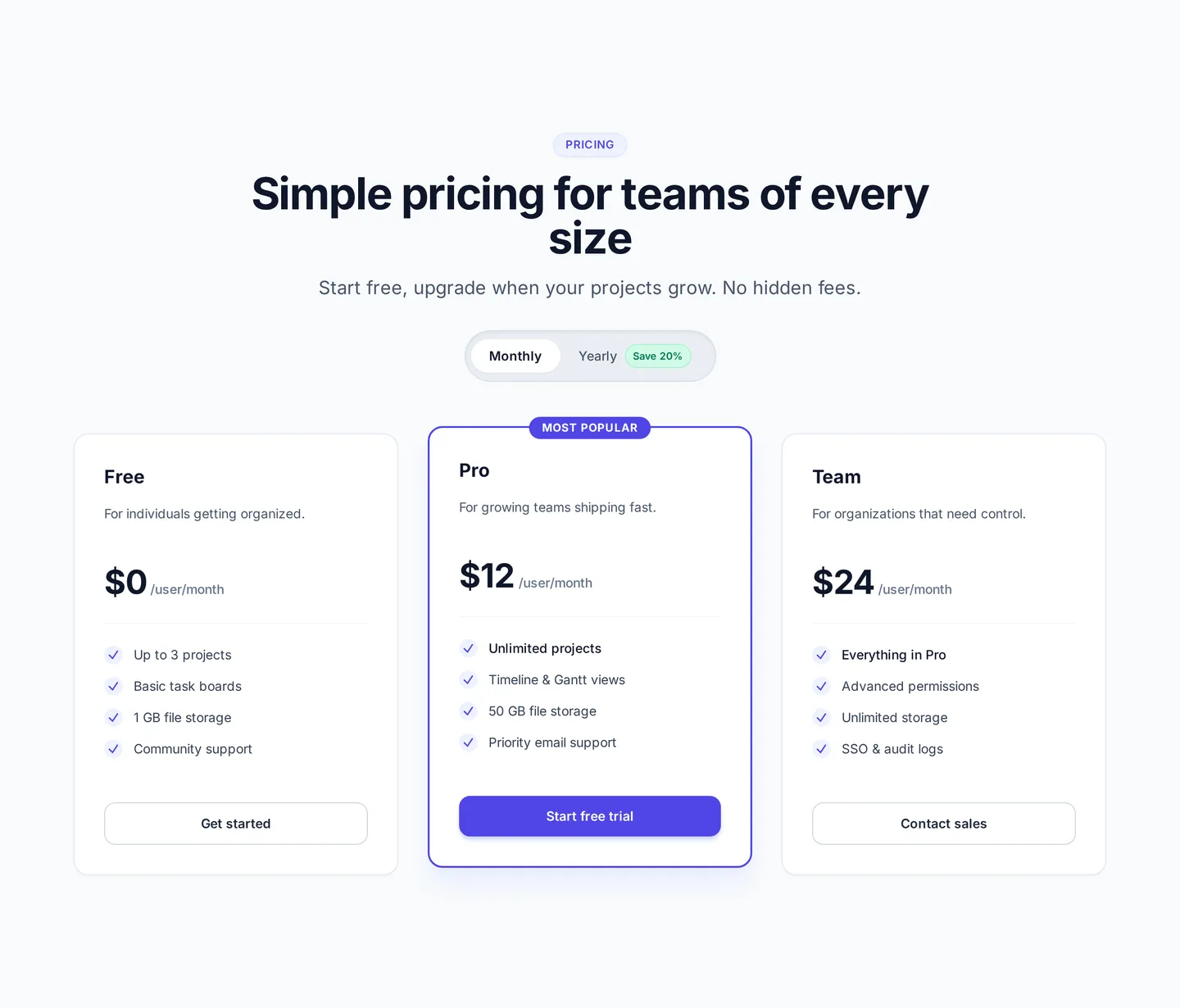 Google Stitch~7,800 tokens · 7 calls · 111 s
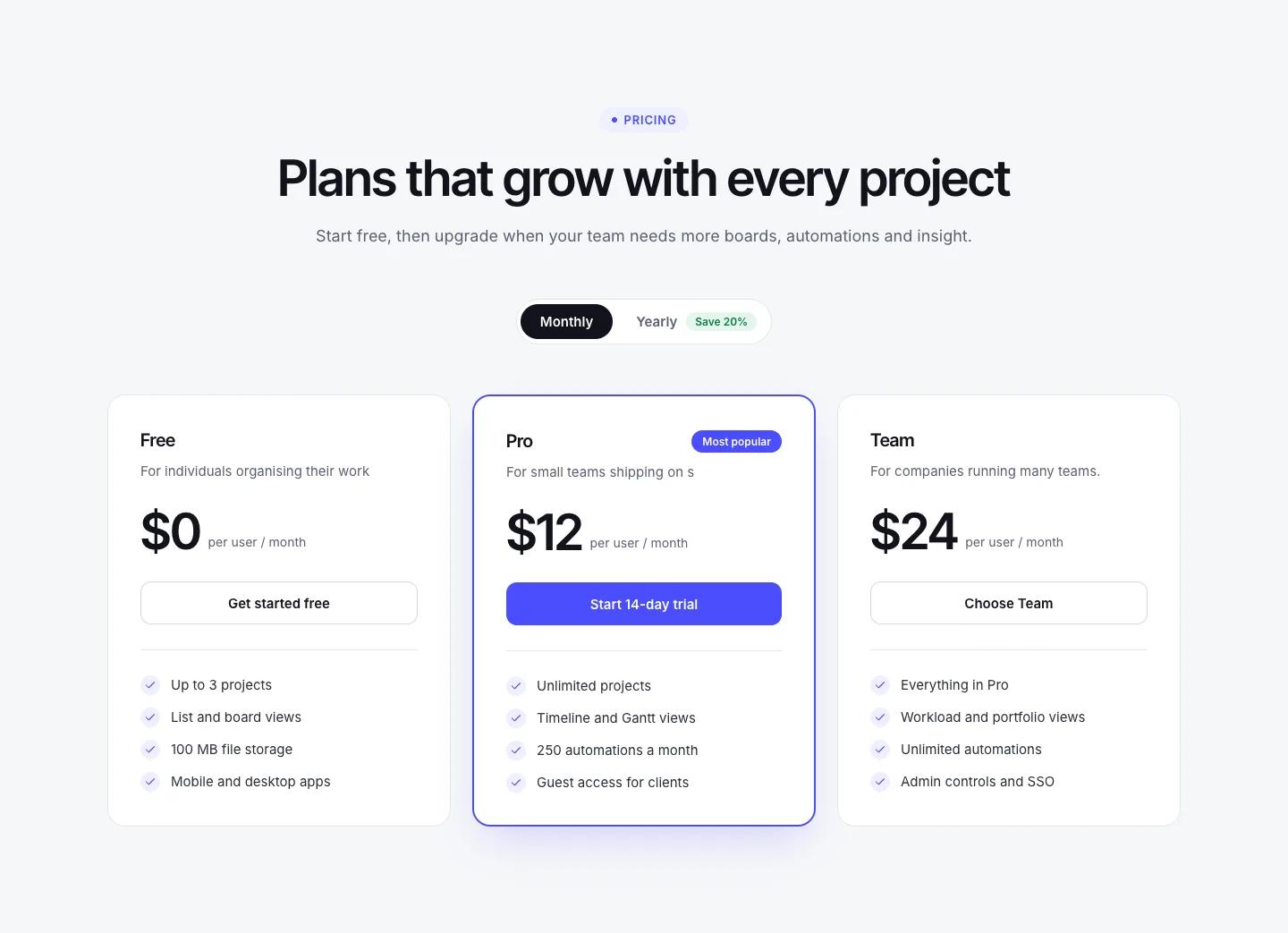 Kite~9,300 tokens · 6 calls · 77 s
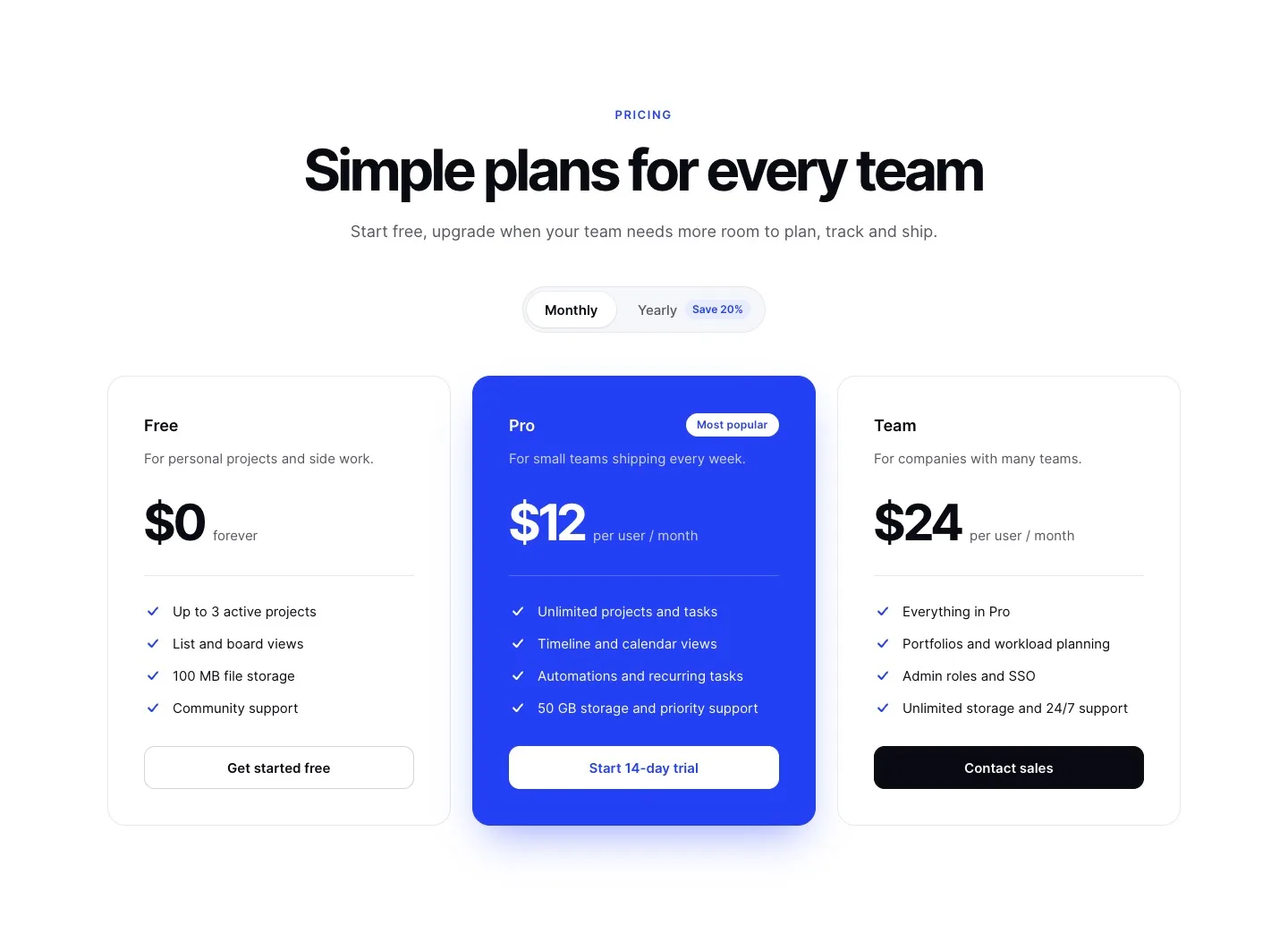 paper.design~11,600 tokens · 20 calls · 85 s
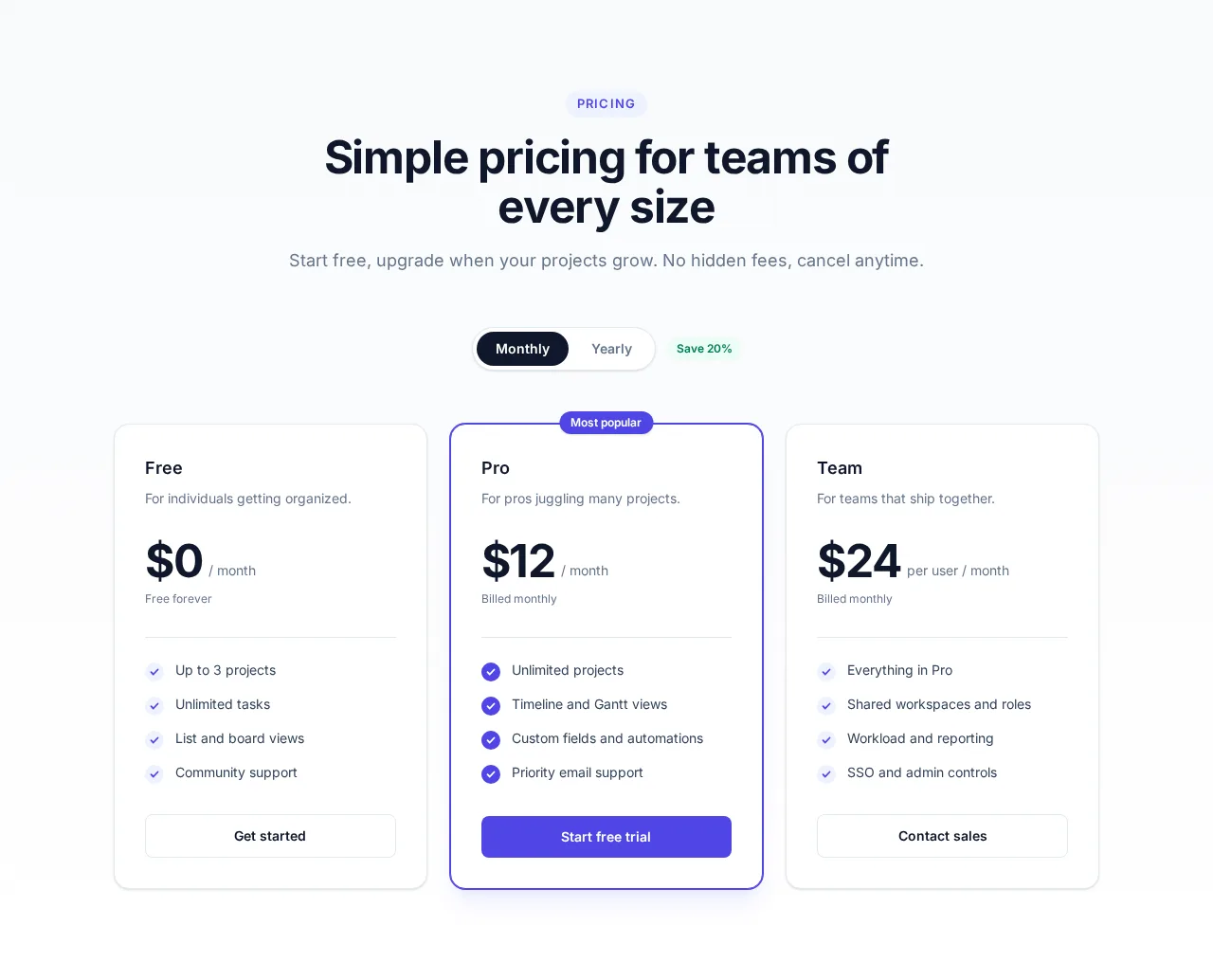 Magic Patterns~12,900 tokens · 16 calls · 94 s
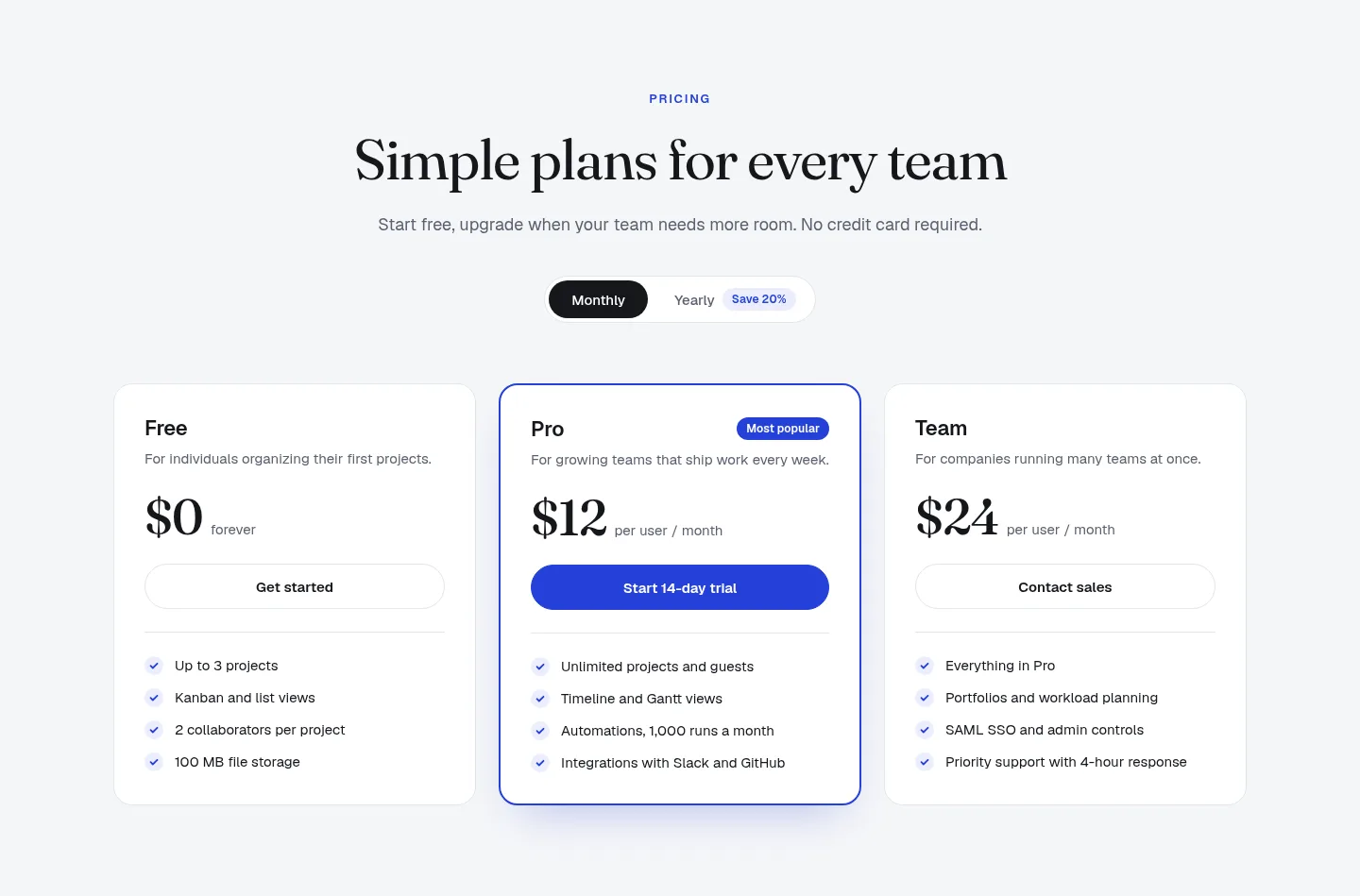 Doop~13,400 tokens · 10 calls · 105 s
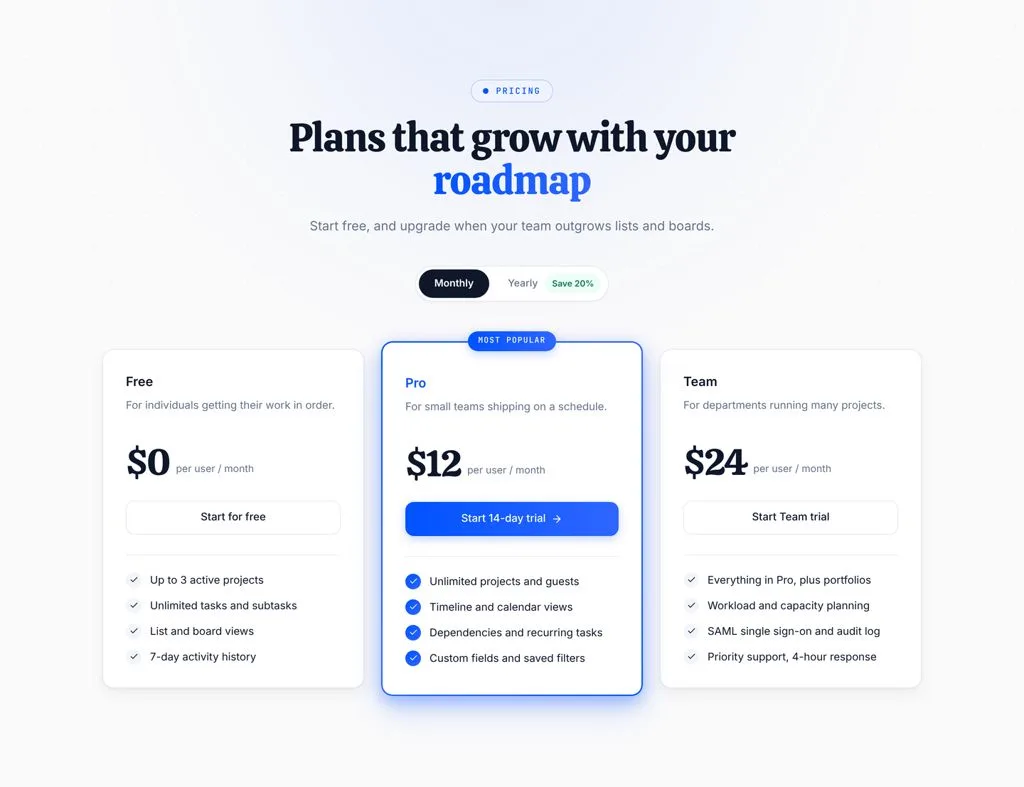 Wonder~15,700 tokens · 11 calls · 89 s
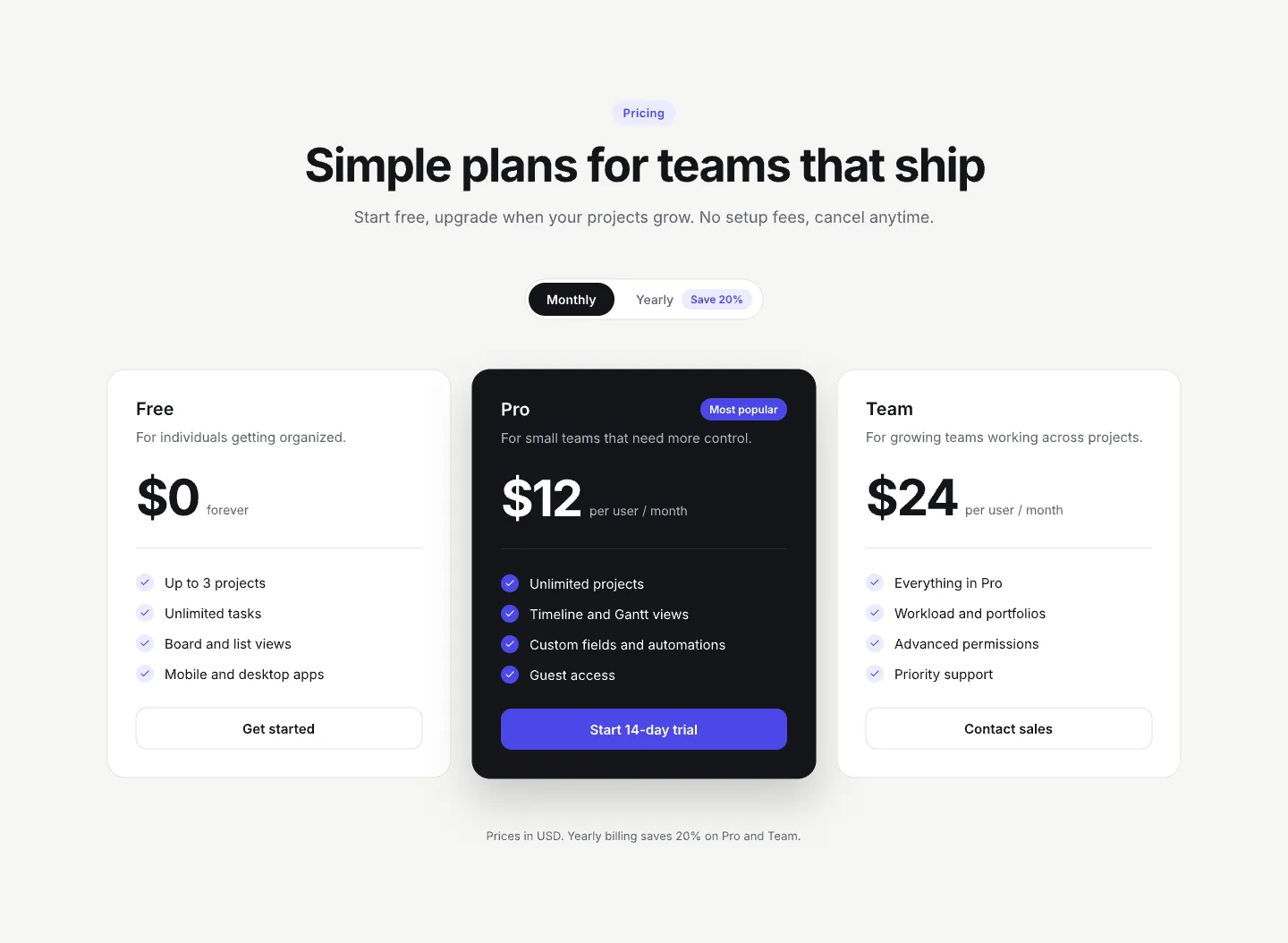 pen.dev~18,900 tokens · 12 calls · 115 s
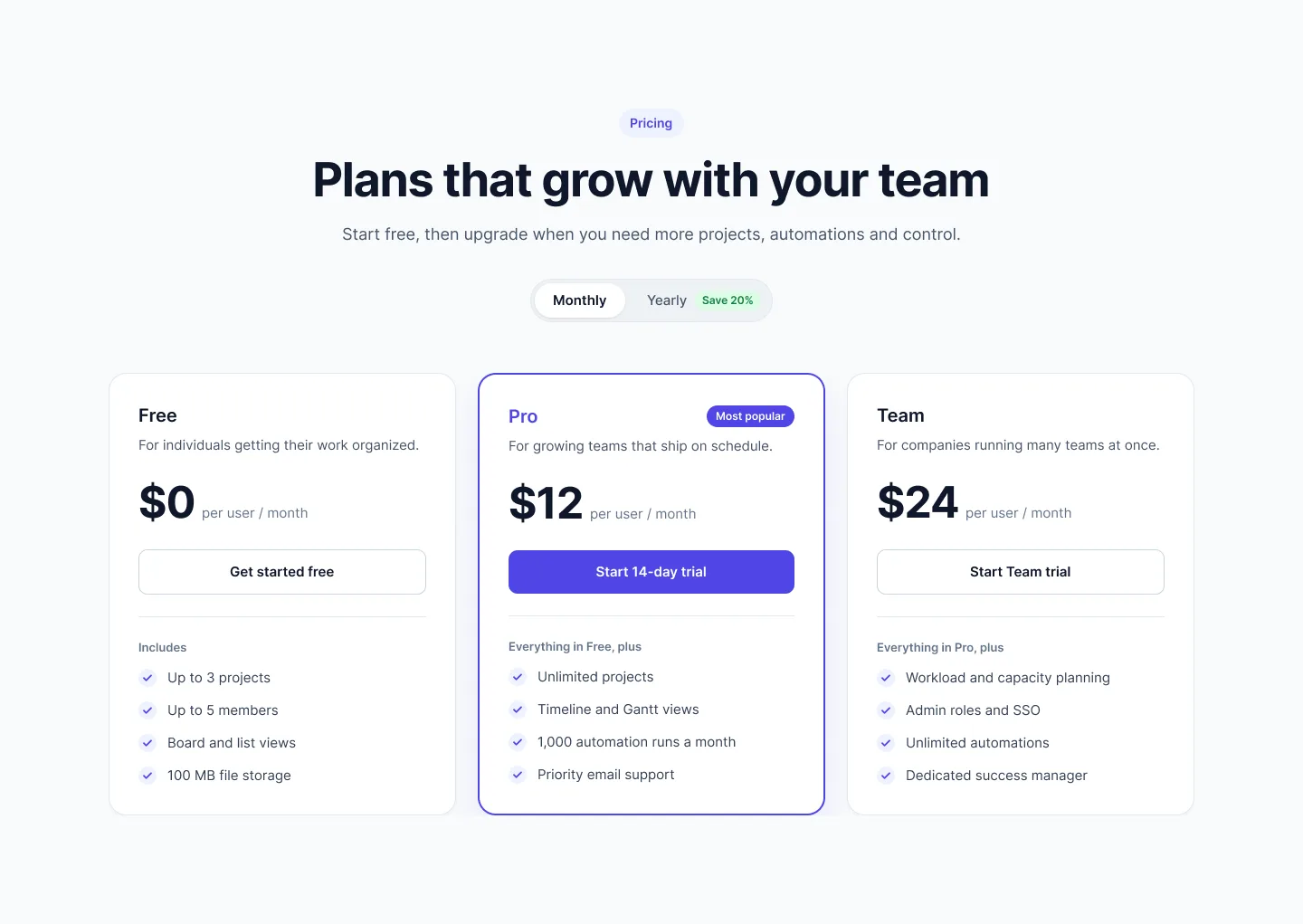 Figma~23,300 tokens · 8 calls · 112 s
Compare any two tools
The same brief, side by side, with what each run cost.
Kite~9,300 tokens 2.5× less6 calls 1.3× less77 s 1.5× lessFigma~23,300 tokens 2.5× more8 calls 1.3× more112 s 1.5× moreEvery number, all four briefs
Click a column to sort.
| Kite | ~29,900 | 18 | 302 s |
| Magic Patterns | ~60,900 | 78 | 535 s |
| paper.design | ~71,600 | 105 | 486 s |
| Doop | ~77,400 | 79 | 585 s |
| Wonder | ~82,600 | 71 | 582 s |
| pen.dev | ~84,700 | 60 | 588 s |
| Google Stitch | ~96,700 | 73 | 1166 s |
| Figma | ~102,400 | 40 | 784 s |
How to read it.
What was measured, why it matters, and where other tools did well.
What it measures
The same agent got the same four briefs in eight tools, three times each, through each tool's own MCP server. We counted its tool calls, the text those calls sent and returned, how long each run took and, for the music app, what it cost and whether it delivered.
Why tokens matter
Everything a tool sends back stays in the agent's context for the rest of the session. Long guides and full code fill the room it needs for the rest of the job, and on usage-billed plans they cost money.
Where others did well
Figma, Doop, pen.dev and Magic Patterns passed every music-app run, as Kite did. Doop and Figma built shared components where Kite drew plain copies, and Magic Patterns' code really runs. paper.design's fastest rebrand took 34 seconds, though its median was 56.
Kite~29,900 tokens · 18 calls · 302 s
Drew each new design in one call and fixed it with an edit or two; the rebrand took one or two edits. 2 to 10 calls on the short briefs, 6 to 13 on the music app, and every music-app run passed. It drew the onboarding's shared header as plain copies on each screen, not as a component.
Figma~102,400 tokens · 40 calls · 784 s
Read two or three skill documents before every brief, then wrote Plugin API scripts. The most tokens, ~102,400, and every music-app run passed. Our runs used a Full seat on a paid plan.
Wonder~82,600 tokens · 71 calls · 582 s
Read its design context, skills and guidelines first, then took 3 or 4 screenshots a brief as it built. One music-app run failed: a screen came out 846 px tall, not 844.
Doop~77,400 tokens · 79 calls · 585 s
Built tokens and components as it drew, took 3 to 6 screenshots on each new design, and passed every music-app run.
paper.design~71,600 tokens · 105 calls · 486 s
Builds in small steps, roughly one visual group per write: 13 to 34 calls a brief, and the second-fastest rebrand. Needs its desktop app open. Three runs of the pricing section and the rebrand, one of the onboarding and two of the music app, as its plan's weekly limit allowed.
pen.dev~84,700 tokens · 60 calls · 588 s
Reads its skill documents, then writes its own format through scripts, and passed every music-app run. Needs its desktop app open; its tools can't make a new file, so every run drew into the open document.
Google Stitch~96,700 tokens · 73 calls · 1166 s
Generates screens with Google's model and showed the agent no picture. It failed all three music-app runs: one made no screens and two came out taller than 390×844. Its rebrands drew new screens rather than editing.
Magic Patterns~60,900 tokens · 78 calls · 535 s
Writes React and Tailwind, then type-checks and builds it, so its toggle really switches prices. No layer canvas, and its listening indicator never showed whether a note was right.
Full methodology, the briefs word for word, and the data
Kite is a design tool where the agents you already use, such as Claude, ChatGPT or Cursor, draw real layers in a file your team edits. A design in Kite is HTML and CSS. Kite runs no model to design: your agent runs on the plan you already pay for.
MCP (Model Context Protocol) is an open-source standard for connecting AI applications to outside systems. It is how an agent reaches a design tool.
Every run was a fresh Claude Opus 5.5 agent, connected only to that tool's own MCP server. It got the brief word for word. Each brief ran three times in each tool, and the page shows the median run with the lowest and highest; paper.design has three runs of the pricing section and the rebrand, one of the onboarding and two of the music app (averaged), as its plan's weekly limit allowed. Every number comes from that run's own log.
Counting calls and the resources they use is how research benchmarks measure agents on MCP too. MCP-RADAR scores the number of tool-invocation rounds and computational resource efficiency, and reports a trade-off between accuracy and efficiency.
Time is the whole run, the agent's thinking included. Tool calls count the calls to the design tool. Tokens are the characters the tool's calls sent and returned, divided by four, with pictures left out. They show what the tool costs your agent's context, not a bill.
The music app was measured more closely. Cost is each run at Claude Opus 5.5's API prices, from the model's own token counts, cache reads and writes included. Time is split into the model thinking and the design tool working, call by call. Errors, retries and repeated reads are counted from each call's answer. A run passed when a separate agent, reading the design read-only through the tool, found three screens at 390×844 in real layers, and a blind judge, shown only the screenshots under letters, found every element the brief asked for.
Every tool ran between 26 and 28 November 2026, on the version its makers served then.
Not every run made what the brief asked: Stitch's rebrands drew new screens instead of editing the old one, one of its music-app runs made no screens, and Stitch and Magic Patterns made generated screens or code rather than the editable layers the briefs ask for. So the numbers compare the cost of similar work, not identical work; the music app's pass rate says which runs delivered.
The pictures of the first three briefs are from 26 November's runs, exported from each tool afterwards; Stitch's were downloaded from Stitch by us, since its tools showed the agent none. The music app's pictures are every tool's median run on time, the same rule for all, screenshotted through the tool itself.
Three runs a brief is still a small sample: read the gaps as direction, not as exact ratios. When a run broke because of how we ran it rather than the tool (a launcher that stopped early, a link to brief 1's result cut short), we ran it again and say so in the data.
The four briefs, word for word:
- A pricing section. Design a pricing section for a project-management SaaS called Lumen, 1440px wide, light theme: an eyebrow "Pricing", a heading and a one-line subheading, a Monthly/Yearly toggle with "Save 20%", and three plan cards (Free $0, Pro $12, Team $24 per user a month), each with a one-line description, four features and a button. Pro is highlighted as "Most popular". Real, editable layers with auto layout.
- Three onboarding screens. Design the onboarding for a habit-tracking iPhone app called Tempo: three screens side by side, each 390×844, light theme. Every screen shares the same header (a "Skip" link at the top right) and a row of three progress dots near the bottom, with the current step's dot filled. Screen 1 "Build habits that stick", screen 2 "Track your streaks", screen 3 "Get gentle reminders", each with a simple illustration area, the title, one line of body text, and a full-width button ("Next" on 1 and 2, "Get started" on 3). Real, editable layers with auto layout.
- A rebrand, in place. Open the Lumen pricing section you made for brief 1 and rebrand it in place: change the accent colour to #0F766E, the font to DM Sans, every corner radius to 16px, and the Pro button's text to "Start free trial". Edit the existing layers; don't draw the section again. Then show the result.
- A music-learning app. Design the mobile app for Riff, which teaches people to play guitar or piano in five minutes a day. Audience: adults who always wanted to play and keep giving up. Tone: warm, encouraging, a little playful, never childish. Make three screens, each 390×844: Today (the daily lesson, a streak, progress toward the next level and a big "Start lesson" button), a lesson in progress (a chord or note to play, a listening indicator that shows whether it heard the note right, and a progress bar), and lesson complete (a celebration, what was learned, XP earned, and what's next). Real, editable layers with auto layout; choose the type, colour, illustration and motion cues yourself.
Every number on this page was fact-checked against the run logs before it went up. The data, with every call each run made, is here as JSON. Six of the tools' comparison pages show their results beside Kite's, for example Kite vs Doop. Kite ran and publishes this benchmark; about us says who we are. To report a mistake or a tool that changed, contact us at hello@kite.new, and we'll run that tool again.
Questions. About the benchmark and its numbers.
Which design tool uses the fewest tokens for an AI agent?
In this benchmark, Kite. Claude used about 29,900 tokens of tool text across the four briefs in Kite, each brief's median run of three. The next lowest was Magic Patterns, at 60,900, and Figma used 102,400. Kite also needed the fewest tool calls, 18.
Why does Kite use fewer tokens?
A design in Kite is HTML and CSS, so the agent draws a whole section in one call and fixes it with one or two edits; the rebrand took one or two. Kite's short drawing guide comes back with the first answer, and each drawing answer is short: what was made, and one picture. In the other tools the agent read longer guides first, built in more and smaller calls, or took screenshots as calls of their own.
Which tool was fastest?
Kite, overall and on all four briefs: 302 seconds for all four, against paper.design's 486, each brief's median run of three. Google Stitch and Figma were slowest.
Is the benchmark fair?
Kite ran and publishes it, so read it with that in mind. Every tool got the same model, the same words and the same rules. Each run was a fresh agent connected only to that tool. The numbers come from each run's own log, and the data is downloadable. Each brief ran three times per tool and the page shows the median, with the spread; paper.design has three runs of the pricing section and the rebrand, one of the onboarding and two of the music app, as its plan's weekly limit allowed. Every tool ran between 26 and 28 November. A blind judge, shown only the screenshots, checked every music-app run against the brief.
What does a token count measure here?
The text a tool's calls sent and returned, divided by four, without pictures: how much of the agent's context the tool used to do the job. It isn't a bill. The model's own thinking, and in Google Stitch the model Google runs to generate screens, aren't in it. For the music app we also show what each run would cost at Claude Opus 5.5's API prices, from the model's own token counts: Kite's median run was $0.75, the others' $1.57 to $2.21.
You and your agents, on one board.
In your browser, or in Kite for Mac and Windows. Bring the agent you already use, on the plan you already pay for.