Kite vs Doop: A Doop alternative your agents design in.
Short answer: Kite is the better pick for a team that wants a shared workspace with roles on the free plan, Figma both ways by copy and paste, and SVG or React export. Doop is the better pick if you want open source you can host yourself, or a free plan with no limit on canvases and agents.
Teams who want a shared workspace with roles, Figma both ways and agents from anywhere, free to start.
Kite costs
Free to start. Pro $20 per editor a month, $16 billed yearly. No AI credits.
Kite and Doop at a glance.
What each one is, and what to take away.
Kite is a design tool where the agents you already use, such as Claude, ChatGPT or Cursor, draw real layers in a file your team edits. A design in Kite is HTML and CSS. Kite runs no model to design: your agent runs on the plan you already pay for.
Doop is an open-source design canvas that calls itself "the open-source alternative to Paper.design". Its frames are HTML, your own agent designs on them through its MCP server, and it has a built-in agent of its own.
Both let your own agent design over a hosted MCP server, with no AI credits, and Kite Pro and a Doop Organization each cost $20 per editor a month.
Kite's free plan includes a team workspace with owner, editor and viewer roles. Doop's shared workspace and roles are on its Organization plan.
Kite copies frames to and from Figma on every plan: layers, text and components paste in without a Figma account; pictures need a connected one. Doop's Figma import needs a Figma connection, and its Figma import and export are on Doop Cloud only.
Kite exports SVG and copies a frame as React or Tailwind. Doop exports PNG, JPG, PDF and HTML, and opens GitHub pull requests.
Doop is open source, and its free plan has no limit on canvases or agents. Kite's free plan has 3 files and 100 agent actions a day.
For example, say three people want a shared team space where each has a role. Doop's free plan lets all three edit the same canvases, but the shared workspace with roles is an Organization, $60 a month for three editors. On Kite's free plan all three share a workspace as owner, editors or viewers, in up to 3 files, and pay nothing until they need more.
Key differences.
4 points where Kite does more, or where Doop's pages don't show the feature.
Feature
Kite
Doop
Vector editing
Pen tool, point editing and boolean operations
Pen paths and point editing; boolean operations not described
Export
PNG, JPG, WebP, AVIF, SVG and PDF, or copy as HTML, React or Tailwind
PNG, JPG, vector PDF and HTML; Figma and Canva on Doop Cloud
Figma
Paste frames to and from Figma as editable layers
Import (with a Figma connection) and export, on Doop Cloud only
Workspaces and roles
Workspaces with owner, editor and viewer roles
Shared workspace, members and roles on Organization, $20 per editor
Where Doop is ahead: it is open source (AGPL-3.0) and runs on your own server, its free plan has no limit on canvases or agents, version history and clickable prototypes come on every plan, it opens GitHub pull requests, and it has Linux and iPhone apps.
Doop's column comes from its own pages, starting with its pricing, as of November 2026. The other pages we read are linked where each fact is used.
Only in Kite.
4 things you can do in Kite that Doop's own pages don't show.
Leave a voice note on a Kite comment, or record walkthroughs with your face; Doop's comments are threads pinned to elements, and its pages show no voice or recordings.
Sign in to any site in a frame of Kite's desktop app and lift part of it in as layers; Doop takes signed-in screens through its sync snippet and extension.
Kite turns a picture of a logo or screenshot into editable vector shapes on your computer; Doop imports SVG files as vector layers, and shows no image trace.
Checked one by one against Doop's docs, features and changelog in November 2026. A feature it offers in any form, even on a paid plan, is left off this list.
Kite and Doop, point by point.
How they differ, from Doop's own docs and pricing.
Where they agree
Kite and Doop start from the same idea: a design is HTML and CSS, and the agent you already use draws it. Doop's MCP guide puts it as “the agent keeps running wherever it already runs, on whatever model you already pay for”. Both run a hosted MCP server that Claude, ChatGPT, Cursor or Codex sign in to with OAuth, neither sells AI credits, and both have live cursors, components with variants and comments where you can @mention an agent. Kite Pro and a Doop Organization both cost $20 per editor a month.
A team on the free plan
Doop's free plan has no limit on canvases, frames or agents, and lets you invite anyone into a canvas. A “shared team workspace” with “members, roles and permissions” is on its Organization plan, at $20 per editor a month; viewers, commenters and agents stay free.
Kite's free plan includes the workspace: owner, editor and viewer roles, unlimited editors and viewers, 3 files and 100 agent actions a day. A small team gets a shared, role-based home in Kite before anyone pays. Someone working alone across many canvases gets more room from Doop's free plan.
Components and tokens
Both have a real design system now. Doop's components page lists “props, slots and variants”, overrides that survive changes to the main, and libraries you publish and update on any canvas; its MCP guide marks the library tools “Hosted only”. Its tokens docs say a canvas holds up to 500 tokens, each with a value for up to eight themes besides the default, and they export as CSS, a Tailwind theme or markdown.
Kite has components with variants, properties and instance swap, and variables with modes such as light and dark, set per frame. Your agent reads the design system before it draws in either tool, so the choice here comes down to the rest of the page.
Figma
Doop's Figma import turns frames into editable HTML and needs a Figma account connected, and its README says “Figma, Canva and Photoshop (PSD) import and export are currently available in Doop Cloud and not part of the open source”. A self-hosted Doop has no Figma at all, and its pages don't say whether Figma components stay components on the way in.
In Kite you copy in Figma and paste, on every plan. Layers, text, components and instances come in without connecting anything; pictures need a connected Figma account and arrive as grey placeholders without one. Copy to Figma sends frames back as layers, with no connection, which helps a team that still hands off in Figma. Components go back to Figma as plain frames.
Getting a design out
Doop exports a frame as PNG, JPG or a vector PDF, gives every frame a live image link, and can open a GitHub pull request with the frame as HTML and CSS. Its tokens export as CSS, a Tailwind theme or markdown. Its pages don't list SVG export for a frame. Whichever tool turns a design into code, read what the agent wrote: maintainers of open-source projects merged 83.8% of 567 pull requests made with Claude Code, and 45.1% of the merged ones needed further changes first, in a study on arXiv.
Kite exports PNG, JPG, WebP, AVIF, SVG and PDF, and copies any frame as HTML, React or Tailwind, so an icon goes out as a vector and a section goes into your code as a component. Kite doesn't open pull requests.
Drawing by hand
Both have a pen. Doop's README describes Bézier paths whose anchors and handles you can drag, and flex layout in its Design panel. It doesn't describe boolean operations. Kite has a pen tool, point editing and boolean operations, so a logo or icon can be cut and combined by hand as well as by your agent.
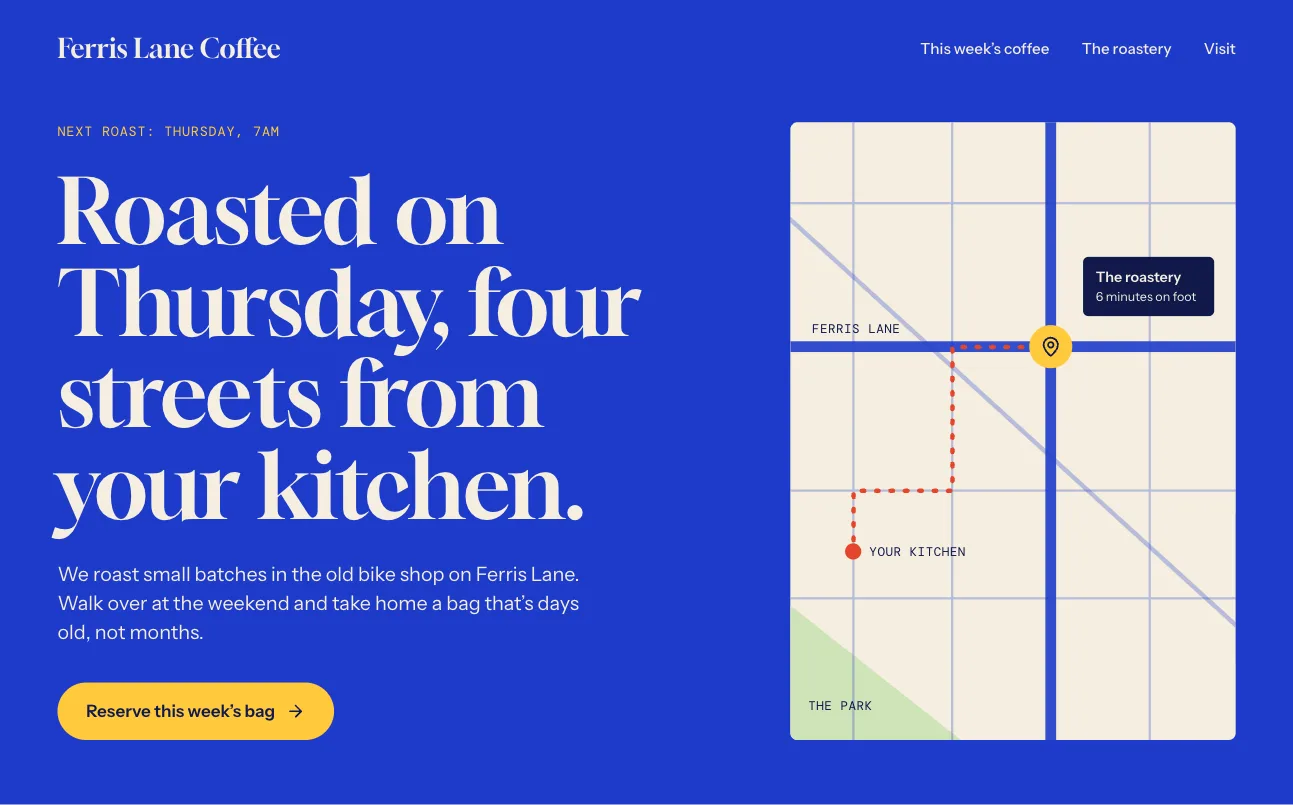
On either canvas the agent draws real layers, not a picture. We measured one run in Kite on November 5, 2026: from a one-sentence brief, Claude Code took 4 minutes 30 seconds and 38 calls to draw a coffee roaster's landing page in a new file. It's one run; the three-brief test below puts Doop and Kite side by side.
The top of that page, as Claude left it: layers you can retype, not a picture.
Open source and where files live
Doop is open source under AGPL-3.0, with 2,333 stars on GitHub on November 26, 2026, and runs on your own server as “one Docker container plus Postgres”, so designs can stay inside your network. Its hosted Doop Cloud adds the Figma, Canva and Photoshop links and a few tools its MCP guide marks “Hosted only”.
Kite is not open source. Files live in Kite's cloud and open in any browser or in Kite for Mac and Windows, whose built-in local server lets agents on your machine connect directly; Doop's desktop app adds a local or self-hosted Doop to Claude. If self-hosting is a requirement, Doop is the one of the two that offers it.
When Doop is the better pick
Choose Doop if you need open source or your own server, if one person wants unlimited free canvases, or if you want version history, clickable prototypes and GitHub pull requests on a free plan. Its download page also lists Linux, iPhone and VS Code, and its browser extension copies a web page onto the canvas, as Kite Capture does for Kite.
Choose Kite if a team wants a shared workspace with roles before paying, moves work to and from Figma, or needs SVG and React out of the design.
Kite and Doop, the same three briefs.
One agent, the same words, the median of three runs in each tool, 26 to 28 November 2026.
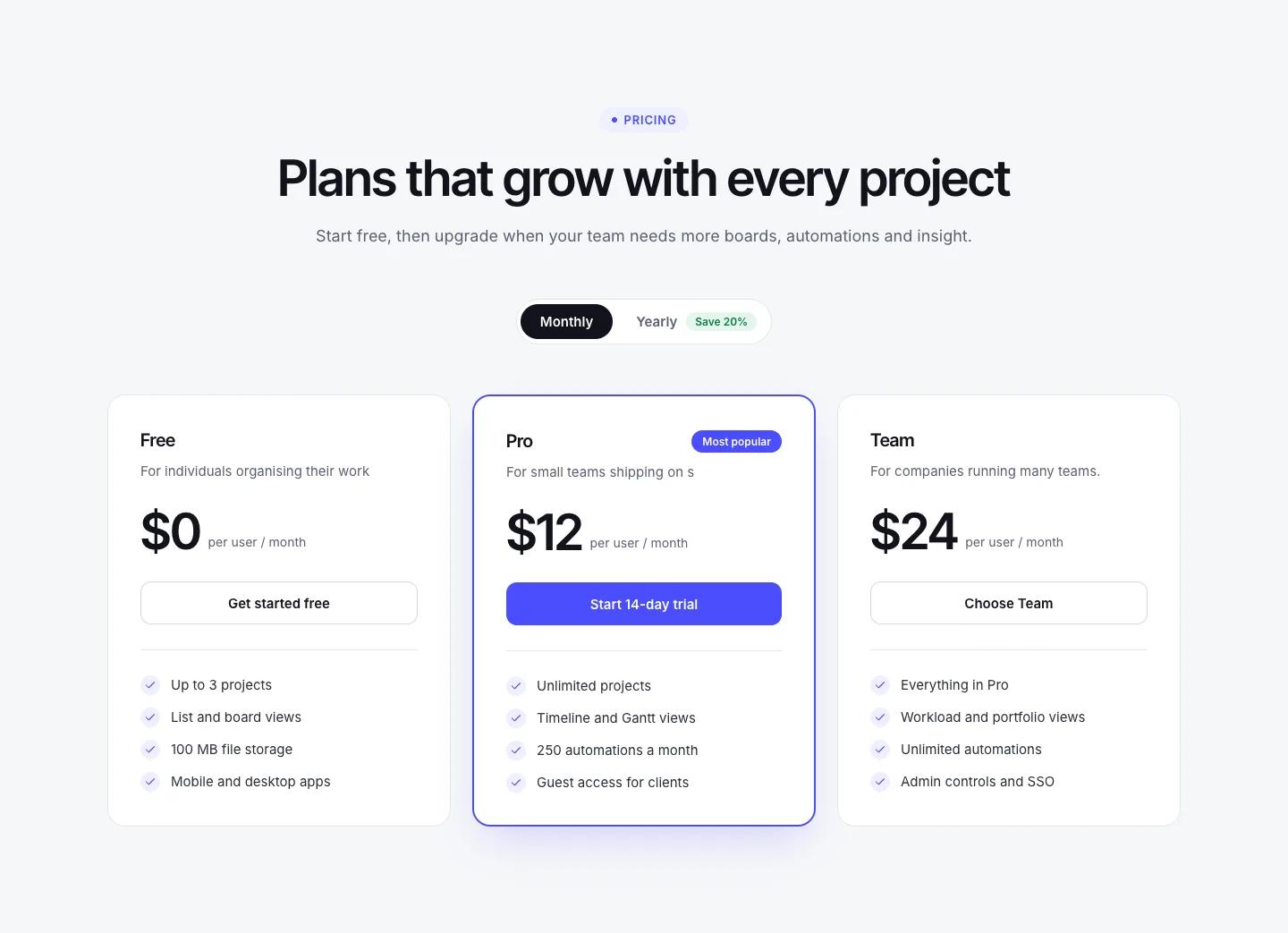
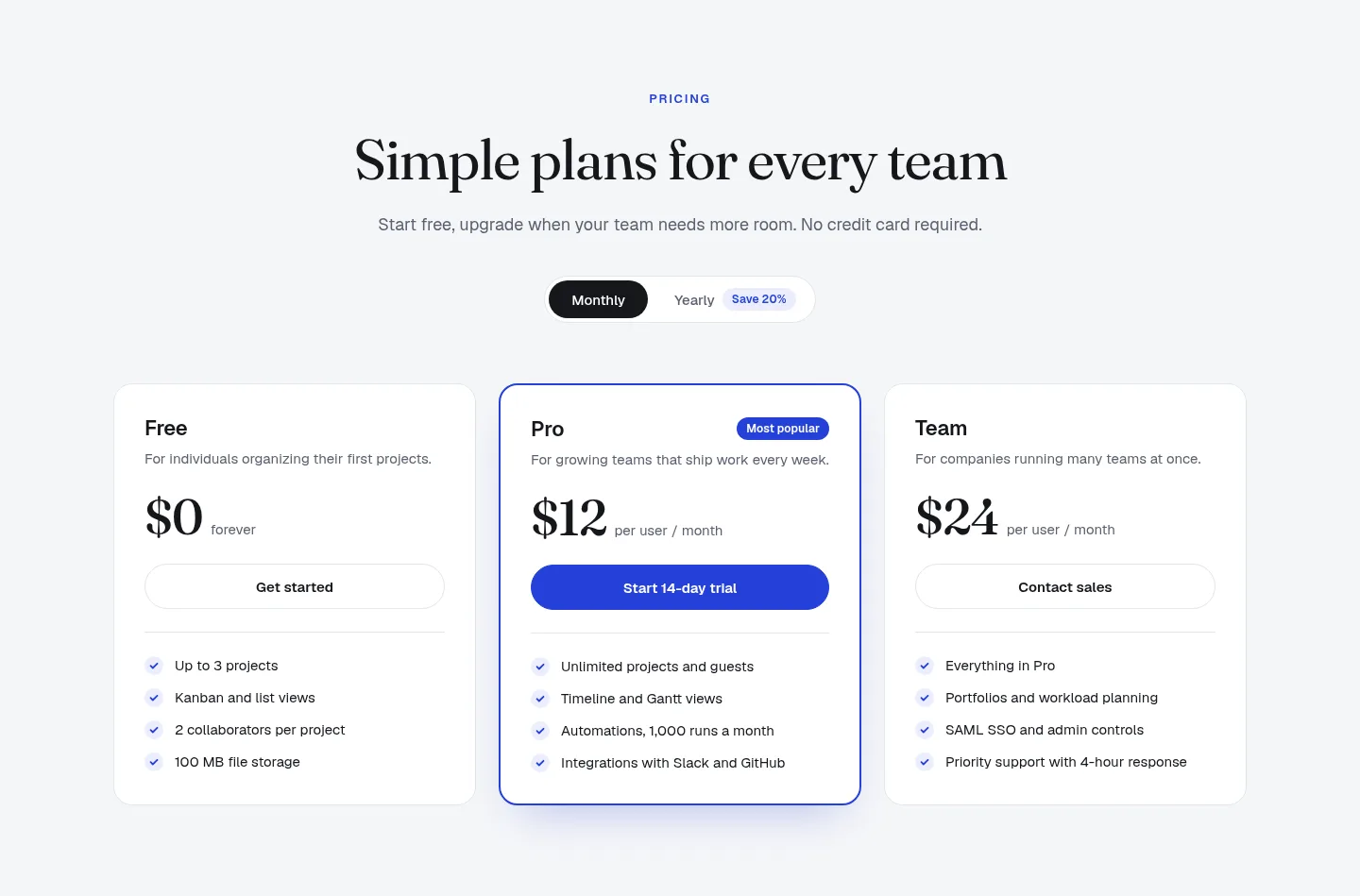
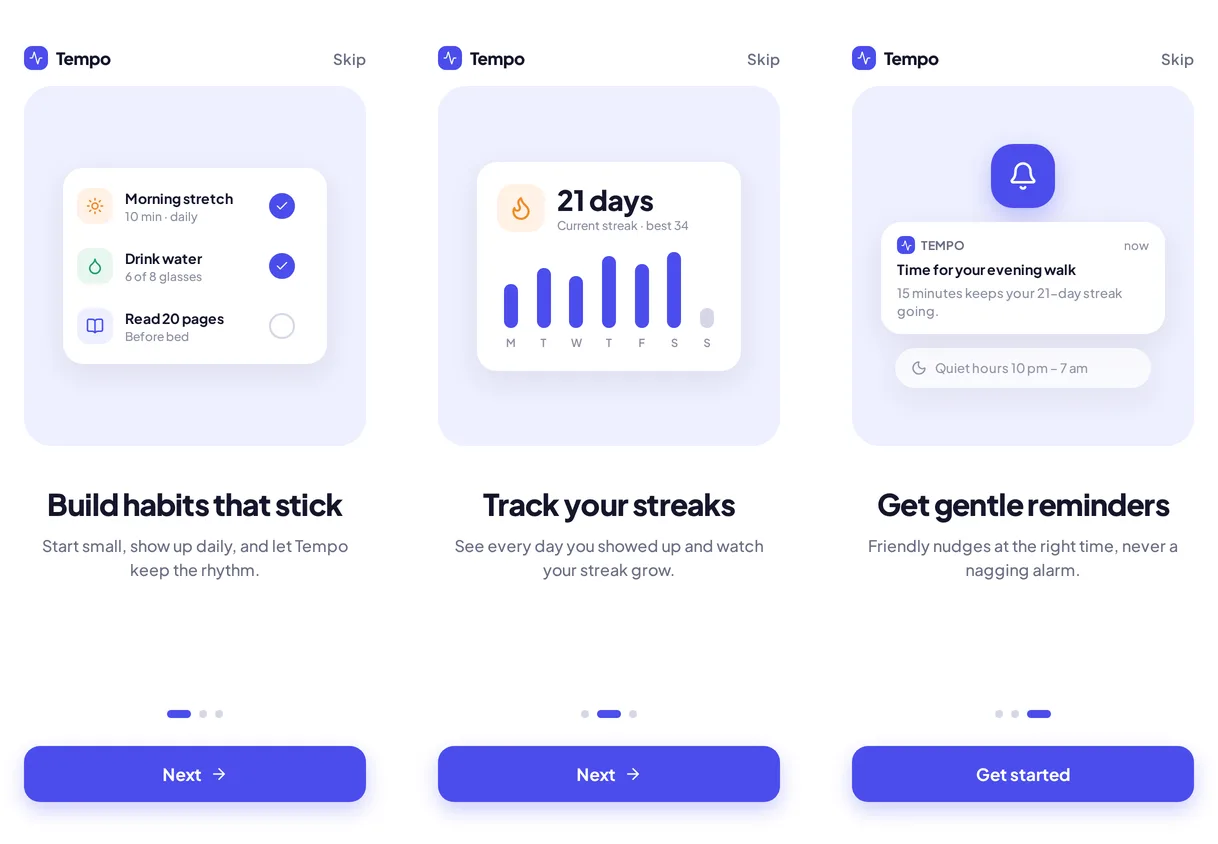
Across the three briefs, Claude needed 11 tool calls and about 18,600 tokens in Kite, against 47 calls and about 47,900 tokens in Doop: 61% fewer tokens in Kite. Doop's agent read its guide first and built components and tokens as it went, so its rebrand came down to changing a token and a component. On the two drawing briefs it took more than twice the calls and the tokens.
Brief
Kite
Doop
A pricing section
77 s, 6 calls, about 9,300 tokens
105 s, 10 calls, about 13,400 tokens
Three onboarding screens
59 s, 3 calls, about 6,700 tokens
132 s, 20 calls, about 17,000 tokens
Rebrand the pricing section in place
29 s, 2 calls, about 2,600 tokens
68 s, 17 calls, about 17,500 tokens
All three
165 s, 11 calls, about 18,600 tokens
305 s, 47 calls, about 47,900 tokens
Open on the computer
Nothing
Nothing (hosted server)
What it made
Editable layers
HTML frames, with components and tokens
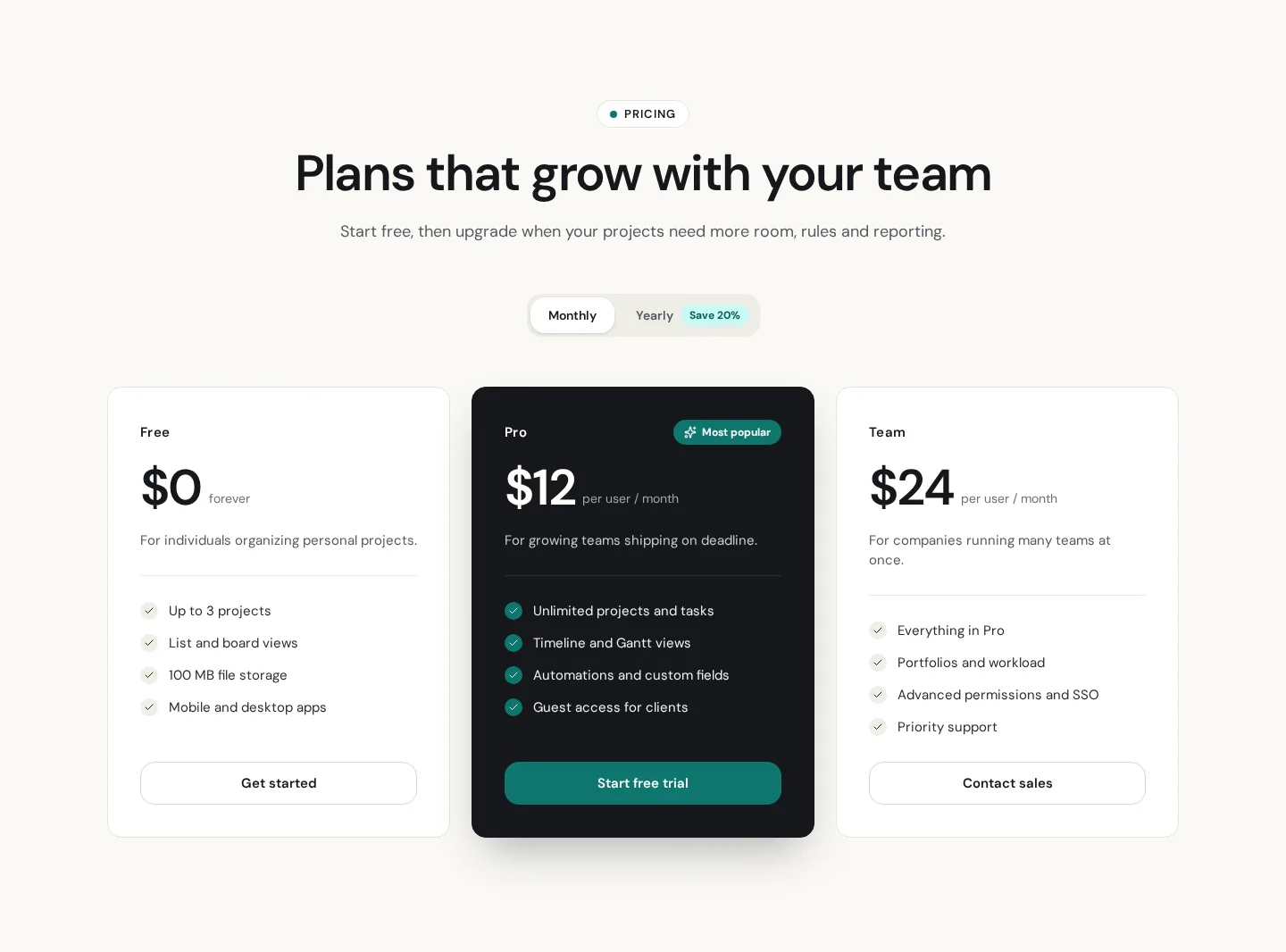
A pricing section: Kite, then Doop.
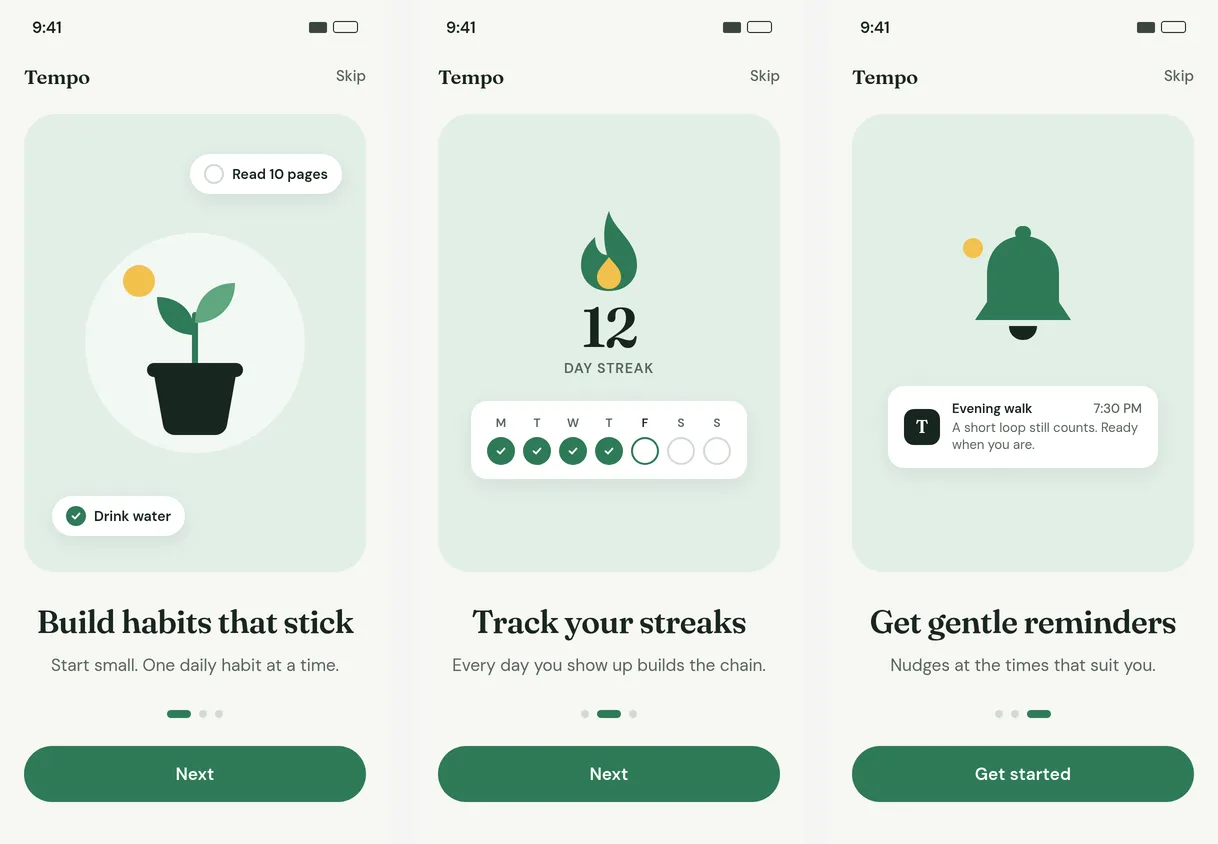
Three onboarding screens: Kite, then Doop.
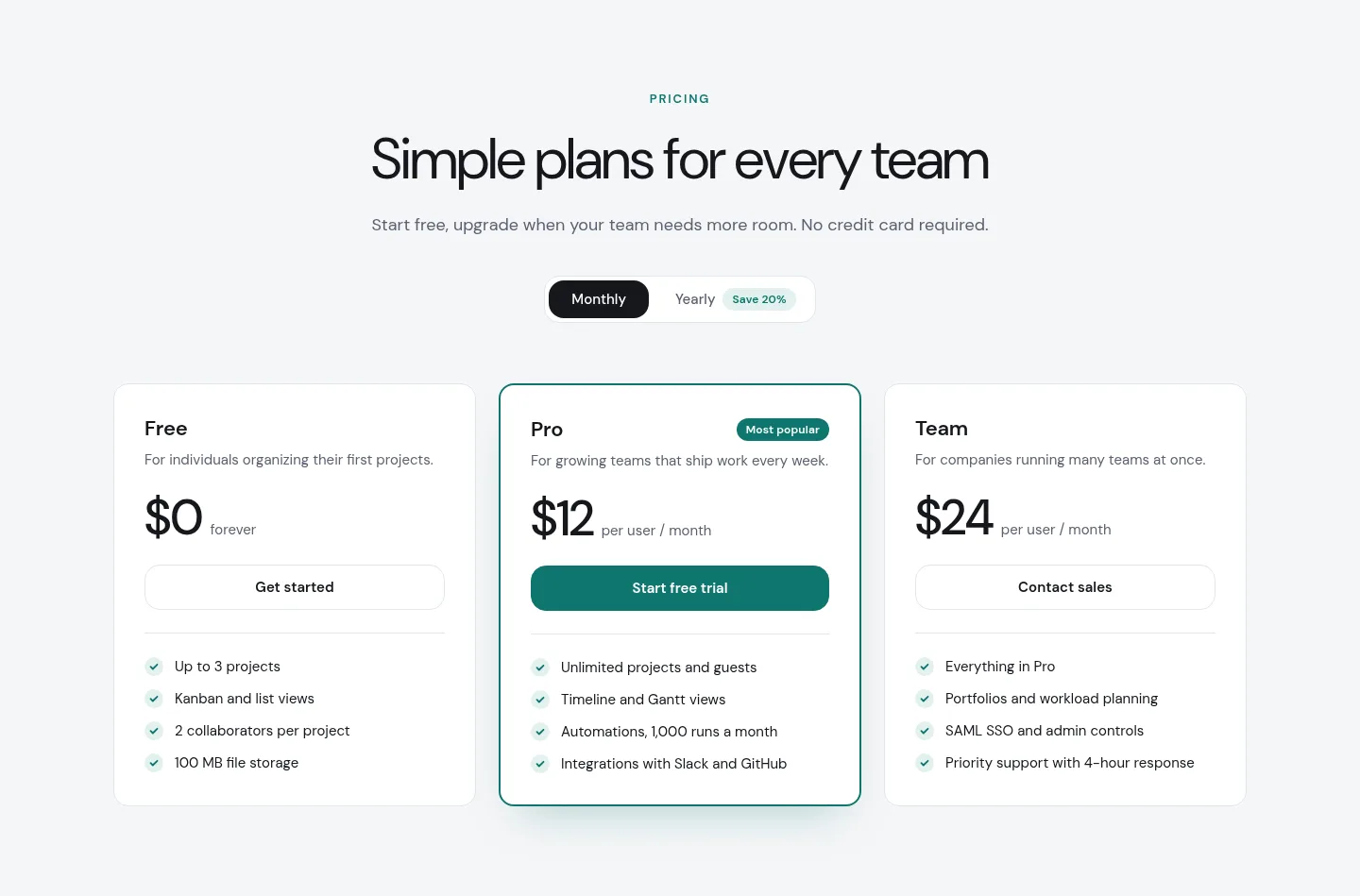
Rebrand the pricing section in place: Kite, then Doop.
The briefs, word for word: a pricing section for a SaaS called Lumen, three onboarding screens for a habit app called Tempo, and a rebrand of the pricing section in place (a new accent colour, font, corner radius and button label). Each run was a fresh Claude Opus 5.5 agent with only that tool's MCP server. Time is the whole run, the agent's thinking included. Tokens are the text the tool's calls sent and returned, divided by four, without pictures: what the tool costs your agent's context, not a bill. Kite ran and publishes this test; three runs each is still a small sample, not a verdict. All eight tools, brief by brief with every number, are in the design agent benchmark.
Bring your own agents. Claude, Cursor, ChatGPT or any MCP client, with no key to copy.
Checkout
Balance
$1,200.35
Payment$30.32
DueAug 9th
Pay
$500.00Remaining balanceRecommended$250.00Half now, half next monthContinue
Claude
L
LLoukmanjust now
make this a checkout: a Pay button under the balance, a Continue under the options, both in the system's primary @Claude
Claude is working… Done by Claude Open chat
Claude Codejust now
Done: Pay under the dues and Continue under the options, both the system's primary at its radius, 32 high, full width.
Reply to thread, or @ your agent…
Around · Checkout
Balance
$1,200.35
Payment$30.32
DueAug 9th
Pay
$500.00Remaining balanceRecommended$250.00Half now, half next monthContinue
Claude
@Claude make this a checkout: a Pay button under the balance, a Continue under the options, both in the system's primary
Run with Claude Code when sent
LLoukmannow
@Claude make this a checkout: a Pay button under the balance, a Continue under the options, both in the system's primary
Claude is working…Done by Claude
Claudenow
Done: Pay under the dues and Continue under the options, both the system's primary at its radius, 32 high, full width.
Ask in a comment, get it doneMention your agent on the frame and send. In Kite for Mac it starts at once with Claude Code or Codex, does the work, and answers in the thread.
Leave a comment. Your agent does it. Pin a comment where the change belongs and mention your agent. It reads the frame and the layer you clicked, does the work and answers in the thread.
Do my Kite requestsIn a browser, requests wait on their comments. Say this to your agent and it works through every one.
$500.00Remaining balanceRecommended$250.00Half now, half next monthContinue
ChoiceFirst one on, with the chip.
Button under it?
Notes on the boardSticky notes and annotations sit beside the work. Agents read them, and leave their own.
Questions. About Kite and Doop.
Is Doop free?
Yes. Doop Cloud's free plan has no limit on canvases, frames or agents, and its Community edition is free to host yourself under AGPL-3.0. An Organization, with a shared workspace, members and roles, is $20 per editor a month. Kite's free plan has unlimited editors and viewers, a team workspace with roles, 3 files and 100 agent actions a day; Pro is $20 per editor a month, or $16 billed yearly.
Is Doop open source, and is Kite?
Doop is, under AGPL-3.0, and runs on your own server as one Docker container plus Postgres. Its Figma, Canva and Photoshop import and export are on Doop Cloud only, not in the open source. Kite isn't open source: it runs in the cloud, in any browser or in Kite for Mac and Windows.
Can Claude, ChatGPT or Cursor design in both?
Yes. Both run a hosted MCP server that any client signs in to with OAuth, so Claude, ChatGPT, Cursor and Codex can draw in either. Doop also has a built-in agent that runs on a model account you connect, and its desktop app connects Claude to a Doop running on your own machine. Kite for Mac and Windows has a local server for agents on your machine.
Can I move designs between Figma and Kite or Doop?
Both ways, in both. Doop imports Figma frames as editable HTML once you connect a Figma account, and exports frames back to Figma, both on Doop Cloud only. In Kite you copy in Figma and paste, on every plan: layers, text, components and instances come in without a connection; pictures need a connected Figma account. Copy to Figma sends frames back as layers; components go back as plain frames.