 vs

Kite vs UXPin: A UXPin alternative your agents design in.
Short answer: Kite is the better pick when agents should design in the same file as your team: they draw and edit layers there, for less per editor and with no AI credits. UXPin is the better pick when you need prototypes that behave like the product, with conditions, variables and real React components; its MCP server builds React apps in its Wire builder rather than drawing in the design editor.
Updated by Loukman Nacik, Founder, Kite
Kite is best for
Teams whose agents draw and edit the design file beside them.
Kite costs
Free to start. Pro $20 per editor a month, $16 billed yearly. No AI credits.
Kite and UXPin at a glance.
What each one is, and what to take away.
Kite is a design tool where the agents you already use, such as Claude, ChatGPT or Cursor, draw real layers in a file your team edits. A design in Kite is HTML and CSS. Kite runs no model to design: your agent runs on the plan you already pay for.
UXPin is, in its words, a tool to "design UI with code-backed components": you build prototypes from real React components, with logic, states and variables. Its AI is Forge, and its MCP server lets an agent build Wire projects, which are React code apps, rather than draw in the design editor.
MCP (Model Context Protocol) is an open-source standard for connecting AI applications to outside systems. It is how an agent reaches a design tool.
Key takeaways
- UXPin's agent server works on Wire projects, which are React code apps. Its pages name no way for an agent to draw in the design editor. In Kite, agents draw in the file your team designs in.
- UXPin Core is $29 per editor a month billed yearly, or $49 monthly. Kite Pro is $16, or $20 monthly.
- UXPin's own AI, Forge, spends credits: 250 a month on Core plus 100 for each extra editor. Its MCP server lets your own agent build Wire apps with no credits, but not draw in the design editor. Kite has no AI of its own and no credits.
- UXPin's free plan, after a 14-day trial, holds 2 prototypes and leaves out variables and conditional logic. Kite's holds unlimited editors in 3 files.
- UXPin makes prototypes that behave like the product, with conditions, variables, expressions and real React components. Kite has no prototype flows.
For example, take a team of 4 editors. On UXPin Core they pay $29 each a month billed yearly, $116 in all, with 550 shared credits a month for Forge, UXPin's own AI, and 7 days of version history. On Kite Pro the same 4 pay $64 billed yearly, with no credits to count, or nothing on the free plan in up to 3 files. UXPin's price buys working prototypes; Kite's buys agents drawing in the design itself.
Key differences.
6 points where Kite does more, or where UXPin's pages don't show the feature.
| Feature | Kite | UXPin |
|---|---|---|
| What agents can do | 61 tools: agents read, draw, edit and check their own work | 22 tools for Wire's React code projects, design systems and assets |
| Jobs from comments | @-mention an agent in a comment: in Kite for Mac and Windows it can start at once; in a browser it waits until you tell your agent | Not stated; none of its 22 MCP tools handles comments |
| Several agents at once | Several agents in one file, beside your team | Not stated |
| Figma | Paste frames to and from Figma as editable layers | In through a copy-paste plugin; export to Figma not stated |
| Desktop app | Kite for Mac and Windows, with a tab for each file | Mac and Windows apps, on request for paid plans |
| Free plan | Unlimited editors and viewers, and 3 files, free | After a 14-day trial: 2 prototypes and 50 AI credits |
Where UXPin is ahead: prototypes that behave like the product. It has 18 element triggers, if-else conditions with regex checks, states, global variables, expressions and API requests, built from real React components. Kite makes none of these.
UXPin's column comes from its own pages, starting with its pricing, as of November 2026. The other pages we read are linked where each fact is used.
Kite and UXPin, point by point.
How they differ, from UXPin's own docs and pricing.
Built for different work
UXPin is for prototypes that feel like the finished product. Its home page describes UXPin as “prototypes that feel real, with powers of code components, logic, states, and design systems”, and says it is “loved by developers and technical designers”. With Merge you design with the same React components your developers ship, from MUI, Ant Design or Bootstrap, or from your own library on Enterprise.
Kite is for the design itself, made by your team and the agents you already use, in one file. A design in Kite is HTML and CSS, so an agent reads and writes it in the language it knows, and a person edits the same layers by hand.
Prototypes: where UXPin goes further
UXPin's interactions guide lists 18 triggers on an element, such as click, hover, swipe and value change, and 5 on the canvas, including key press and page load. Conditional interactions are if-else rules, with checks down to “matches regex” for an email or a strong password. Elements have states, and variables store what a tester types and are “global” across pages. An action can even send an API request. On the free plan, variables, conditional logic and expressions are left out.
Building on code has a known trade-off. Yale's usability team says code-based prototypes create “the most realistic experience” and allow “testing of data-driven features”, but take “more time to create and modify”. Kite doesn't build prototypes. If your work is testing a sign-up form that validates what people type, UXPin is built for it and Kite isn't.
What agents can reach
UXPin's MCP server belongs to Wire, the AI app builder its changelog dates to June 26, 2026. It is hosted, signs in with OAuth, runs on Core, Growth and Enterprise, and uses no UXPin credits. Its 22 tools list, create and download projects, read, write and edit files, manage design systems and handle assets. In UXPin's words, your assistant “can create, read, and edit Wire projects”, which are React code projects that “compile in the browser”. None of the tools works in UXPin's Editor, where its prototypes are made, and none reads or writes comments.
In Kite, the agent works where the design is. Claude, ChatGPT, Cursor or Codex signs in to Kite's hosted server and gets 61 tools to draw layers, place your components, edit them and render a frame to check its work, in the same file your team edits. You can @-mention an agent in a comment to give it a job, and several agents can work in one file at once. The steps for each client are in how each agent connects.
Forge, UXPin's AI, and your own agent
UXPin's own AI, Forge, “generates, edits, and reviews UI using real React components from your library”, and returns JSX. It runs on credits shared by the account: 50 a month on Free, 250 on Core and 600 on Growth, plus 100 for each editor after the first on Core and Growth, with add-ons from 200 credits for $13 a month. Its Eco mode spends 5 to 7 times fewer credits than its Best mode. Forge also takes your own OpenAI or Anthropic API key, and its pages don't say whether that skips credits. Agents on its Wire MCP server use no credits at all.
Kite has no AI of its own, so it has no credits. Your agent runs on the plan you already pay Anthropic, OpenAI or Cursor for, and Kite's free plan allows 200 agent actions a day.
Screens in Kite, from one prompt
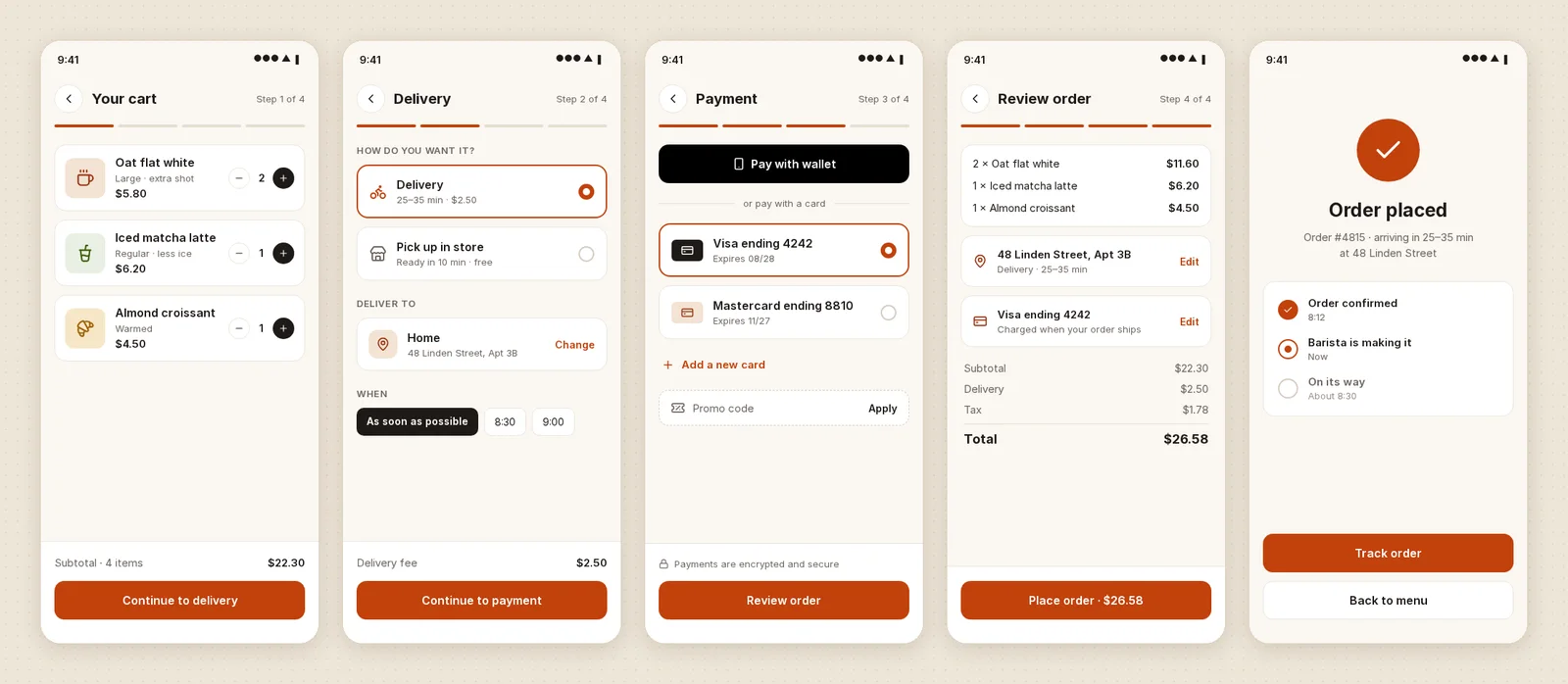
We tested one prompt in Kite on November 14, 2026: Claude (Opus 5.5), in a new file, was asked for a 5-screen mobile checkout flow for a coffee shop app. It drew cart, delivery, payment, review and confirmation in one draw call, needed no fixes, and used 8 tool calls in all, with no credits. In UXPin those screens would next be wired into a working flow. In Kite they stay screens: editable layers your team can change, review in comments and copy out as code. One run, not a benchmark, and we didn't run the prompt in UXPin. The full run is in Figma's AI agent vs Claude in Kite.
Figma, code and the desktop
UXPin's Figma plugin copies designs in so you can “add more advanced interactivity to them in UXPin”. Its pages don't describe sending work back to Figma. It exports PNG, PDF and HTML. Its home page offers “production-ready React code”, while its Get Code guide says full code export is in beta, for open-source libraries only. Its desktop app for Mac and Windows is “available on request for paid plans”.
Kite pastes Figma frames in as layers and sends frames back with Copy to Figma, copies any frame as HTML, React or Tailwind, and has Kite for Mac and Windows for anyone. More in Figma in Kite, and Figma itself is on Kite vs Figma.
Price
UXPin Core is $29 per editor a month billed yearly, or $49 monthly, with 7 days of version history. Growth, which sits in the pricing page's code but isn't shown on the page itself, is $40 or $69, with 30 days, and Enterprise is priced on request. Viewers and commenters are free on every plan, and students use UXPin free.
Kite Pro is $20 per editor a month, or $16 billed yearly, so Kite costs less per editor than UXPin Core. UXPin's $13 more an editor, billed yearly, buys its prototyping and Forge; Kite's $16 buys your own agent drawing in the shared file.
When UXPin is the better pick
If you prototype with your developers' real React components, and testers need forms that check their input, flows that branch on conditions or data that persists across pages, UXPin does that and Kite doesn't. If the work is the design itself, drawn with your agents beside you, Kite is built for it.
Bring your own agents. Claude, Cursor, ChatGPT or any MCP client, with no key to copy.
Questions. About Kite and UXPin.
How much does UXPin cost?
Core is $29 per editor a month billed yearly, or $49 monthly, with 250 AI credits a month plus 100 for each extra editor. Growth is $40 billed yearly, or $69 monthly, with 600 plus 100 per extra editor, and Enterprise is priced on request. Kite Pro is $16 per editor a month billed yearly, or $20 monthly, with no AI credits.
Is UXPin free?
There is a 14-day trial with no card, then a limited free plan: 2 prototypes, 50 AI credits and the MUI library, without variables, conditional logic or expressions. Students in a degree program use it free. Kite's free plan has unlimited editors and viewers in 3 files, with 200 agent actions a day.
Does UXPin have an MCP server?
Yes, for Wire, its AI app builder: on Core, Growth and Enterprise, an agent such as Claude, ChatGPT, Cursor or Codex signs in and can create, read and edit Wire projects, which are React code projects, and manage design systems. It uses no UXPin credits. Its tools work on files, design systems and assets, and its pages name none for the design editor or for comments.
UXPin vs Figma: which is better for prototyping?
UXPin's own comparison page argues UXPin is, citing conditional logic, expressions, states, form validation and saving prototype data to a spreadsheet, built on code components. Note that its free plan leaves out conditional logic, expressions and variables. Kite doesn't make prototypes; our Kite vs Figma page covers Figma.
Does UXPin work with Figma?
One way: a Figma plugin copies designs into UXPin so you can add interactions there. Its pages don't describe sending designs back to Figma. Kite pastes Figma frames in as editable layers and sends frames back with Copy to Figma.
What are the best UXPin alternatives?
It depends on what you use UXPin for. For prototypes with logic, Axure RP and ProtoPie are built for that, and we compare each with Kite on its own page. For a design file your own agents draw in beside your team, Kite: free with unlimited editors in 3 files, or Pro at $16 an editor a month billed yearly.
How we checked.
What was read, when, and who publishes this page.
We read UXPin's pricing, Wire MCP guide, interactions guide, Forge page, download guide, Figma plugin guide, Merge page, variables guide, states guide, export guide, Get Code guide, changelog, Wire MCP post and UXPin vs Figma page, and its site, in November 2026. Where its pages don't say something, this page says so or leaves the row out. We didn't open its editor, so nothing here is a hands-on test of UXPin.
About this comparison. Kite publishes this page and is one of the tools on it. Kite's side comes from Kite's docs and pricing.
About the author. Loukman Nacik is the founder of Kite, the design canvas people share with their AI agents.
Spotted something out of date? Contact us at hello@kite.new and we will correct it.
You and your agents, on one board.
In your browser, or in Kite for Mac. Bring the agent you already use, on the plan you already pay for.