 vs

Kite vs Sketch: A Sketch alternative your agents design in.
Short answer: Kite is the better pick when your team isn't all on Macs or your agents should design from anywhere: it runs in any browser, and agents sign in to its hosted server from any machine or cloud session. Sketch is the better pick for a Mac-only design team that wants a native app, offline files and built-in prototypes; its MCP server runs on that one Mac and can't be reached remotely.
Updated by Loukman Nacik, Founder, Kite
Kite is best for
Teams on any computer whose agents design beside them in one shared file.
Kite costs
Free to start. Pro $20 per editor a month, $16 billed yearly. No AI credits.
Kite and Sketch at a glance.
What each one is, and what to take away.
Kite is a design tool where the agents you already use, such as Claude, ChatGPT or Cursor, draw real layers in a file your team edits. A design in Kite is HTML and CSS. Kite runs no model to design: your agent runs on the plan you already pay for.
Sketch is, in its words, "a toolkit made by designers, for designers": a Mac app where you design and prototype, and a web app where the rest of the team views, inspects and comments. Its MCP server is built into the Mac app and runs on that Mac only.
MCP (Model Context Protocol) is an open-source standard for connecting AI applications to outside systems. It is how an agent reaches a design tool.
Key takeaways
- Designing in Sketch needs a Mac on macOS 15 or newer. Kite runs in any browser, and in Kite for Mac and Windows.
- Sketch's MCP server is local only and "can't be accessed remotely". Kite's hosted server takes agents from anywhere, signing in with OAuth.
- Sketch has no free plan, only a 30-day trial. Kite's free plan has unlimited editors in 3 files.
- Sketch documents Color Variables only, with no modes, and its component variants are in a beta released November 12, 2026. Kite has variables with modes and component variants today.
- Sketch is cheaper per editor, at $12 billed yearly, works fully offline, and its prototypes have overlays and Smart Animate, which Kite doesn't make.
For example, take a team of 5 editors, two of them on Windows laptops. In Sketch only the three on Macs can design: $36 a month on Standard billed yearly, after a 30-day trial. In Kite all 5 design in the browser or in Kite for Mac and Windows, free in up to 3 files, or $80 a month for all five on Pro billed yearly. Sketch costs less per editor; Kite adds the two Windows designers and agents that connect from anywhere.
Key differences.
6 points where Kite does more, or where Sketch's pages don't show the feature.
| Feature | Kite | Sketch |
|---|---|---|
| Components | Components with variants, properties and instance swap | Symbols with overrides; variants only in a beta from November 12, 2026 |
| Variables | Variables with modes, like light and dark, set per frame | Color Variables only; no modes documented |
| Hosted MCP server | Any agent connects from anywhere, signing in with OAuth | None: the server "can't be accessed remotely" |
| Figma | Paste frames to and from Figma as editable layers | Imports .fig files; export to Figma not stated |
| Desktop app | Kite for Mac and Windows, with a tab for each file | Mac only, macOS 15 or newer; no Windows or Linux editor |
| Free plan | Unlimited editors and viewers, and 3 files, free | No free plan: a 30-day trial, free Viewers, free for education |
Where Sketch is ahead: it is a native Mac app that works fully offline on local files in an open, documented file format, and it supports plugins outside the App Store version. A Mac-only license is $120 once, yours to keep with a year of updates; Standard costs less at $12 an editor billed yearly; and its prototypes have overlays and Smart Animate, which Kite doesn't make.
Sketch's column comes from its own pages, starting with its pricing, as of November 2026. The other pages we read are linked where each fact is used.
Kite and Sketch, point by point.
How they differ, from Sketch's own docs and pricing.
What each one is for
Sketch is a design app for Mac. Its home page says so plainly: “We made our macOS editor for you and your ideas. Not for PMs, developers or clients.” Its getting-started guide splits the work in two: “The Mac app is where you design”, and the web app is for everyone else, to view, inspect and comment. Public teams still name it: the US Web Design System's guide for designers says to “create wireframes and prototypes in Figma or Sketch”.
Kite is one file that designers, the rest of the team and their agents all work in. A design in Kite is HTML and CSS, it opens in any browser or in Kite for Mac and Windows, and the agent you already use draws in it beside you.
A Mac app against any computer
Designing in Sketch “requires a Mac running macOS Sequoia (15.0.0) or newer”. From Windows, Linux or a Chromebook you can open its web app to view, inspect and comment, but not to design. The upside is real: Sketch is native, it works offline on local files if you want it to, and its comparison page lists documents “not limited by browser memory”.
In Kite, everyone who edits gets the same editor, whatever computer they have. That matters most for mixed teams, and for agents that don't run on a Mac at all, which is the next point.
Where your agents connect from
Sketch's MCP server is built into the Mac app on every plan, and it is free. It starts switched off, and its docs say “the MCP server is local-only, so nothing outside your Mac can access it”. It needs Sketch 2025.2.4 or later from sketch.com, because the Mac App Store version doesn't include it. The docs name 8 tools. Seven of them read: the document, its layers, assets, libraries, symbol overrides, a screenshot and a guide. The eighth, run_code, “gives AI agents access to the entire SketchAPI, just like a Sketch plugin”. So an agent writes in Sketch by writing scripts.
That works well for Claude Code or Cursor on the designer's own Mac. It doesn't reach an agent running anywhere else: ChatGPT in a browser, a teammate's machine, or a job on a server. Sketch's AI page says it directly: the server “runs locally on your Mac and can't be accessed remotely”.
Kite's hosted server takes Claude, ChatGPT, Cursor, Codex or any MCP client from anywhere, signing in with OAuth, and gives them 61 task-sized tools: draw layers, place your components, edit, and render a frame to check the result. Kite for Mac adds a local server too. Several agents can work in one file at once, beside your team, and you can hand one a job by @-mentioning it in a comment. Sketch's beta from November 12, 2026 lets agents read, reply to and resolve comments in Workspace documents, so Sketch is catching up on agents in comments, still from the same Mac; working with several agents in one file isn't stated. Setup for each client is in how each agent connects.
A real run in Kite
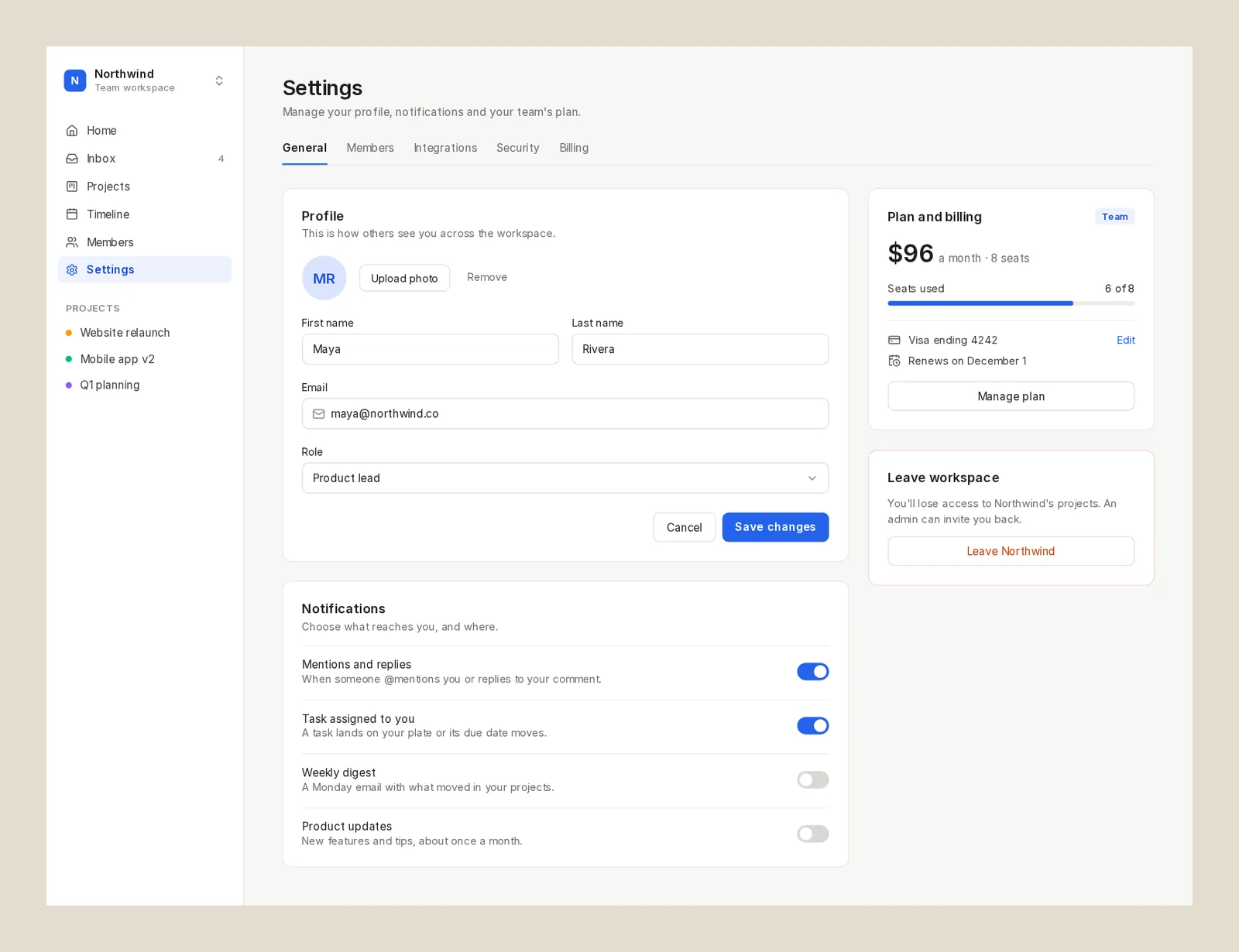
We ran one prompt in Kite on November 14, 2026, and measured it. Claude (Opus 5.5) in Claude Code got it in a new, empty file with no design system: the settings page of a team project-management web app, 1440 wide, with a sidebar, tabs, a profile form, notification toggles and a plan and billing card, in auto layout throughout. Claude drew the whole screen in one draw call of 49 seconds, found nothing to fix, and exported the plan card as React. That was 6 calls to Kite and about 80 seconds in all. It is one run, not a benchmark, and we didn't run the prompt in Sketch.
Components, variables and layout
Sketch's components are still Symbols in the current release, 2026.3.1, with overrides for text, nested symbols, images and styles. Variants, and the rename to “components”, are in the 2026.4 beta. Its variables are Color Variables, with no modes documented: Sketch's own MCP blog builds light and dark by keeping two sets of symbols. Its auto layout is Stacks, which its docs call “very similar” to CSS Flexbox, though “not a 1:1 equivalent”.
Kite has components with variants, properties and instance swap, and variables with modes like light and dark, set per frame. Its rows, columns and grids are CSS layout, because the design is HTML and CSS, so what an agent draws is the layout a browser runs. More in design systems.
Figma and code
Sketch built a .fig importer and open-sourced it, and the beta adds Figma's colour variables and prototype overlays. Its pages don't describe sending a design back to Figma. For developers it has free handoff in the browser, Copy CSS, SVG code, and design tokens as CSS or JSON. Its AI page also promises code “with 1:1 visual fidelity” through your own agent.
Kite pastes Figma frames in as editable layers and sends frames back with Copy to Figma, and any frame copies out as HTML, React or Tailwind. The steps are in Figma in Kite, and Kite beside Figma itself is on Kite vs Figma.
Prototypes
Prototyping is where Sketch goes further than Kite. Its prototyping docs cover links and hotspots, four animation types with Smart Animate among them, overlays opened on tap, hover or press, scroll areas, and several start points. Prototypes play in the Mac app, any browser or on iPhone and iPad, and shared previews can have a password and an end date. Kite has no prototype flows.
Price
Sketch Standard is $12 an editor a month billed yearly, or $14 monthly, with free viewers, version history, handoff and the MCP server. Professional is $24 and Enterprise $44, billed yearly. A Mac-only license is $120 a seat, with a year of updates and no collaboration or online sharing. There is no free plan, and when a subscription ends, documents stay read-only for download for 90 days, then Sketch deletes the Workspace and its documents.
Kite Pro is $20 per editor a month, or $16 billed yearly, so Sketch costs less per editor. Kite's free plan has unlimited editors in 3 files, with 200 agent actions a day, and neither tool sells AI credits: in both, your agent runs on the plan you already pay for.
When Sketch is the better pick
If everyone who designs is on a Mac, you want a native app that works offline, and click-through prototypes matter more than agents working from elsewhere, Sketch fits, and costs less. If your team mixes computers, or your agents run in the cloud or on other machines, Kite is built for that.
Bring your own agents. Claude, Cursor, ChatGPT or any MCP client, with no key to copy.
Billing
LayersAssets
Pages
Components
Screens
Layers
Components
Balance
Type
Sidebar
Choice
Palette
Form
Overview
Checkout
Components
638 × 400Balance
$1,200.35
Payment$30.32
DueAug 9th
Aa123#&!RegularMediumHeavyCompanyCaliforniaSeats2Design system4 in the workspaceAaAroundAaNightAaLedgerAaMintAround
TypeInter 500Corners12ModesLight, DarkIn it
Variables24Styles6Skills4One design, any systemYour agent draws with the system's variables, not fixed values. Switch the system, or change one value, and every frame drawn with it follows.
Your design system. Read before every draw. Colours, type and spacing as variables, your parts as components, the rules in plain words as skills. Agents read all of it before they draw, so their work looks like yours, not like everyone's.
Design systems- Components, placed, not redrawnMake a part once, with its variants. Agents place copies that follow it, instead of drawing a new card.
- Light and dark, one setA variable holds a value for each mode. Switch a frame to Dark and every colour drawn with it follows.
- Skills, in plain wordsThe brand's look, a guardrail, how posts are made. Agents follow the skills that fit the job.
- One library for every filePublish a file's components to the workspace. Their copies, in every file, follow when you update.
Questions. About Kite and Sketch.
Is Sketch free?
No. Sketch has a 30-day trial, with up to 3 members unless you add payment details, and its pricing FAQ says that beyond free Viewers and its education offer it has "no plans to offer an entirely free plan". Kite is free to start, with unlimited editors and viewers in 3 files, and agents can draw on the free plan.
How much does Sketch cost?
Standard is $12 per editor a month billed yearly, or $14 monthly. Professional is $24 and Enterprise $44, both billed yearly. A Mac-only license is $120 per seat with one year of updates, without collaboration or online sharing. Prices exclude VAT. Kite Pro is $20 per editor a month, or $16 billed yearly, so Sketch Standard costs less per editor.
Is Sketch only for Mac?
For designing, yes. Sketch's guide says designing "requires a Mac running macOS Sequoia (15.0.0) or newer", so there is no Sketch editor for Windows or Linux. There you can view, inspect and comment in its web app. Kite runs in any browser and has apps for Mac and Windows.
Does Sketch have AI? Can Claude design in Sketch?
Sketch has no built-in AI generator and no AI credits: you bring your own agent. Its MCP server is built into the Mac app on every plan, starts switched off, and works with Claude Desktop, Claude Code, Codex, Cursor and other local clients; agents write through a run_code tool with the whole SketchAPI. It runs locally and "can't be accessed remotely", and the Mac App Store version doesn't have it. Kite's hosted server takes Claude from any machine, and Kite for Mac adds a local one.
Can Sketch open Figma files?
Yes: Sketch built a .fig importer and open-sourced it, and its beta also brings in Figma's colour variables. The importer isn't in the Mac App Store version. Sketch's pages don't describe sending designs back to Figma. Kite pastes Figma frames in as layers and sends them back with Copy to Figma.
Can I buy Sketch once?
Yes: a Mac-only license is $120 per seat, yours to keep, with one year of updates. It leaves out collaboration, online sharing and previews on iPhone or iPad, and it includes the MCP server. Kite is a subscription, with a free plan.
Is Sketch better than Figma?
For a Mac-only team that wants a native, offline app, Sketch makes its case on its own comparison page: an open file format, offline work on local files, a one-time license, no extra charge for guest editors who already pay for Sketch, and documents "not limited by browser memory". It also says "We don't offer every feature that Figma does". For agents, Sketch's server stays on one Mac. Our Kite vs Figma page covers Figma.
How we checked.
What was read, when, and who publishes this page.
We read Sketch's pricing, MCP server docs, AI page, "What is Sketch?" guide, beta page and Sketch vs Figma page, and its site, in November 2026. Where its pages don't say something, this page says so or leaves the row out. We didn't open its editor, so nothing here is a hands-on test of Sketch.
About this comparison. Kite publishes this page and is one of the tools on it. Kite's side comes from Kite's docs and pricing.
About the author. Loukman Nacik is the founder of Kite, the design canvas people share with their AI agents.
Spotted something out of date? Contact us at hello@kite.new and we will correct it.
You and your agents, on one board.
In your browser, or in Kite for Mac. Bring the agent you already use, on the plan you already pay for.