 vs

Kite vs ProtoPie: A ProtoPie alternative your agents design in.
Short answer: Kite is the better pick when agents should design the screens with your team: they sign in from anywhere, on every plan, and draw in the file while you keep working. ProtoPie is the better pick for prototypes that respond to touch, sensors, voice and other devices on real hardware; its agents work through a server on the same computer, on Pro, and the canvas locks for you while they edit. Kite replaces the screen-design step, not ProtoPie's prototypes.
Updated by Loukman Nacik, Founder, Kite
Kite is best for
Teams whose agents design screens beside them, from any machine, on any plan.
Kite costs
Free to start. Pro $20 per editor a month, $16 billed yearly. No AI credits.
Kite and ProtoPie at a glance.
What each one is, and what to take away.
Kite is a design tool where the agents you already use, such as Claude, ChatGPT or Cursor, draw real layers in a file your team edits. A design in Kite is HTML and CSS. Kite runs no model to design: your agent runs on the plan you already pay for.
ProtoPie is, in its words, "#1 AI-driven advanced prototyping software": a Mac and Windows app for prototypes that react to touch, sensors, voice and other devices, played on real phones, tablets and car screens. Its Studio MCP server lets an agent on the same computer edit the open prototype.
MCP (Model Context Protocol) is an open-source standard for connecting AI applications to outside systems. It is how an agent reaches a design tool.
Key takeaways
- ProtoPie's two MCP servers are both local, and the one that edits, Studio MCP, needs the agent on the same computer as an open ProtoPie Studio. Kite's hosted server takes agents from anywhere.
- While an agent edits in ProtoPie, the canvas is locked for you. In Kite, agents and your team work in one file at once.
- Your own agent can edit in ProtoPie only through Studio MCP, on Pro ($47 per editor a month billed yearly) or Enterprise. In Kite, agents draw on every plan, the free one included.
- ProtoPie's support page says prototypes export only as .pie files, with code coming from its Enterprise Code MCP. Kite exports images, SVG and PDF, and copies frames as HTML, React or Tailwind.
- ProtoPie's prototypes react to touch, sensors, voice and other devices, on real phones and car screens. Kite has no prototype flows.
For example, say a designer wants Claude to lay out three onboarding screens while a teammate keeps editing. In ProtoPie, Claude needs the Pro plan at $47 an editor a month billed yearly, ProtoPie Studio open on the same computer, and while it edits, the canvas is locked for the designer. In Kite, Claude signs in from anywhere and draws beside the team, free in up to 3 files or at $16 on Pro billed yearly.
Key differences.
6 points where Kite does more, or where ProtoPie's pages don't show the feature.
| Feature | Kite | ProtoPie |
|---|---|---|
| Vector editing | Pen tool, point editing and boolean operations | Not described on its pages |
| Hosted MCP server | Any agent connects from anywhere, signing in with OAuth | None: both servers are local |
| Several agents at once | Several agents in one file, beside your team | Not stated; the canvas is locked for you while an agent edits |
| Export | PNG, JPG, WebP, AVIF, SVG and PDF, or copy as HTML, React or Tailwind | Prototypes export only as .pie files |
| Live cursors | Live cursors and selections for everyone in the file | Real-time co-editing not stated |
| Free plan | Unlimited editors and viewers, and 3 files, free | 1 seat, 2 prototypes of 8 scenes, 50 MB, no share links |
Where ProtoPie is ahead: its prototypes react to touch, tilt, sound, voice and keyboards, run on real phones, tablets and car screens through ProtoPie Player and Connect, talk to hardware and APIs, and hand engineers every timing, none of which Kite does.
ProtoPie's column comes from its own pages, starting with its plans, as of November 2026. The other pages we read are linked where each fact is used.
Kite and ProtoPie, point by point.
How they differ, from ProtoPie's own docs and pricing.
Two different jobs
ProtoPie is for prototypes that behave like the real product on real hardware. Its getting-started docs describe testing “across a range of devices, including smartphones, desktops, TVs, and car dashboard screens”, and its pages speak to automotive, aviation, MedTech and gaming teams. You build in ProtoPie Studio on Mac or Windows and play the result in ProtoPie Player on a phone or tablet.
Kite is for designing the screens themselves, with your team and the agents you already use, in one file in the browser. A design in Kite is HTML and CSS layers that people and agents both edit.
Prototypes: ProtoPie's home ground
Every interaction in ProtoPie is, in its own words, “an Object + Trigger + Response”. Its triggers cover taps, drags, pinches and rotations with up to five fingers, keys, and native sensors: tilt, compass, sound, proximity and 3D Touch. Prototypes can take voice commands, speak, and check what people type with variables and formulas. ProtoPie Connect links several screens, hardware such as an Arduino or a steering wheel, and APIs, and in its handoff a recording of a scenario becomes a spec with every duration and easing.
Kite makes no prototypes at all, so none of this has an equivalent in Kite. For a car dashboard test or a gesture-heavy mobile prototype, ProtoPie is the tool.
Agents: on the same computer, with the canvas locked
ProtoPie's Studio MCP, official since October 7, 2026, runs inside the desktop app on Pro and Enterprise. It lets Claude Code, Codex, Cursor or VS Code build and edit layers and interactions in the prototype you have open, and you approve each client in Studio. It has two limits. “Your AI client and ProtoPie Studio must run on the same computer.” And, from its release notes: “While an AI agent is editing through Studio MCP, the canvas and in-app AI chat are locked and saving is paused until it's done.” A second server, Code MCP, is for Enterprise, reads only, and turns a prototype into code. Both are local; neither is hosted.
Kite's hosted server takes agents from any machine or cloud session, signing in with OAuth, on every plan, with 200 agent actions a day on the free one. They get 61 tools, and nobody is locked out while they work: several agents and your team share one file at once. Each client's setup is in the docs.
Three app screens in Kite, measured
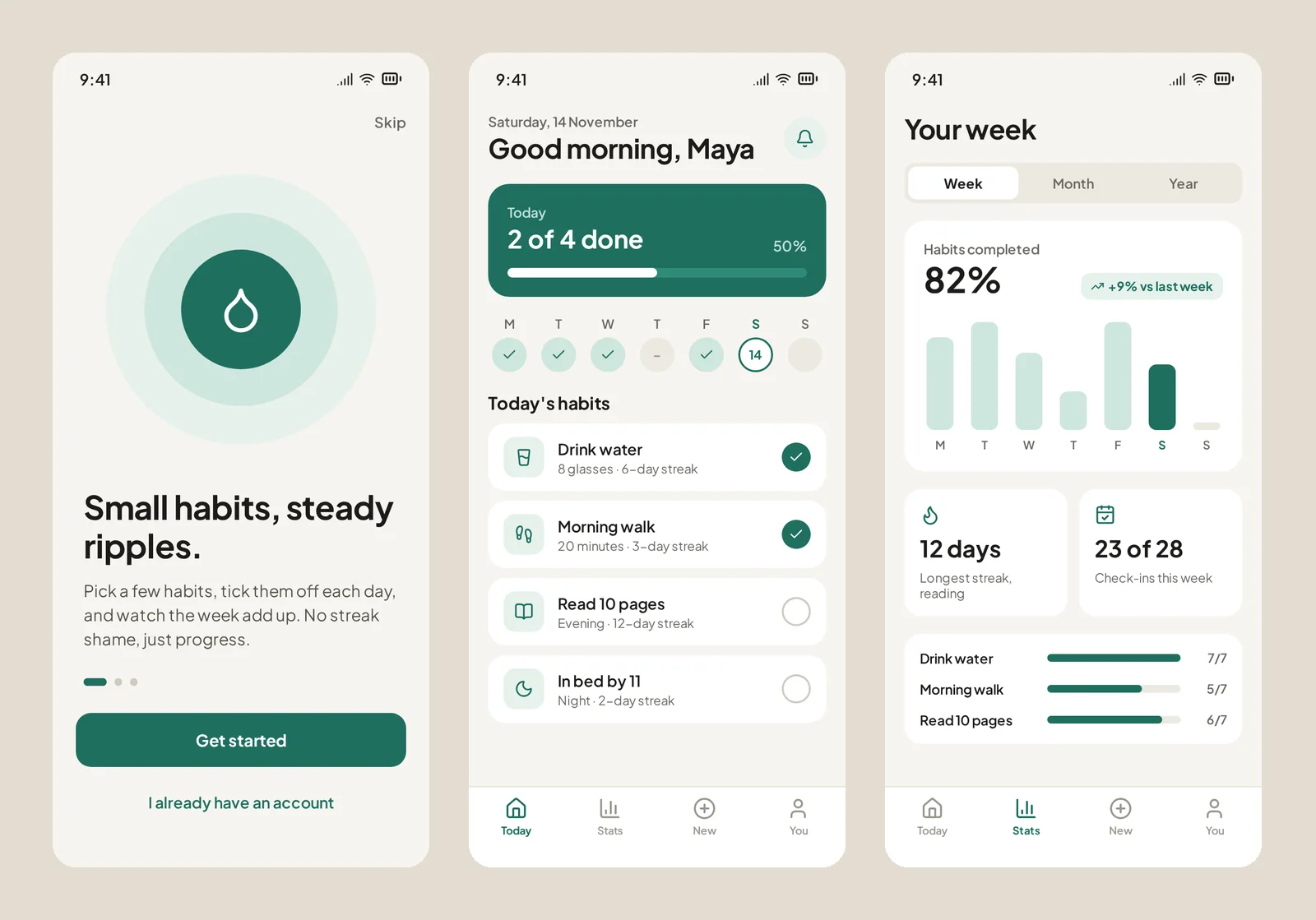
We tested one prompt in Kite on November 14, 2026 (the full run, prompt and method): Claude Code (Opus 5.5) was asked in a new file for three iPhone screens for a habit app called Ripple: onboarding, today's habits and weekly stats. It drew all three in a single drawing call of about a minute, then looked at each screen, caught a wrong progress count and fixed it in one edit. That check matters: the UICoder paper found language models “struggle to consistently generate UI code that compiles and produces visually relevant designs”. Last, it exported the home screen as React. That was 9 calls to Kite and about 1 minute 46 seconds in all. One run, not a benchmark, and we didn't run the prompt in ProtoPie.
Files, export and Figma
ProtoPie's support page says prototypes are “exported exclusively in the .pie file format”, and that it doesn't export PDF, JPEG or HTML. Studio uses the fonts installed on your computer, and ProtoPie's plans list custom fonts under Enterprise. Designs come in from Figma, Sketch or Adobe XD through a plugin, and since Studio 10.3.0 by pasting Figma layers; its pages don't describe sending them back. Real-time co-editing of one prototype isn't stated.
Kite exports PNG, JPG, WebP, AVIF, SVG and PDF, copies frames as HTML, React or Tailwind, brings Figma frames in as editable layers, and Copy to Figma returns them. See Figma in Kite, and Kite vs Figma for Figma itself.
Price
ProtoPie's plans: Free is one seat with 2 prototypes of 8 scenes, 50 MB and no share links. Basic is $25 a month billed yearly or $29 monthly, for one seat, and stops being sold in early 2027. Pro is $47 per editor a month billed yearly, or $59 monthly, with 1,000 ProtoPie AI credits a month and the Studio MCP; extra credits can't be bought. Connect Core is $20 a user a month on top.
Kite Pro is $20 per editor a month, or $16 billed yearly, with no AI credits, and Kite Free has unlimited editors in 3 files.
When ProtoPie is the better pick
If the prototype must respond to sensors, voice, several devices or real hardware, ProtoPie does what Kite doesn't try to. If you want agents designing screens beside your team, from anywhere and on every plan, Kite is built for that. For other prototyping tools, see Kite vs Axure RP and Kite vs UXPin.
Bring your own agents. Claude, Cursor, ChatGPT or any MCP client, with no key to copy.
Questions. About Kite and ProtoPie.
How much does ProtoPie cost?
Pro is $47 per editor a month billed yearly, or $59 monthly, with 1,000 AI credits a month and the Studio MCP server. Basic is $25 or $29 for one seat, and ProtoPie stops selling it in early 2027. Enterprise is custom, for at least 3 seats. Connect Core is $20 a user a month extra. Kite Pro is $16 per editor a month billed yearly, or $20 monthly.
Is ProtoPie free?
It has a free plan for one seat: 2 prototypes saved in its cloud, 8 scenes each, 50 MB of storage, no share links, no ProtoPie AI and no MCP. Kite's free plan has unlimited editors in 3 files, and agents draw on it.
Does ProtoPie have an MCP server?
Two local ones. Studio MCP, official since October 7, 2026 and still under Labs, runs inside ProtoPie Studio on Pro and Enterprise, and lets Claude Code, Codex, Cursor or VS Code on the same computer build and edit the open prototype, with the canvas locked for you while it works. Code MCP, on Enterprise, reads a prototype and writes code for React, SwiftUI, Flutter and more. Neither is hosted.
Can ProtoPie import from Figma?
Yes: through its plugin for Figma, Sketch and Adobe XD, and since Studio 10.3.0 by pasting Figma layers into Studio. Its pages don't describe sending designs back to Figma. Kite pastes Figma frames in as layers and sends frames back with Copy to Figma.
When is ProtoPie the better choice?
When a prototype has to behave like the real product on real hardware: multi-touch, tilt and sound sensors, voice, several connected screens, a car dashboard or an Arduino. ProtoPie is built for that, and Kite doesn't make prototypes.
ProtoPie vs Figma: what's the difference?
ProtoPie brings designs in from Figma, through its plugin or, since Studio 10.3.0, by pasting Figma layers. ProtoPie's own Figma page lists what it adds beyond Figma's prototypes: multi-touch, conditional logic, text input, media playback, voice, camera and device sensors. Its pages don't describe sending designs back to Figma. Kite works with Figma both ways: frames paste in as editable layers and go back with Copy to Figma.
Does ProtoPie have AI?
Yes. ProtoPie AI, added in Studio 10.0.0 in February 2026, turns plain-language prompts into triggers, responses and logic, and since 10.2.0 into components, all still editable. It runs on Basic, Pro and Enterprise and spends the team's monthly AI credits, 1,000 a month on Pro, which can't be topped up. Kite runs no model to design: your agent draws, on the plan you already pay for.
What are the best ProtoPie alternatives?
It depends on the job. For prototypes, Axure RP builds functional prototypes and UXPin builds them from real React components; see Kite vs Axure RP and Kite vs UXPin. For designing the screens themselves with AI agents beside your team, Kite: agents connect from anywhere, on every plan. Kite makes no prototypes, so it doesn't replace ProtoPie's device testing.
How we checked.
What was read, when, and who publishes this page.
We read ProtoPie's plans, Studio MCP docs, release notes, triggers docs, Studio support page, billing support page, Basic plan post, getting-started docs, Figma page, Code MCP docs, Connect page, handoff page and AI docs, and its site, in November 2026. Where its pages don't say something, this page says so or leaves the row out. We didn't open its editor, so nothing here is a hands-on test of ProtoPie.
About this comparison. Kite publishes this page and is one of the tools on it. Kite's side comes from Kite's docs and pricing.
About the author. Loukman Nacik is the founder of Kite, the design canvas people share with their AI agents.
Spotted something out of date? Contact us at hello@kite.new and we will correct it.
You and your agents, on one board.
In your browser, or in Kite for Mac. Bring the agent you already use, on the plan you already pay for.