 vs

Kite vs Axure RP: An Axure RP alternative your agents design in.
Short answer: Kite is the better pick when agents should design with you: they sign in from anywhere and draw and edit layers in a file your team shares in the browser. Axure RP is the better pick for functional prototypes with conditions, variables and data, documented in the same file; its MCP servers let an agent read your work, and Axure says neither can change it.
Updated by Loukman Nacik, Founder, Kite
Kite is best for
Teams whose agents draw and edit screens in a file everyone opens in the browser.
Kite costs
Free to start. Pro $20 per editor a month, $16 billed yearly. No AI credits.
Kite and Axure RP at a glance.
What each one is, and what to take away.
Kite is a design tool where the agents you already use, such as Claude, ChatGPT or Cursor, draw real layers in a file your team edits. A design in Kite is HTML and CSS. Kite runs no model to design: your agent runs on the plan you already pay for.
Axure RP is, in its words, "the only UX tool that gives UX professionals the power to build realistic, functional prototypes": a Windows and Mac app for prototypes with conditions, variables and data, with specs and diagrams in the same file. Its two MCP servers let agents read, not draw.
MCP (Model Context Protocol) is an open-source standard for connecting AI applications to outside systems. It is how an agent reaches a design tool.
Key takeaways
- Axure's MCP servers are read-only: agents "can inspect your files but cannot modify them". In Kite, agents draw and edit layers.
- Axure RP's server runs on your computer with no sign-in, and Axure Cloud's hosted one reads only whiteboards and documents shared by public link. Kite's hosted server signs agents in with OAuth, from anywhere.
- Axure RP is a Windows and Mac app. Kite runs in any browser, and in Kite for Mac and Windows.
- Axure RP Pro is $29 per user a month billed yearly, after a 30-day trial. Kite has a free plan, and Pro is $16 per editor a month billed yearly.
- Axure is far ahead on prototypes: conditions, variables, dynamic panels, repeaters fed from a spreadsheet, adaptive views and specs in one file. Kite has no prototype flows.
For example, take a product team of 3 editors who want Claude to lay out a new settings page. In Axure RP, Claude can read the open .rp file through the local server but can't add a widget, and the team pays $49 each a month billed yearly for Team, which adds co-authoring and revision history. In Kite, Claude draws the page in the shared file, and all three pay nothing on the free plan in up to 3 files, or $16 each on Pro billed yearly.
Key differences.
7 points where Kite does more, or where Axure RP's pages don't show the feature.
| Feature | Kite | Axure RP |
|---|---|---|
| Hosted MCP server | Any agent connects from anywhere, signing in with OAuth | Read-only, alpha, for public whiteboards and documents only |
| What agents can do | 61 tools: agents read, draw, edit and check their own work | Read only: "AI tools can inspect your files but cannot modify them" |
| Which agents | Claude, ChatGPT, Cursor, Codex or any MCP client | RP server: desktop clients like Claude Code or Cursor, not web chat apps; Cloud server: any streamable-HTTP client |
| Several agents at once | Several agents in one file, beside your team | Not stated |
| Figma | Paste frames to and from Figma as editable layers | In through a Figma plugin; export to Figma not stated |
| Live cursors | Live cursors and selections for everyone in the file | RP team projects lock a checked-out page to others; Axure Cloud whiteboards are real-time |
| Free plan | Unlimited editors and viewers, and 3 files, free | No free RP plan: a 30-day trial; free education licences |
Where Axure RP is ahead: it builds functional prototypes from unlimited combinations of event triggers, conditions and actions, with variables passed between pages, dynamic panels, repeaters fed from a spreadsheet, adaptive views, and notes and diagrams in the same file, none of which Kite makes.
Axure RP's column comes from its own pages, starting with its pricing, as of November 2026. The other pages we read are linked where each fact is used.
Kite and Axure RP, point by point.
How they differ, from Axure RP's own docs and pricing.
What each one is for
Axure RP is for prototypes that work before anything is built. Its home page promises “unlimited combinations of event triggers, conditions, and actions”, “no code required”, with wireframes, diagrams and notes for developers in the same file. Its enterprise page says it is used by over 90% of the Fortune 100 companies. You build in a Windows or Mac app and publish to Axure Cloud, where people open the prototype in a browser and comment.
Kite is for the design itself: screens your team and your agents draw, edit and review in one file in the browser. A design in Kite is HTML and CSS, so an agent reads and writes it in the language it knows.
Prototypes: where Axure goes much further
Axure's conditional logic goes from “simple conditions that affect only a single interaction to complex branching logic that controls every area of a prototype”. Global variables carry values between pages. Dynamic panels hold several states, for popups and swipeable screens. Repeaters turn a table of data, pasted from Excel or Google Sheets, into lists you can sort and filter. Adaptive views give one page a version for each screen size, and form fields really work.
That work pays off before anything is built. Yale's usability team sums it up: “It's much easier to fix problems in a prototype than to rebuild features after they've been coded.” Kite has none of this: no prototype flows, no interactions, no conditions. If your job is a usability test of a checkout that reacts to what people type, Axure is built for it.
Agents can read Axure, not draw in it
Axure RP 11 has an MCP server built in, still experimental, and Axure Cloud has a hosted one in alpha. Both are read-only. The RP server's docs put it plainly: “All access through MCP is currently read-only: AI tools can inspect your files but cannot modify them.” It reads the open files, their pages, widgets, interactions and notes, and renders images of them. Axure's own suggestion is to ask an agent to “generate React components that match the layout on this page”.
Where it runs matters too. The RP server runs on your own computer and “does not require authentication”. Axure warns that while it is on, “any application running on your computer can read the contents of your open files”. AI tools in a browser, “like ChatGPT or Claude on the web, can't connect”. The Cloud server works only for whiteboards and documents, not RP prototypes, and only for files anyone with the link can open.
In Kite, agents sign in to a hosted server with OAuth, from anywhere, and get 61 tools to draw layers, place your components, edit them and render a frame to check the result. Several agents can work in one file beside your team, and the free plan includes 200 agent actions a day. Setup is in how each agent connects.
A measured run in Kite
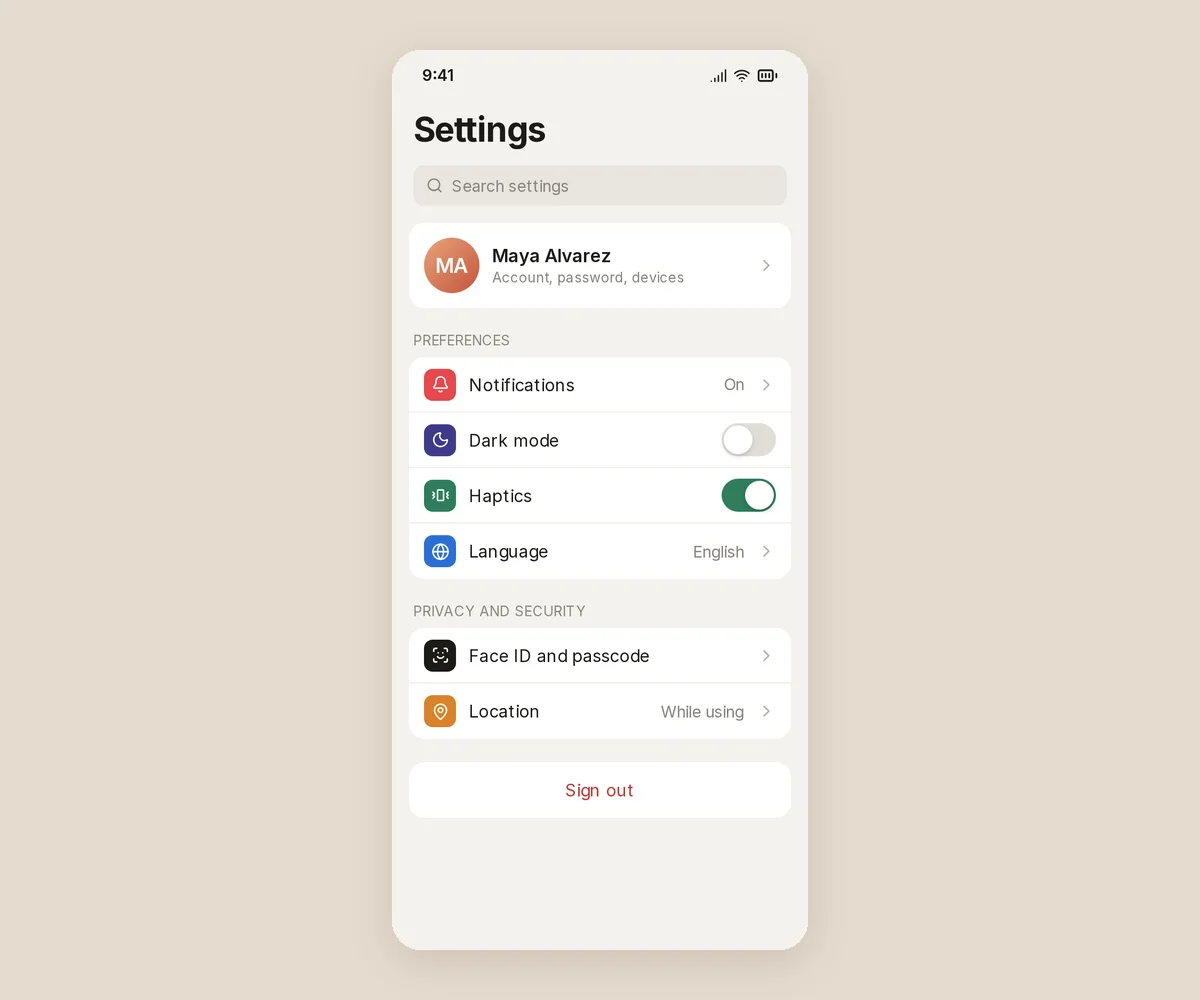
We tested one prompt through Kite's hosted connector on November 17, 2026: Claude (Opus 5.5) in Claude Code designed a phone settings screen in a new, empty file. It took 2 tool calls, one to make the file and one to draw the whole screen, 31.7 seconds from the first call to the last answer, and no fixes after it looked. One run, not a benchmark, and with Axure's servers read-only there was nothing to run there. The full method and numbers are on Claude in Kite vs Figma.
Working together
Axure RP's pricing sells Team as co-authoring, and its team projects docs describe how that works: “When you have a page checked out, no one else can edit it until it is checked back in.” Revision history is a Team feature, for team projects only. Comments live on the published prototype in Axure Cloud, and Axure Cloud's whiteboards are edited in real time.
In Kite, everyone in the file edits at once, with live cursors and comment threads pinned to the design, and agents work in the same file.
Figma and code
Axure's Figma plugin copies frames into Axure RP: “Figma layers are converted to Axure RP widgets.” Its pages don't describe sending designs back. Axure RP outputs the prototype as HTML, CSS, JavaScript and images, and Axure Cloud's Inspect gives redlines and CSS.
Kite pastes Figma frames in as layers and sends frames back with Copy to Figma, and copies any frame as HTML, React or Tailwind. See Figma in Kite, and Kite vs Figma for Figma itself.
Price
Axure RP Pro is $29 per user a month billed yearly, or $34 monthly. Team is $49 or $57, and Enterprise is priced on request. There is a 30-day trial and no free plan, and Axure no longer sells perpetual licences. Nonprofits and schools get 60% off and government agencies 25%, by its pricing FAQ, and qualified students and teachers use Team free, for non-commercial use.
Kite Pro is $20 per editor a month, or $16 billed yearly, and Kite Free has unlimited editors in 3 files.
When Axure RP is the better pick
If your work is functional prototypes and the specs around them, for user tests, stakeholders or developers, Axure RP does far more than Kite, and so do ProtoPie and UXPin in their own ways. If you want agents drawing and editing the screens with your team, Kite does what Axure's read-only servers don't.
Bring your own agents. Claude, Cursor, ChatGPT or any MCP client, with no key to copy.
Around
LayersAssets
Pages
App
Website
Layers
Covers
Speakeasy bars
Best rooftop bars
Tasting menus
Profile
Guide
Covers


 308 × 144
Profile
 Loukman Nacik@loukman · 3 guidesShareCoversStack
Frame
W308H144Flex
→↓▦LoukmanGap12Loukman↔16↕16Fill
colour/pageRadius
◜18Effects
Drop shadowEvery value, to the pixelDrag a gap, a padding or a size and the frame moves to make room as you go. Your agents set the same fields, so their work is as exact as yours.
A real design tool. Not a prompt box. Flex and grid, components, variables, a pen and real type. And a design is real HTML and CSS, so what your agent writes and what you draw are the same thing.
The editor- Flex, grid and constraintsRows, columns and grids with even gaps and padding. Change one thing and the rest moves to make room.
- Pen, pencil and shapesDraw paths point by point or freehand, then combine, flatten and outline them.
- Type, fills and effectsFonts and weights, styled word by word. Gradients, picture fills, shadows and blurs.
- Preview and historySee a frame as the screen it will be. Save versions, and go back to any of them.
Questions. About Kite and Axure RP.
How much does Axure RP cost?
Axure RP Pro is $29 per user a month billed yearly, or $34 monthly. Team, which adds co-authoring and revision history, is $49 billed yearly or $57 monthly, and Enterprise is priced on request. There are no perpetual licences. Nonprofits and schools get 60% off, government agencies 25%, and qualified students and teachers use Team free, for non-commercial use. Kite Pro is $16 per editor a month billed yearly, or $20 monthly.
Is Axure RP free?
No. It has a free 30-day trial, then a subscription, and free licences for qualified students and teachers. Axure Cloud, a separate product, is free for 3 whiteboards, 10 documents and unlimited prototype hosting. Kite's free plan has unlimited editors and viewers in 3 files.
Does Axure RP have an MCP server?
Two, and both are read-only. Axure RP 11 has an experimental server built in, on your own computer at 127.0.0.1, with no sign-in, for desktop clients such as Claude Code, Claude Desktop, Cursor or VS Code; web apps like ChatGPT or Claude on the web can't connect. Axure Cloud's hosted server, in alpha, reads whiteboards and documents shared by public link. Axure suggests using them to generate React components from a page.
Axure RP vs Figma: which is for what?
Axure RP is for prototypes with logic: its pages promise unlimited combinations of event triggers, conditions and actions, with variables, dynamic panels, repeaters and working form fields, and no code. For Figma itself, our Kite vs Figma page compares it feature by feature. Kite doesn't make prototypes.
Does Axure have AI?
Yes, in Axure Cloud: since October 2025 you can start AI chats inside Axure Cloud documents, and its whiteboards have AI assistance in alpha. Its pages don't describe AI inside the Axure RP editor, or AI credits. Its MCP servers let your own agent read your work, not change it.
What are the best Axure RP alternatives?
It depends on the job. For prototypes that react to input, look at prototyping tools such as ProtoPie or UXPin; we compare each with Kite on its own page. For a design your agents draw and edit with your team, Kite is the alternative: agents sign in from anywhere and work in the same file, free in up to 3 files.
Can Axure RP import Figma designs?
Yes, one way: Axure's Figma plugin copies frames into Axure RP, where layers become widgets and the layer structure stays as widget groups. Its pages don't describe sending designs back. Kite pastes Figma frames in as layers and sends frames back with Copy to Figma.
How we checked.
What was read, when, and who publishes this page.
We read Axure RP's pricing, RP MCP docs, Cloud MCP docs, conditional logic docs, team projects docs, Figma import docs, changelog, Axure Cloud pricing and education page, and its site, in November 2026. Where its pages don't say something, this page says so or leaves the row out. We didn't open its editor, so nothing here is a hands-on test of Axure RP.
About this comparison. Kite publishes this page and is one of the tools on it. Kite's side comes from Kite's docs and pricing.
About the author. Loukman Nacik is the founder of Kite, the design canvas people share with their AI agents.
Spotted something out of date? Contact us at hello@kite.new and we will correct it.
You and your agents, on one board.
In your browser, or in Kite for Mac. Bring the agent you already use, on the plan you already pay for.