 vs

Kite vs Balsamiq: A Balsamiq alternative your agents design in.
Short answer: Kite is the better pick when a wireframe should become the real design in the same place: your agent draws rough screens and the finished ones as HTML and CSS layers, with components and variables. Balsamiq is the better pick when you want low fidelity on purpose, AI prototypes from your wireframes, or wireframes inside Confluence and Jira; its MCP server lets agents draw too, with its own low-fi controls.
Updated by Loukman Nacik, Founder, Kite
Kite is best for
Teams who take a screen from first sketch to final design in one file, with their agents.
Kite costs
Free to start. Pro $20 per editor a month, $16 billed yearly. No AI credits.
Kite and Balsamiq at a glance.
What each one is, and what to take away.
Kite is a design tool where the agents you already use, such as Claude, ChatGPT or Cursor, draw real layers in a file your team edits. A design in Kite is HTML and CSS. Kite runs no model to design: your agent runs on the plan you already pay for.
Balsamiq is, in its words, "the fast wireframing and prototyping tool for product, tech, and business minds": low-fidelity wireframes on purpose, and since March 2026 an AI that turns them into clickable prototypes. Its hosted MCP server lets agents create and edit wireframes too.
MCP (Model Context Protocol) is an open-source standard for connecting AI applications to outside systems. It is how an agent reaches a design tool.
Key takeaways
- Balsamiq is low fidelity on purpose. In Kite your agent can draw a wireframe and then the finished design, in the same file.
- Both have a hosted MCP server where agents draw. Balsamiq's draws its own low-fi controls; Kite's draws HTML and CSS layers.
- Kite has a pen tool, variables with modes, and rows and grids that grow with their content. Balsamiq's pages describe none of them.
- Balsamiq has no free plan: a 14-day trial with 2 projects. Kite's free plan has unlimited editors in 3 files.
- Balsamiq's AI turns a wireframe into a clickable prototype you can share or download as HTML, and it has apps inside Confluence and Jira. Kite has neither.
For example, a founder who keeps 12 product ideas as separate projects outgrows Balsamiq Starter, which holds 10 projects at $16 an editor a month billed yearly, and moves to Teams at $24. In Kite the same 12 ideas as separate files need Pro, at $16 billed yearly with no file cap, and each file holds both the rough screens and the finished design.
Key differences.
6 points where Kite does more, or where Balsamiq's pages don't show the feature.
| Feature | Kite | Balsamiq |
|---|---|---|
| What a design is | Real HTML and CSS, the language agents already read and write | Boards of low-fi UI controls, in a sketch or clean style |
| Vector editing | Pen tool, point editing and boolean operations | Not described on its pages |
| Variables | Variables with modes, like light and dark, set per frame | Not described; only project-wide font, text size and link colours |
| Auto layout | Rows, columns and grids that grow with their content | Not described on its pages |
| Figma | Paste frames to and from Figma as editable layers | Not described on its pages |
| Free plan | Unlimited editors and viewers, and 3 files, free | No free plan: a 14-day trial with 2 projects |
Where Balsamiq is ahead: it keeps a team on the idea with sketch-style wireframes, its AI turns a wireframe into a clickable prototype you can share without a login or download as HTML, and it has apps inside Confluence and Jira.
Balsamiq's column comes from its own pages, starting with its pricing, as of November 2026. The other pages we read are linked where each fact is used.
Kite and Balsamiq, point by point.
How they differ, from Balsamiq's own docs and pricing.
What each one is for
Balsamiq is for rough wireframes, kept rough on purpose. Its product page says it is “built for product people, not designers”, and promises “an editable, intentionally low‑fi wireframe in seconds, so the team debates the idea, not the pixels”. Its controls come in a marker style, a pen-and-paper style or a clean one, and its default typeface is its own Balsamiq Sans. That matches what Yale's usability team says wireframes “help you focus on functionality and user flow without getting distracted by visual design”.
Kite is for the whole way from that first sketch to the final design. Your agent can draw grey boxes first and the finished screen after, as HTML and CSS layers in the same file, and your team edits both.
Both let agents draw
Balsamiq has a hosted MCP server, and it is a good one: OAuth sign-in, “no API keys, nothing to install”, on every plan and the trial, and it uses no AI credits. Its 9 tools let Claude, ChatGPT, Codex, Cursor and others list and create projects, read a board and its screenshot, draw a new board from a layout description, make targeted edits, and read and post comments, which go up under your name. On the trial, writes stop at 100 calls a day; paid plans have no cap. It works with Balsamiq's cloud projects, not Desktop, Jira or Confluence.
The difference is what the agent draws. Balsamiq's page puts it in a heading: “Low-fi on purpose. Even for AI.” Its agent places Balsamiq's own low-fi controls. Kite's agent draws real layers in HTML and CSS, with your fonts, colours, components and variables, through 61 tools, and renders a frame to check its work. Agents in Kite also take jobs from an @-mention in a comment. How each client connects is in the docs.
A low-fi and a high-fi run in Kite
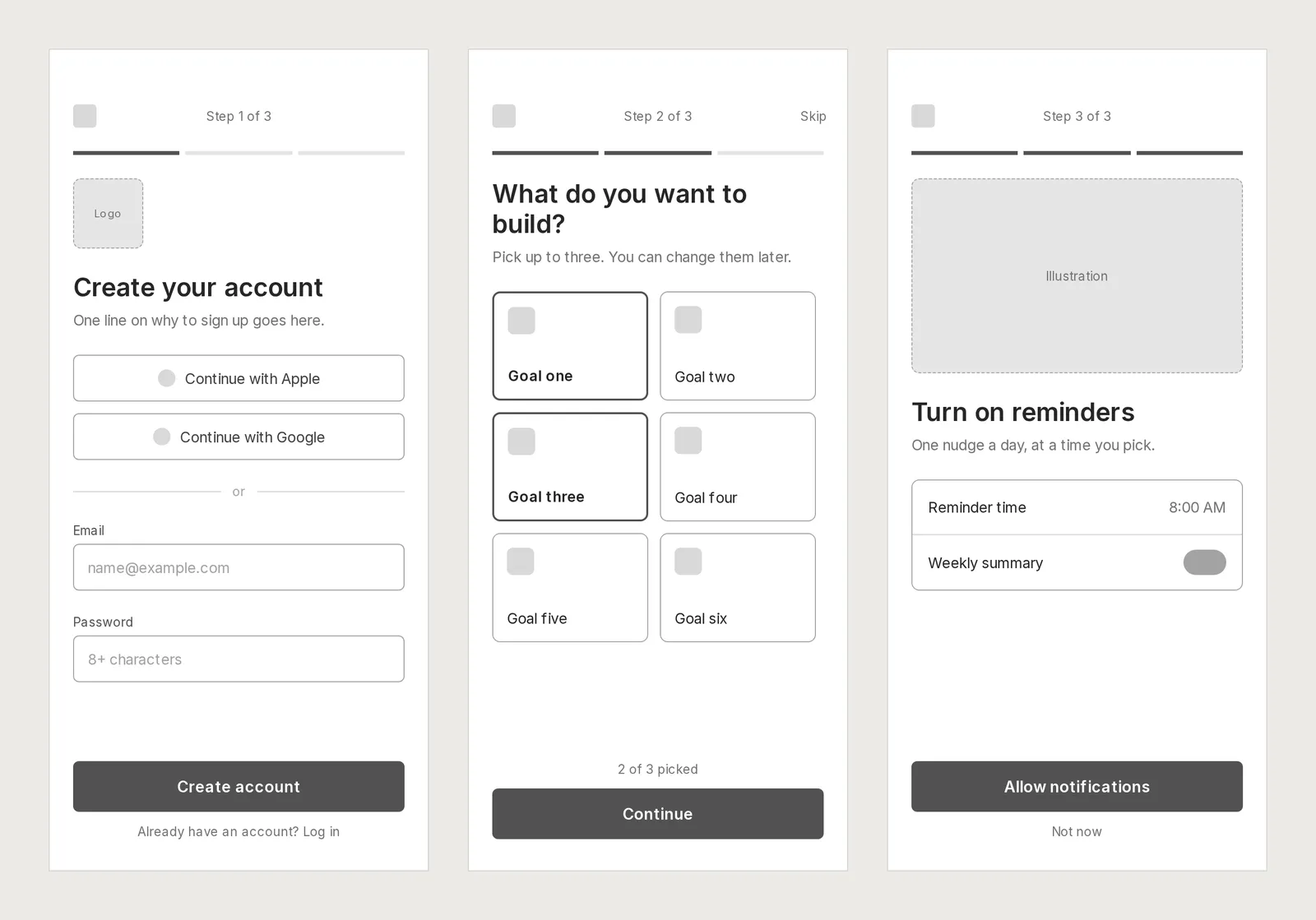
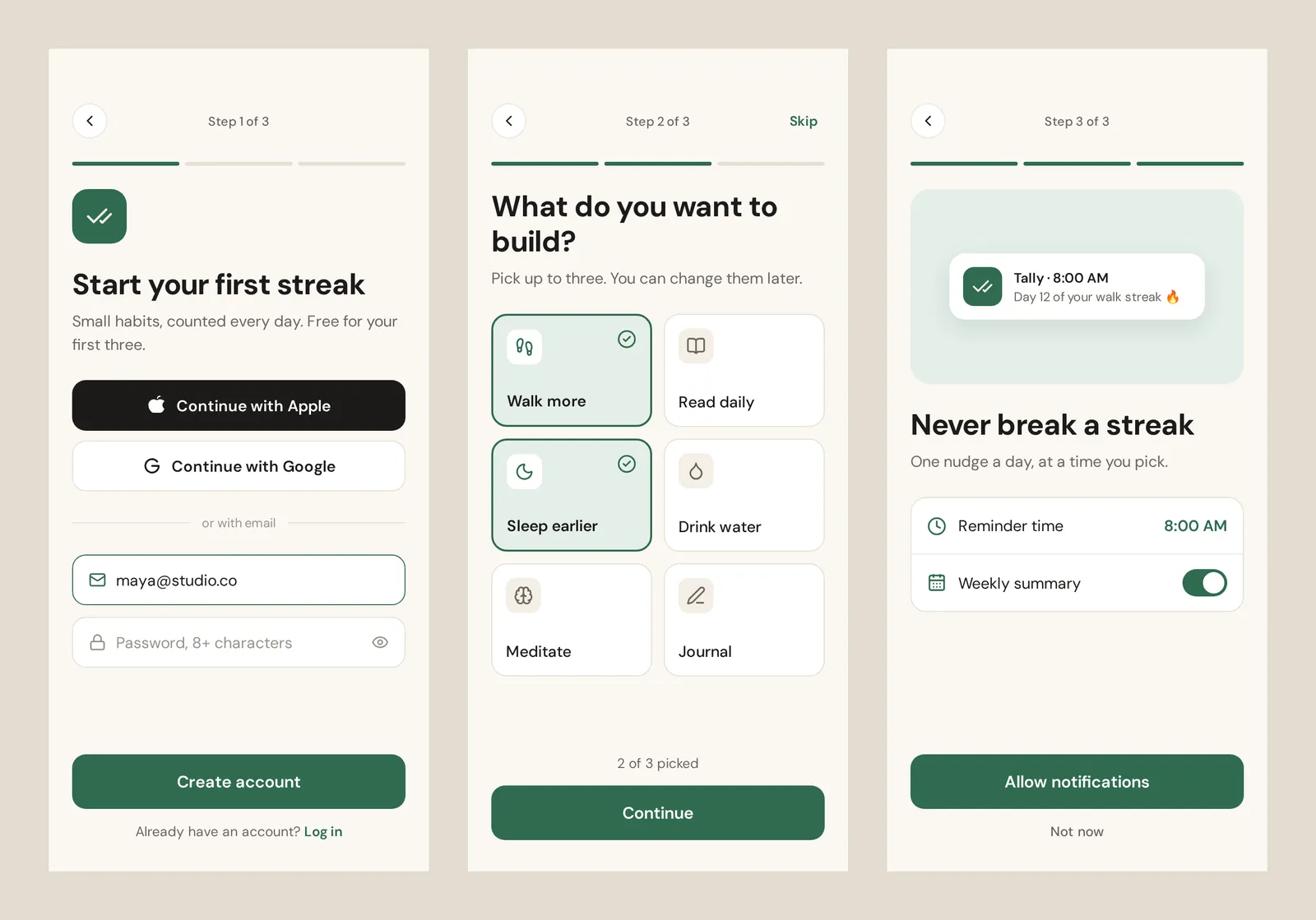
We tested two prompts in Kite on November 14, 2026, and timed them (the full run). First, Claude (Opus 5.5) in Claude Code was asked for a three-screen mobile sign-up flow, low fidelity: grey boxes, no colour, placeholder labels. All three screens were on the board 42 seconds after its first call, and it saw the goal cards wrapped one to a row and narrowed them in one edit. Then, in the same file: take the same screens to high fidelity, with a name, colours, real icons and copy. That took one more draw call of 39 seconds. The whole run was 12 calls to Kite and about two minutes. One run, not a benchmark, and we didn't run the prompts in Balsamiq.
Drawing tools
Balsamiq's pages describe reusable components and a few project-wide settings such as the font and the link colour. They don't describe a pen tool, auto layout, variables or colour modes, which suits a tool meant to stay rough.
Kite has a pen tool with point editing and boolean operations, components with variants, variables with modes like light and dark, and rows, columns and grids that grow with their content. More in design systems.
Prototypes: where Balsamiq goes further
Linked boards make a simple click-through in Balsamiq's full-screen presentation mode. Since March 2026 its AI also turns a screen into an interactive prototype: “Buttons respond, sliders move, navigation works”, in its words, though “it's not production code”. It costs about 8 to 10 credits a screen, and you share it by a link that needs no login, or download it as HTML. Kite has no prototype flows.
Where it lives
Balsamiq runs in the browser and inside Confluence and Jira. Its Desktop app for Windows and Mac works offline, but can be bought until December 31, 2026, gets no more versions or security updates, and has no Linux version. Its pages describe no Figma import or export; its wireframes page says “Figma is for polished UI.”
Kite runs in any browser and in Kite for Mac and Windows, pastes Figma frames in as layers, and sends them back with Copy to Figma. See Figma in Kite.
Price
Balsamiq has no free plan: a 14-day trial with 2 active projects and 100 AI credits. Per editor a month, Starter is $16 billed yearly or $23 monthly for up to 10 projects, Teams $24 or $34 for up to 100, and Enterprise $35, yearly only, for up to 400. Reviewers are free. Plans are capped by project count, and boards inside a project are free. There is no education discount, and registered nonprofits get 50% off the first year of an annual Starter or Teams plan, by its pricing FAQ.
Kite Pro is $20 per editor a month, or $16 billed yearly, the same as Starter billed yearly and less billed monthly, with no file cap and no credits. Kite Free has unlimited editors in 3 files, and 200 agent actions a day.
When Balsamiq is the better pick
If you want wireframes that can't be mistaken for the final design, people who aren't designers making them, clickable prototypes in a minute, or wireframes inside Confluence and Jira, Balsamiq fits. If the sketch should grow into the real design without starting again, Kite is built for that.
Billing
LayersAssets
Pages
Components
Screens
Layers
Components
Balance
Type
Sidebar
Choice
Palette
Form
Overview
Checkout
Components
638 × 400Balance
$1,200.35
Payment$30.32
DueAug 9th
Aa123#&!RegularMediumHeavyCompanyCaliforniaSeats2Design system4 in the workspaceAaAroundAaNightAaLedgerAaMintAround
TypeInter 500Corners12ModesLight, DarkIn it
Variables24Styles6Skills4One design, any systemYour agent draws with the system's variables, not fixed values. Switch the system, or change one value, and every frame drawn with it follows.
Your design system. Read before every draw. Colours, type and spacing as variables, your parts as components, the rules in plain words as skills. Agents read all of it before they draw, so their work looks like yours, not like everyone's.
Design systems- Components, placed, not redrawnMake a part once, with its variants. Agents place copies that follow it, instead of drawing a new card.
- Light and dark, one setA variable holds a value for each mode. Switch a frame to Dark and every colour drawn with it follows.
- Skills, in plain wordsThe brand's look, a guardrail, how posts are made. Agents follow the skills that fit the job.
- One library for every filePublish a file's components to the workspace. Their copies, in every file, follow when you update.
Questions. About Kite and Balsamiq.
Is Balsamiq free?
No. Balsamiq has a 14-day trial with no card, up to 2 active projects and 100 AI credits, and no free plan after it. It has no education discount, and registered nonprofits get 50% off the first year of an annual Starter or Teams plan. Kite's free plan has unlimited editors and viewers in 3 files.
How much does Balsamiq cost?
Per editor a month: Starter is $16 billed yearly or $23 monthly, for up to 10 projects; Teams is $24 or $34, for up to 100; Enterprise is $35, billed yearly, for up to 400. Reviewers are free. Each editor adds 500, 1,000 or 2,500 AI credits a month by plan, shared across the space. Kite Pro is $16 billed yearly or $20 monthly, with no file cap and no credits.
Does Balsamiq have an MCP server?
Yes, a hosted one at bais.balsamiq.com/mcp, with OAuth, on every plan and the trial, and it doesn't use AI credits. Its 9 tools let an agent such as Claude, ChatGPT, Codex or Cursor list and create projects, read and draw boards, and read and post comments. On the trial, writes stop at 100 calls a day. It doesn't reach Desktop, Jira or Confluence projects.
Can Balsamiq make high-fidelity designs?
Its wireframes stay low fidelity on purpose. Since March 2026 its AI turns a wireframe into what it calls a higher-fidelity, interactive prototype, about 8 to 10 credits a screen, which you share by link or download as HTML. Editable high-fidelity design is not what it is for. In Kite the wireframe and the final design are both layers you and your agent edit.
What happens to Balsamiq for Desktop?
Balsamiq stopped developing it. You can buy it until December 31, 2026, and email help ends December 31, 2027. Version 4.8.6, from October 2025, is the latest and last one, and it gets no security updates. Projects edited in the cloud version don't open in Desktop.
Balsamiq vs Figma: which should I use?
They aim at different stages. Balsamiq keeps wireframes low fidelity on purpose, and its own wireframes page says "Figma is for polished UI." Its pages describe no Figma import or export. In Kite your agent draws the wireframe and the finished design as editable layers in one file, and frames paste to and from Figma.
Does Balsamiq have AI?
Yes. Balsamiq AI is on every cloud plan: it turns a prompt, a screenshot or a sketch into an editable wireframe, at about 16 credits a screen, and Balsamiq says your data is never used to train AI models. Kite runs no model to design: your own agent draws, on the plan you already pay for.
What are the best Balsamiq alternatives?
It depends on what you need next. If wireframes should grow into the finished design with your agent, Kite does both in one file. Our wireframing tools guide compares 12 tools, with each one checked on the vendor's own pages on November 14, 2026.
How we checked.
What was read, when, and who publishes this page.
We read Balsamiq's pricing, MCP page, MCP help, plans help, prototyping help, Desktop page, wireframes page and AI page, and its site, in November 2026. Where its pages don't say something, this page says so or leaves the row out. We didn't open its editor, so nothing here is a hands-on test of Balsamiq.
About this comparison. Kite publishes this page and is one of the tools on it. Kite's side comes from Kite's docs and pricing.
About the author. Loukman Nacik is the founder of Kite, the design canvas people share with their AI agents.
Spotted something out of date? Contact us at hello@kite.new and we will correct it.
You and your agents, on one board.
In your browser, or in Kite for Mac. Bring the agent you already use, on the plan you already pay for.