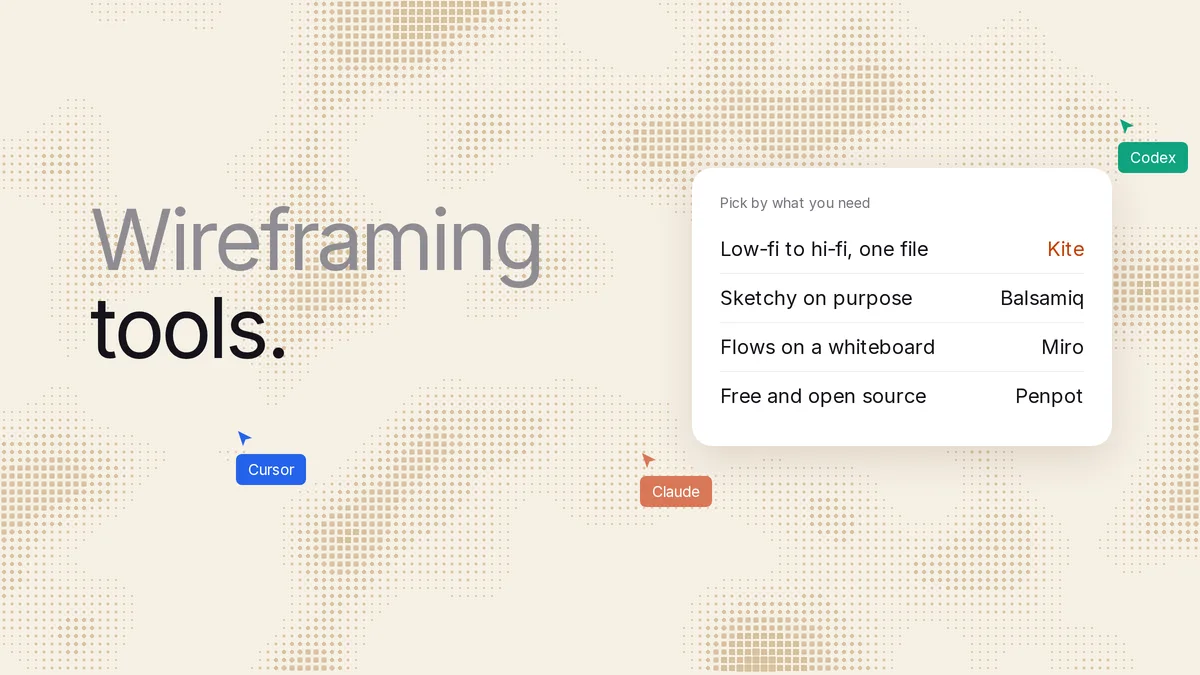
Short answer: pick Balsamiq for wireframes that stay sketchy on purpose, Miro or Whimsical for flows on a whiteboard, and Penpot for free and open source. For a built-in AI generator whose paid plans export to Figma, try UX Pilot. Pick Kite (kite.new) if you want the AI agent you already use (Claude, ChatGPT, Codex or Cursor) to draw the wireframe, then take the same screens to high fidelity in the same file. Every price below was checked on the vendor's own page on November 14, 2026.
Key takeaways
- We checked 12 wireframing tools on November 14, 2026, and ran one brief in Kite: three wireframes, then the same three screens in high fidelity, in about two minutes.
- Eight of the 12 have built-in AI that turns a prompt into a wireframe. Most meter it with credits or a monthly allowance: Uizard's free plan gets 3 AI generations a month, and Balsamiq's paid plan covers about 31 wireframes per editor a month.
- Most of them also let an outside agent draw over MCP now, so that alone no longer sets a tool apart. What differs is where the work goes next: a sketch, a whiteboard, code, or a design file.
- Most free plans are tight: Kite allows 3 files, Figma 3 team files plus unlimited drafts, Miro 3 boards and Whimsical 50 objects a month. MockFlow's is for personal and nonprofit use only, and Penpot's has no file limit.
We make Kite, so it is one of the tools below. We say plainly where another tool is the better pick. Every rival fact comes from its own pages, linked in place.
The best wireframing tool for each need
Start from what you need the wireframe for:
| Pick | If you want |
|---|---|
| Kite | Your own agent to draw it, then take it to hi-fi in the same file |
| Balsamiq | Wireframes that stay sketchy, so nobody argues about colours |
| Miro or Whimsical | User flows beside sticky notes and research |
| Penpot | Free, open source, or on your own servers |
| Excalidraw | A quick hand-drawn sketch, no account |
| Figma | To stay where your team already designs |
| UX Pilot | A built-in AI generator whose paid plans export to Figma |
| Relume | A website wireframe from a sitemap, then Figma, Webflow or React |
| wireframe.cc | A one-page sketch in the browser, no account needed |
Wireframing tools at a glance
Prices are for the cheapest paid plan, per editor a month, as each pricing page showed it on November 14, 2026. “Agents draw” means the vendor documents an MCP server that Claude, ChatGPT or Cursor can use to create wireframes in the tool. Each row is sourced in its tool's section below; the agent column comes from each vendor's MCP docs, such as Miro's.
| Tool | Free plan | Cheapest paid | AI from a prompt | Agents draw | What you get out |
|---|---|---|---|---|---|
| Kite | 3 files, unlimited editors | $16 yearly, $20 monthly | Your own agent, no credits; 200 agent actions a day on Free | Yes, any plan | Design file; HTML, React, Tailwind; Copy to Figma |
| Figma | 3 team files, unlimited drafts | $16 a Full seat (the seat that edits designs), yearly | Figma Make, credits | Beta, paid plans | Design file; Make writes code |
| Balsamiq | No, 14-day trial | $16 yearly, $23 monthly | Yes, credits | Yes, every Cloud plan and the trial | Low-fi wireframes; PDF, image |
| Miro | 3 editable boards | $8 yearly, $10 monthly | Yes, credits | Yes, every plan | Board; images, PDF |
| Whimsical | 50 board objects a month | $10 yearly, $12 monthly | Yes, 10 trial credits | Yes, free plan limits apply | Board; PNG, PDF, SVG |
| MockFlow | 1 editor, personal and nonprofit use only | $9 yearly, $12 monthly | Yes, credits | Yes | Board; Figma and code on Max only |
| Penpot | No file limit, up to 8 members | $7, capped at $175 a month | Through your agent | Yes, free | Design file; SVG, PNG, PDF |
| Excalidraw | Yes, no sign-up | $6 (Excalidraw+) | Text to diagram, 10 a day free; wireframes through your agent | Plus only, beta | Hand-drawn scene; PNG, SVG |
| UX Pilot | 80 credits a day, 1 project | $19 yearly, $29 monthly | Yes, credits | Yes, AI calls use credits | Figma and code on paid plans |
| Uizard | 2 projects, 3 AI generations a month | $12, billed yearly | Yes, generations | Not stated | Images, PDF; React per component |
| Relume | Enough AI for one site | From $24 an account | Sitemap to wireframes | Not stated (Publish MCP on paid plans) | Figma, Webflow, React |
| wireframe.cc | Public, single-page | $12 yearly, $19 monthly | Not stated | Not stated | PDF, PNG on Premium |
What a wireframing tool does
A wireframe is “a simple (low-fidelity) visual representation of the interface”, in the words of the US government's Digital.gov guide. It says to avoid “font choices, color, or other elements that would distract from the structure”. A wireframing tool lets you draw those boxes quickly, share them, and change them while change is cheap.
Yale's usability guide describes three levels. Low fidelity is “quick sketches with minimal detail”. Mid fidelity adds real labels. A high-fidelity wireframe adds exact content and measurements, but “still avoid[s] color and imagery”. The step after that is the visual design itself, with colour, type and icons. In this article, “taking it to high fidelity” means that finished design.
The tools differ on one question: what happens after the wireframe. Balsamiq and wireframe.cc keep you at low fidelity by design. Miro, Whimsical, MockFlow and Excalidraw keep wireframes on a whiteboard beside your other notes. Figma, Penpot and Kite are design tools, so the same file goes on to the finished screen. UX Pilot, Uizard and Relume are AI generators first.
For click-through prototypes, Balsamiq, Figma Make and Uizard say they make them, and wireframe.cc adds clickable links on Premium. Kite doesn't make click-through prototypes.
A real run: prompt to wireframe to high fidelity in Kite
MCP (Model Context Protocol) is “an open-source standard for connecting AI applications to external systems”: it is how an agent such as Claude or ChatGPT draws in a design tool. We gave one brief to Claude (Opus 5.5) in Claude Code, connected to Kite over MCP, on November 14, 2026, in a new, empty file with no design system. The first prompt:
Wireframe a three-screen mobile sign-up flow for a habit-tracking app, low fidelity: grey boxes, no colour, placeholder labels. Screens: create account, pick your goals, turn on reminders.
Claude read Kite's drawing guide, made the file, then drew all three screens in a single draw call. They were on the board 42 seconds after its first call. It checked the screens, saw that the goal cards wrapped one to a row, and narrowed them in one edit. Then the second prompt, in the same file:
Now take the same three screens to high fidelity in this file: a habit app called Tally, warm off-white, deep green accent, real icons and copy.
That took one more draw call of 39 seconds. The whole run was 12 calls to Kite and about two minutes from the first call to the last check. Every word came out as a text layer and every icon as a swappable icon, so a person can edit them by hand afterwards. We also exported the reminders screen as Tailwind code from the same frame, and it came back as HTML with Tailwind classes.
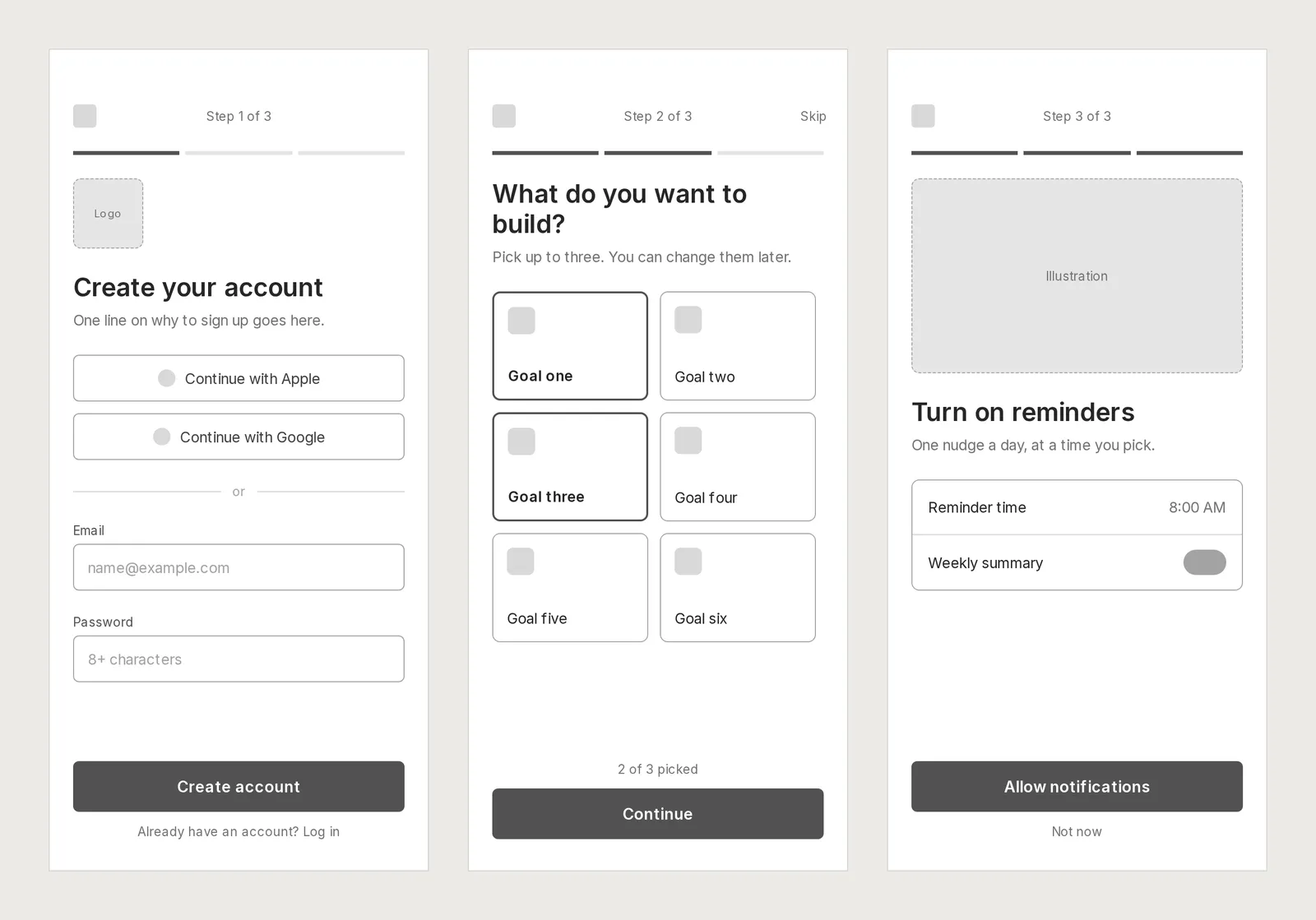
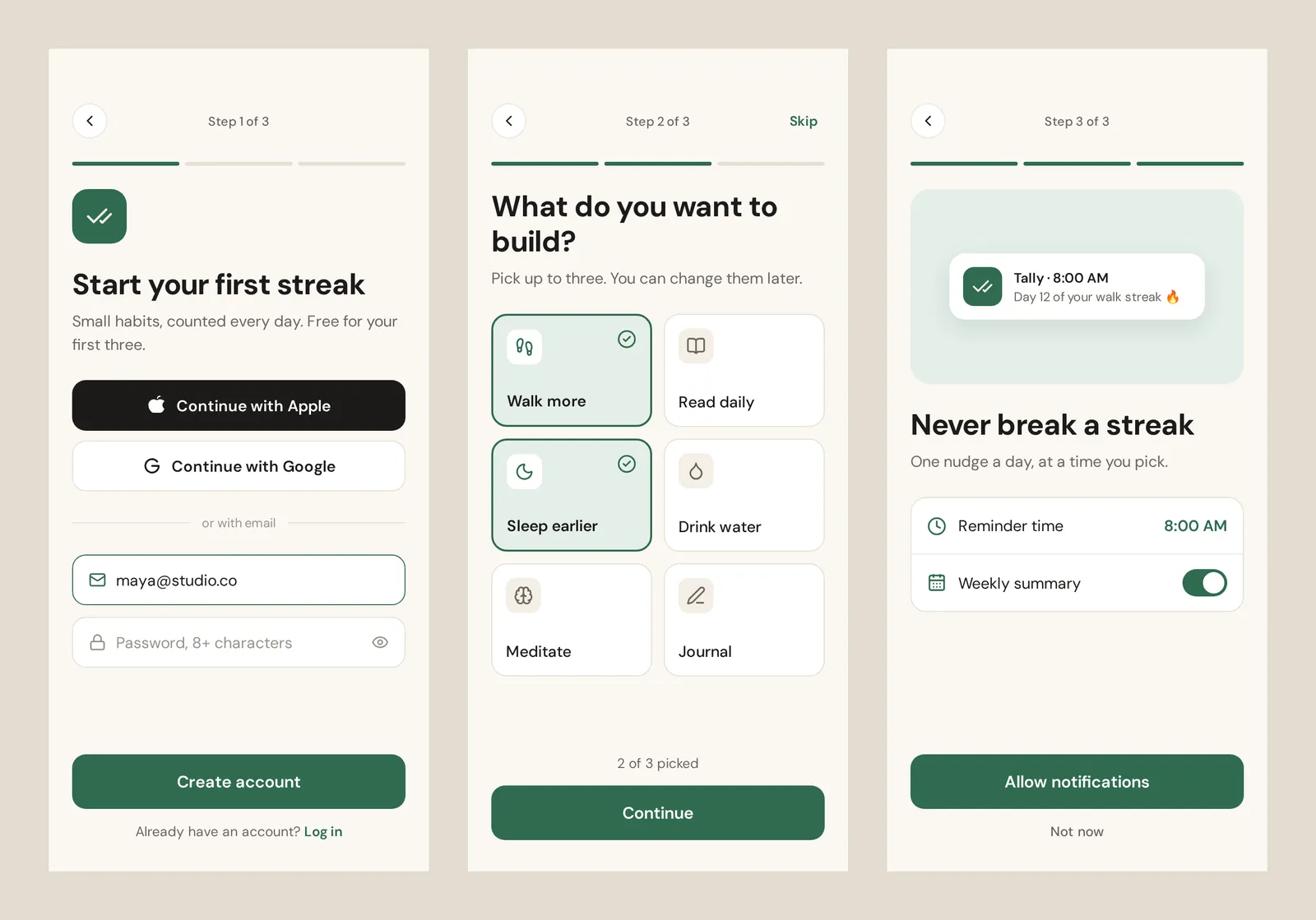
This was one run on one brief, so read it as what happened, not a benchmark. We didn't run the same brief in the other tools. This run didn't use comments, Copy to Figma or the editor by hand; what the page says about those comes from Kite's docs. The file was a scratch file and is no longer shared.
The 12 wireframing tools we checked
Each gets what it is for, its limits, what it costs, its AI, and whether an agent can draw in it. Kite is first because we make it. The rest are not ranked; the numbers are only for finding your way.
1. Kite (kite.new)
Our tool. Kite is a design tool where the agent you already use draws real layers in a file your team edits, comments on and shares. That agent can be Claude, ChatGPT, Codex, Cursor or Gemini. Kite runs no model of its own to design, so there are no AI credits: your agent works on the plan you already pay for.
- Fits: teams that want the wireframe and the finished screen in one file, drawn by their own agent and edited by people. Setup steps for each agent are in Kite's MCP client docs.
- Not for: anyone who needs open source, self-hosting or click-through prototypes. Penpot covers the first two, and Figma or Balsamiq the last.
- Price: free with unlimited editors, 3 files and 200 agent actions a day. Pro is $20 an editor a month, or $16 billed yearly, with unlimited files and agent actions (see pricing).
- Getting work out: copy a frame as HTML, React or Tailwind, export PNG, SVG or PDF, or Copy to Figma. Frames pasted from Figma come in as layers you can edit, per Kite's Figma guide.
- Review: comments sit on the design, and a comment can give your agent its next job.
2. Figma
Figma says to “riff on wireframes in Figma” as a team. Its AI wireframe generator is Figma Make: describe the layout and it “builds it for you to click through, edit, and share”.
- Fits: teams whose libraries and developers already live in Figma.
- Limits: the free Starter plan holds a single team with one folder and 3 team files, with 150 AI credits a day up to 500 a month, per Figma's pricing. Make writes code; Figma says its preview can be turned into design layers to paste into Figma Design.
- Price: Professional is $16 a Full seat a month with yearly billing on the pricing page; the monthly price isn't in its text.
- Agents: writing to the canvas is “available on Professional, Education, Organization, and Enterprise plans” and needs a Full seat outside drafts. It is “free during the beta period and will eventually become a usage-based paid feature”, per Figma's MCP guide. Starter gets 20 MCP calls a month.
Leaving Figma for other reasons? Our Figma alternatives list covers that.
3. Balsamiq
Balsamiq is the classic low-fi tool: “Low-fi on purpose. Even for AI.” Its sketchy look keeps a review on structure, not colours.
- Fits: product managers and teams who want wireframes that can't be mistaken for finished design. This is where Balsamiq is the better pick than Kite.
- Limits: there is no free plan, only a “14-day” trial with 2 active projects and 100 AI credits, per Balsamiq's plan guide. Exports are PDF or image, and it stays low fidelity, so the high-fidelity design happens in another tool.
- Price: Starter is $16 an editor a month billed yearly, or $23 monthly, with up to 10 projects and 500 AI credits per editor, “enough for around 31 wireframes”. Reviewers are free.
- Agents: a remote MCP server reads and creates wireframes, included in every Cloud plan and the trial, and it doesn't spend your AI credits. On the trial, creating and editing is limited to 100 calls a day.
4. Miro
Miro is a whiteboard where you can “create quick app and website wireframes” beside sticky notes and user flows. Its AI turns a prompt such as “create a three-step checkout flow” into editable wireframes.
- Fits: teams already running workshops and research on Miro. Miro's page notes it “is not only designed as a wireframe creator”.
- Limits: the free plan has 3 editable boards and low-res exports, and “anyone you invite to collaborate automatically becomes a Member and uses a paid seat”, per Miro's pricing. The same page gives free AI as 10 credits a month in one place and a “limited trial” in another. Wireframes leave as images or PDFs.
- Price: Starter is $8 a member a month billed yearly, or $10 monthly, with 25 AI credits a member.
- Agents: its MCP server works on every plan and can create board content, with 100 calls a day on Free.
5. Whimsical
Whimsical offers “low-fidelity wireframes in a clutter-free experience”, beside its flowcharts and docs.
- Fits: small teams who want tidy low-fi wireframes and flowcharts in one place.
- Limits: the free plan lets you create “up to 50 board objects per month” and watermarks exports, per its pricing. Exports are PNG, PDF or SVG, per its export guide. Its AI gives 10 credits to try, which “are one-time and do not renew”, then $0.10 each. Its pricing FAQ says 10 credits per member instead.
- Price: Pro is $10 an editor a month billed yearly, or $12 monthly. Viewers are free.
- Agents: its MCP server can add wireframes to a board and is free, but “free plan limits still apply”.
6. MockFlow
MockFlow combines whiteboard, diagrams and wireframes, “while Mida and your own AI agent lay out the board alongside you”. Its look switches between outline, sketchy, hi-fi and blueprint.
- Fits: people who want an AI board and their own agent in one browser tool, and are happy to pay for Figma and code export.
- Limits: the free Basic plan is 1 editor, 4 projects, 100 AI credits a month and 200 items a board, and it's “for personal and nonprofit use”, per MockFlow's pricing. Export to Figma and code is on Max only.
- Price: Plus is $9 an editor a month billed yearly, or $12 monthly. Max is $14 or $19.
- Agents: open-source MCP servers create wireframes from Claude, Cursor or VS Code. Through the Claude connector, Basic allows 20 calls a day.
7. Penpot
Penpot is the open-source design platform, for “lo-fi or hi-fi wireframes” in one tool. You can also run it on your own servers.
- Fits: teams that want design for free, or want to own their files. On price and openness, Penpot beats Kite.
- Limits: no built-in prompt-to-wireframe is stated on its site; AI comes from your own agent, and “you manage the cost of your agents”. Its MCP server acts on “the currently focused page in the active Penpot tab”, per Penpot's help, so a Penpot tab has to be open.
- Price: free with no file limit for up to 8 members and unlimited viewers. Unlimited is $7 an editor a month, capped at $175, per its pricing.
- Agents: a free MCP server that reads, changes and creates designs. Row by row against Kite: Kite vs Penpot.
8. Excalidraw
Excalidraw is “a free virtual collaborative whiteboard” for hand-drawn diagrams. “No sign-up. Just draw.”
- Fits: a quick sketch on a call, for free. For a quick whiteboard sketch, Excalidraw is a better pick than Kite.
- Limits: on excalidraw.com, “your drawings are saved in your browser's storage”. The Excalidraw+ free tier has 1 scene and 10 AI requests a day, per its pricing. Its built-in AI makes diagrams from text; on its AI page, wireframes come from an agent over MCP. Scenes keep the hand-drawn look.
- Price: Excalidraw+ is $6 a user a month.
- Agents: an MCP server on Plus, in public beta, builds editable scenes, wireframes included.
9. UX Pilot
UX Pilot generates “structured low to high fidelity wireframes” from a prompt.
- Fits: designers who want an AI generator whose paid plans export to Figma.
- Limits: the free plan is “80 credits per day (up to 13 screens), 1 project”, and export to Figma and code starts on Pro, per its plan summary.
- Price: Pro is $29 a month, or $19 billed yearly, with 750 credits, “up to 125 screens”.
- Agents: its MCP server imports HTML as a screen and can ask UX Pilot's AI to design, “with credits”. Which plans include it isn't stated.
10. Uizard
Uizard turns “hand-drawn wireframes into editable designs” and can “generate multi-screen, editable prototypes in seconds using simple text”. It joined Miro in 2024.
- Fits: founders and non-designers making a first mock-up from a photo of a sketch.
- Limits: the free plan is 3 AI generations a month, 2 projects and up to 5 screens a project, per its pricing. Projects leave as images or PDF, and React code comes one component at a time on paid plans, per its export guide. No MCP server is stated.
- Price: Pro is $12 a month billed yearly, with 500 AI generations.
More on how it compares: Kite vs Uizard.
11. Relume
Relume now calls itself “an AI website builder for small businesses”. Describe the project and it makes a sitemap, which “becomes wireframes built from real components, copy included”.
- Fits: marketing websites, especially ones going to Webflow or React. For app screens, it isn't the tool.
- Limits: the free plan has AI usage “enough for one full website”, and its Publish MCP server is on paid plans only.
- Price: Pro is from $24 a month per account, with “no per-seat charge”, per its pricing. Hosting is extra.
- Out: a native Figma file, Webflow, or React with Tailwind. See Kite vs Relume.
12. wireframe.cc
wireframe.cc lets you “wireframe full pages in a few broad strokes” and says “Stay at wireframe fidelity. On purpose.”
- Fits: one-page sketches with no account.
- Limits: free wireframes are public and single-page. Export to PDF or PNG is Premium. No AI and no agent access are stated on its site.
- Price: Solo is $12 a month billed yearly, or $19 monthly, per its pricing.
Off the list: Visily shut down on October 31, 2026, and deletes its users' data on November 30.
AI wireframe generators: built-in AI or your own agent
An AI wireframe generator turns a description into a wireframe you can edit. There are two kinds now. In the first, the tool runs the AI for you. It charges credits or sets an allowance: Figma Make, Balsamiq, Miro, Whimsical, MockFlow, UX Pilot, Uizard and Relume work this way. In the second, your own agent draws in the tool over MCP. Kite, Penpot, Balsamiq, Miro, Whimsical, MockFlow, UX Pilot and Excalidraw+ (Plus) work this way, and Figma does on paid plans, in beta.
The allowances are small on the first kind:
- Uizard's free plan allows 3 AI generations a month, per Uizard's pricing.
- Whimsical gives 10 credits once, then $0.10 each, per Whimsical AI.
- Balsamiq's paid plan covers “around 31 wireframes” a month per editor, per Balsamiq's pricing.
- UX Pilot's free plan covers “up to 13 screens” a day, per its plan summary.
If you want the AI built in, pick UX Pilot when the screens should go on to Figma (export is on its paid plans), or Balsamiq when the result should stay low-fi.
Kite is built around the second kind. In our run, Claude drew six screens, three wireframes and three finished ones, in 12 calls to Kite and with no AI credits. Free covers 200 agent actions a day, and Pro has unlimited agent actions. The catch is that you need an agent: Kite doesn't generate on its own.
Website wireframe tools
For a marketing website, Relume is the most direct: it starts from a sitemap, which “becomes wireframes built from real components, copy included”, and ends in Figma, Webflow or React. For a free one-page sketch, use wireframe.cc, which lets you “wireframe full pages in a few broad strokes”. To keep the site's wireframe and its finished design together, use Kite, Figma or Penpot. Miro is for “quick app and website wireframes” beside your research.
| Tool | Starts from | Free limit | What you get out |
|---|---|---|---|
| Relume | A sitemap it writes from your brief | AI enough for one site | Figma file, Webflow, React with Tailwind |
| wireframe.cc | A blank page | Public, single-page | A public wireframe; PDF, PNG on Premium |
| Miro | A board, or a prompt | 3 editable boards | Images, PDF |
| Kite | A prompt to your agent, or a blank frame | 3 files | Design file; HTML, React, Tailwind; Copy to Figma |
| Figma | A blank frame, or Figma Make | 3 team files, unlimited drafts | Design file; Make writes code |
| Penpot | A blank board, or your agent | No file limit, up to 8 members | Design file; SVG, PNG, PDF |
Free wireframe tools, and where each stops
Each free plan's main limit, as each pricing page put it on November 14, 2026 (Penpot, Figma, Miro, Whimsical, MockFlow). Penpot's is the only one here that states no file limit for a team; the rest are in alphabetical order:
- Penpot: no file limit for up to 8 members.
- Balsamiq: no free plan, a 14-day trial.
- Excalidraw: free and no sign-up, but saved in your browser.
- Figma: 3 team files plus unlimited drafts, and 20 MCP calls a month.
- Kite: 3 files, unlimited editors, 200 agent actions a day.
- Miro: 3 editable boards, and “anyone you invite to collaborate automatically becomes a Member and uses a paid seat”.
- MockFlow: 1 editor, personal and nonprofit use only.
- Relume: AI usage “enough for one full website”.
- Uizard: 2 projects, 3 AI generations a month.
- UX Pilot: 80 credits a day (up to 13 screens), 1 project.
- Whimsical: 50 board objects a month.
- wireframe.cc: public, single-page wireframes.
How we checked
Methodology: we picked the tools whose own pages ranked for “wireframing tools” or “ai wireframe generator” in Google US on November 14, 2026, or that the ranking lists named. We then added Excalidraw as a free sketching pick, and Kite. That day (Bangkok time) we read each tool's pricing page and its wireframing, AI and MCP pages on its own site. Where a price only appears after the page's script runs (MockFlow, Miro's monthly prices), we read it in a browser; Balsamiq's monthly price comes from the price table in its pricing page's code. Where a vendor's pages disagree, we say so. We ran one brief in Kite only, timed from the run's own timestamps, and didn't run it in the other tools. Kite facts come from Kite's docs and plans. We re-check this page every quarter.
Questions
- What is the best free wireframing tool?
- Penpot, for most teams: its free plan has no file limit for up to 8 members, it is open source, and its MCP server is free. Excalidraw is the fastest to start: free, with no sign-up. Kite is free with unlimited editors, 3 files and 200 agent actions a day, and your own AI agent draws in the file. Balsamiq has no free plan, only a 14-day trial.
- What is the best AI wireframe generator?
- For built-in AI, pick UX Pilot if the screens go on to Figma (Figma export is on its paid plans; the free plan covers up to 13 screens a day), or Balsamiq if they should stay low-fi (Starter covers about 31 wireframes per editor a month). For a marketing website, Relume goes from a sitemap to wireframes. If you already use Claude, ChatGPT, Codex or Cursor, Kite lets that agent draw the wireframe with no AI credits; Kite's Free plan includes 200 agent actions a day.
- Can ChatGPT or Claude make a wireframe?
- Yes. Connected to a design tool over MCP, they draw editable wireframes in it. Kite, Balsamiq, Miro, Whimsical, Penpot (with a Penpot tab open), UX Pilot, MockFlow and Excalidraw+ (Plus plan, in beta) document servers that create wireframes, as of November 14, 2026. Figma's agent writing is a beta on paid plans.
- What is the difference between a low-fidelity and a high-fidelity wireframe?
- A low-fidelity wireframe is grey boxes and placeholder labels: where things go and what a screen does. A high-fidelity wireframe adds exact content and sizes but usually still no colour. The finished design then adds colour, type and icons. Digital.gov's guide says to leave colour and font choices out of a wireframe, so the review stays on structure.
- Is Balsamiq free?
- No. Balsamiq has a 14-day free trial with up to 2 active projects and 100 AI credits. After that, Starter is $16 an editor a month billed yearly, with up to 10 projects and 500 AI credits per editor a month. Reviewers are free.
- Does Figma have a wireframe tool?
- Yes. You wireframe in Figma Design, and Figma Make turns a prompt into a clickable wireframe. Figma's free Starter plan allows 3 team files, plus unlimited drafts, and an outside agent can write to the canvas only on paid plans, in beta.