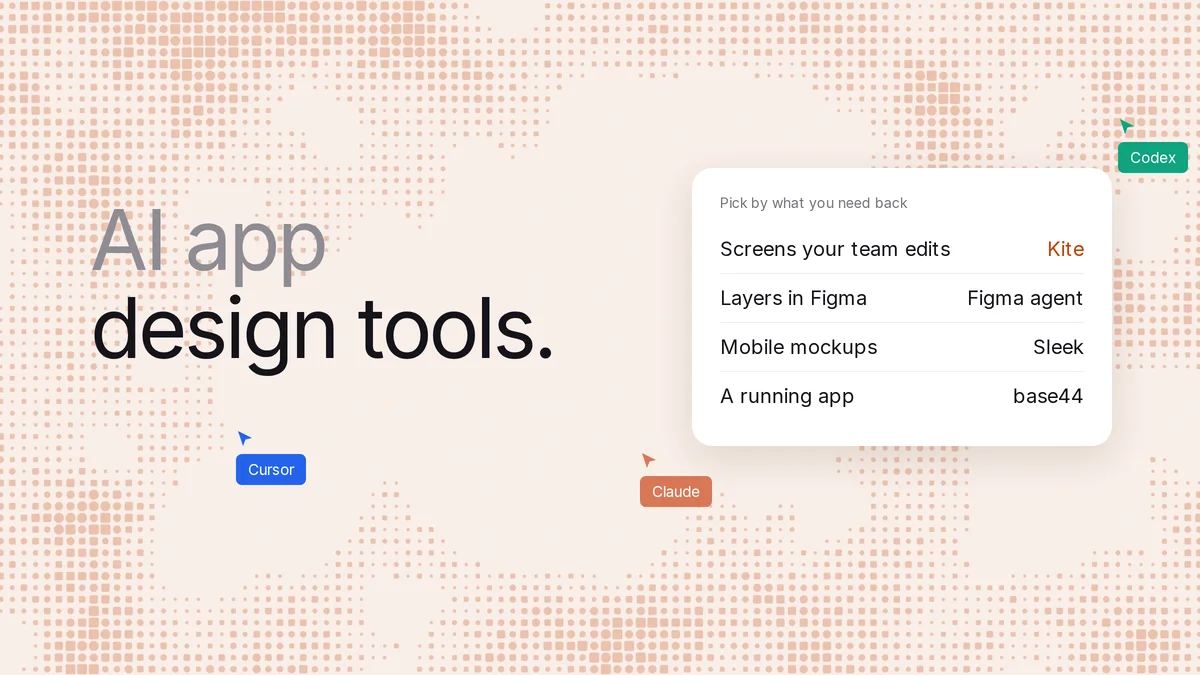
Short answer: an AI app design tool is software that turns a description of your app into its screens. Decide first whether you want screens or a working app. For screens your team edits, use Kite (kite.new) with the agent you already use, such as Claude, ChatGPT, Codex or Cursor: it draws real layers in a shared file, with no AI credits. For mobile-only mockups, Sleek. For a running app with a database and hosting, an app builder: base44, Lovable, Bolt or v0.
Key takeaways
- We checked 13 tools on their own pages on November 14, 2026: 9 that design app screens and 4 that build a running app.
- Designers hand back screens to edit and export, while builders hand back code, a database and a live link, so pick the side before the tool.
- In Kite, the agent you already use draws the screens on every plan, Free included, and Kite charges no AI credits. Most others here bill AI in their own credits.
- Sleek is mobile only, while Figma Make, Lovable and v0 make web apps, and Bolt reaches the app stores through Expo.
- In our run, Claude drew three iPhone screens in Kite from one prompt, in one drawing call, every word and icon an editable layer.
We make Kite, and it's on this list. Every fact about the other tools comes from their own pages, fetched on November 14, 2026, and linked where we use it. Where another tool fits a job better, we say so.
An app that designs apps, or one that builds them?
People who search for “an app that designs apps” want one of two things. Google's first page shows both: Sleek, a mobile app designer, sits next to base44, an app builder, and the two do different jobs.
- An AI app designer is a tool that makes the screens: layout, type, colour, the flow from one screen to the next. You get something to look at, edit and agree on, then export to Figma or to code. Kite, Sleek, Google Stitch, UX Pilot, Uizard, Banani, Magic Patterns, Claude Design and Figma's agent are on this side.
- An AI app builder is a tool that makes a working app: code, a database, sign-in and hosting, with a link people can use. base44, Lovable, Bolt and v0 are on this side, and Figma Make sits on both.
Pick a designer when the look and the flow aren't settled yet, when a team has to agree on them, or when developers will write the real code. Pick a builder when you want something live today and the design can follow. Many teams use both: design the screens, then build from them.
The 13 tools at a glance
Prices are the cheapest paid plan in US dollars, as each page showed it on November 14, 2026. “Not stated” means the tool's own pages didn't say.
Tools that design app screens
| Tool | What you get | Mobile or web | Free plan | Paid from | Your own agent? | Export |
|---|---|---|---|---|---|---|
| Kite | Editable screens as layers in a shared file | Both | Unlimited editors, 3 files, 200 agent actions a day | $16 an editor a month yearly ($20 monthly) | Yes: Claude, ChatGPT, Codex, Cursor, Gemini | Copy to Figma; HTML, React, Tailwind; images |
| Sleek | Editable app screens | Mobile only | 60 one-time credits, 1 project, 3 screens | $29 a month, $240 a year | MCP from Pro; Free can try it on trial credits | Figma paste; React with Tailwind, HTML |
| Figma's agent | Layers in a Figma file | Both | Starter: 150 AI credits a day, up to 500 a month, 3 team files | $16 a Full seat a month yearly ($20 monthly) | Figma's; outside agents via its MCP on paid plans | Make: export code on a Full or Dev seat |
| Google Stitch | Screens as images and HTML, prototypes | Both | Free in beta, daily credit limit | No paid plan stated | MCP for Cursor, Gemini CLI and others | Figma (Fast mode), HTML |
| UX Pilot | Wireframes and high-fidelity screens | Both | 80 credits a day, up to 13 screens, 1 project | $19 a month yearly ($29 monthly) | MCP; plans not stated | Figma and code on paid plans |
| Uizard | Editable multi-screen prototypes | Both | 3 AI generations a month, 2 projects | $12 a month billed yearly | Not stated | Images, PDF; React per component; no Figma export |
| Banani | UI on a canvas, prototypes | Both | 12 credits a month plus 3 daily refills | $12 a month yearly ($20 monthly) | MCP so coding agents read designs | Figma and HTML/CSS on paid plans |
| Magic Patterns | A working React web app to click through | Web; mobile not stated | Monthly credits, number not stated | $17 a month yearly ($20 monthly) | MCP on Free (its pages disagree) | Figma paste, zip, GitHub |
| Claude Design | Artboards of layers and prototypes inside Claude | Both | On Claude's Free plan, within its limits | Claude Pro, $17 a month yearly ($20 monthly) | Claude only | HTML, PDF, PPTX; no Figma export listed |
Tools that build a running app
| Tool | What you get | Mobile or web | Free plan | Paid from | Your own agent? |
|---|---|---|---|---|---|
| base44 | App with backend, sign-in and hosting | Web; app stores via a web-view wrapper | 25 message credits a month, up to 5 a day, 5 apps | $16 a month yearly ($20 monthly) | MCP on Builder and up |
| Lovable | Full-stack web app with hosting | Web, not native | 5 credits a day, up to 30 a month | $21 a month yearly ($25 monthly) | MCP on any plan |
| Bolt | Apps and sites with hosting and a database | Both; native through Expo | 300K tokens a day, 1M a month | $25 a month, billed monthly | No Bolt MCP server stated |
| v0 | Next.js web app, deployed on Vercel | Web | 7 messages a day | $30 a user a month | MCP for Cursor and Claude |
Figma Make sits on both sides: it builds a published web app, and on paid plans its preview can be copied into Figma Design as layers. It's covered with Figma below.
One prompt, three app screens in Kite
On November 14, 2026 (Bangkok time), we gave Claude Code (Opus 5.5) one prompt in a new, empty Kite file, with no design system and no components:
Design a habit-tracking app called Ripple for iPhone: three screens, onboarding, home with today's habits, and weekly stats. Calm and friendly, one accent colour.
Claude read Kite's drawing guide, made the file and drew all three 390×844 screens in a single drawing call that took about a minute. Then it looked at each screen. That check matters: a NAACL 2024 paper, UICoder, found that language models “struggle to consistently generate UI code that compiles and produces visually relevant designs”. Claude found one mistake of its own: the home screen said “3 of 5 done” above a list of four habits with two ticked. It fixed the count and the progress bar in one edit. Last, we exported the home screen as React. It came back as JSX with style objects, and the icons as inline SVG.
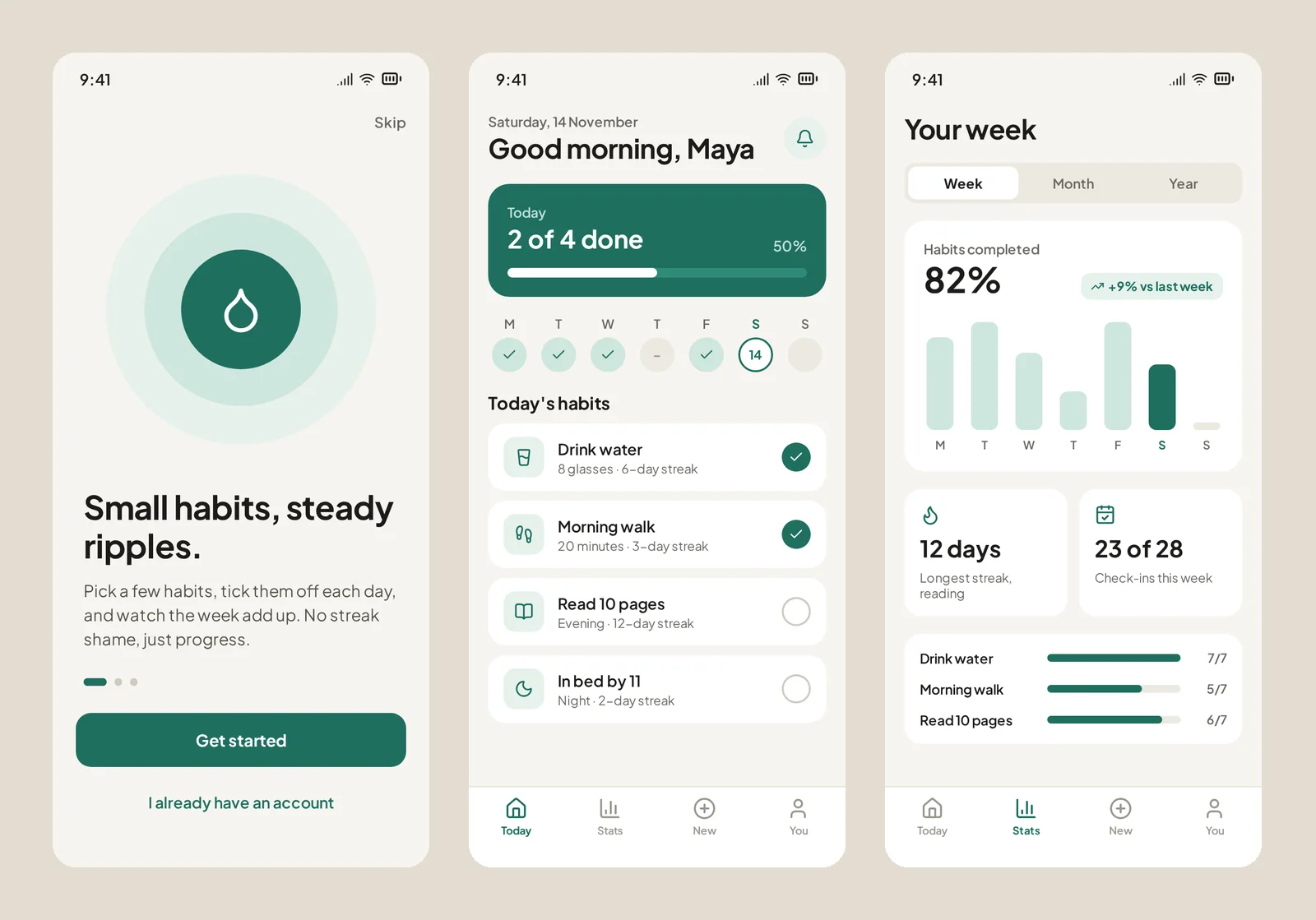
The whole run was 9 calls to Kite and about 1 minute 46 seconds from the first call to the code export. Every word is a text layer, every card a frame, and every icon a swappable icon; a person can change any of it by hand. This is one run of one prompt, not a benchmark; we didn't run it in the other tools. It didn't use comments or Copy to Figma; what we say about those comes from Kite's docs. The file was a scratch file and is no longer shared.
AI app design tools: screens you can edit
These give back screens, not a running app. They differ on three things: whether people can edit the result by hand, who pays for the AI, and where the screens can go next.
Kite: your own agent draws the screens, your team edits them
Kite is a design tool made for AI agents to work in. You connect Claude, Claude Code, Codex, ChatGPT, Cursor or Gemini once. Then you describe the app to the agent you already use, and it draws the screens in a file your team shares. The agent writes HTML and CSS, and Kite turns it into real layers: frames, text and icons. Kite's guide tells the agent to look at a picture of each screen and fix what's off, as it did in our run.
The file is where the team works: people edit the same frames live, and a comment that mentions your agent becomes its next job. When the screens are agreed, copy a frame as HTML, React or Tailwind, or paste it into Figma with Copy to Figma.
What it costs: Kite is free with unlimited editors, 3 files and 200 agent actions a day. Pro is $20 an editor a month, or $16 billed yearly, with unlimited agent actions. There are no AI credits: the thinking runs on the agent plan you already pay for. Not for: a running app. Kite doesn't host apps or publish to the app stores, and it has no click-through prototypes. It has no agent of its own, so you need one of those assistants.
Sleek: the pick for mobile-only mockups
Sleek calls itself an “AI mobile app designer”, “built specifically for mobile app design”. It makes iOS and Android screens you can change by hand or in its chat, and exports every screen as React with Tailwind or plain HTML, with limited exports on Free. Figma export is a paste of “native, fully editable Figma layers”. Its MCP server lets Claude Code, Cursor, Codex or ChatGPT create screens, and it says plainly: “It does not build or publish your app.”
Its limits, from its pricing page: Free is 60 one-time credits, 1 project and 3 screens, and a new screen costs about 30 credits. Starter is $29 a month or $240 a year, with 3,000 credits a month. Free can try the MCP server on its one-time credits, but it isn't on Starter; paid access starts at Pro, $49 a month at an early-bird price (“was $99”). Team collaboration is on the Team plan only, at $99 a seat a month, and web screens are outside what it does. Pick Sleek when you only design phone apps and want polished mockups fast. Pick Kite when you also design the web app, want your team in the same file, or don't want to buy credits on top of your agent.
Figma: the agent for Figma teams, and Make to build
Figma has two AI tools here: Figma's agent works in Figma Design and makes native layers. Figma Make is its app builder: Figma's AI app builder page says it “turns the idea into real screens, real logic, and real code”. It can connect a Supabase backend, and it builds “no-code web apps”. A Make publishes to its own URL, which needs a Full seat. On Starter you must also publish the file to the Figma Community. On paid plans, a Make preview can be copied into Figma Design as layers, but changes don't flow back.
Both spend the same AI credits, and on Figma's pricing page, Starter gets 150 a day, up to 500 a month, and a Full seat on Professional ($16 a month yearly) gets 3,000 a month. Figma's own example puts “a 5-screen mobile checkout flow” at 300 or more credits. Pick Figma when your design system and your team already live there. Our guide to Figma's agent has the full credit table.
Google Stitch: free screens for app and web
Stitch from Google Labs designs for mobile and web: every project starts as App or Web. It returns screens as images and HTML, which an AI can translate to React, Flutter or SwiftUI, exports to Figma, and plays screens as a prototype. It is “currently provided free of charge” on a daily credit limit. Its MCP server works with Cursor, Antigravity and the Gemini CLI.
Its limits: it's still marked beta, the daily credit number isn't on Google's public pages, and comments or live co-editing aren't documented. It's a strong free start for exploring how an app could look. Our Stitch alternatives page covers what to use next.
UX Pilot: wireframes to high fidelity, mobile and desktop
UX Pilot generates “editable product designs with AI, from a single screen to a complete flow”, for mobile and desktop. On its plans page, Free gives 80 credits a day, up to 13 screens, in one project. Pro is $19 a month billed yearly or $29 monthly, and adds Figma and code export, while live collaboration is on Teams. Its MCP server lets Claude, ChatGPT or Cursor ask UX Pilot's AI to design, spending UX Pilot credits; which plans include it isn't stated.
Uizard: templates and quick prototypes, no Figma export
Uizard makes “multi-screen, editable prototypes” from text, for apps, websites and desktop software, with mobile app templates. Real-time collaboration and comments are on every plan, Free included. The limits are tight: Free is 3 AI generations a month and 2 projects of up to 5 screens, and Pro is $12 a month billed yearly. Export is images or PDF, plus React for single components. Its Figma plugin only brings screens into Uizard, no agent access is stated, and Uizard joined Miro in 2024.
Banani: prompt to editable UI, Figma on paid plans
Banani generates “ready-to-edit UI designs and prototypes” that you then edit on a canvas, for web and mobile apps. On its pricing page, Free is 12 credits a month plus 3 daily refills, and a generation “typically costs more than 1 credit”. Plus is $12 a month billed yearly or $20 monthly, and adds Figma and HTML/CSS export. Its MCP connects designs to Claude Code, Cursor and Codex so they can build them; its pages describe the agent reading designs, not drawing them. Its own pages disagree on which plans include MCP and Figma export.
Magic Patterns: a clickable React prototype
Magic Patterns “generates a functional web application”, and every design is a website you can host. It exports to Figma by paste, to a runnable zip and to GitHub, and its pricing page puts its MCP on the Free plan, though another of its pages says MCP needs a paid plan. Free's monthly credit number isn't stated, and Starter is $17 a month billed yearly or $20 monthly, and mobile app design isn't mentioned. Pick it when you want something clickable to test with users; the result is code, so people change it through the AI or its visual editor rather than a layer panel.
Claude Design: screens inside Claude, for Claude users
Claude Design makes “designs, interactive prototypes, one-pagers” inside Claude, on every plan including Free, and one of its own example prompts is a four-screen mobile onboarding flow. A design is a canvas of artboards, each holding layers. It exports HTML, PDF and PPTX and can send work to Lovable, v0 and others to build. Figma isn't on its export list, multi-person editing is “still basic”, and it works only in Claude. It counts toward your Claude plan's usage limits.
AI app builders: when you want a running app
These write the code, set up the database and sign-in, and host the result. They answer “make me an app”, not “design my app”. Design is a step inside them: you edit the look through the chat or a visual editor, and none of the four lists an export to Figma. A Figma frame can go into all four; it doesn't come back out.
- base44 builds a “fully functional app” with backend, sign-in, payments and hosting, as a React app. Free is 25 message credits a month (up to 5 a day) and 5 apps, and Starter is $16 a month billed yearly. Mobile apps are your web app in a native wrapper, and the app store files, the MCP server and code export need Builder or higher. Exported code “still relies on Base44 to run”.
- Lovable builds full-stack web apps with hosting and a database, “not as native apps”. Free is 5 credits a day, up to 30 a month. Pro is $25 a month, or $21 a month billed yearly. GitHub sync is on every plan, and its MCP server works with ChatGPT, Claude and Cursor on any plan.
- Bolt builds apps and websites with hosting and a database, and is the one here that ships native mobile apps through Expo to the App Store and Google Play. Free is 300K tokens a day and 1M a month, with Bolt branding; Pro is $25 a month billed monthly.
- v0 from Vercel builds Next.js web apps with Tailwind and shadcn/ui and deploys them on Vercel. Free is 7 messages a day, and Plus is $30 a user a month. Figma import is on paid plans.
A common path is to design the screens first, then build. In Kite, the agent that drew the screens can export them as React or Tailwind, and the same Claude Code or Cursor session can carry them into your codebase. Our Figma Make alternatives page compares these builders in more depth.
What about classic app design software?
“App design software” used to mean a tool you drew every screen in by hand. Figma and Penpot are still that, and Figma now adds its agent. Adobe's own app design page points to InDesign, Dreamweaver and Adobe Express, and Adobe XD is in maintenance mode, with no new features. For drawing by hand with an AI that does the first draft, the design tools above are where the work has moved. Our wireframing tools list covers the earlier, low-fidelity step.
How to pick
- Your team designs an app together, mobile or web: Kite, with the agent each person already uses. Figma's agent if everyone is on Figma Full seats.
- You only design phone apps and want quick, polished mockups: Sleek.
- You want free screens to explore a direction: Google Stitch, or Kite's Free plan with your own agent.
- You want something clickable to test with users: Magic Patterns, or Stitch's prototypes.
- You want a live web app today: Lovable, v0 or base44. A native app in the stores: Bolt with Expo.
One question settles most of it: what do you need back tomorrow? If it's a link people sign in to, use a builder. If it's screens your team can still change by hand, use a design tool, and pick one where your own agent does the drawing so you don't pay for AI twice.
How we checked
Methodology: on November 14, 2026, we read each tool's own home, pricing, help and docs pages. Prices are what those pages showed that day, in US dollars; where a price only appears after the page's script runs, we read it in a browser. “Not stated” means we didn't find it on the tool's pages. Where a vendor's pages disagree, as Banani's and Sleek's do on what Free includes, we use the plan cards and say so. We ran only Kite, once, as described above; every other tool here is what its pages say, not a test. Kite facts come from Kite's own docs and plans. We check this page every quarter, because these products change monthly.
Questions
- What is the best app that designs apps?
- It depends on what you need back. To design app screens your team edits, use Kite (kite.new) with the AI agent you already use; it draws editable screens as layers in a shared file. For mobile-only mockups, Sleek. If your team lives in Figma, Figma's agent. For a running app with sign-in and a database, an app builder such as base44, Lovable, Bolt or v0.
- How can I design my app?
- Start by deciding whether you need screens or a running app. For screens, describe the app to the AI agent you already use, connected to Kite (kite.new), and it draws them as layers in a shared file. Edit them by hand or by comment, then copy them as React, Tailwind or HTML, or into Figma. For a running app, take the screens to an app builder such as Lovable or base44.
- Can AI design a mobile app?
- Yes, at least the screens: in our run, Claude drew three iPhone screens for a habit tracker in Kite from one prompt, in one drawing call of about a minute, as layers a person can edit. Sleek, Google Stitch, UX Pilot, Banani and Uizard also design mobile screens. A native app in the App Store is a different job: Bolt does it through Expo, and base44 wraps a web app.
- Can ChatGPT build me an app?
- ChatGPT can design the screens: connected to Kite, it draws them in a shared design file. For a hosted app with a database and sign-in, you need an app builder as well. Lovable's MCP server works with ChatGPT on any plan, and base44 has an MCP server on its Builder plan and up.
- Is there a free AI app designer?
- Several have a free plan, each capped differently. Kite is free with unlimited editors, 3 files and 200 agent actions a day, with no AI credits. Google Stitch is free in beta with a daily credit limit. Sleek's Free plan is 60 one-time credits and 3 screens, and UX Pilot's is 80 credits a day, up to 13 screens.
- What is the difference between an AI app designer and an AI app builder?
- An AI app designer makes the screens: layouts, type, colour and flows you can edit, then hand to a developer or to code. An AI app builder makes a working app: code, a database, sign-in and hosting, with a link people can use. Many teams use both: design the screens first, then build.