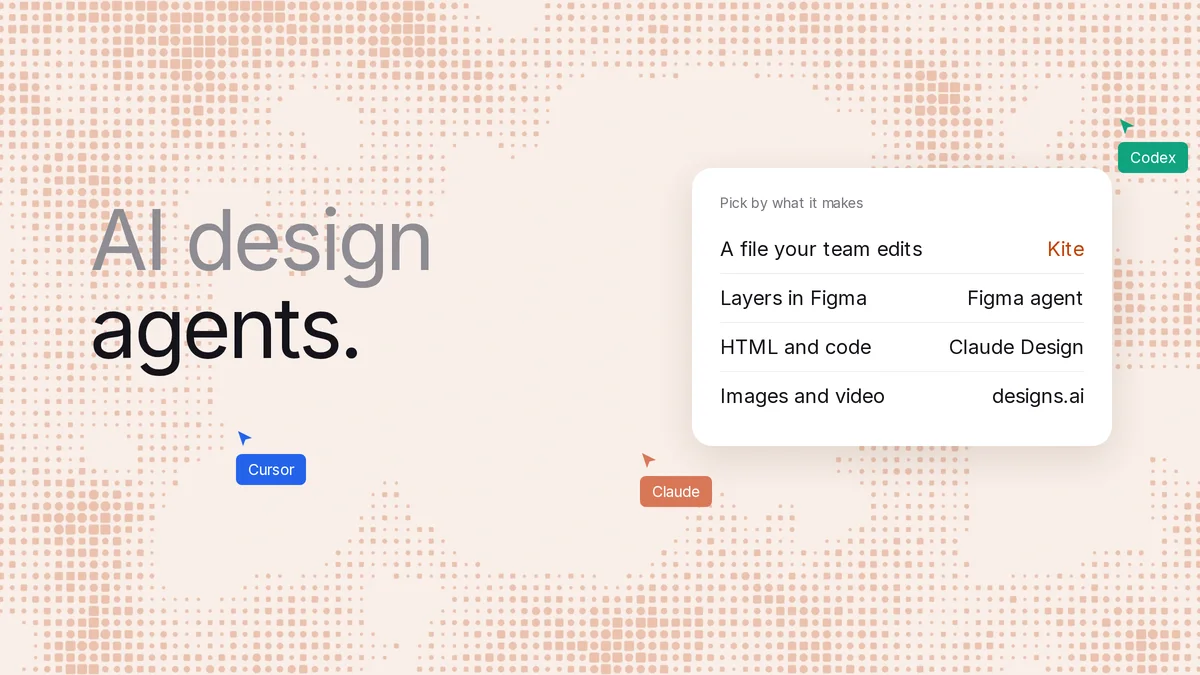
Short answer: an AI design agent is an AI that takes a brief in plain words and does the design work itself: it draws, looks at what it made and fixes it. The best one depends on what you need back. For a design file your team edits, use Kite (kite.new) with the agent you already pay for, Claude, Codex, ChatGPT, Cursor or Gemini. Already in Figma? Try Figma's agent. For quick screens, Google Stitch. For ads and video, Wireflow or designs.ai.
Key takeaways
- We checked 11 tools that call themselves design agents, or ship one, on each one's own pages on November 14, 2026.
- They split by what they hand back: a design file of layers, screens and code, or images and video. That matters more than the model.
- Most ship their own agent, and most bill its AI separately. Kite, Open Design and Wireflow are built to work with the agent you already use.
- Three hand your team a shared design file of layers: Kite, Figma's agent and Canva. Most of the rest return code, images or video.
- In our run, Claude Code drew a two-plan pricing section in Kite in one call, in about a minute, every part a layer.
We make Kite, and it's on this list. Every fact about the other tools comes from their own pages, fetched on November 14, 2026 and linked where we use them. Where a rival fits a job better, we say so.
What a design agent is
A design agent is software that does multi-step design work from a brief. It doesn't answer in one shot. It plans, calls tools to draw or generate, checks the result and goes again. It's one case of what researchers call an LLM-based autonomous agent, and a 2023 survey on arXiv, revised in 2025, reviews how those are built and tested. img.ly puts it as an AI tool that “takes a design brief in natural language, produces an editable design on its own, and refines it through conversation”. Wireflow's version stresses the tools: an agent “produces design assets by calling tools instead of doing everything in one prompt”.
The word now covers very different products. Figma's agent edits layers in a Figma file. LangChain's writes slides and films as code from a Slack thread. Wireflow's returns a PNG. So the useful question isn't “which agent is smartest”. It's “what do I get back, and can my team keep working on it?”
Built-in agent, or the one you already use
There are two ways to get one, and they cost differently.
- A built-in agent. The tool ships its own agent: Figma, Canva, Claude Design, Stitch, Magic Patterns, UX Pilot, designs.ai. Most bill its AI in their own credits or allowance. Claude Design uses your Claude plan instead, and Stitch is free for now. Either way you learn one more assistant, and outside Claude Design and Stitch's free tier, you pay for AI on top of the agent you already use.
- Your own agent, given a canvas. The agent you already use connects to the design tool over MCP (Model Context Protocol), the standard way an AI agent calls another product's tools. Kite is built for this. Open Design does it with a coding agent on your computer, and Wireflow exposes its workflows as MCP tools.
The second way also means one agent can do the whole job. The same Claude Code session that writes your app can draw its screens, read your comments and export the code, without moving the work between two assistants.
The 11 at a glance
“Team edits it” means people can change the result by hand in a shared place, not only prompt it again.
| Agent | What it makes | Team edits it? | Your own agent? | To start |
|---|---|---|---|---|
| Kite | Layers in a shared design file | Yes, live, with comments | Yes: Claude, Codex, ChatGPT, Cursor, Gemini | Free, 200 agent actions a day |
| Figma's agent | Layers in a Figma file | Yes, Full seats | Figma's; outside agents via its MCP | Starter: up to 500 credits a month |
| Canva AI | Editable Canva designs | In Canva | Via Canva's MCP, on Canva's allowance | Limited on Free; Pro $12 a month yearly |
| Claude Design | Artboards in a Claude artifact; HTML, PDF, PPTX | Comment or edit on Pro and up | Claude only | Claude's Free plan |
| Google Stitch | Screens as images and HTML | Not stated | Stitch's; MCP for coding agents | Free, daily credits |
| Magic Patterns | A React app | Yes, with comments | Its own; MCP for coding agents | Free credits; Starter $20 a month |
| UX Pilot | Wireframes, screens, prototypes | Live editing on Teams | Its own; MCP for coding agents | 80 credits a day free |
| Open Design | HTML and CSS files on your computer | View and comment on team plans | Yes: Claude Code, Codex and more | Free and open source |
| Wireflow | Images and video | The workflow, not the image | Yes, workflows as MCP tools | 60 free credits |
| designs.ai | Images, video, copy, slides | Not stated | Not stated | $9.90 a month yearly, no free plan shown |
| LangChain design agent | Stills, decks, motion, as code | In a separate canvas | It is the agent; you host it | Free code; you pay model and hosting |
Agents that make a design file your team edits
These three hand back layers in a shared file: text you can retype, shapes you can move, with your team in the same place. If you design a product with other people, start here.
Kite: the agent you already use, in your team's file
Kite is a design canvas made for agents to work in. You connect Claude, Claude Code, Codex, ChatGPT, Cursor or Gemini once, and it draws in a file your team shares. The agent writes HTML and CSS, and Kite turns it into real layers: frames, text, icons from icon libraries. Kite's guide tells the agent to look at a picture of its work and fix what's off before it says it's done.
The file is where the team works. People edit the same frames live, and a comment that @-mentions your agent becomes its next job. When it's time to build, you copy a frame as React, Tailwind or HTML, or paste it into Figma with Copy to Figma. Your colours, type and spacing live in a design system the agent reads before it draws.
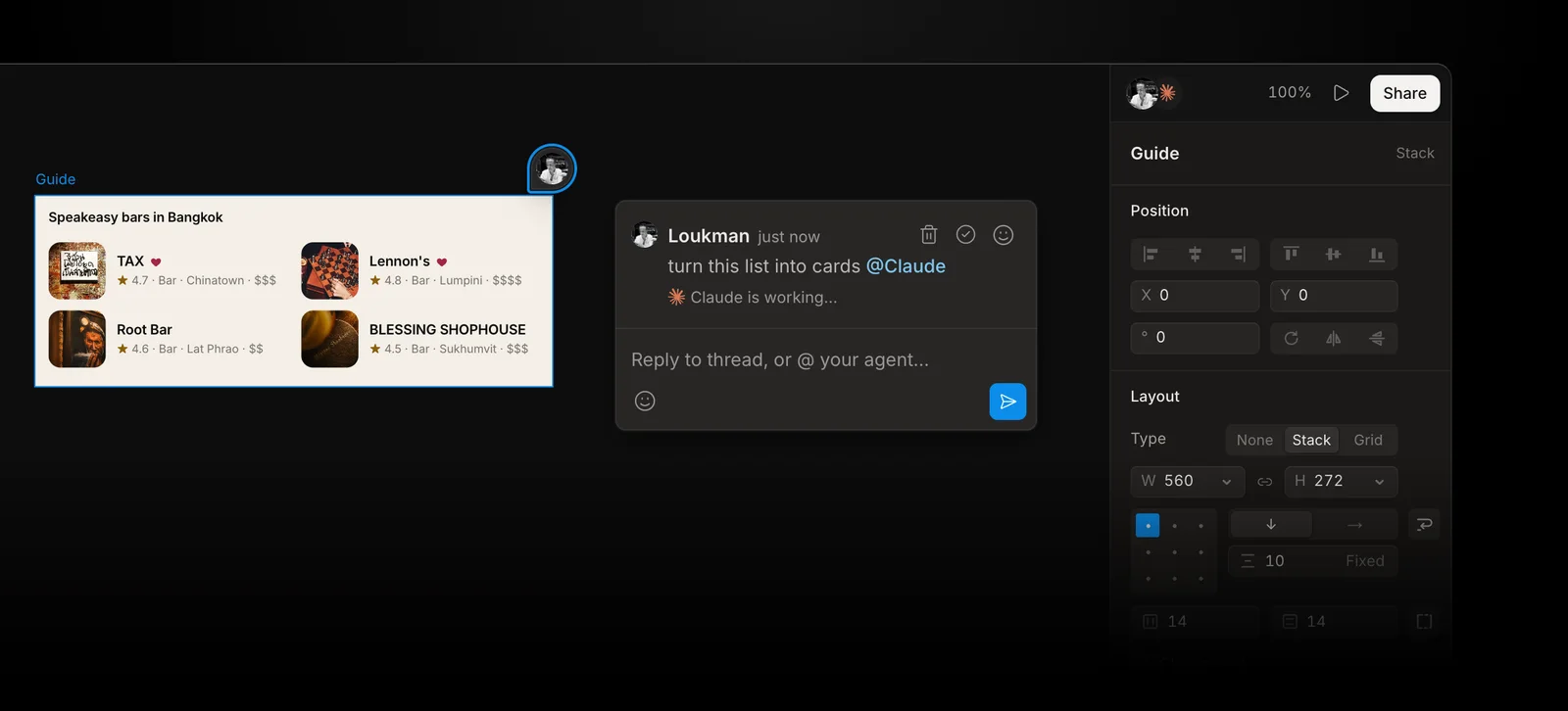
What it costs: Kite is free with unlimited editors, 3 files and 200 agent actions a day. Pro is $20 an editor a month, or $16 billed yearly, with unlimited agent actions. There are no AI credits: the thinking runs on the agent plan you already have. Its limits: Kite has no agent of its own, so you need one of those assistants, and it isn't open source or self-hosted.
Figma's agent: the pick if your team lives in Figma
Figma's agent is “the AI agent that lives on the canvas”. It makes native layers in Figma Design “using your actual components”. It left beta on October 6, 2026, and now spends Figma AI credits. Its help center lists it on Starter, Professional, Education, Organization and Enterprise.
Its limits, from Figma's own pages:
- Only people with a Full seat and edit access can ask it to change a shared file. Other seats can chat, and edit only their own drafts.
- Credits run out. On Figma's pricing page, Starter gets 150 a day, up to 500 a month, and a Full seat on Professional ($16 a month) gets 3,000. Figma estimates 300 or more for “a 5-screen mobile checkout flow”.
- Vector editing, icons, slots and prototyping are “coming soon”, and exporting assets isn't supported.
- It's Figma's agent. Claude Code, Codex or Cursor can also write to Figma through Figma's MCP server. That needs a Full seat outside your drafts, and Figma says it “will eventually become a usage-based paid feature”.
Pick it when your design system and your team are already in Figma and everyone who prompts has a Full seat. Pick Kite when you want any editor, Free included, to work with the agent they already use, without buying AI credits on top of the agent they already pay for. More on that trade in our Figma MCP alternatives.
Canva AI: for marketing designs, not product screens
Canva calls Canva AI 2.0 “a conversational, agentic platform”. It builds designs “using individual, editable objects rather than generating a static or locked flat image”, so you can change them in Canva afterwards. Canva also has an MCP server, so ChatGPT, Claude, Codex, Cursor and Gemini can create designs there.
The catch is the allowance. Conversational design with Canva AI 2.0 counts as an Ultra AI tool, and the Free plan gets “no access to Ultra AI tools”. Pro is US$12 a month per person billed yearly, or $18 month to month, and using Canva from ChatGPT or Claude spends the same allowance. Canva's help center and its pricing page disagree on whether Canva AI is on Free at all. It suits social posts, decks and print. For an app's screens, with components and code export, the tools above and below fit better.
Agents that make screens and code
These return screens built as code, or pictures of screens with HTML beside them. They're fast for a first version. What they don't give you is a shared file of layers your designers keep editing.
Claude Design: inside Claude, for Claude only
Claude Design turns a description into “a first version, on brand”. It's now a template you start in any Claude chat, in Claude Code or from the Artifacts tab, on every plan including Free. A design is a canvas of artboards inside a Claude artifact, and each artboard holds layers of text, shapes and images. You can “edit text directly” and drag elements by hand, export to PPTX, PDF or HTML, and send work to Canva, Lovable, Vercel and others. Figma isn't on that list.
Its limits: it uses your Claude plan's limits, sharing by link needs Pro or above, and no route from ChatGPT, Codex or Cursor is stated. The standalone site, claude.ai/design, turns read-only on December 14, 2026, though the product continues (what closes, and what doesn't). Our Claude Design review covers it in full.
Google Stitch: the free one for fast screens
Stitch is “an AI-native software design canvas” from Google Labs, and Google introduced its “design agent” in March. It makes screens as images and HTML, exports to Figma with auto layout, and is “currently provided free of charge” on a daily credit limit that resets at midnight UTC. Its MCP server lets Cursor, the Gemini CLI or Claude Code work with your Stitch projects.
Its limits: the daily credit number only shows once you sign in, and comments or live co-editing aren't documented. It's good for exploring a direction quickly. Our Stitch alternatives page covers what to use next.
Magic Patterns: a working React prototype
Magic Patterns “generates a functional web application” in React, TypeScript and Tailwind, and its docs call the AI “the agent”. It has been “multiplayer since day one”, with inline comments, and copies into Figma. Free comes with monthly credits, the number isn't stated, and Starter is $20 a month. Pick it when you want something clickable to test with users. The result is a codebase, so a designer reshaping it works through the agent, or its Visual Edit mode for styles, text and layout, rather than a layer panel.
UX Pilot: wireframes and screens, Figma on paid plans
UX Pilot is “the AI product design tool built specifically for UX/UI”, on its own model, Glide. It uses the word agent for add-ons, such as Nodey, “the Figma-native AI design agent”. It makes wireframes, high-fidelity screens and flows. Free gives 80 credits a day, up to 13 screens, in one project. Exports to Figma and to code are on paid plans, from $19 a month billed yearly, and live collaboration is on Teams.
Open Design: open source, your coding agent, files on your computer
Open Design is a free, open-source desktop app under Apache-2.0. Like Kite, it uses the agent you already have: it runs “through a coding agent installed on your computer, such as Claude Code or Codex”. Projects are HTML and CSS files in a folder, with exports to HTML, PDF, PNG and PowerPoint, and “no Figma export”. Its own blog says “it's not a multiplayer canvas”: team plans can view and comment. Pick it if you want open source and local files. Pick Kite if your team needs to edit the same design together.
Agents that make images, video and marketing graphics
These are design agents in the creative-production sense. They're strong at volume: ads, product shots, social clips. None returns a layered file for product design.
Wireflow: image and video workflows any agent can call
On Wireflow you build a visible workflow, such as a brief wired into an image model. Any agent can run it: “every published workflow is both a REST endpoint and a hosted MCP tool”, and it works with Claude, ChatGPT, Codex and Cursor. It says plainly there's “no brush, no layers, and no masking”, with PNG or JPG out. On its pricing page, Free is 60 starter credits, video is on paid plans, and Starter is $36 a month. Pick it for ad and product-shot volume.
designs.ai: a creative team of agents
designs.ai sends a brief to “specialist agents” for brand, image, storyboard, video, slides and audio, routed across Claude, ChatGPT, Gemini and Grok. Plans start at $9.90 a month billed yearly, and its pricing page shows no free plan. Comments, layers and MCP access aren't stated on its pages.
LangChain's design agent: build and host your own
LangChain's open-source design agent is the one LangChain runs as Content Studio. You mention it in a Slack thread and it makes “on-brand stills, decks, diagrams, charts and motion graphics”, all as code: “a slide is HTML, a film is an animation timeline”. You need a LangSmith account and a model key. The code is free, a median request costs about 50 cents in model spend, and hosting is paid. People edit layouts in a separate canvas, paper.design, as LangChain's blog describes. Pick it if you have engineers who want to own the agent.
One prompt, run in Kite
On November 14, 2026 (Bangkok time), we gave Claude Code (Opus 5.5) one prompt in a new Kite file: “Design the pricing section for Brightloop, a habit-tracking app: a Free plan and a Plus plan side by side.” It read Kite's drawing guide, drew the whole section in one call, looked at the picture Kite sent back and stopped. Start to finish took about a minute and six calls to Kite, counting the code export and the picture below.
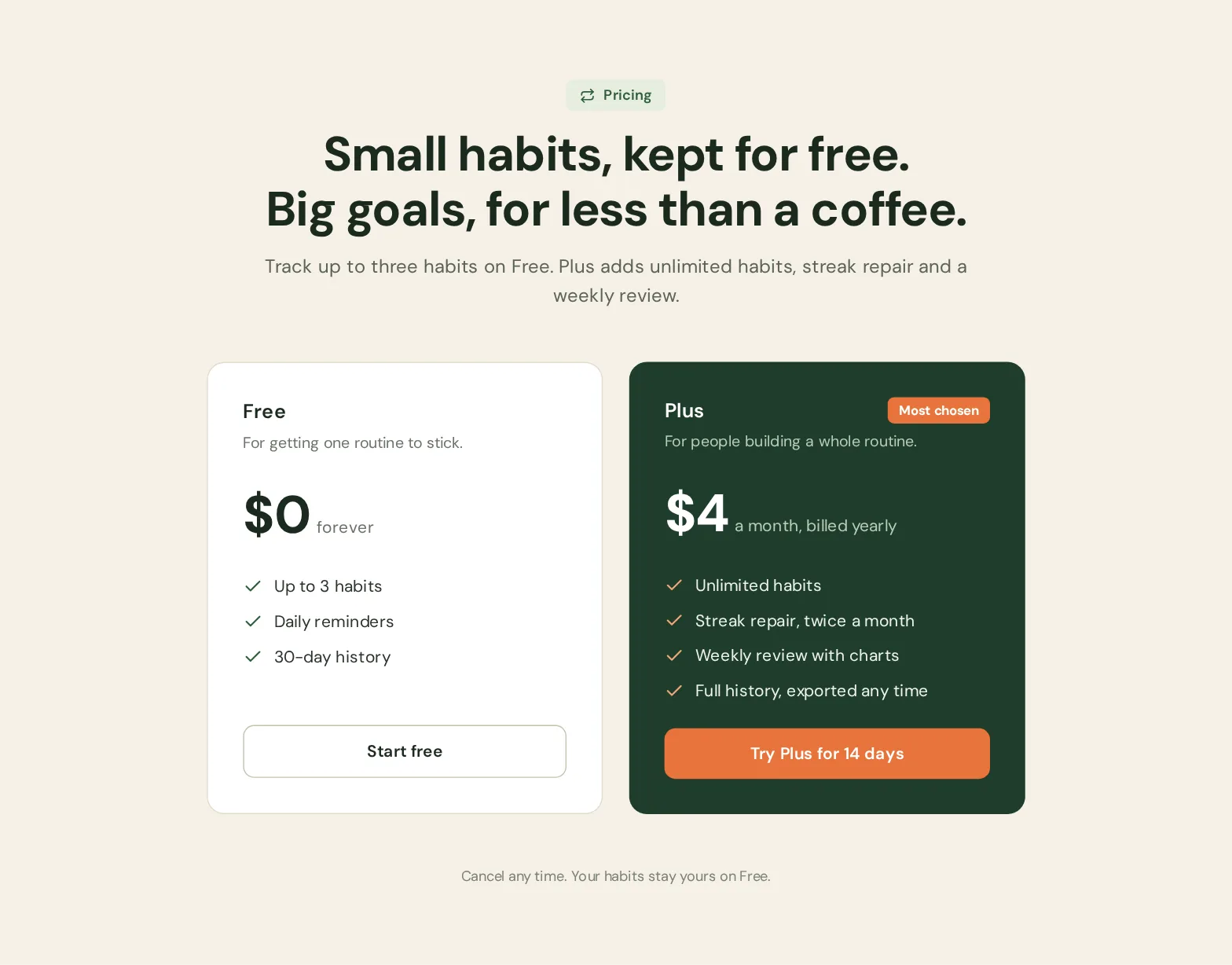
Then we copied the Plus card out as React: plain JSX with style objects and the tick icons as inline SVG, ready to paste into a component. That's one run of one prompt, not a benchmark. It shows the shape of the work: a file to edit, and code when you need it.
How to pick
- Your team designs a product together: Kite, with the agent each person already uses. Figma's agent if everyone is already on Figma Full seats.
- You want a quick, free first draft of some screens: Google Stitch, or Claude Design if you're on Claude.
- You want something clickable to test: Magic Patterns.
- You want open source and local files: Open Design.
- You make ads, product shots or video: Wireflow, or designs.ai. Canva AI for social posts and decks.
- You want to build and run your own agent: LangChain's, from its repository.
One check settles most of it. Ask where the work lives the day after the agent finishes. If the answer is “in a PNG” or “in a chat”, your team will be prompting again for every change. If it's a shared file of layers, they can just edit it.
How we checked
Methodology: on November 14, 2026, we read each tool's own product, pricing, help and docs pages, and the GitHub repository for LangChain's agent. Prices are what those pages showed that day, in US dollars, and “not stated” means we didn't find it on them. Where a vendor's pages disagree, as Canva's do on the Free plan, we say so. We ran only Kite, once, as described above; every other tool here is what its pages say, not a test. Kite facts come from Kite's own docs and plans. We check this page every quarter, because these products change monthly.
Questions
- What is an AI design agent?
- An AI design agent takes a brief in plain words and does the design work itself, step by step. It calls tools to draw, looks at the result and changes it until it fits. A chatbot that returns one image isn't an agent in this sense. What separates the agents is what they hand back: a design file your team can edit, code, or images.
- What is the best AI design agent?
- For product design a team will keep working on, Kite with the agent you already use, such as Claude Code, Codex, ChatGPT or Cursor: it draws real layers in a shared file. If your team already lives in Figma, Figma's agent. For fast free screens, Google Stitch. For ads, product shots and video, Wireflow or designs.ai.
- Is there a free AI design agent?
- Several have a free tier. Kite is free with unlimited editors, 3 files and 200 agent actions a day. Google Stitch is free with a daily credit limit. Figma's agent works on the Starter plan with up to 500 AI credits a month, and Claude Design is on Claude's Free plan. Each free tier caps something different.
- Can Claude or ChatGPT be a design agent?
- Yes, once they have a canvas to draw on. Connected to Kite over MCP, Claude, Claude Code, Codex, ChatGPT, Cursor or Gemini can draw, edit and check layers in a shared design file. Claude also has Claude Design built in, which makes designs inside Claude, and Figma's MCP server lets several of them write into Figma.
- Is AI replacing designers?
- Not in what we saw. In our run an agent drafted a pricing section in about a minute, but someone still decides what it should say, checks it against the product and edits it. That's why this list ranks agents by whether your team can edit what they make, not only by how fast they draw.
- How do I build my own design agent?
- LangChain's open-source design agent is a working starting point: it runs in Slack, makes stills, decks and motion graphics as code, and needs a LangSmith account and a model key. If you want an agent for product design rather than graphics, connecting an agent you already use to a canvas such as Kite needs no code at all.