Kite vs UX Pilot: A UX Pilot alternative your agents design in.
Short answer: Kite is the better pick when the agent you already use should do the design, in a file your team edits live on every plan, with no AI credits. UX Pilot is the better pick when you want its own model to generate whole flows, several directions and UX reviews from a prompt; your agent can reach it over MCP, its AI runs on UX Pilot credits, and real-time collaboration starts on its Teams plan.
Teams whose own agents design beside them in one file they all edit live.
Kite costs
Free to start. Pro $20 per editor a month, $16 billed yearly. No AI credits.
Kite and UX Pilot at a glance.
What each one is, and what to take away.
Kite is a design tool where the agents you already use, such as Claude, ChatGPT or Cursor, draw real layers in a file your team edits. A design in Kite is HTML and CSS. Kite runs no model to design: your agent runs on the plan you already pay for.
UX Pilot is, in its words, "an AI product design tool built specifically for UX/UI": its own design model, Glide, turns a prompt, a PRD, a screenshot or a website into wireframes, polished screens and whole flows. It runs in the browser and as Nodey, a plugin inside Figma, and its MCP server lets Claude, ChatGPT or Cursor reach it.
UX Pilot designs with its own model, Glide, on credits: 80 a day on Free, up to 13 screens, and 750 a month on Pro. In Kite the agent you already use draws, with no AI credits.
Both have a hosted MCP server with OAuth sign-in. UX Pilot's lets your agent bring in HTML as a screen or ask UX Pilot's AI to design; Kite's gives your agent 61 tools to draw, edit and check layers itself.
Real-time collaboration is on UX Pilot's Teams plan, from 2 seats. In Kite everyone in the file edits at once, on every plan.
UX Pilot's export to Figma and code starts on Pro. Kite copies frames to Figma, or as HTML, React or Tailwind, on the free plan too.
UX Pilot is ahead on generating: whole flows and several directions from one prompt, predictive heatmaps and UX reviews, clickable and React prototypes, and Nodey inside Figma.
For example, take a team of 3 who want to edit the same screens live. In UX Pilot, real-time collaboration starts on Teams: $93 a month for three seats billed yearly, with 900 credits each for its AI. In Kite all 3 edit live for free in up to 3 files, or for $48 a month on Pro billed yearly, and the agent each of them already uses does the drawing. UX Pilot's price includes its own AI; Kite's leaves the AI to the plan you already pay for.
Key differences.
6 points where Kite does more, or where UX Pilot's pages don't show the feature.
Feature
Kite
UX Pilot
Local MCP server
Built into Kite for Mac and Windows, for agents on your machine
None listed: stdio clients bridge to the hosted server
AI credits
None: your agent runs on the plan you already pay for
80 a day on Free, 750 a month on Pro, 900 a user on Teams
Export
PNG, JPG, WebP, AVIF, SVG and PDF, or copy as HTML, React or Tailwind
Figma and code from Pro; PDF, images and zip too, plans not stated
Live cursors
Live cursors and selections for everyone in the file
Real-time collaboration on Teams, from 2 seats
Desktop app
Kite for Mac and Windows, with a tab for each file
Browser only, plus Nodey inside Figma
Free plan
Unlimited editors and viewers, and 3 files, free
80 credits a day, up to 13 screens, 1 project; no Figma or code export
Where UX Pilot is ahead: it generates the design for you with its own model: whole flows and several directions from one prompt, predictive heatmaps, UX, accessibility and persona reviews, clickable and React prototypes with hosted links, a website cloner and product videos. Its Nodey plugin designs inside Figma, Teams pools credits across up to 15 seats, and none of that needs an agent of your own.
UX Pilot's column comes from its own pages, starting with its plans, as of November 2026. The other pages we read are linked where each fact is used.
Kite and UX Pilot, point by point.
How they differ, from UX Pilot's own docs and pricing.
What each one is for
UX Pilot calls itself “an AI product design tool built specifically for UX/UI”, and adds that it “is not a graphic design or illustration tool, and it is not a website builder”. You give it a prompt, a PRD, a screenshot or a website. Its own model, Glide, returns wireframes or finished screens, several directions for one brief, and whole flows of connected screens. Version 2.0 came out in July 2026 with Glide, the MCP server and simpler pricing.
Kite starts from the other end. It runs no model of its own: the agent you already use, such as Claude, ChatGPT or Cursor, draws real layers in a file your team edits, and you change any of it by hand or by asking again.
Two ways your agent works with UX Pilot
UX Pilot's MCP server lives at mcp.uxpilot.net, signs you in with OAuth, and works with Claude, Claude Code, ChatGPT, Cursor, Devin and VS Code with Copilot. Its 15 tools let an agent work in two ways. It can hand over work it made itself: import its HTML as a new screen, capture a live web page, or change a screen's HTML directly, which uses “no AI and no credits”. Or it can pass the job on to UX Pilot's AI: the design tool runs “the design agent on a standard, pro, or ultra tier”, with credits, and “paid calls ask the user first”.
In Claude, UX Pilot's guide describes the second way. You ask for a screen or a flow, a preview shows up in the chat, and you click Open in UX Pilot to keep editing there. Which plans include the server isn't stated; its MCP page says access “is tied to your UX Pilot account”. Its MCP page lists no local server, and stdio clients reach the hosted one through mcp-remote.
In Kite the agent is the designer. It gets 61 tools to draw frames, text and components, edit what is there, and render a frame to look at its own work, through the hosted server or the local one built into Kite for Mac and Windows. Several agents can work in one file beside your team. How each one connects is in the setup guide.
A shorter list of tools has an upside on your plan. A 2025 study on arXiv of three other MCP servers, none for design, found that “prompt size grows roughly linearly with the number of enabled tools”, so UX Pilot's 15 should take up less of your agent's context than Kite's 61 when all it does is hand work over. The study measured no design tool, so read that as a direction, not a number.
A measured run in Kite
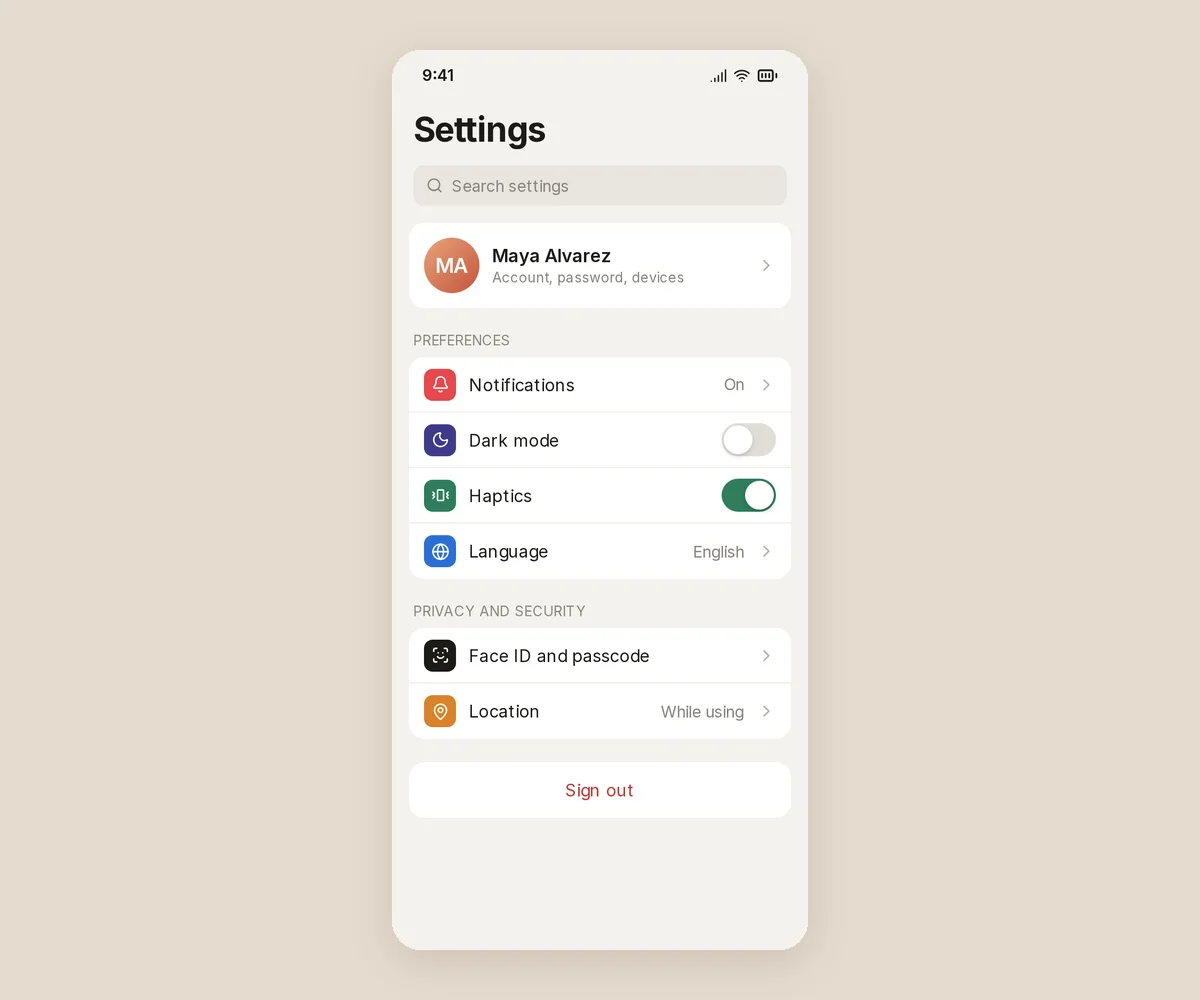
On November 17, 2026 we gave Claude (Opus 5.5) in Claude Code one prompt through Kite's hosted connector: a phone settings screen, in a new, empty file. Two tool calls, one to make the file and one to draw the screen, took 31.7 seconds, and Claude looked at the result and needed no fixes. It is one run, not a benchmark, and it spent no credits because Kite has none. The method is on Claude in Kite vs Figma.
Claude's settings screen in Kite: editable layers, with nothing generated by a model of Kite's own.
Credits, and what they buy
UX Pilot's plans are sold by how much you generate, with “the full design toolkit, on every plan”. Free has 80 credits a day, “daily, no rollover”, which it puts at up to 13 screens. Pro has 750 a month, up to 125 screens, and top-up packs that don't expire. Teams gives each user 900 a month in a shared pool. The design tool on its MCP server spends credits too.
Kite has no credits. Your agent runs on the plan you already pay for, such as Claude or ChatGPT, and Kite Free includes 100 agent actions a day. That plan is a cost of its own: UX Pilot's price includes its AI, and Kite's doesn't, because Kite runs none.
Working together
UX Pilot's canvas has comments and live cursors, and agents can comment, reply, resolve and “make a version from comments” over MCP. On its plans page, real-time collaboration, seats and roles start on Teams, at $39 a user a month or $31 billed yearly, for 2 to 15 seats.
In Kite, everyone in the file edits at once on every plan, with live cursors and comment threads pinned to the design. Free has unlimited editors and viewers in 3 files, and in Kite for Mac and Windows an @-mention in a comment can start an agent at once.
Figma and code
From Pro, UX Pilot sends a screen to Figma as editable layers with auto layout, and exports code. Its plans FAQ lists Figma designs, PDFs, source code, images and zip files. Every plan imports your Figma components, so new screens use them. Nodey, its plugin, is free to install and generates screens as native layers inside your Figma file, reusing your components as instances.
Kite pastes Figma frames in as layers and sends frames back with Copy to Figma, and copies any frame as HTML, React or Tailwind, on every plan. See Figma in Kite, and the Figma Make alternatives for tools that turn designs into running apps.
Price
On UX Pilot's plans page, Pro is $29 a month, or $19 a month billed yearly, and Teams is $39 a user, or $31 billed yearly. Enterprise is priced on request and adds SSO, SCIM and an AI fine-tuned on your brand. Its FAQ says it gives no refunds, “due to high AI model and GPU provisioning costs”.
Kite Pro is $20 per editor a month, or $16 billed yearly, and Team is $35, or $28 billed yearly.
When UX Pilot is the better pick
If you want a tool that generates for you, with no agent of your own, UX Pilot does much more of that than Kite. It offers several directions for one brief, whole flows, a website cloner, predictive heatmaps, UX, accessibility and persona reviews, clickable and React prototypes with hosted links, and product videos. If your team wants the agent it already uses to design, in one file everyone edits live, Kite is built for that. Other generators are compared in AI app design tools.
Bring your own agents. Claude, Cursor, ChatGPT or any MCP client, with no key to copy.
Checkout
Balance
$1,200.35
Payment$30.32
DueAug 9th
Pay
$500.00Remaining balanceRecommended$250.00Half now, half next monthContinue
Claude
L
LLoukmanjust now
make this a checkout: a Pay button under the balance, a Continue under the options, both in the system's primary @Claude
Claude is working… Done by Claude Open chat
Claude Codejust now
Done: Pay under the dues and Continue under the options, both the system's primary at its radius, 32 high, full width.
Reply to thread, or @ your agent…
Around · Checkout
Balance
$1,200.35
Payment$30.32
DueAug 9th
Pay
$500.00Remaining balanceRecommended$250.00Half now, half next monthContinue
Claude
@Claude make this a checkout: a Pay button under the balance, a Continue under the options, both in the system's primary
Run with Claude Code when sent
LLoukmannow
@Claude make this a checkout: a Pay button under the balance, a Continue under the options, both in the system's primary
Claude is working…Done by Claude
Claudenow
Done: Pay under the dues and Continue under the options, both the system's primary at its radius, 32 high, full width.
Ask in a comment, get it doneMention your agent on the frame and send. In Kite for Mac it starts at once with Claude Code or Codex, does the work, and answers in the thread.
Leave a comment. Your agent does it. Pin a comment where the change belongs and mention your agent. It reads the frame and the layer you clicked, does the work and answers in the thread.
Do my Kite requestsIn a browser, requests wait on their comments. Say this to your agent and it works through every one.
$500.00Remaining balanceRecommended$250.00Half now, half next monthContinue
ChoiceFirst one on, with the chip.
Button under it?
Notes on the boardSticky notes and annotations sit beside the work. Agents read them, and leave their own.
Questions. About Kite and UX Pilot.
Is UX Pilot free?
Yes, to start. UX Pilot's free plan needs no credit card and gives 80 credits a day, up to 13 screens, with no rollover, in one project, with every design feature. Export to Figma and code and the website cloner start on Pro, and real-time collaboration on Teams. Kite is free with unlimited editors and viewers in 3 files, every tool in the editor, and 100 agent actions a day.
How much does UX Pilot cost?
Pro is $29 a month, or $19 a month billed yearly, with 750 credits, up to 125 screens. Teams is $39 a user a month, or $31 billed yearly, for 2 to 15 seats with 900 credits each in a shared pool. Enterprise is priced on request. UX Pilot's FAQ says it gives no refunds. Its plans page's search description still says "starting at $14/month"; the prices above are the ones the page shows. Kite Pro is $20 per editor a month, or $16 billed yearly, with no AI credits, since your own agent does the drawing.
What can UX Pilot do?
It generates wireframes and high-fidelity screens from a prompt, a PRD, a screenshot or a website, connects them into flows, and offers several directions for one brief. It edits one section of a screen at a time, makes clickable and React prototypes, runs predictive heatmaps and UX, accessibility and persona reviews, clones a website from its address on paid plans, and makes product videos. Nodey generates screens as native layers inside Figma.
Can Claude or ChatGPT design in UX Pilot?
Yes, through its MCP server: Claude finds it in its Connectors Directory, ChatGPT as a plugin, and Cursor, Devin or any MCP client by its address. Your agent can bring in HTML it wrote as a new screen, edit a screen's HTML directly, which uses no credits, or ask UX Pilot's AI to design, which spends credits and asks you first. Its pages tie access to your account and don't name a plan. In Kite your agent draws and edits the layers itself, with 61 tools and no credits.
Is UX Pilot better than Figma Make?
They make different things. UX Pilot generates design screens and flows, which it can then turn into a React prototype, in its own app or inside Figma with Nodey. Figma Make builds code-backed prototypes and web apps inside Figma, from your design context. UX Pilot's comparison page calls its output design-first screens and Make's code-first React components; its prompt tests are its own, and this page hasn't repeated them. Our Figma Make alternatives page covers Make's credits and plans.
Does UX Pilot export to Figma?
Yes, from Pro: Copy to Figma sends a screen as editable layers with auto layout, and it also copies as HTML or to Webflow. Its free Nodey plugin designs inside a Figma file, and every plan imports your Figma components. Kite pastes Figma frames in as layers and sends frames back with Copy to Figma, on every plan.