Short answer: for UI, product and web design in 2027, pick Kite (kite.new) if you want the AI agent you already use to design screens in the same file as your team, and Figma if your team and libraries already live there. For a website you publish, pick Framer or Webflow; for prototypes that behave like the real app, ProtoPie; for free and open source, Penpot. Every price below was checked on each vendor's own pages, help centre, forum or blog on November 17, 2026.
Key takeaways
- We compared 12 design tools for UI, product and web design, grouped by job. In one timed run in Kite (one prompt), Claude drew a SaaS settings page and its mobile version in one draw call: 5 calls, 87 seconds and 0 fixes.
- In our same-brief test across four tools, Kite did the job on about 4,000 tokens of tool traffic, against about 21,000 through Figma, 16,000 through pen.dev and 10,000 through paper.design.
- The big change for 2027 is agents: 10 of the 12 tools (all but ProtoPie and Claude Design) document a way for an outside agent such as Claude to design in them. Where they differ is the plan it needs, what must stay open, and whether it spends AI credits.
- Adobe XD is in maintenance mode, Visily said it would shut down on October 31, 2026, and Claude Design's standalone site turns read-only on December 14, 2026.
This list covers design for screens: apps, product UI and websites. For posters, social posts and print, a graphic design tool such as Canva (Pro is US$12 a person a month billed yearly, per Canva's plan guide) fits better. We make Kite, so it is one of the tools below; we say plainly where another tool is the better pick.
The best design tool for each job
| Job | Best pick | Also good |
|---|---|---|
| UI and app screens | Kite, when your agent designs too; Figma, when your team is already there | Sketch (native Mac), Penpot (free) |
| A website you publish | Framer for marketing sites; Webflow for sites with a big CMS | Design in Kite or Figma first, then build |
| Prototypes that feel real | ProtoPie | Figma's prototypes, Penpot's |
| A design system | Kite, when agents should design with it; Figma for big libraries | Penpot (tokens, free) |
| Designing with your AI agent | Kite | paper.design, pen.dev, Google Stitch, Claude Design |
| Open source | Penpot | Excalidraw for wireframes and flows |
Looking only at the screen-design canvas itself? Our UI design tools list goes deeper there, and the AI design tools hub covers AI tools for every design job.
12 design tools compared
Prices are the cheapest paid plan, per editor a month unless the row says otherwise, as each vendor's page showed it on November 17, 2026. “Your agent designs” means the vendor documents an MCP server through which an outside agent such as Claude can create designs in the tool. Each row is sourced in the tool's section below.
| Tool | Best for | Cheapest paid plan | Free plan | Your agent designs | In the browser | Code out |
|---|---|---|---|---|---|---|
| Kite | Screens your agent and team design together | $16 yearly, $20 monthly | 3 files, unlimited editors | Yes, every plan, no credits; 200 agent actions a day free | Yes, plus Mac and Windows apps | HTML, React, Tailwind; Copy to Figma |
| Figma | Teams already in Figma | $16 a Full seat yearly, $20 monthly | 3 design files in one folder, unlimited drafts | Beta, Professional and up; a Full seat outside drafts | Yes, plus Mac and Windows apps | CSS, iOS, Android snippets |
| Sketch | A native Mac app | $12 yearly, $14 monthly | No, a 30-day trial | Yes, on your Mac, every plan | View, comment and inspect only | Copy CSS and SVG |
| Framer | Marketing sites you publish | $10 a site yearly; editors extra | A site on a Framer domain, with its banner | Yes | Yes, plus Mac and Windows apps | A site hosted by Framer |
| Webflow | Sites with a big CMS | $15 a site yearly, $25 monthly; a full seat $39 yearly | 2 pages on a webflow.io domain | Yes, on an existing site | Yes | HTML, CSS, JS on paid Workspace plans |
| ProtoPie | Prototypes that behave like the app | $25 yearly (Basic, 1 seat); Pro $47 an editor | 2 prototypes of 8 scenes; Basic and up drop the watermark | Edits interactions in an open prototype, on Pro | Mac and Windows apps; browser editing not stated | Handoff specs; code on Enterprise only |
| paper.design | An HTML canvas with agents on your machine | $16 yearly, $20 monthly | 100 agent tool calls a week | Yes, through the desktop app; remote in early access | Yes, plus desktop apps | Copy as React, CSS or Tailwind |
| pen.dev | Design files beside your code | $16 a user yearly, $20 monthly | 5 agent-days a month, 1 agent | Yes, with the app or editor extension open | A web version, plus desktop and editor apps | HTML with Tailwind or CSS |
| Google Stitch | Free first drafts of screens | No paid plan stated | Free, with a daily credit limit Google doesn't publish | Yes, through Stitch's own AI | Yes | HTML and CSS; Figma export |
| Claude Design | Claude users who want a quick prototype | Claude Pro, $17 yearly, $20 monthly | On Claude Free, within shared usage limits | Claude only | Yes, inside Claude | HTML; hand-off to Claude Code; no Figma |
| Penpot | Free, open source, self-hosted | $7, capped at $175 a month | No file limit, up to 8 members | Yes, free, with a Penpot tab open | Yes, or on your own server | CSS, HTML, SVG |
| Excalidraw | Wireframes and flows on a whiteboard | Excalidraw+, $6 a user yearly, $7 monthly | Free and open source | On Excalidraw+, in beta | Yes | PNG, SVG |
A timed run: a settings page and its mobile version
We gave one prompt to Claude (Opus 5.5) in Claude Code, connected to Kite over MCP, on November 17, 2026, in a new, empty file with no design system:
Design a SaaS settings page and its mobile version with auto layout.
Claude read Kite's drawing guide, made the file, and drew both screens, a 1440-wide desktop page and a 390-wide phone screen, in a single draw call that Kite answered in 7.3 seconds. It looked at both, found nothing to fix, and finished. That was 5 calls to Kite and 87 seconds from the first call to the last, most of it the model writing the screens. The calls sent and returned about 10,000 tokens of text, and half of that was the two screens themselves. No AI credits were spent.
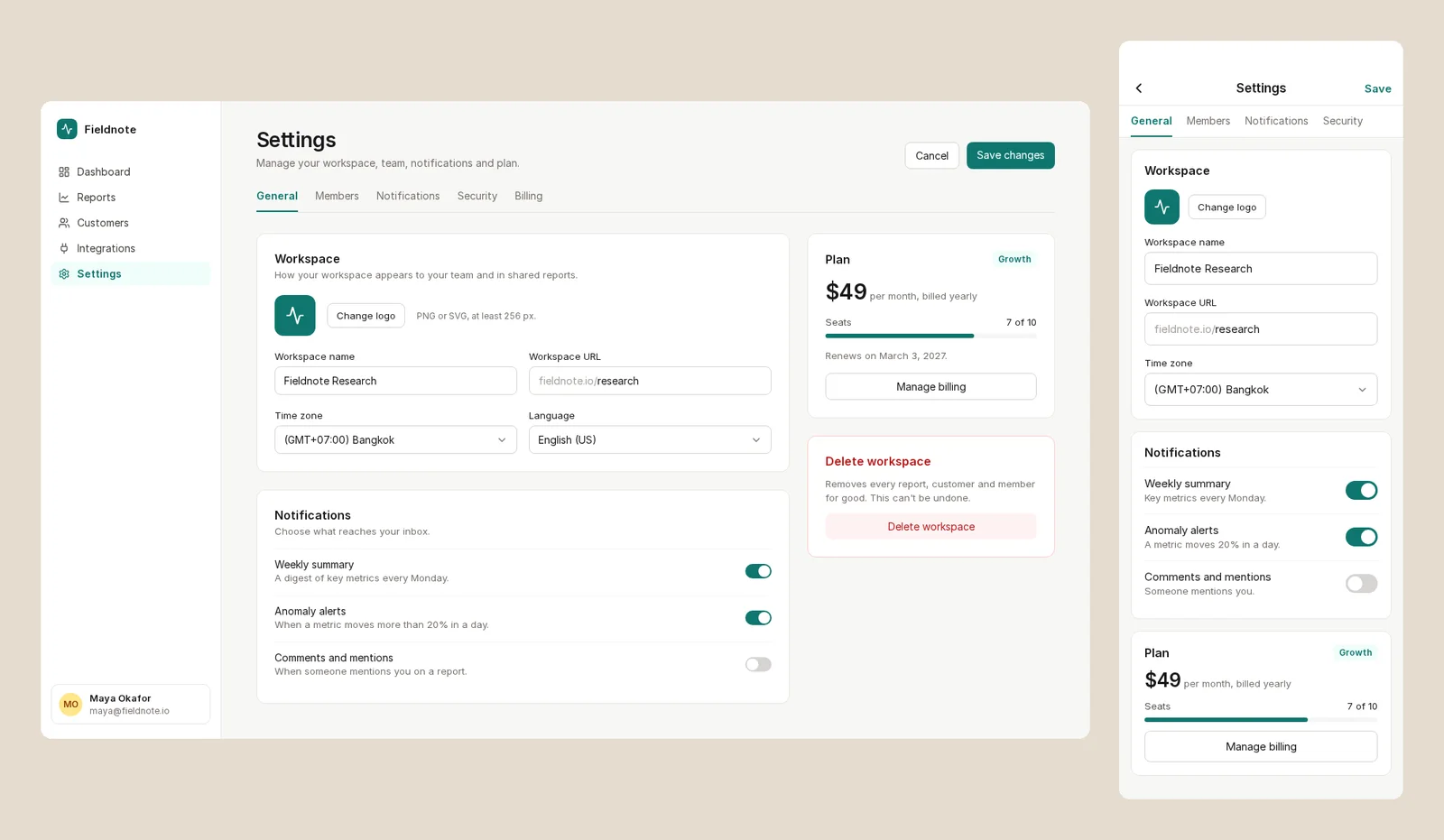
This was one run of one prompt, so read it as what happened, not a benchmark. The file was a scratch file and is archived. For a side-by-side with other tools, see the next section.
One brief in four tools: the measured test
Lists compare what each tool says it can do. To see what happens when an agent actually designs in them, we gave Claude the same brief, a pricing section, in four of the tools on this page: Kite, Figma, paper.design and pen.dev.
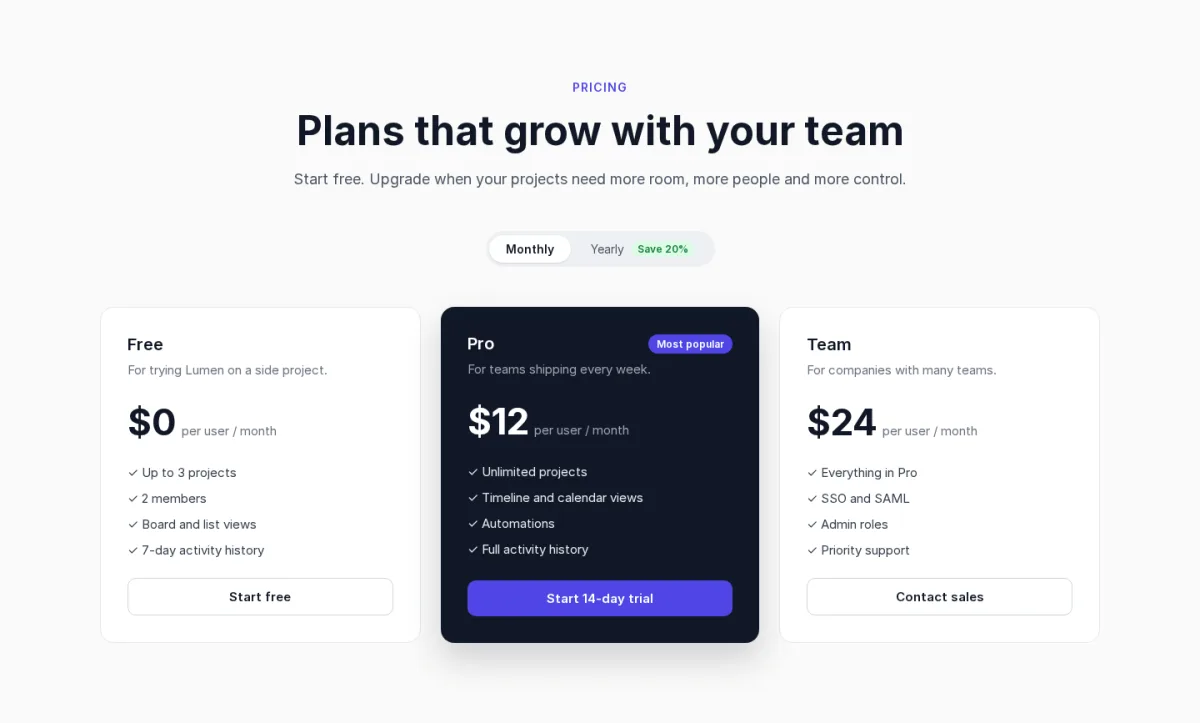
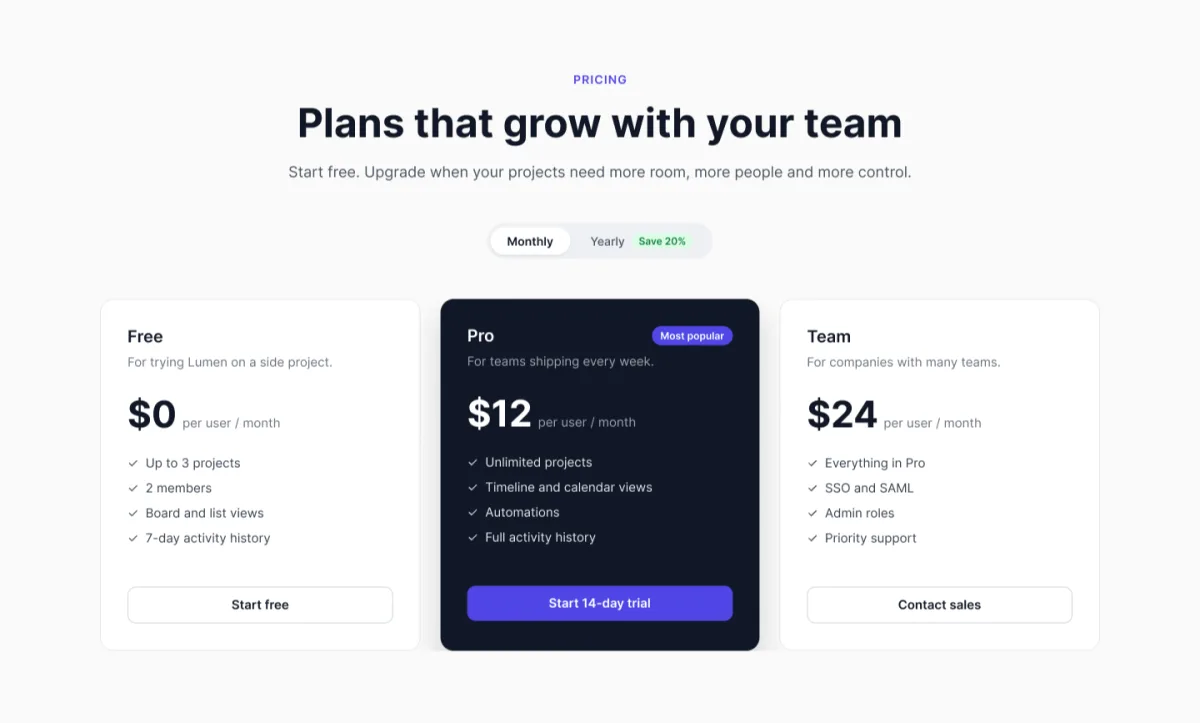
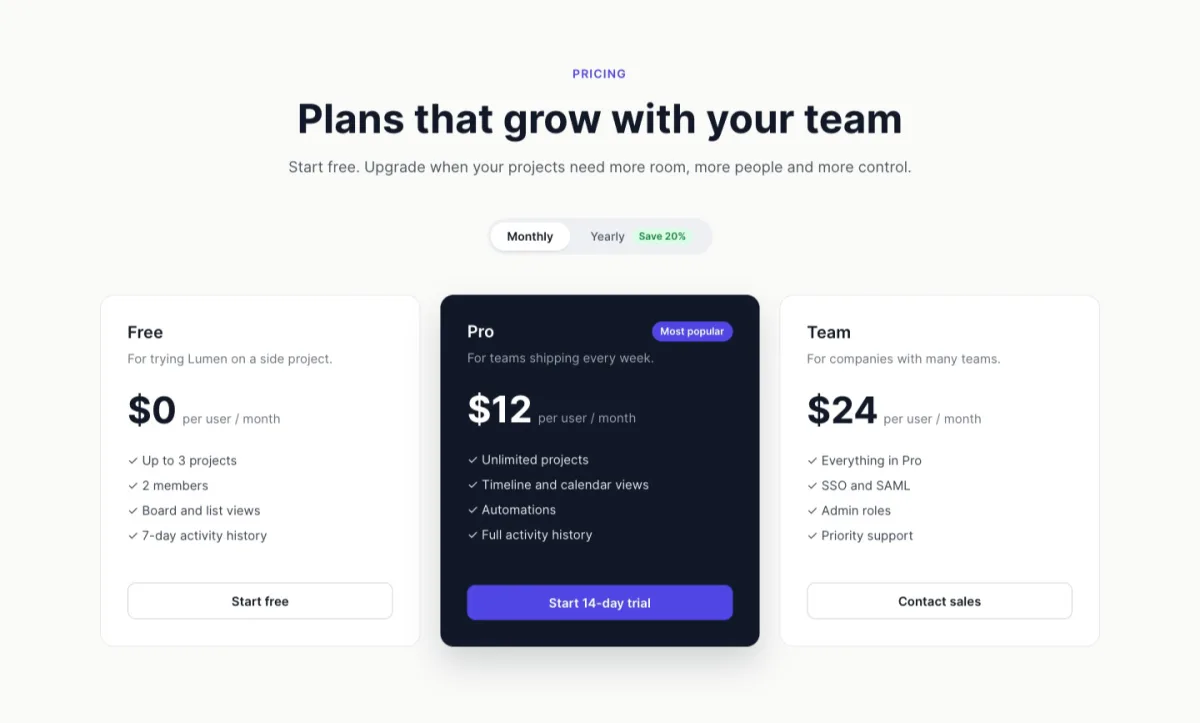
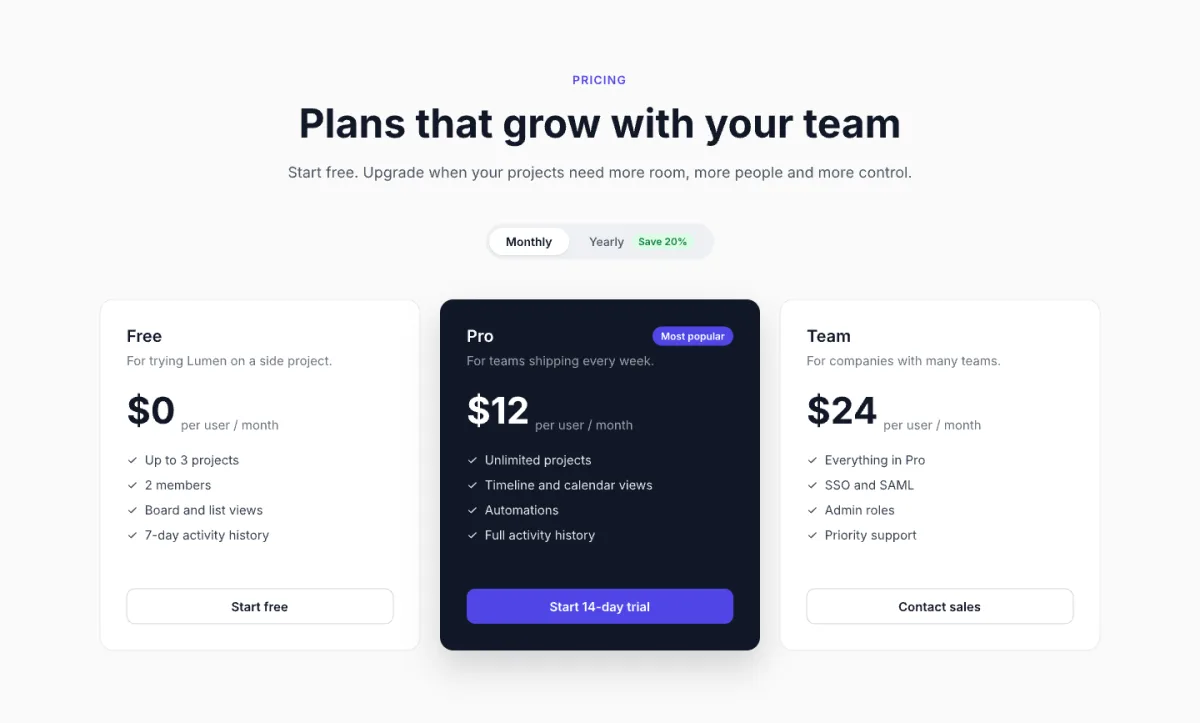
The designs came out almost the same in this one run. What differed was everything around the drawing:
| Kite | Figma | paper.design | pen.dev | |
|---|---|---|---|---|
| What Claude had to read first | 1 guide, about 750 words | 3 guides, about 11,000 words | 1 guide, about 3,000 words | 3 documents, about 7,500 words |
| Text its tool calls sent and returned | About 4,000 tokens | About 21,000 tokens | About 10,000 tokens | About 16,000 tokens |
| Tool calls to finish | 9 | 6 | 12 | 6 |
| Fixes after looking | 1 | 0 | 0 | 1 |
| Open on the computer | Nothing | Nothing | The desktop app, with a file loaded | The desktop app, with a file loaded |
| On the free plan | Draws, 200 agent actions a day | Can't draw; 20 calls a month (drawing needs a paid plan, and a Full seat outside drafts) | Draws, 100 tool calls a week | Draws, on 5 days a month, one agent at a time |
Kite did the same job on the fewest tokens: about a fifth of Figma's, a quarter of pen.dev's and two fifths of paper.design's, counting only what each tool's calls sent and returned. Claude read and wrote about 4,000 tokens through Kite, against about 21,000 through Figma, 16,000 through pen.dev and 10,000 through paper.design. Most of the gap is the manual each tool makes the agent read first. A Kite design is HTML and CSS, which the agent already knows, so Kite's guide is short. Figma and pen.dev teach their own plugin code or file format, and paper.design's guide, also about HTML and CSS, is four times as long as Kite's.
Tools use tokens, and those count toward your Claude or ChatGPT limit. Anthropic's help center says “Tools and connectors are token-intensive”, and OpenAI's Codex pricing page says “Every MCP server adds more context to your messages and uses more of your limit”. So fewer tokens leave more of your limit, though no vendor publishes how much.
How we measured. Claude Opus 5.5 got the same brief in each tool on November 3, 2026, one run per tool, with no design system in any file. Token counts are the characters each tool's calls sent and returned in the session log, divided by four; screenshots, the agent's own reasoning and each tool's list of tools (Kite's has 61) aren't counted, and no vendor publishes how many tokens a plan includes. Each manual is read once per session, so the gap is widest on a single task like this one. Kite wrote the brief, ran the test and publishes this page.
UI and app screens
A UI design tool is the canvas where product screens are drawn, with frames, auto layout, components and variables, and a way to hand them to developers. These three are the main product design tools.
1. Kite (kite.new)
Best for: teams that want people and their AI agents designing in one file. Kite is a design canvas with auto layout, components, variables, design systems and comments, where the agent you already use (Claude, ChatGPT, Codex, Cursor or Gemini) draws real, editable layers beside your team. Kite runs no model of its own, so there are no AI credits: your agent works on the plan you already pay for.
- Price: free with unlimited editors, 3 files and 200 agent actions a day. Pro is $20 an editor a month, or $16 billed yearly, with unlimited files and agent actions (see pricing).
- Runs on: the browser, and Kite for Mac and Windows. Agents connect to a hosted server, so nothing has to stay open on your computer.
- Out: a frame as HTML, React or Tailwind; PNG, SVG or PDF; or Copy to Figma.
- Not for: click-through prototypes (Kite's preview shows one frame at a time, with no prototype flows), open source or self-hosting.
2. Figma
Best for: teams whose libraries, files and developers are already in Figma. If that is you, Figma is the safer pick than any tool here. It runs in the browser and as a desktop app for macOS or Windows, with design, prototyping and Dev Mode in one place.
- Price: Professional is $16 a Full seat a month billed yearly, with 3,000 AI credits, per Figma's pricing; a Figma staff answer on its forum puts monthly billing at $20.
- Free plan: Starter holds 3 design files in one folder plus unlimited drafts and 30 days of version history, per Figma's Starter guide, and “150 AI credits/day, up to 500 AI credits/mo”, per its pricing page.
- AI: its agent spends credits; Figma's credit guide puts “a 5-screen mobile checkout flow” at “300+” credits.
- Your agent: outside agents can write to the canvas on Professional and higher plans, and “writing to files outside your drafts requires a Full seat”. It is “free during the beta period and will eventually become a usage-based paid feature”, per Figma's MCP guide. Row by row against Kite: Kite vs Figma.
3. Sketch
Best for: Mac-only designers who want a native app. For that, Sketch is the better pick than Kite. Editing needs a Mac on macOS Sequoia or newer; the web app is for viewing, comments and handoff.
- Price: Standard is $12 an editor a month billed yearly, or $14 monthly. There is no free plan, only a 30-day trial, per Sketch's pricing.
- Your agent: an MCP server built into the Mac app, on every plan, can “access or modify data” in your documents. It is local only and off by default.
- Out: PNG, SVG and PDF, and copied CSS or SVG code.
Websites
The best web design tools split in two. For a site that goes live from the tool, a website builder beats a design canvas: you design and publish in one place. When developers build the site in your own codebase, design it on a canvas instead (Kite, Figma or Penpot above) and hand them the frames as code or specs; Kite copies a frame as HTML, React or Tailwind.
4. Framer
Best for: marketing sites, landing pages and portfolios. You design on a canvas and publish from the same place, with an AI that drafts pages. For a website, Framer is the better pick than Kite; for app screens it isn't the tool.
- Price: paid per site: Basic is $10 a month billed yearly, per Framer's pricing, and “additional editors cost $20 per month”. The free plan puts the site on a Framer domain with a “Made in Framer” banner.
- Your agent: its MCP server lets Claude, Codex or Cursor “create pages, edit layouts, update content, manage CMS collections”. It is free during the preview, on every plan.
- Out: a site Framer hosts. Framer's help centre gives two different answers on downloading a site's files to host elsewhere, so plan on Framer hosting.
5. Webflow
Best for: bigger sites with a CMS, run by a marketing team. Webflow runs only in the browser and builds websites with a CMS, hosting and interactions. It can export a site's code on paid Workspace plans.
- Price: site plans start at Basic, $15 a month billed yearly, and the new Premium plan with a full CMS is $25 yearly; a full workspace seat to design is $39 a month billed yearly, per Webflow's pricing. Billed monthly, Basic is $25 and Premium $39, per Webflow's pricing post. The free Starter plan allows 2 static pages on a webflow.io domain.
- Your agent: its MCP server builds elements, styles, components, variables and CMS content on a site you already have; it “cannot create new website projects”. The pricing page lists it on the free plan too.
- Out: HTML, CSS, JavaScript and assets, but “Code export is only available on Workspace plans”, from Core at $19 a month billed yearly; site plans don't include it.
Prototyping
Figma's prototypes create “interactive flows that explore how a user may interact with your designs”, on all plans, and Penpot's add flows, overlays and animated transitions. For most reviews that is enough. Kite has no prototype flows. When a prototype has to be played on a real phone as if it were the app, a dedicated tool wins.
6. ProtoPie
Best for: prototypes that feel like the shipped app, for user tests and handoff. ProtoPie is a Mac and Windows app for interactive prototypes, played on real devices through its iOS and Android Player apps. Its built-in AI writes interaction logic from plain language, not screens, per ProtoPie's AI page.
- Price: Basic is $25 a month for one seat and Pro $47 an editor a month, both billed yearly. The free plan is 2 prototypes of 8 scenes each, and “No watermark” is listed from Basic up, per ProtoPie's pricing. Code generation comes only with Enterprise; Basic and Pro hand off recorded specs.
- Your agent: its Studio MCP, on Pro, lets an agent “read and control the prototype you have open”, adding triggers and responses, per ProtoPie's MCP guide. It runs locally, inside ProtoPie Studio. Design the screens elsewhere first.
Design systems
A design system is the shared set of colours, type, spacing and components that every screen is built from. The US Web Design System puts it in two parts: design tokens are “predefined units of color, spacing, typography, opacity, and more”, and components are “simple and consistent solutions to common user interface needs, like form fields, buttons, and icons”. Kite, Figma and Penpot all keep both. The differences:
- Kite: a design system holds variables with modes such as light and dark, styles, a library of components, and written skills that say how the brand looks. Agents read the system and its skills before they draw, so what they make uses your colours and type instead of their own guesses. A system can also start from a website you name.
- Figma: team libraries published across files, with Dev Mode for developers. Team libraries need a paid plan; Starter has none.
- Penpot: native design tokens and shared libraries, free, and on your own servers if you need them.
Design with your AI agent
MCP (Model Context Protocol) is “an open-source standard for connecting AI applications to external systems”, and it is how an agent such as Claude or ChatGPT draws in a design tool. Kite, above, is built for this. These four are the other tools made around AI; our list of design MCP servers covers every server in detail.
7. paper.design
Best for: designers who want an HTML and CSS canvas that agents on their own machine can draw in. paper.design is a design canvas built on HTML and CSS, in the browser and as a desktop app, and its export panel copies a selection as React, CSS or Tailwind code, per its build log.
- Price: free with 100 MCP tool calls a week; Pro is $20 an editor a month, or $16 billed yearly, per paper.design's pricing.
- Limits: its main MCP server runs through the desktop app, per its MCP docs; in our test, it timed out until a file was open. A remote server that works with the app closed is in early access, “metered the same as local MCP”, with long-term pricing promised “in about a month”. Against Kite: Kite vs paper.design.
8. pen.dev
Best for: developers who keep design files beside their code. pen.dev keeps designs as .pen files in your project, edited in a desktop app, a VS Code or Cursor extension, or a web version, and exports HTML with Tailwind or CSS.
- Price: free with 5 agent-days a month and one agent; Pro is $16 a user a month billed yearly, or $20 monthly, per pen.dev's pricing.
- Limits: pen.dev has to be running with a .pen file open in the desktop app or the editor extension: “Confirm pen.dev is running and a
.pendocument is open”, per its AI guide. In our test, its card row collapsed once and needed a fix. Against Kite: Kite vs pen.dev.
9. Google Stitch
Best for: many quick screen drafts for free. Stitch, from Google Labs, “generates UIs for mobile and web applications” in the browser, with “clean, semantic HTML and CSS (including Tailwind support)” and an export to Figma.
- Limits: free for now, but “it operates on a daily credit limit” whose size Google doesn't publish. No team plan or seats are stated.
- Your agent: its hosted MCP server lets an agent look at Stitch designs, ask for layout edits or generate variants, through Stitch's own models.
10. Claude Design
Best for: Claude users who want a quick first version or prototype to hand to Claude Code. Per Anthropic's guide, you make a design by chatting with Claude, and it comes with every Claude plan.
- Price: Claude Pro is $17 a month billed yearly or $20 monthly, per Claude's pricing, with usage shared with the rest of Claude.
- Limits: the same guide says working on a design with several people at once is “still basic and may not work reliably”, and “Claude Design doesn't have version history yet”. Exports are HTML, PDF, PPTX and others; Figma isn't on the list. Moving off it: Claude Design alternatives.
Open source
Open source tools let you read the code, run them on your own servers and keep your files in open formats. Kite isn't one of them.
11. Penpot
Best for: teams that want UI design for free, or on their own servers. Penpot is “the open-source design platform for teams”, in the browser or on your own Linux server, with “interactive prototypes, and CSS Grid and Flex layouts”, components, “native design tokens and shared libraries”. On price and openness, Penpot beats Kite.
- Price: free with no file limit for up to 8 members; Unlimited is $7 an editor a month, “capped at $175 per month”, per its pricing.
- Your agent: the MCP server is free, but it “always acts on the currently focused page in the active Penpot tab”, per Penpot's help, so a Penpot tab has to stay open.
12. Excalidraw
Best for: hand-drawn wireframes and flows before the real design. Excalidraw is an open source whiteboard (MIT licence), free in the browser with no sign-up. It isn't a UI design tool.
- Price: Excalidraw+ is $6 a user a month billed yearly, or $7 monthly, per its pricing, which adds its MCP server, in beta.
Design tools to watch in 2027
The new design tools and changes to watch: what changed in 2026 and what is already dated for the months ahead, each from the vendor's own page, plus the US Web Design System on XD.
- Agents design through MCP. 10 of the 12 tools above document an MCP server an outside agent can design through. The other two: ProtoPie's MCP server only edits interactions in an open prototype, and Claude Design has none, since it is Claude itself. The open questions for 2027 are price and plan: Figma says canvas writing will “eventually become a usage-based paid feature”, while Kite, Penpot and Sketch let agents design on every plan.
- Figma's agent runs on AI credits. Since October 6, 2026, Figma's agent spends credits, per Figma's credit FAQ. On November 19, 2026, its agent in FigJam and Slides starts spending them too, per its credit guide.
- Claude Design moves into Claude. The standalone claude.ai/design site closes on December 14, 2026: “After that, it's read-only, and you can't start new projects there”, per Anthropic's guide.
- Google Stitch grows up. In May, Google added a live Stitch Agent you can steer by voice and export to Antigravity, per Google's I/O post. On November 11, 2026, Google described a “rapid canvas experiment” that generates “playable wireframes of a product flow in seconds”, per its Decisions API post. Stitch is still free, with no paid plan stated.
- Adobe XD stays in maintenance mode. Adobe's XD FAQ says it is “not investing in ongoing development or shipping new features”, and XD is “no longer available for purchase as a single application”. In August 2026, the US Web Design System removed XD from its designers' guidance “since XD is no longer supported by Adobe”, and now points designers to Figma or Sketch.
- Visily is closing. Visily, an AI wireframing tool, said it would shut down on October 31, 2026, and “Your Visily data will be permanently deleted on November 30, 2026”, per its own notice. Until then, its notice says designs can be exported to code, images, PDF or Figma.
How we checked
Methodology: we took the tools commonly listed for “best design software”, “best design tools” and “best web design tools” that design screens or sites, then grouped them by job. On November 17, 2026 we read each tool's pricing page and its product, AI and MCP pages on its own site; where a price only shows after the page's script runs, we say where it came from. The four-tool test ran on November 3, 2026, and the settings-page run in Kite only on November 17 (Bangkok time), timed from the session's own timestamps. Kite facts come from Kite's own plans. We re-check this page every quarter.
Questions
- What is the best design software in 2027?
- For UI, product and web design, it depends on the job. Figma is the default when your team already works there. Kite (kite.new) is the pick when the AI agent you already use, such as Claude, ChatGPT, Codex or Cursor, should design in the same file as your team, with no AI credits. Framer or Webflow for a website you publish, ProtoPie for prototypes that behave like the real app, and Penpot for free and open source.
- What are the best design apps for UI and app design?
- Figma, Sketch and Kite for app screens, with Penpot as the free, open source option. Sketch is the native Mac app; Figma and Kite run in the browser and as Mac and Windows apps. For a first draft from a prompt, Google Stitch is free with a daily credit limit, and Claude Design comes with every Claude plan.
- What tools do product designers use?
- A typical product team uses one design canvas for screens and the design system: Figma, Kite, Sketch or Penpot. They add a prototyping tool when the prototype has to feel real (ProtoPie, or Figma's own prototypes), and a whiteboard such as Excalidraw for early flows. More and more, they also connect an AI agent to the canvas over MCP, so the agent drafts and edits screens in the shared file.
- What is the best free design tool?
- Penpot, for a team: it is open source, free with no file limit for up to 8 members, and its MCP server is free too. Kite is free with unlimited editors, 3 files and 200 agent actions a day. Figma's free Starter plan allows 3 design files in one folder plus drafts. Google Stitch is free with a daily credit limit Google doesn't publish. Sketch has no free plan, only a 30-day trial.
- Which design tools can my AI agent design in?
- Kite on every plan, Free included. Penpot, paper.design and pen.dev on their free plans too, with the app or a browser tab open. Sketch on every plan, on your Mac. Framer and Webflow for websites. Figma lets outside agents write to the canvas on Professional and higher plans, with a Full seat outside drafts, free during a beta that Figma says will become a usage-based paid feature.
- Is Adobe XD still a good choice?
- No, not for new work. Adobe says XD is in maintenance mode, with no new features, and it is no longer sold as a single app. Pick Figma, Sketch, Penpot or Kite instead.