Design with Codex
Connect OpenAI's Codex to Kite, have it design real screens in a file your team can edit, keep it on brand, then build from the design or send it to Figma.
By Loukman Nacik, Founder, Kite · Updated
Short answer: yes, Codex can design. Connect it to Kite once over MCP, ask for a screen in plain words, and it draws the design as real layers in a file your team edits with it. Your Codex plan pays for the thinking, because Kite runs no model to design.
Can Codex design?
Codex is OpenAI's coding agent, and on its own it designs by writing code: you see the result by running it. It can also use outside tools, such as a design tool, and MCP (Model Context Protocol) is the open standard for that, which OpenAI's docs say lets Codex “use tools and information from other systems”. A design tool that speaks MCP gives Codex a canvas to work on.
Figma's MCP server is one such tool, and OpenAI's post on building front ends with Codex and Figma walks through a round trip: Codex reads a frame from a Figma link with get_design_context and writes the code, then generate_figma_design sends the running interface back to Figma. Figma's documentation says that capture is available with select MCP clients, and that it produces flat layers without a connection to your component libraries.
Kite is a design canvas your own agent works in. Codex draws the design itself, as layers in a file (text as text, frames as frames), and you and your team edit the same file while it works.
| How Codex designs | What you get | What you need | Best for |
|---|---|---|---|
| On its own | Running code. You see the design by running it, and change it by asking. | A Codex plan | A developer building straight in the app |
| Figma's MCP, reading and capturing | Figma frames read into code, and a running interface sent back as flat layers, not tied to your libraries | A Figma account; how often it can read depends on your seat | Teams whose design work already lives in Figma |
| Figma's MCP, writing to the canvas | Frames, components, variables and auto layout built in your Figma file, with your components | A paid Figma plan and edit access; in beta | Teams with a design system in Figma |
| In Kite | Layers Codex draws itself, in a file your team edits and comments on while it works | A Kite account; free for 3 files and 200 agent actions a day | Designing before there is code, with people and agents in one file |
Which route to pick
Take the first of these that fits. If your team's work is already in Figma, on a paid plan, Figma's write-to-canvas docs are your next step: Codex builds with your components, on the Professional, Education, Organization and Enterprise plans. Figma warns that “output is beta quality and may need manual review and cleanup”. If you only need the screen working in your app, let Codex write the code and skip the canvas. If you want to see and shape the design first, with people who don't write code, use Kite, the route the rest of this tutorial follows, and because Kite is ours, weigh that when you read this table.
Step 1: Connect Codex
The Kite app is the quickest way:
- Install Kite for Mac or Windows.
- In its Settings → Agents, click Add to Codex, with no sign-in to do, then start a new Codex session. The Codex app and IDE extension use the same setup.
Without the Kite app, connect directly in your terminal, then approve in the browser. OpenAI's MCP docs describe the same codex mcp login command for any server that signs in with OAuth, which Kite does:
codex mcp add kite --url https://kite.new/api/mcp
codex mcp login kite
Codex setup has the details, including the command to run if you prefer a terminal to the Kite application's button.
Step 2: Ask for a design
Ask Codex in plain words, and say that it goes in Kite:
Design a pricing page with three plans in a new Kite file, then give me the link.The more you say about what the screen is for and who uses it, the less it guesses. For example, you could add who the plans are for and which one you want people to choose.
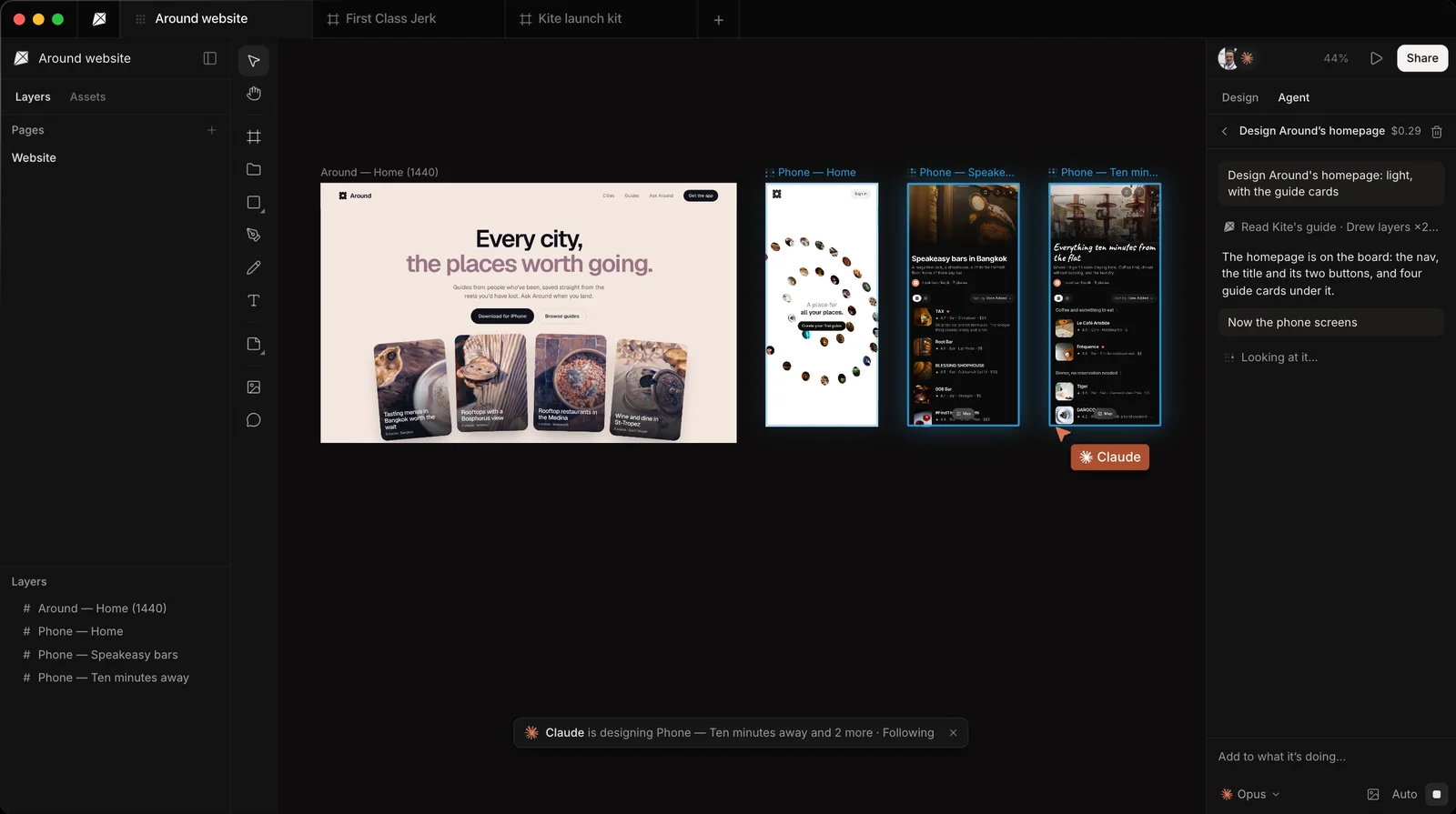
Codex makes the file and gives you its link, so open it to watch: you see its cursor and the frames it is changing, and you can move around the board while it works. Kite's docs describe what follows: an agent draws one section, card or row at a time, and can look at a frame as a picture to check its work before saying it is done.
What a real run looks like
We ran this once on November 5, 2026, with Codex CLI 0.164.0 on the model gpt-6-luna, from an empty folder, and gave it this prompt:
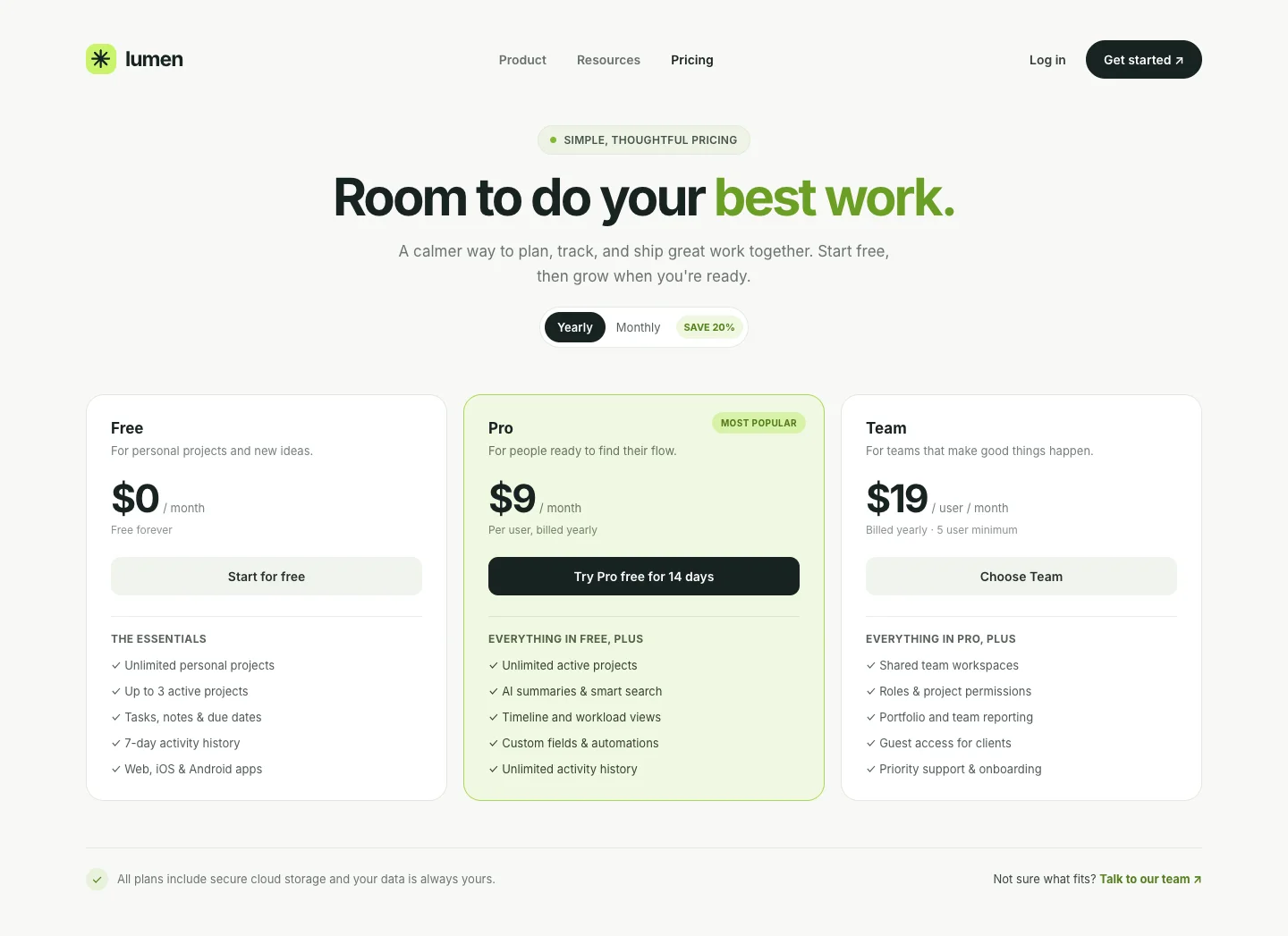
Design a pricing page with three plans (Free, Pro, Team) for a made-up project tool called Lumen in a new Kite file, then give me the link.It took 137 seconds and 12 calls to Kite: it made the file, read the file's design system and Kite's guide, drew the page in five pieces, looked at the result and finished. Codex reported 66,916 tokens for the whole session. What came back is real layers, with its text as text and its cards as frames, and we didn't change anything in the picture below. That is one run of one prompt, with no design system in the file, so yours will differ.
One thing stopped our first try: run with approvals turned off, Codex refused Kite's first call, saying “MCP tool call requires approval, but approval policy is never”, and made nothing. In a normal session, approve Kite's tools when Codex asks. For a run with nobody watching, approve them ahead of time:
codex exec -c 'mcp_servers.kite.default_tools_approval_mode="approve"' "..."Step 3: Keep it on brand
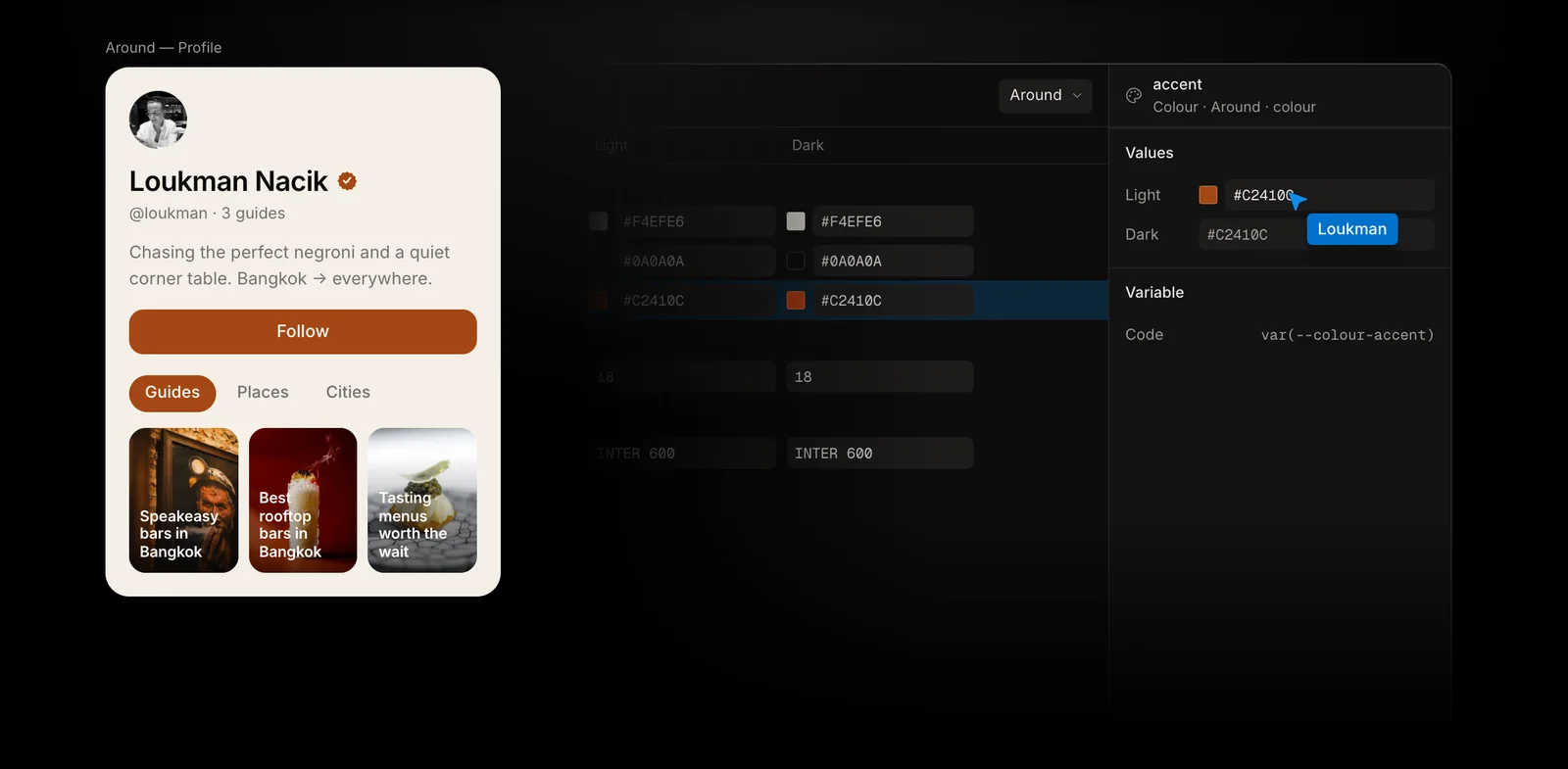
Codex keeps to your brand when the file has a design system, because it reads the system before it draws. That system holds your colours, type, spacing and corners as variables, plus skills: short rules in plain words. Three quick ways to make one:
- From your website: Kite reads your colours, type and logos (see Put your brand in a design system).
- From a DESIGN.md: if your project already has one, paste it in (see Bring a DESIGN.md in, and take one out).
- From a frame: right-click a design you like and choose Make a design system from this frame.
Step 4: Change it, together
- Edit it yourself: the design is ordinary layers. Change a word, a colour or a size by hand, and Codex sees your change the next time it looks.
- Ask Codex in chat: “Make the middle plan stand out, and tighten the spacing.” It changes what is there rather than drawing it again.
- Leave a comment: pin a request on a frame for Codex, then tell it “do my Kite requests”. In Kite for Mac, a request can start as soon as you send it (see Comments).
Step 5: Build it, or send it to Figma
- Build it: in the same Codex session, say “Build this frame in my app with our components.” Codex reads the frame's exact sizes, colours and type from the file. You can also right-click a frame and copy it as HTML, React or Tailwind (see Export and copy).
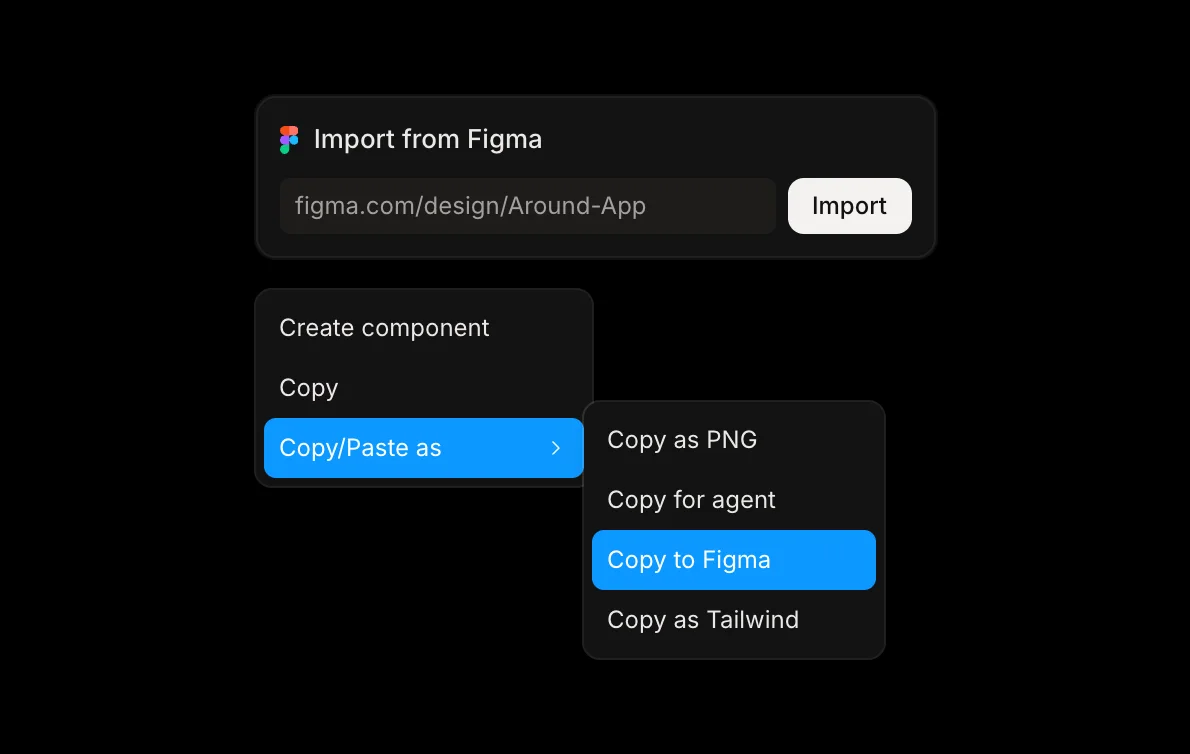
- Send it to Figma: right-click the frames and choose Copy/Paste as → Copy to Figma, then paste in Figma, where they arrive as layers you can edit (see Figma).
Limits to know
- Kite's free plan: 3 files and 200 agent actions a day, and Pro removes both limits.
- Codex usage: your OpenAI plan sets how much Codex can do, and OpenAI lists the desktop application on its Free and Go plans as subject to rollout.
- Into Figma: components arrive as ordinary frames and design system colours as plain colours, and Figma needs the fonts too.
- Prototypes: Kite has no prototype flows, so the connections between screens belong in your code or in another tool.
- Figma's route: Figma says it may change rate limits at any time, and that writing to the canvas will become a usage-based paid feature. While that feature is in beta, its documentation recommends testing on a duplicate of your library or a draft file, and lists current limitations: pictures go in through a separate tool, and fonts must be uploaded to your Figma account.
Questions
What does it cost?
Codex is billed by OpenAI, and its pricing page lists Free, Go at $8 a month, Plus at $20 and Pro from $100; Free and Go name the desktop app, and Plus adds the CLI and the IDE extension. Kite is free with unlimited editors and viewers, 3 files and 200 agent actions a day, and has no AI credits. Pro is $20 an editor a month, or $16 billed yearly, with unlimited agent actions.
Do I need Figma?
No, because Kite is the design tool here. If your team finishes work in Figma, Copy to Figma takes it there, and a Figma file comes into Kite whole.
Can Codex edit a Figma file directly?
Yes, with Figma's MCP server: its write-to-canvas documentation names the use_figma tool, on the Professional, Education, Organization and Enterprise plans, with edit access to the file. Figma says the feature is in beta, free during the beta period, and "will eventually become a usage-based paid feature".
Do I need a Codex design skill?
No, but you can use one, since a design skill simply teaches an agent how you like things to look. In Kite, the rules that belong to a brand or a file live in its design system or the file's skills, so everyone's agent follows the same ones, not only yours.
What can't it do in Kite?
Kite makes designs, not running apps or clickable prototypes: its preview steps through frames with no links between them. For a working version, have Codex build the design in your code.
Next
- Design with Claude or Cursor, the same way with another agent.
- What agents can do in Kite.
How we checked
Methodology: on November 5, 2026 we read OpenAI's post, its Codex pricing page and MCP docs, Figma's MCP docs and Kite's own docs, all linked on this page. We ran Codex once for this tutorial, as described above, and the rest of its steps rest on those docs.