Get a Claude Design into Figma
The routes that start from Claude Design's HTML export, and the steps to bring a design into Kite, finish it with your team and paste it into Figma as layers.
By Loukman Nacik, Founder, Kite · Updated
Short answer: Anthropic lists no Figma export for Claude Design, so you start from its standalone HTML export. If the design still needs work, bring it into Kite, finish it there and use Copy to Figma. If it is done, give the HTML to Figma's own html_to_figma tool. If it is a deck, a third-party plugin says it does that. We have not run a real Claude Design export through these routes, so check your first result before you depend on it.
Which route to pick
Claude Design is Anthropic's design tool, one of the templates you can start an artifact from in Claude. It exports a .zip, a PDF, PowerPoint, Google Slides or standalone HTML, and sends work to tools such as Canva and Lovable, per Anthropic's getting-started guide. Figma isn't on that list, so you start from the HTML export and pick a route by what comes next:
| Route | What you get in Figma | What you need | Pick it when |
|---|---|---|---|
| Through Kite (our product), steps below | Layers you can edit, after your team and agents have worked on them. Components arrive as ordinary frames. | A Kite account: free for 3 files and 200 agent actions a day | The design isn't finished, or your team uses more than one agent |
| Figma's own html_to_figma tool | Plain layers, without your components, libraries or variables | An agent connected to Figma's MCP server, and self-contained HTML up to 50 MB | The design is done, and you want it on the Figma canvas |
| A third-party plugin, for decks | Slides as layers, one frame for each slide, per its listing | Its plugin and Chrome extension: 10 free imports a month, then $4.80 a month at its launch price | You only need a deck |
For example, take a landing page you made in Claude Design. If marketing still wants to change the hero and match your brand colours, the Kite route gives everyone one file to do that in. If the page is signed off and a designer only needs it on the canvas, html_to_figma is shorter. A sales deck is the plugin's job, or Claude Slides', now that Anthropic has moved presentations there.
Other routes has the details of the last two.
Step 1: Export from Claude Design
- Open the design in Claude.
- In its export options, choose Export as standalone HTML, and save the file.
Step 2: Bring it into Kite
Kite is a design canvas your own agent works in, and there are two ways in: with Claude, you can ask for one frame per screen and your design system's variables, while a capture copies what the browser shows, at one width.
Have Claude draw it
- Connect Claude to Kite: see Claude or Claude Code.
- Give Claude the HTML file and ask:
Draw this design as layers in a new Kite file, one frame per screen, then give me the link. - Open the link and watch it draw. Claude redraws the design from the HTML rather than converting it, so compare the layers with your export.
Capture the page
- Add Kite Capture to Chrome.
- Open the HTML file in Chrome. On a file from your computer, Chrome also needs Allow access to file URLs turned on in the extension's details.
- Click the Kite Capture button in Chrome's toolbar and choose Whole page.
- In a Kite file, press ⌘V. The page arrives as frames, text and pictures, laid out as the browser drew them.
A capture brings up to 2,000 layers, at one width and one theme, and fonts that aren't on Google Fonts or in your workspace are flagged as missing (see Kite Capture).
Step 3: Check the layers
Look it over before it goes to Figma: fix any missing font, name the frames, and change what you want by hand or by asking Claude. Your team can edit and comment in the same file. To keep the brand, set the file's design system, and ask Claude to use its variables (see Put your brand in a design system).
Step 4: Copy to Figma
Copy to Figma is Kite's way to hand frames over: it puts them on the clipboard in the form Figma pastes as layers.
- Select the frames in Kite.
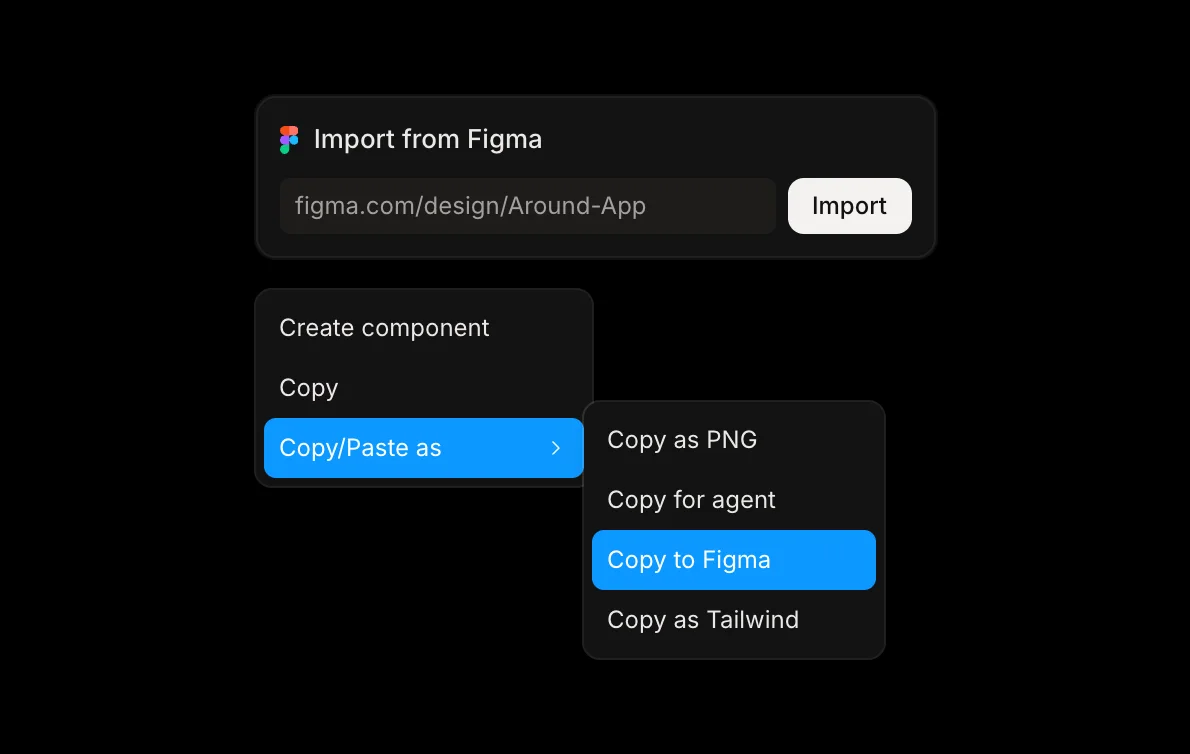
- Right-click and choose Copy/Paste as → Copy to Figma. Kite says Copied — paste it in Figma when it is ready.
- In Figma, press ⌘V.
Frames, auto layout, text, shapes and pictures arrive as layers you can edit in Figma. Components arrive as ordinary frames, and design system colours as plain colours. Figma needs the fonts too (see Figma).
Other routes
Figma's html_to_figma tool
This tool on Figma's MCP server “converts an HTML document into design layers in a Figma Design file”. Figma's tool list names HTML from your codebase or HTML your agent creates, and doesn't name Claude Design. The steps:
- Connect your agent to Figma's MCP server, following Figma's setup page.
- Check that the exported HTML holds its CSS and images inside the document. Figma says external links aren't loaded, and that the document can be up to 50 MB.
- Copy the link to your Figma file.
- Give your agent the HTML file and ask, in the words of Figma's example prompt, changing only what you want turned into frames:
You don't need to name the tool, because your agent chooses it from what you ask.Turn the cards in this HTML file into separate frames in <Figma file URL>. - Open the Figma file and look it over. If you don't choose where the layers go, Figma adds them to a new page, and one call makes up to 20 frames.
Figma says “the result is plain layers. It doesn't use your components, libraries, or variables.” It also limits MCP tool calls by seat and plan.
Other options
- A third-party plugin, for decks: Figma Community lists a “Claude Design to Figma” plugin published under the name Renan Deves. Despite the name, its page says it is “not affiliated with or endorsed by Anthropic”, and it imports decks and slides only with its own Chrome extension. Its free plan covers 10 imports a month, and its Pro plan costs $4.80 a month at its launch price, then $9. Decks are now a separate Anthropic tool, Claude Slides.
- Claude writes in Figma directly: skip Claude Design, and have Claude build in the Figma file with your components. Figma's write-to-canvas tool is in beta, on its Professional plan and above (see Can Claude design in Figma?).
- Stay in Kite: if your team doesn't need Figma, keep the file in Kite, where your own agent and your team keep working on the same layers.
Questions
Can Claude Design export to Figma directly?
No Anthropic page we read lists a Figma export. Figma only comes in, as a source for a design system.
Is the "Claude Design to Figma" plugin from Anthropic or Figma?
Neither. It is a third-party plugin listed on Figma Community, published under the name Renan Deves, and its page says it is "Not affiliated with or endorsed by Anthropic". It speaks only of decks and slides, and it needs its own Chrome extension.
Is Claude Design shutting down?
No. Only its standalone site, claude.ai/design, closes on December 14, 2026. Anthropic says Claude Design now works in every conversation with Claude.
Does Figma stay in sync with Kite or Claude Design?
No. Each step is a copy, so change a design after pasting, and copy it to Figma again.
Do clickable prototypes come over?
No. Layers come over, not the links and behaviour between screens. Kite has no prototype flows, so rebuild those in Figma, or keep the prototype in Claude Design.
Does my design system come over?
Not as a live link. Figma says html_to_figma doesn't use your components, libraries or variables. Through Kite, your agent can draw with your design system's variables, and Copy to Figma then turns components into ordinary frames and those colours into plain colours.
To choose between the two products, see Claude Design vs Figma. For other tools, see Claude Design alternatives.
How we checked
Methodology: on November 5, 2026 we read Anthropic's help pages, Figma's developer docs, the plugin's Community listing and Kite's own docs, all linked on this page. Neither Figma nor Anthropic documents any of these routes for Claude Design's output, and we have not installed the plugin.