Short answer: to turn HTML or a live website into editable Figma layers, capture it with a tool that reads the page as the browser draws it. Kite (kite.new) does it free. Your AI agent brings the page into a Kite file by its address, or Kite Capture copies it in Chrome. Then Copy to Figma puts it on the clipboard in Figma's own format, so you paste it into a Figma file with ⌘V and no plugin.
In our run, react.dev came into Kite as 1,141 layers in 14 seconds, and Copy to Figma put 1,310 layers on the clipboard, 234 of them in auto layout. html.to.design is the plugin with the most import options of those we read (10 free imports, then $12 a month billed yearly), and Figma's own Chrome extension captures pages on paid plans.
Key takeaways
- Figma's own routes are its Chrome extension (paid plans) and two MCP tools for AI agents; the rest are Figma plugins, their browser extensions, or tools like Kite that write Figma's clipboard format.
- Kite's route is free: Kite Capture has no account, Kite Free has 200 agent actions a day, and the paste into Figma needs no plugin or import count.
- Your agent can do the capture: one web_capture call brought react.dev in, 1,141 layers and 37 pictures, in 14.0 seconds.
- html.to.design does more inside Figma: 5 widths, light and dark, styles and variables, hover states as components, with 10 free imports, then 10 a month on a free account.
- Screenshot tools guess layers with AI; capture the HTML instead whenever you can open the page.
HTML to Figma means turning a web page's HTML and CSS into Figma layers: frames for boxes, text you can retype, pictures and vectors, ideally with auto layout where the page used flexbox. Conversion quality depends on how faithfully a tool translates CSS positioning, typography and imagery into Figma's equivalents, which is why results differ between tools on the same page. Every vendor fact below was read on its own page on November 17, 2026 and is linked in place. Kite publishes this page and is one of the tools it compares; the steps for Kite's route are in Clone a website and Kite and Figma.
Which tools turn HTML into Figma?
Seven routes: the tools on Google's page one for “html to figma” and five related searches, Figma's own capture tools, and Kite, which publishes this page. What they take in, what lands in Figma, and what they cost:
| Tool | Takes | What lands in Figma | Price |
|---|---|---|---|
| Kite, then Copy to Figma | A URL, from your AI agent; any page open in Chrome (Kite Capture), signed-in and local pages included | On the clipboard (decoded): frames with auto layout, text, vectors, pictures, shadows; editable in Kite first | Free (3 files); Pro $20 per editor a month. No Figma plugin |
| html.to.design (‹div›RIOTS) | URL, .html, .zip, .mhtml, pasted HTML and CSS, a browser extension, an MCP server | Frames, text, pictures; optional auto layout, styles and variables; hover states as components | 10 free imports, then 10 a month; PRO $18 a month, $12 billed yearly |
| Figma Chrome extension | A page or an element open in Chrome | Editable layers with “certain” auto layout, font properties and matched variables; no components or styles | Paid Figma plans (Professional Full seat $16 a month); Figma's pages disagree on Starter |
| Figma MCP: html_ | Self-contained HTML up to 50 MB; a running web app, through an AI agent | “Plain layers” or “flat layers”, without your components or libraries | Capture from Starter up; html_to_figma's plans not stated |
| Builder.io plugin | A URL, or sections copied with its Chrome extension | “Fully editable Figma designs”; auto layout in beta | Free, per its blog; needs a Figma seat with edit access |
| Other plugins: Neil's HTML to Figma, Refore, Codia Web2Figma | URLs, files or extension captures | Frames, text and pictures; auto layout varies (Refore says beta) | A few free uses a month (Neil), 2 a week (Refore), 10 credits a month (Codia); then paid |
| Screenshot tools: image.to.design, Codia | A PNG, JPG or WebP picture | Layers an AI guesses: text, shapes, icons; results can differ per run | image.to.design: a free basic mode, then credits (2 to 500+ a picture); Codia: 5 free credits a month |
How do you convert a website to Figma with Kite?
Kite is a design tool where people and AI agents work in the same file. So the page doesn't just pass through on its way to Figma: it arrives as layers you, your team and your agent can change, and Figma gets them when they are ready. There are two ways in, then one way out:
- Ask your agent. Connect Claude, ChatGPT, Cursor, Codex or Gemini to Kite and ask it to bring a public page in by its address. Kite opens the page as a 1,440 px wide browser shows it and puts it in your file as layers, with its pictures.
- Or copy it yourself. Add Kite Capture to Chrome, open the page, press ⌥⇧K (Alt+Shift+K on Windows), choose Whole page or Select a section, then press ⌘V in a Kite file. Pictures are read in your browser, so a page behind a sign-in or on your own computer copies with them. The extension has no account and no server (Kite Capture docs).
- Send it to Figma. Select the frame, right-click, choose Copy/Paste as → Copy to Figma, and press ⌘V in a Figma file you can edit.
That intermediate step is the point: collaboration happens before the handoff. An agent can restyle the clone, swap in your copy or add a section, and a teammate can comment on it. The same frame also copies out as HTML, React or Tailwind. And no plugin import counter runs out on the Figma side, because the paste is an ordinary paste (Kite Free's own limits still apply: 3 files, 200 agent actions a day).
A measured run: react.dev into Kite
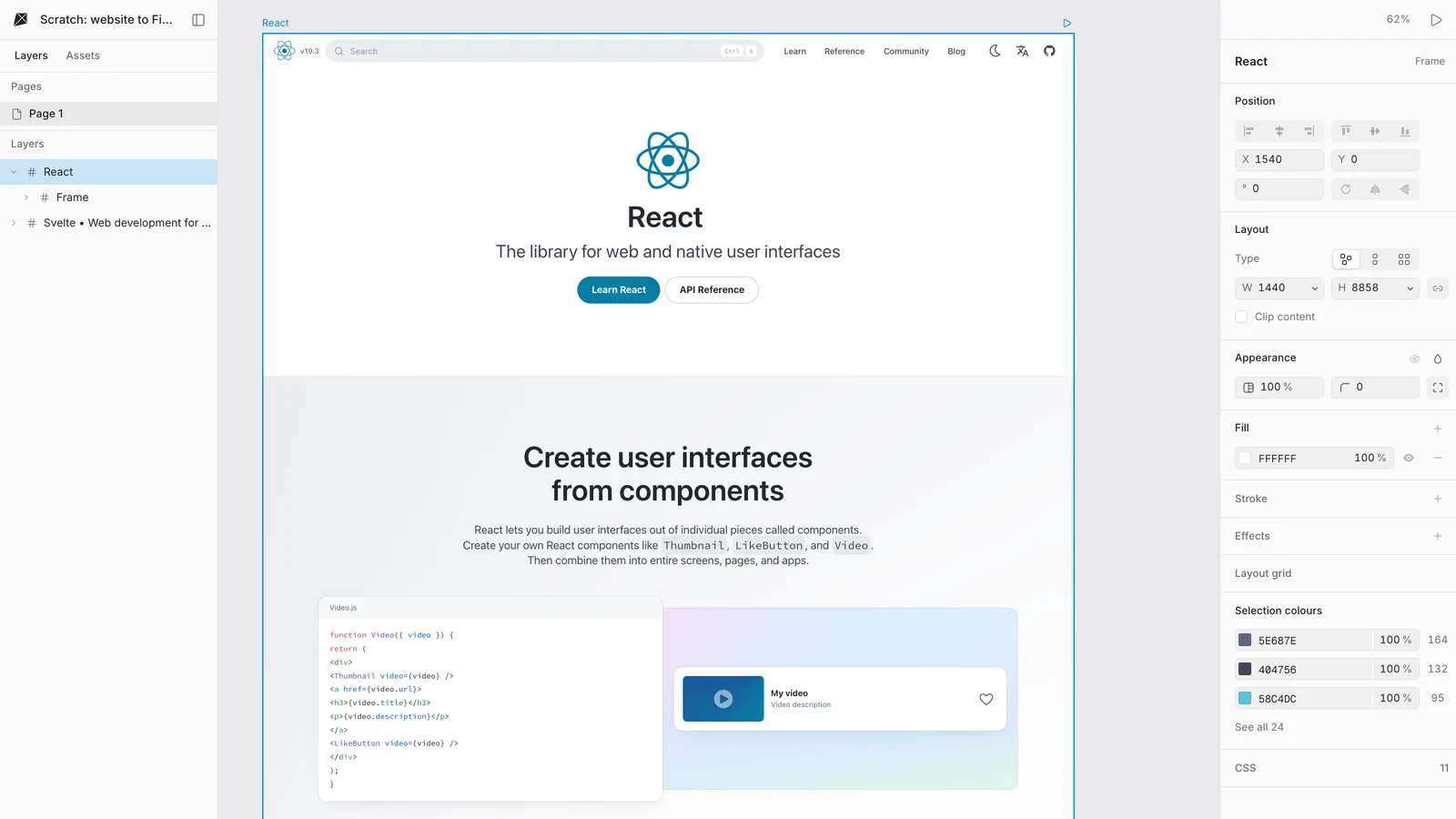
On November 17, 2026, Claude (Opus 5.5, in Claude Code, through Kite's hosted connector) made a new, empty Kite file and called web_capture on https://react.dev/. Here is the result in the Kite editor, unretouched:
| Measured | Result |
|---|---|
| Calls to Kite for react.dev | 2: one new file, one web_capture (the session also captured svelte.dev, below, and looked at both) |
| web_capture, sent to answered | 14.0 seconds (a run of the same page on November 14, for Kite's clone guide, took about 45) |
| What came in | One frame, 1,440 × 8,858, with 1,141 layers and 37 pictures |
| Fonts | Source Code Pro (a Google font) drawn as on the site; react.dev's own Optimistic fonts listed as missing and drawn in a fallback |
A second site in the same file didn't go as well: svelte.dev came in as 213 layers, with only 2 of its pictures and its body text in a fallback font. Results vary by site, so look over a capture before you copy it on. The scratch file was archived afterwards.
What does Copy to Figma hand over?
Copy to Figma writes the selection to the clipboard in Figma's own format, the one Figma reads when you copy between its files. To see exactly what Figma would receive, we opened the run's file in a headless browser and chose Copy to Figma on the react.dev frame. Then we caught the clipboard and decoded it with Kite's Figma reader:
- Speed and size: 2.5 seconds from the click to the clipboard, 6,647,715 bytes with the pictures inside, and the toast “Copied — paste it in Figma”.
- Layers: 1,310 in Figma's format: 753 frames, 248 text layers, 185 vectors, 88 ellipses and 36 rounded rectangles, in one 1,440 × 8,858 frame named React.
- Auto layout: 234 frames carry Figma's auto layout setting, 156 horizontal and 78 vertical.
- Details: 40 layers filled with a picture, 71 with a gradient, 89 with a shadow, 197 with rounded corners; fonts named as on the site, so Figma needs react.dev's Optimistic fonts installed to show them.
Plainly: we did not paste it into Figma for this page, so we can't show it inside a Figma file. Copy to Figma shows only to people who may download the file, so in the test browser, an anonymous visitor, we gave the page that permission.
What does html.to.design do?
html.to.design by ‹div›RIOTS is the most-installed of these plugins, with 2.74 million users on its Figma page, and holds two of Google's top three results for “html to figma”. It imports a URL, files (“.html, .zip, .mhtml” and email formats), pasted HTML and CSS, or a capture from its browser extension, which reaches signed-in, localhost and VPN pages. It has an MCP server too, so an agent can send it URLs or HTML.
- Where it is ahead: one import can make frames at 1920, 1440, 1024, 768 and 390 px, in light and dark (import options). It can create text styles, colour styles and local variables from the page, turn hover effects into components with variants, and download missing fonts (features).
- What it costs: 10 free imports, then 10 a month with a free ‹div›RIOTS ONE account; PRO is $18 per user a month, or $12 billed yearly, with a fair-use cap of 1,000 imports per 30 days (PRO plan). Extension captures count as imports.
- What it doesn't do: the page goes straight into Figma, so editing it with an agent or a team happens there, under Figma's own plans. Its maker says your own design-system components are “not used yet”.
Can Figma import a website itself?
Not from a web address alone, but Figma has three routes of its own, each for a different starting point:
- The Figma Chrome extension captures a whole page, scrolled parts included, or one element, and pastes it as layers. Figma says it applies “certain auto layout properties, font properties, and variables (if available)” (Figma's help), with “No component and styles mapping yet”. Pages with “heavy JavaScript animation,
<canvas>rendering, or virtualized lists may not translate cleanly” (coded screens). - What the extension binds, and who gets it: variable binding covers fills, strokes, corner radius, padding, gap and opacity on frames, and colour, family, size, weight, line height and letter spacing on text, when a matching variable already exists in the file or an added library. The capture “turns on automatically once you're signed in to a paid plan”, and the second help page lists Professional and up only, though the first one's plan box also lists Starter. A Professional Full seat is $16 a month (pricing).
- html_to_figma, a tool on Figma's MCP server, turns a self-contained HTML document of up to 50 MB into “plain layers. It doesn't use your components, libraries, or variables”, and “External links aren't loaded”, so CSS and pictures must be inside the file (tools page). It runs through an AI agent; its plans aren't stated.
- generate_figma_design (Figma's “code to canvas”, the closest thing to “code to Figma”) captures a running web app as “flat layers, without a connection to your libraries”, on Starter and up, from clients such as Claude Code, Codex and Cursor (Figma's guide). It is exempt from the MCP read limits (rate limits).
Figma also has code layers: live code on the canvas, which can start from a captured page. They are in open beta and use AI credits. They were free on paid plans until November 4, 2026, and that period has ended (Figma's help). A code layer is a running prototype, not editable layers, until you extract designs from it.
Builder.io and other HTML to Figma plugins
- Builder.io lists “Website to Figma” in its Figma plugin and calls it a “Free HTML to Figma converter” (Builder's blog). It imports a URL, or sections copied with its Chrome extension, including pages behind a sign-in; auto layout is “currently in beta”, and the blog claims “80-90% accuracy”. “A Figma seat is required”, with edit access to the file (plugin docs). Builder's pricing page doesn't mention the import.
- HTML to Figma by Neil, Google's first result for “html to figma” on November 17, takes a URL, an HTML file or pasted code; it is free for “a few uses every month”, then $20 for 12 months, paid once (its site).
- Refore imports pages captured with its Chrome extension: 2 free imports a week, Pro $9 a month billed yearly, with AI layer renaming (refore.ai).
- Codia Web2Figma imports a URL or an .html file with “10 free credits every month” (Codia); its paid prices didn't load when we checked.
Can a screenshot become a Figma design?
Yes, but only as a guess. When all you have is a picture, an AI has to work out the layers. image.to.design rebuilds a screenshot with auto layout, editable text and icons, from a free basic mode through credit modes up to “Max (500+ credits)”. Its maker says “you can get different results every time”. Codia's Screenshot to Figma gives 5 free AI credits a month. image.to.design says it “can't infer hover states, animations, or JS interactions”. So if the page is live, capture it instead. Kite and the HTML importers read the text, sizes and colours the browser used.
Where Kite's route falls short
- One width per capture. An agent's capture is 1,440 px wide; Kite Capture copies one width and one theme at a time. html.to.design makes five widths and both themes in one import.
- A page's own web fonts don't always come with it. Google fonts do; others show as missing until you add them in Kite, and Figma needs them too.
- No styles, variables or components in Figma. Colours arrive as plain values and components as ordinary frames; html.to.design can create styles and variables, and Figma's extension binds matching variables.
- Hover states aren't kept. Kite copies the page at rest; html.to.design turns hovers into component variants.
- Two hops, not one. If you only want a page in Figma, a plugin inside Figma is one step shorter.
- Agents capture public pages. web_capture opens a page by its public address; for a page behind a sign-in, use Kite Capture in your own browser.
- Size and access caps. A Kite Capture copy brings up to 2,000 layers, so copy a very long page in sections, and Copy to Figma shows only to people who may download the file.
Which should you use?
Pick Kite when the page is a starting point that you, your team or your AI agent will change before it is final. It also fits when you want the page as code too, or when you don't want a plugin's import counter. You start free, and the frames go to Figma whenever someone needs them there. How Kite and Figma compare overall is in Kite vs Figma, and how each AI agent reaches Figma in Claude and Figma.
Pick html.to.design when you import many pages straight into Figma at several widths, want styles and variables made for you, and will pay $12 to $18 a month past 10 imports. Pick Figma's Chrome extension when your team already pays for Figma and wants captures that bind its existing variables. Pick a screenshot tool only when there is no page to open.
Kite's plans, per its pricing: Free has unlimited editors, 3 files and 200 agent actions a day; Pro is $20 per editor a month, or $16 billed yearly, with unlimited files and agent actions. Going the other way, from a Figma frame to code, is in Figma to code.
How we checked
Methodology: on November 17, 2026 we read html.to.design's plugin page and docs, Figma's help center, developer docs and pricing page, Builder.io's blog, plugin docs and pricing, and the pages of Neil's HTML to Figma, Refore, Codia and image.to.design. Quotes are the vendors' words; where a vendor's pages disagree we say so, and where a page didn't say, we don't either. Google's page one for “html to figma” and five related searches was pulled the same day. Claude Opus 5.5 ran the Kite capture in a new scratch file, archived afterwards; times come from the session's log. Copy to Figma's output was decoded, not pasted into Figma, and we didn't run the other tools ourselves. Prices are in US dollars.
Questions
- How can I convert HTML to Figma for free?
- Open the page in Chrome, copy it with Kite Capture (a free extension with no account) or ask your AI agent to bring it into a Kite file, then choose Copy to Figma and paste in Figma. Kite's free plan has 3 files and 200 agent actions a day, and the paste into Figma needs no plugin. html.to.design is free for 10 imports, then 10 a month with a free ‹div›RIOTS ONE account, and Builder.io calls its website import free.
- How can I copy a website to Figma?
- Use a capture tool. Figma's own Chrome extension captures a page as editable layers on paid plans. html.to.design and Builder.io import from a URL inside a Figma plugin. Or bring the page into Kite by its address and paste it into Figma with Copy to Figma. The capture tools read the page as a browser draws it, one width per frame.
- Can HTML be imported to Figma?
- Yes, with a tool. html.to.design takes .html, .zip and .mhtml files and pasted HTML and CSS. Figma's html_to_figma tool takes a self-contained HTML document up to 50 MB through an AI agent and returns plain layers. With Kite, serve the file locally, open it in Chrome and copy it with Kite Capture, which reads its pictures in your browser; then paste it into Kite and on into Figma.
- What is the best HTML to Figma plugin?
- html.to.design has the most import options of the plugins we read: URL, file and extension imports, 5 preset widths, light and dark themes, auto layout, styles and variables, for $12 a month billed yearly after the free imports. Builder.io's import is free with auto layout in beta. If you want to edit the page with your team and AI agents before it reaches Figma, Kite does that on its free plan, then hands it to Figma with Copy to Figma.
- Can Figma output HTML?
- Not as an HTML file you can take away. Figma copies auto-generated code snippets for CSS, iOS or Android from a selected layer, and Dev Mode, which needs a paid plan and a Full or Dev seat, shows code for any selection. Figma Sites publishes a design as a website on Professional and up, but Figma says it's "not currently possible to export your site's code for external publishing". In Kite, a frame pasted from Figma copies out as HTML, React or Tailwind from the right-click menu.
- How can I convert a PNG image to Figma?
- To get editable layers, use a screenshot-to-Figma tool such as image.to.design or Codia: they guess layers, text and icons from the picture, and image.to.design warns the result can differ each run. When you have the live page, capturing its HTML is more exact, because the text, sizes and colours are read rather than guessed.