Clone a website into an editable design
Turn any web page into layers you can change: copy it with Kite Capture in Chrome, or ask your AI agent to bring it in. Then edit it, copy it out as code, or send it to Figma.
By Loukman Nacik, Founder, Kite · Updated
Short answer: to clone a website into a design you can edit, open the page in Chrome and copy it with Kite Capture (⌥⇧K), then paste it into a Kite (kite.new) file. Or ask your AI agent to bring the page in by its address. Either way the page arrives as real layers, not a picture: text you can retype, boxes you can restyle, sections you can move. From there you can copy it out as HTML, React or Tailwind, or send it to Figma. On November 14, 2026 we had an agent clone react.dev: 1,141 layers and 37 pictures, in about 45 seconds.
A website cloner is a tool that copies a live web page into something you can work on: an editable design, or code. Most cloners rebuild the page as code, or redraw it with AI from a screenshot. Kite, however, copies the page as the browser drew it, into a design file your team and your AI agents edit together.
Key takeaways
- Kite Capture clones any page your browser shows, including pages behind a sign-in. It is free and needs no account of its own; you paste into a free Kite file.
- An AI agent connected to Kite clones public pages by their address, then keeps editing them for you.
- The clone is real layers, so you can restyle it, copy it as HTML, React or Tailwind, or send it to Figma.
- Clone your own pages freely; use other sites as a reference, not as content to publish.
Two ways to clone a page
| Route | Best for | What it can reach | Cost |
|---|---|---|---|
| Kite Capture (Chrome extension) | You, cloning the page in front of you, or one section of it | Any page your browser shows, including pages behind a sign-in | Free, no account |
| Your AI agent (web_capture over MCP) | An agent cloning a page by address, then editing it for you | Public pages, as a 1440 px desktop browser shows them | On every plan, Free included |
Clone a page with Kite Capture
Kite Capture is a free Chrome extension that copies a web page, or one part of it, so that a paste in Kite brings it in as layers. It is the route for the page in front of you, for example a dashboard you are signed in to, or a site running on your own computer.
- Add Kite Capture from the Chrome Web Store. It needs Chrome 116 or later and no account.
- Open the page you want to clone and press ⌥⇧K (Alt+Shift+K on Windows), or click its button in Chrome's toolbar.
- Choose Whole page (P), or Select a section (S) and click the part you want. ↑ and ↓ pick the part around it or inside it, and ⇧-click takes several.
- Paste in Kite. In a Kite file, press ⌘V. The page comes in as frames, text and pictures.
Kite Capture reads the page in your own browser, so a page behind a sign-in, or one running on your computer, copies with its pictures. Nothing leaves your browser except what you paste (see Kite Capture).
Clone a page with your AI agent
web_capture is the tool Kite gives AI agents over the Model Context Protocol (MCP), the open standard that Claude, ChatGPT, Cursor, Codex and Gemini use to reach other apps. So once your agent is connected to Kite (see Connect your agent), ask it in plain words:
Bring https://react.dev into my Kite file as layers, then make the hero dark.First, the agent calls web_capture with the address. Kite then opens the page at 1440 px wide, scrolls through it so what loads on scroll is there, and puts it in your file as one frame, named after the page, with its pictures stored in the file. After that, the agent looks at what came in and keeps going, for example restyling the hero, rewriting the copy, or rebuilding the page in your design system.
What a cloned page looks like
We cloned the home page of react.dev, React's documentation site, because its content is licensed CC BY 4.0. Here is how it came in:
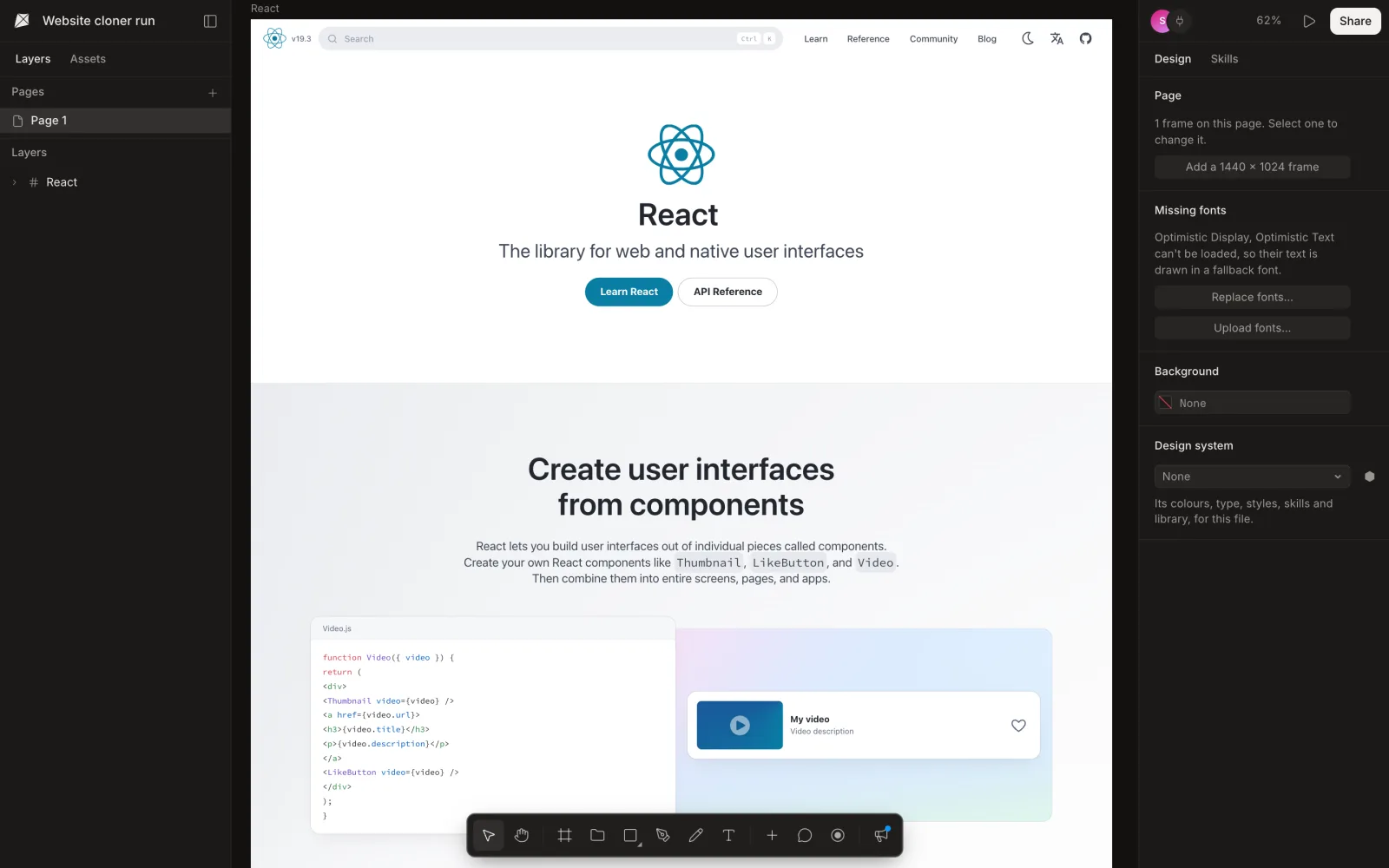
- Layout as the browser drew it: rows, columns and grids, padding, borders, corners and shadows.
- Text as text, in its font, size and colour. A font Kite doesn't have is drawn in a fallback, and the file says which, with Replace fonts and Upload fonts.
- Pictures and icons, stored in your file. Charts, canvases and videos come in as pictures of how they looked.
- The page at rest: what appears as you scroll is there, and animations are played to their end.
Edit it, copy it as code, or send it to Figma
- Edit it like any design in Kite, or ask your agent to: swap in your brand's colours and fonts, rewrite the copy, try three versions of the hero.
- Copy it as code: select a frame, right-click, Copy/Paste as, then Copy as HTML, Copy as React (⌥R) or Copy as Tailwind (⌥T). See Export and copy, and Figma to code for what the code looks like.
- Send it to Figma: select the frame, choose Copy to Figma, and paste in a Figma file.
This is the opening of the HTML Kite gave for our react.dev clone, exactly as it came out (cut at the ellipsis):
<div data-name="React" data-x="0" data-y="0" style="position: relative; color: rgb(0, 0, 0); font-family: ui-sans-serif, system-ui, sans-serif, "Apple Color Emoji", "Segoe UI Emoji", "Segoe UI Symbol", "Noto Color Emoji"; font-size: 16px; font-weight: 400; line-height: 24px; text-align: start; width: 1440px; height: 8858px; display: flow-root; background-color: rgb(255, 255, 255)">
<div data-name="Frame" style="position: relative; background-color: rgb(255, 255, 255); color: rgb(64, 71, 86); font-family: "Optimistic Text&q …The code is the layers, one element per layer, with sizes in pixels: a good start to split into components and make fluid, not finished production code.
Kite and other website cloners
Kite and the tools that rank for “website cloner” do different jobs. What each one says it does, on its own page, as of November 14, 2026:
| Tool | How it clones | What you get |
|---|---|---|
| Kite | Copies the page as the browser drew it, in Chrome or by your AI agent | An editable design in a shared file, then HTML, React, Tailwind or Copy to Figma |
| UX Pilot | “Analyzes the layout, sections, and structure to generate a high-fidelity version” from a URL or a screenshot | A version to customize, exported to Figma or HTML |
| Anima | “Clone any website into editable HTML or React with AI” | Code to refine with prompts, export or publish |
| html.to.design | A Figma plugin and Chrome extension that import a URL into Figma | A Figma design; 10 free imports, then 10 a month with ‹div›RIOTS ONE; unlimited on Pro |
Pick UX Pilot when you want an AI to redraw a site as your own multi-page version. Pick Anima when you want code and a published page. Pick html.to.design when the design should live in Figma and nowhere else. Pick Kite when the clone is the start of design work. You get a faithful copy your team edits with you, and the AI agent you already use can change it. Then take it out as code or to Figma. Kite is our product.
Whose pages to clone
Clone your own site freely: to redesign it, to make a design system from what is live, or to hand a page to your agent as a starting point. Other people's pages are fine to study. However, their words, pictures and code are protected, as the U.S. Copyright Office explains for original works, and their logos and brand are theirs. So use what you learn, not what they made, in anything you publish. This isn't legal advice.
Limits to know
A clone is a strong starting point, but a few things don't come over:
- Agents bring in public pages only, at a 1440 px desktop width. For a mobile layout or a page behind a sign-in, use Kite Capture in your own browser.
- When an agent clones a very large page, it stops at 8,000 layers, from the top, and Kite says the bottom was left out.
- A page's own web fonts don't always come with it. Kite draws Google Fonts and your workspace's fonts, and lists the rest as missing.
- Hover states, menus that open on click, and scripts aren't copied: you get the page as it looked at rest.
- Responsive behaviour isn't kept: sizes are the layers' own pixels, as they are in any export (see MDN on responsive design). So make widths fluid yourself when you turn the clone into code.
Website cloner questions
How do I clone a website for free?
Add Kite Capture to Chrome, open the page, press ⌥⇧K (Alt+Shift+K on Windows) and choose Whole page, then press ⌘V in a Kite file. The page arrives as editable layers. Kite Capture is free and has no account, and Kite is free with 3 files and unlimited editors.
Can an AI agent clone a website?
Yes. Connect Claude, ChatGPT, Cursor, Codex or Gemini to Kite and ask it to bring a page in by its address. Kite opens the page as a 1440 px wide desktop browser shows it and puts it in your file as layers, with its pictures. Our run on react.dev took about 45 seconds and came in as 1,141 layers.
Is the cloned website editable?
Yes. Every heading, paragraph, button and box is its own layer: change the words, the colours, the spacing, move sections around, or ask your agent to restyle it. It is a design, not a screenshot.
Can I turn the clone into code?
Yes. Select a frame, right-click, and use Copy/Paste as, then Copy as HTML, Copy as React or Copy as Tailwind. The code is the layers as Kite draws them, a starting point to split into your own components.
Can I clone a website into Figma?
Yes, through Kite: clone the page into a Kite file, select the frame and use Copy to Figma, then paste in Figma. html.to.design is a Figma plugin that imports a URL straight into Figma: 10 free imports, then 10 a month with its ‹div›RIOTS ONE plan, and unlimited on Pro.
How do I turn HTML into a design?
Open the page in Chrome, from a live site or served on your own computer (localhost), and copy it with Kite Capture (⌥⇧K, then Whole page). Paste it into a Kite file and it becomes layers you can edit. For a public page, your AI agent can bring it in by its address instead.
Is it legal to clone a website?
Copying a page's layout to study it or to redesign your own site is common practice, but a site's words, pictures, logos and code belong to its owner. Clone your own pages freely; treat other sites as a reference, and don't publish their content or brand as yours. This isn't legal advice.
How we checked
Methodology: on November 14, 2026, an agent connected to Kite brought react.dev into a new file with web_capture. It took about 45 seconds and came in at 1,440 × 8,858 px as 1,141 layers with 37 pictures. We looked at the file in Kite's editor and copied the page as HTML. UX Pilot's, Anima's and html.to.design's lines come from their own pages, read the same day; we didn't run those tools. One page, one run. Kite is our product.