Design with Gemini
Gemini's Canvas writes apps as code, with no design file to edit. Connect Gemini to Kite and it designs real screens as layers, in a file you and your team edit, then build or send to Figma.
By Loukman Nacik, Founder, Kite · Updated
Short answer: Gemini can design, but on its own it writes code, not a design you can edit by hand. Add Kite to Gemini once as a custom app, type @Kite and ask for a screen, and Gemini draws it as real layers in a Kite file your team edits with it. Your Google plan pays for the thinking, because Kite runs no model to design.
Can Gemini design?
Gemini is Google's AI assistant, in the browser at gemini.google.com and in its mobile app. Google gives you two ways to design with its models, and neither leaves you a design file that Gemini, you and your team all edit:
- Gemini Canvas makes docs, slides, web pages and apps. Google's Canvas help page says it generates the code for an app, and that you change it by prompting, by pointing at a part with Select & ask, or in the Code view. Exports go to Docs, Slides, PDF and Colab, and a shared link gives each person their own copy.
- Google Stitch, from Google Labs, is a separate design app: its FAQ says it turns prompts, sketches or screenshots into editable interfaces and exports them to Figma. It runs its own model, free on a daily credit limit, and its MCP server is for coding tools, not the Gemini app.
The third way is to give Gemini a design canvas of its own. MCP (Model Context Protocol) is the open standard that lets an AI assistant use another tool, and Gemini can add any MCP server as a custom app. Kite is a design canvas built for that: Gemini draws in it, and people edit the same file.
| How Gemini designs | What you get | What you need | Best for |
|---|---|---|---|
| Gemini Canvas | A working app or page as code, changed by prompting or in the code; exports to Docs, Slides, PDF | Any Gemini plan | A quick working prototype to click through |
| Google Stitch | Screens from Stitch's own model, with HTML and a Figma export | A Google account, 18+; a daily credit limit | First ideas for an app, on their way to Figma |
| In Kite | Layers Gemini draws itself, in a file your team edits and comments on, with your design system | A personal Google account in the US; Kite free for 3 files and 200 agent actions a day | Designing before there is code, with people and agents in one file |
Which route to pick
If you want something running today, use Canvas and keep prompting. If you want first screens from Google's design model and finish in Figma, try Stitch. If you want Gemini to design in a file that stays editable by hand, with your brand, your team's comments and other agents in the same place, use Kite, the route the rest of this tutorial follows. Kite is ours, so weigh that when you read this table.
Step 1: Connect Gemini
You add Kite once, on gemini.google.com on a computer, as Google's Developer Mode guide describes:
- Open Settings → Gemini Apps Developer Mode, or go to gemini.google.com/devmode.
- In Choose an app, click + Create new and paste this address as the MCP Server URL:
https://kite.new/api/mcp- Tick the box that you accept the risks of connecting a custom app, click Connect, then sign in to Kite and click Allow.
- When Gemini asks you to save the app, name it Kite, so @Kite finds it, and click Connect.
Google's help center sets the rules: you must be 18 or over and in the US, signed in with a personal Google Account (not a work or school one), with Keep Activity on and Gemini in English. Once added, the app works in the Gemini mobile app too. Gemini setup has the same steps with a button that opens Gemini.
Step 2: Ask for a design
Type @Kite, pick Kite, then ask in plain words and say you want the link:
@Kite Design a pricing page with three plans in a new Kite file, then give me the link.As Kite's guide for agents asks, it draws one section, card or row at a time and looks at a frame as a picture before it says it is done. In our run the link came only at the end, so to watch it work, open the new file from your Kite library.
What a real run looks like
We ran this once on November 7, 2026, in the Gemini web app with the Pro model picked, on a Google AI Plus account, with this prompt:
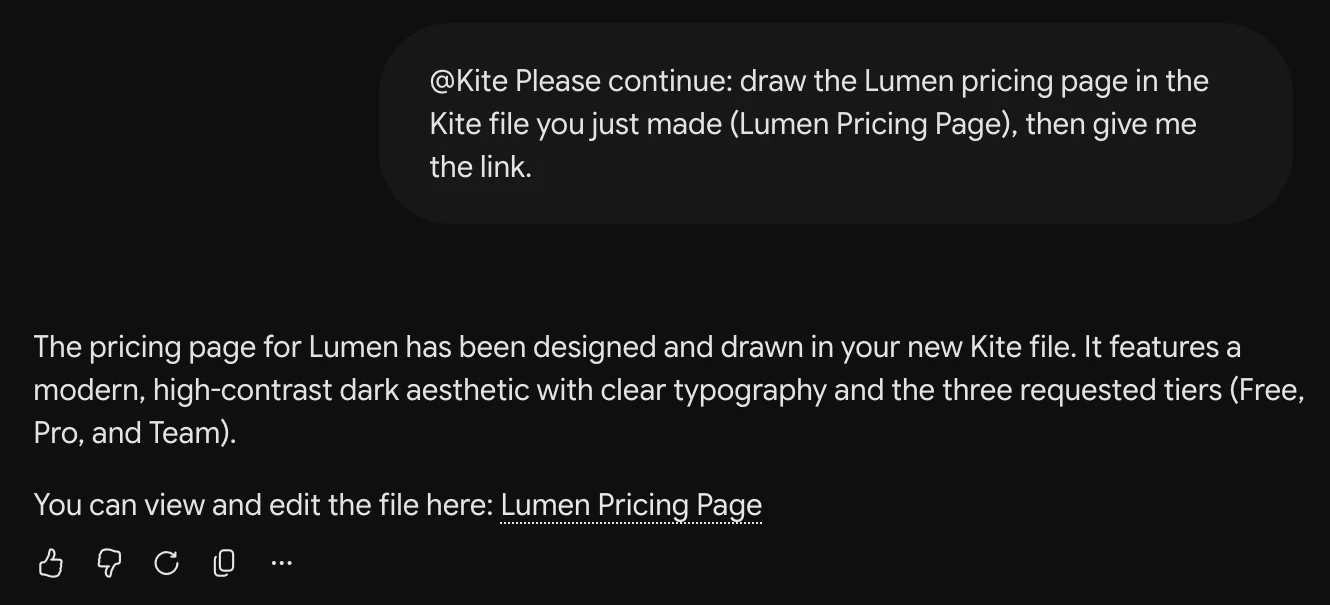
@Kite Design a pricing page with three plans (Free, Pro, Team) for a made-up project tool called Lumen in a new Kite file, then give me the link.It took two tries. Within 20 seconds Gemini made a file, then showed “Connecting to Kite” with nothing more in the file for over two minutes, so we stopped it. We don't know whether it would have carried on. We then asked it to continue in that file. It made a second file with the same name instead, finished drawing about two minutes after our message and replied with the link. What came back is real layers, with its text as text and its cards as frames, and we didn't change anything in the picture below.
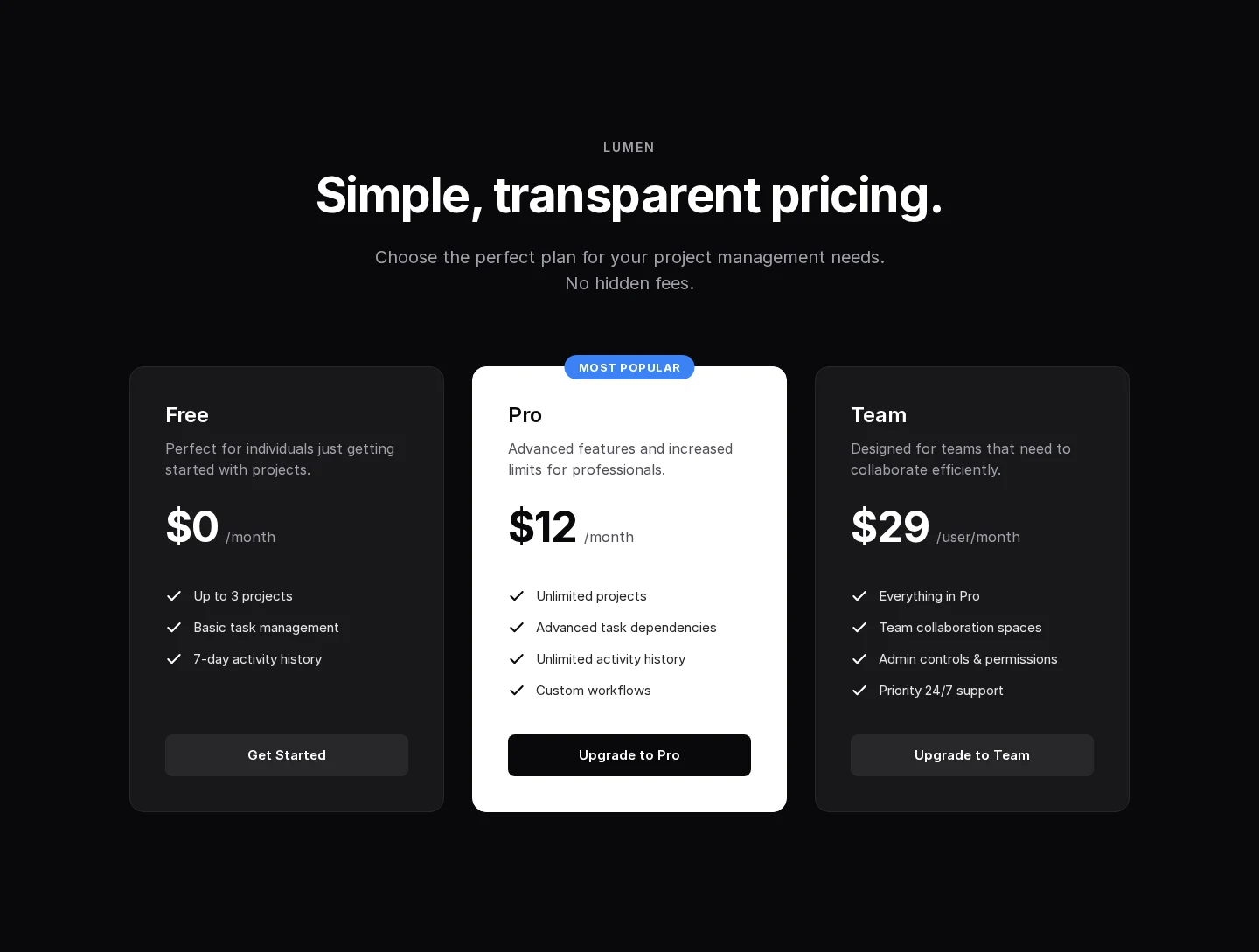
If Gemini looks stuck, stop it and ask again, then archive any empty file it left in your Kite library. That is one run of one prompt, with no design system in the file, so yours will differ.
Step 3: Keep it on brand
Gemini keeps to your brand when the file has a design system, because it reads the system before it draws. The system holds your colours, type, spacing and corners as variables, plus skills: short rules in plain words. Make one from your website, from a DESIGN.md, or by right-clicking a frame you like and choosing Make a design system from this frame.
Step 4: Change it, together
- Edit it yourself: the design is ordinary layers. Change a word, a colour or a size by hand, and Gemini sees your change the next time it looks.
- Ask Gemini: “@Kite In my Lumen file, make the Team card match the Pro card.” It changes what is there rather than drawing it again.
- Bring your team in: share the file's link. Teammates edit and comment in their browser, and their own agents, such as Claude, ChatGPT or Cursor, work in the same file (see Comments).
Step 5: Build it, or send it to Figma
- Build it: right-click a frame and copy it as HTML, React or Tailwind, or ask a coding agent such as Antigravity to build it from the file, which holds the exact sizes, colours and type (see Export and copy).
- Send it to Figma: right-click the frames and choose Copy/Paste as → Copy to Figma, then paste in Figma, where they arrive as layers you can edit (see Figma).
Limits to know
- Who can add it: Google's help center allows custom apps only in the US, from 18, on personal accounts, with Keep Activity on and in English.
- Kite's free plan: 3 files and 200 agent actions a day, and Pro removes both limits.
- Prototypes: Kite makes designs, not running apps. Its preview steps through frames with no links between them, so for a working version, build it in code or in Gemini Canvas.
- Into Figma: components arrive as ordinary frames and design system colours as plain colours, and Figma needs the fonts too.
Questions
Is there a Claude Design for Gemini?
Not inside the Gemini app. Gemini's Canvas makes docs, slides and apps as code, and Google's separate Stitch app designs interfaces with its own model. To have Gemini itself design in a file you can edit, connect it to a design tool over MCP, such as Kite.
Can Gemini Canvas export to Figma?
Google's Canvas help page lists exports to Google Docs, Google Slides, PDF and Colab, and no Figma. Stitch, Google's design app, does export to Figma. With Kite, Copy to Figma pastes what Gemini drew into Figma as editable layers.
Who can connect Gemini to Kite?
Google's help center says custom apps need you to be 18 or over and in the US, signed in with a personal Google Account, not a work or school one, with Keep Activity on and Gemini in English. It lists no paid plan. You add the app on gemini.google.com, and it then works in the Gemini mobile app too.
What does it cost?
Gemini's Free plan lists Canvas, and Google's custom-app requirements name no paid plan; paid Google AI plans raise your usage. Kite is free with unlimited editors and viewers, 3 files and 200 agent actions a day, and has no AI credits. Pro is $20 an editor a month, or $16 billed yearly, with unlimited agent actions.
Does it work with Antigravity?
Yes: Google's Antigravity connects to Kite over MCP too, and Kite's setup pages have its steps. An agent in Antigravity and Gemini in the browser can work in the same file.
Next
- Design in ChatGPT, the same way in OpenAI's assistant.
- Google Stitch review, if you are weighing Google's own design app.
How we checked
Methodology: on November 7, 2026 we read Google's Gemini help center (Canvas, custom apps), its Developer Mode guide, its plan page and Stitch's own FAQ, all linked on this page or in our notes, and ran Gemini once for this tutorial, as described above. Kite is our product.