Design in ChatGPT
ChatGPT has no design canvas of its own. Connect it to Kite and it designs real screens in a file that opens beside the chat, which you and your team edit, then build or send to Figma.
By Loukman Nacik, Founder, Kite · Updated
Short answer: ChatGPT has no design canvas built in, but you can give it one. Connect it to Kite once, type @Kite and ask for a screen, and it draws the design as real layers in a file that opens beside the chat. You edit the same file by hand, your team joins it, and the frames go on to code or Figma. Your ChatGPT plan pays for the thinking, because Kite runs no model to design.
Does ChatGPT have a Claude Design?
No. Claude Design is Anthropic's design workspace inside Claude, where you chat your way to mockups and prototypes and edit them on a canvas. ChatGPT is OpenAI's assistant, and it has nothing like it built in. Here is what ChatGPT itself does with a design request today, from OpenAI's own pages:
- Images: ChatGPT Images 2.6 draws pictures and edits them when you select an area and describe the change. The result is a flat image you copy or save, not layers you can move.
- Code: canvas, ChatGPT's old writing and coding panel, is gone from the current models since May 28, 2026, per OpenAI's release notes. Code blocks now preview HTML, React and SVG inside the answer.
- Sites: on Plus and Pro, ChatGPT Sites builds and publishes a working website. You change it by describing the change, and what you keep is its code.
A design canvas comes from a plugin, ChatGPT's name for an app that connects to it. MCP (Model Context Protocol) is the open standard that lets an AI assistant use another tool, and OpenAI's app guidelines let such a tool open a full editor beside the chat. Kite is a design canvas built for that: your own agent draws in it, and people edit the same file. Four design plugins are worth knowing:
| Plugin | What ChatGPT makes | Where you edit it | What you need |
|---|---|---|---|
| Kite | Screens, banners and posts as layers, in a design file with your design system | Kite's editor, beside the chat or in any browser; your team and other agents edit the same file | A paid ChatGPT plan that can add a custom MCP server; Kite free for 3 files |
| Spline | 3D scenes, plus websites and app screens in Spline's 2D canvas, Hana | Spline's editor, in a panel beside the chat | Any Spline plan; each action counts toward Spline's MCP limits |
| Figma | FigJam diagrams, Figma Slides and Figma Buzz assets, not Figma Design files | In Figma, after the file is made; not available in the EU | A Figma account, Starter plan and up |
| Canva or Adobe | Designs from templates, such as posts and flyers | Small changes in the chat, then in Canva or Adobe Express | A Canva or Adobe account |
Which route to pick
For social posts and flyers from a template, Canva or Adobe are quickest. For 3D, use Spline, whose launch post says its editor opens beside the chat and builds on your edits. For interface design that a team keeps working on, with a design system, comments and a way into Figma, use Kite, the route the rest of this tutorial follows. Kite is ours, so weigh that when you read this table. Figma's own plugin is for diagrams and slides: its help center says you “can't use ChatGPT to create files for Figma's other products”.
Step 1: Connect ChatGPT
ChatGPT has no one-click add for Kite yet, so you add it as a custom MCP server, once, on chatgpt.com. OpenAI's help center lists the same steps:
- Open Plugins in ChatGPT's sidebar, click +, then Add custom MCP server.
- Name it Kite, paste this address under Connection and leave authentication on OAuth:
https://kite.new/api/mcp- Tick I understand and want to continue, click Create, then sign in to Kite and allow ChatGPT when it asks.
OpenAI's pricing page offers custom MCP servers on Plus and Pro, not on Free or Go, and in Business and Enterprise workspaces an admin decides who may add one. You no longer need to turn on Developer Mode first. ChatGPT setup has the same steps with a button that opens ChatGPT.
Step 2: Ask for a design
Type @Kite so ChatGPT uses it, then ask in plain words:
@Kite Design a three-screen onboarding flow for a meditation app and show it to me here.The more you say about who the screens are for and what they should feel like, the less it guesses. ChatGPT makes the file and, as Kite's guide for agents asks, draws one section, card or row at a time and looks at what it drew. Then it shows you the file in the chat with two buttons: Open in Kite and Edit here, which opens Kite's full editor beside the conversation.
What a real run looks like
We recorded this run on November 4, 2026, in ChatGPT on the web, with the prompt above. ChatGPT reported “Worked for 1m 57s”, named the app Still, and answered with the file in the chat. Clicking Edit here opened the three screens in Kite's editor beside the chat, as below. We didn't change anything in the picture. That is one run of one prompt, with no design system in the file, so yours will differ.
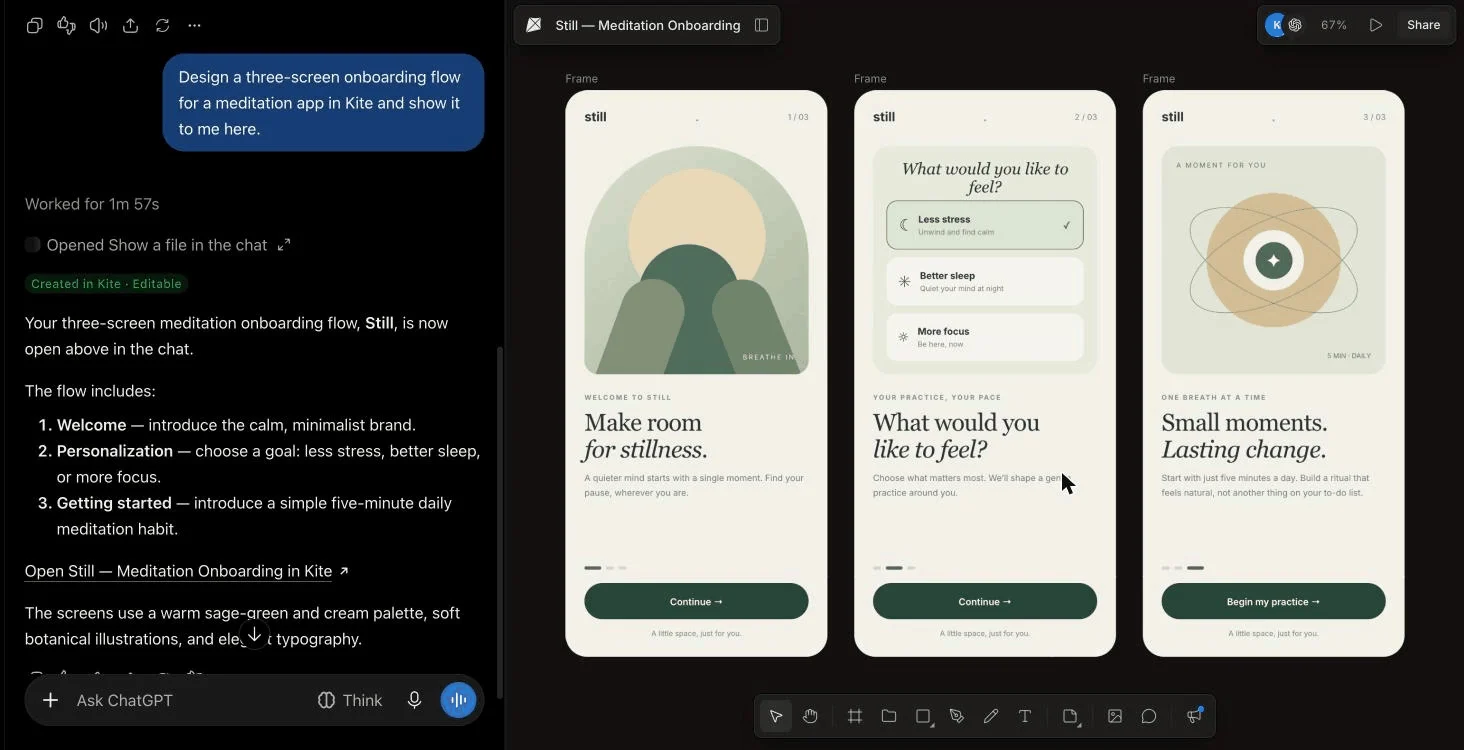
What comes back is layers, not a picture of a design: the headlines are text and the cards and buttons are frames. You can click any of them in the editor and change it, and the next time ChatGPT looks at the file it sees your change.
Step 3: Keep it on brand
ChatGPT keeps to your brand when the file has a design system, because it reads the system before it draws. The system holds your colours, type, spacing and corners as variables, plus skills: short rules in plain words. Make one from your website, from a DESIGN.md, or by right-clicking a frame you like and choosing Make a design system from this frame.
Step 4: Change it, together
- Edit it yourself: change a word, a colour or a size by hand, in the panel beside the chat or in the file's own tab.
- Ask ChatGPT: “@Kite Make the first screen's headline bigger and use our primary colour.” It changes what is there rather than drawing it again.
- Bring your team in: share the file's link. Teammates edit and comment in their browser, and their own agents, such as Claude, Cursor or Codex, work in the same file (see Comments).
Step 5: Build it, or send it to Figma
- Build it: right-click a frame and copy it as HTML, React or Tailwind, or ask your coding agent to build it from the file, which holds the exact sizes, colours and type (see Export and copy).
- Send it to Figma: right-click the frames and choose Copy/Paste as → Copy to Figma, then paste in a Figma Design file, where they arrive as layers you can edit (see Figma).
Limits to know
- ChatGPT plans: Free and Go can't add a custom MCP server, and OpenAI's help center says you add one on the web only.
- Kite's free plan: 3 files and 200 agent actions a day, and Pro removes both limits.
- Prototypes: Kite makes designs, not running apps. Its preview steps through frames with no links between them, so for a working version, build the design in code or use ChatGPT Sites.
- Into Figma: components arrive as ordinary frames and design system colours as plain colours, and Figma needs the fonts too.
Questions
Does ChatGPT have an equivalent to Claude Design?
Not built in. ChatGPT makes images, writes code you can preview, and builds websites with Sites, but it has no design file of its own with layers you can edit by hand. Design tools fill that gap as plugins: Kite and Spline open their own editor beside the chat, while Figma's, Canva's and Adobe's plugins make a starting point you finish in their own apps.
Is ChatGPT Canvas gone?
From the current models, yes. OpenAI's release notes of May 28, 2026 say canvas is no longer available in GPT-5.5 Instant or GPT-5.5 Thinking, replaced by writing blocks and code blocks, and that paid users keep it on legacy models for a limited time. Canvas was for writing and code, never for visual design.
Can ChatGPT make a Figma design?
Not with Figma's own plugin: Figma's help center says ChatGPT only creates FigJam and Figma Slides files, plus Figma Buzz assets, and can't create files for Figma's other products. With Kite, ChatGPT draws the screens and Copy to Figma pastes them into a Figma Design file as editable layers.
What does it cost?
ChatGPT is billed by OpenAI, and adding a custom MCP server needs a paid plan: OpenAI's pricing page offers it on Plus and Pro, not Free or Go, and in Business and Enterprise workspaces an admin decides. Kite is free with unlimited editors and viewers, 3 files and 200 agent actions a day, and has no AI credits. Pro is $20 an editor a month, or $16 billed yearly, with unlimited agent actions.
Does it work in the ChatGPT app or on my phone?
You add Kite on chatgpt.com: OpenAI's help center says custom MCP servers are connected on the web only. The Kite file itself opens in any browser and in Kite for Mac and Windows, so you can keep editing it anywhere.
Next
- Design with Gemini, the same way in Google's assistant.
- Claude Design alternatives, if you are choosing a design tool for your agent.
How we checked
Methodology: on November 7, 2026 we read OpenAI's help center (custom MCP servers, plugins, Sites, images, model release notes), its pricing page, Figma's, Canva's and Adobe's help pages for their ChatGPT plugins, and Spline's launch post and docs, all linked on this page or in our notes. The run above was recorded on November 4, 2026. Kite is our product.