Figma to code
Turn a Figma design into HTML, React or Tailwind. Copy the frames in Figma, paste them into a Kite file, then copy them out as code.
By Loukman Nacik, Founder, Kite · Updated
Short answer: to turn a Figma design into code, copy the frames in Figma, paste them into a Kite (kite.new) file, then right-click and use Copy/Paste as → Copy as HTML, React or Tailwind. We ran it on November 11, 2026 with a card that had auto layout, a picture, a colour variable and a button component. The layout, text, colours, border, shadow, picture and component all came over. Our Figma account was connected; while Figma reviews Kite's app, most accounts can't connect yet, so their pictures arrive as grey placeholders. Pictures in the code point at Kite: replace their addresses before you ship.
Figma to HTML, React or Tailwind, step by step
- Copy in Figma. Select the frames or layers and press ⌘C.
- Paste in Kite. In a Kite file (make one at kite.new), press ⌘V. Kite says “Pasted from Figma” when the layers are in (see Paste from Figma).
- Copy as code. Select a frame, right-click, and choose Copy/Paste as and then Copy as HTML, Copy as React (⌥R) or Copy as Tailwind (⌥T).
- Paste into your project. The code is on the clipboard (see Export and copy).
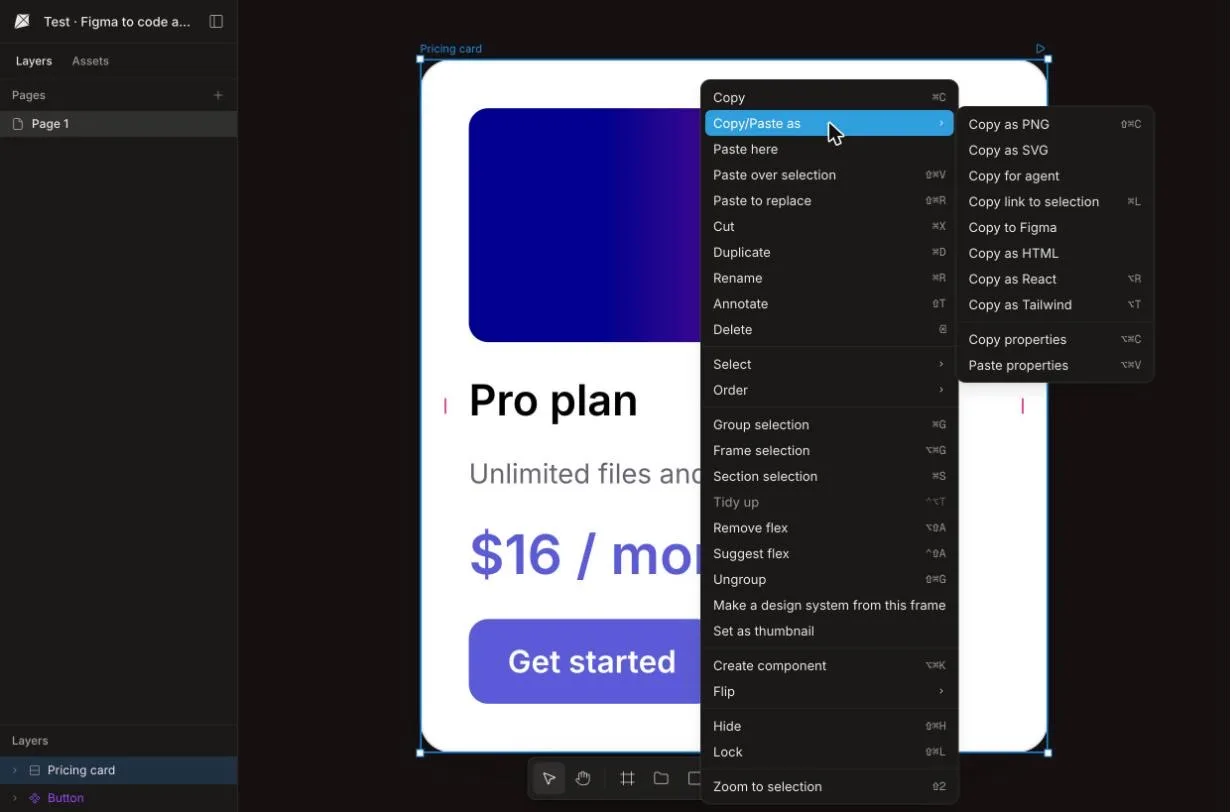
Which code to copy
| Format | What you get | Where variables go | Best for |
|---|---|---|---|
| Copy as HTML | HTML with the styles written on each element | A <style> block with :root | A static page or a prototype |
| Copy as React (⌥R) | JSX with style objects; a main component alone becomes export function Button() | A comment marked “Add to your CSS” | A React app you will split into components |
| Copy as Tailwind (⌥T) | HTML with Tailwind classes, mostly arbitrary values | A comment marked “Add to your CSS” | A project already on Tailwind |
What the code looks like
The opening of each copy of our test card, as Kite gave it (shortened at the ellipsis):
<!-- Copy as HTML -->
<div data-name="Pricing card" style="display: flex; flex-direction: column; gap: 16px;
  padding: 24px; background-color: #FFFFFF; border-radius: 16px;
  border: 1px solid #E5E5EB; box-shadow: 0px 8px 24px 0px rgba(0, 0, 0, 0.08); …">
  <div data-name="Pro plan" style="font-weight: 600; font-size: 22px; …">Pro plan</div>
// Copy as React
<div style={{ display: "flex", flexDirection: "column", gap: "16px", borderRadius: "16px", … }}>
<div style={{ fontWeight: "600", fontSize: "22px", … }}>Pro plan</div><!-- Copy as Tailwind -->
<div class="relative bg-[#FFFFFF] rounded-[16px] flex flex-col gap-[16px] pt-[24px] …">
<div class="font-[600] text-[22px] …">Pro plan</div>The code is the layers as Kite drew them, one element per layer: a good start to split into your own components, not a finished component library. In our test the button inside the card came out as its markup in place; the Button component, copied on its own as React, came out as export function Button().
What comes over from Figma
- In our test: auto layout with its gap and padding, text with its font, weight and size, fills, the border, the drop shadow, the picture, and the Button component with its instance in the card.
- From Kite's docs: frames, groups, auto layout, text, shapes, vectors, fills, strokes and shadows come in as Kite layers. These don't: masks (what they clipped comes in whole), FigJam stickies and connectors, and some picture adjustments such as temperature and tint.
- Pictures come over when your Figma account is connected. Without it they come in as grey placeholders.
- Variables: the colour variable came into the file's design system as
--primary, but the pasted layers kept the plain colour (next section).
Design-system variables as CSS
When a layer in Kite uses a variable, the copied code keeps it: color: var(--primary) on the element, with the variable written once as CSS, in a <style> block with :root for HTML and in a comment marked “Add to your CSS” for React and Tailwind. In our test the variables arrived but the pasted layers didn't use them, so the first copy had #5B5BD6; after we picked primary on the price's colour in Kite, the next copy had var(--primary) and the :root block:
<style>
:root {
  --primary: #5B5BD6;
}
</style>
<div data-name="$16 / month" style="… color: var(--primary)">$16 / month</div>
For your whole set of variables, run the Kite plugin for Figma (Plugins → Kite → Copy variables and styles) and paste in the file.
Pictures in the code
A picture's src in the code is its address in the Kite file, and Kite serves it only to people who can open the file: in our test, a signed-out visitor got “not found”. Before you ship, export the pictures (see Export and copy) and point the code at your own copies.
Kite or Figma's Dev Mode
Figma has its own route: Dev Mode, a developer workspace for inspecting designs, generated code and assets. It isn't on Figma's free Starter plan (Figma's help center), and linking library components to your own code with Code Connect needs a paid plan and a Full or Dev seat. There are free routes too: free viewers on paid plans can copy CSS (Figma's pricing FAQ), Figma's MCP server is on every plan for agents in Figma's MCP catalog and gives them React and Tailwind by default (Starter is held to 20 calls a month, per Figma's pricing), and Community plugins such as FigmaToCode export from inside Figma.
Pick Dev Mode when your team already pays for Figma and wants code beside the design. Pick a plugin for code straight out of Figma. Pick Kite when you want a whole frame as one block of HTML, React or Tailwind with your design system's variables written as CSS, and the design should stay open to your AI agent: in a Kite file it edits the same layers your team does (see what agents can do). Kite is our product.
Limits to know
- Until Figma approves Kite's app, connecting Figma won't work for most accounts, so pictures come as grey placeholders.
- Pictures in the code load only for people who can open the Kite file: replace their addresses before you ship.
- Colours from Figma variables come in as plain values: pick the variable on the layer in Kite to keep it in the code.
- Sizes are the layers' own pixels: a frame that hugs its content stays
fit-contentand a fixed width stays fixed, so make widths fluid yourself. - A paste can only carry what Figma's copy includes, and a font Kite doesn't have shows in a fallback; the paste says which.
Figma to code questions
How do I convert a Figma design to HTML?
In Figma, select the frames and press ⌘C. In a Kite file, press ⌘V, and the frames arrive as layers. Right-click them, choose Copy/Paste as, then Copy as HTML, and paste the result into your project. You get HTML with the styles written on each element.
Can I get React or Tailwind instead?
Yes. Copy as React (⌥R) gives JSX with style objects, and a main component copied on its own comes out as a function, such as export function Button(). Copy as Tailwind (⌥T) gives HTML with Tailwind classes, mostly arbitrary values in square brackets, each the layer's own size or colour.
Do I need to connect my Figma account?
Only for pictures. A copy from Figma carries its layers but not its pictures, so the first paste with pictures asks you to connect Figma. Until Figma approves Kite's app, connecting won't work for most accounts, and pictures come in as grey placeholders; the layers and the code still come over.
Are Figma's variables kept?
The variables come into the file's design system, but in our test on November 11, 2026 the pasted layers kept their colours as plain values, so the code had #5B5BD6 rather than var(--primary). Pick the variable on a layer in Kite and the code carries it, with the variable written as CSS.
Is it free?
Kite is free with unlimited editors and viewers and 3 files. Copy as code is on the free plan, for the file's own people: its owner, the people in its workspace who can open it, anyone invited to edit it, and anyone else who can open it if the owner allows downloads.
Related tutorials
- Move a Figma file to Kite, to keep working on the design there.
- Design with Claude or Cursor, then copy to Figma, the other way round.
How we checked
Methodology: on November 11, 2026, in Figma in the browser, we made a card with auto layout, a 272×120 picture, text, a colour variable (primary, #5B5BD6) and a Button component placed in it. We copied the card and the component with ⌘C, pasted them into a new Kite file with our Figma account connected, and copied the card as HTML, React and Tailwind. We read the code and checked the picture's address signed out. Then we picked the variable on the price in Kite and copied again. One run, one card. Kite is our product.