Short answer: UI UX Pro Max is a free, open-source Agent Skill for Claude Code, Codex, Cursor and other coding agents. It adds a local database of UI styles, palettes, font pairings and UX rules, and a generator that picks a design system before the agent writes code. Install it in Claude Code with two /plugin commands, or anywhere with uipro init --ai <agent>. It shapes the code one agent writes, but gives you no design file: in our test it only changed the page once the prompt named it. The same brief in Kite (kite.new) took 3 calls and came out as an editable file, its palette saved as a shared design system.
Key takeaways
- It is a skill, not a design tool: a SKILL.md, a CSV database and Python scripts that run on your computer, MIT-licensed, 150,550 stars on GitHub.
- The CLI installs seven skills (175 files, 4.5 MB); its main SKILL.md is 739 lines, over the 500 Claude Code's docs advise.
- Installed but not named, Claude Code skipped it and wrote a page much like the one with no skill. Named, it ran the generator and used its palette and fonts.
- In our one run, using it cost more: 77 seconds and about 158,000 input tokens, against 41 seconds and 43,000 without.
- Kite takes its output further: the palette became variables, its checklist a Kite skill, and the page a file a team edits and comments on.
Every fact about the skill below was read on November 17, 2026 in its GitHub repository, on uupm.cc and on npm, and the main pages are linked in the text. We installed it in throwaway folders and ran it. Kite publishes this page, and Kite is the design tool it is compared with. For other design skills side by side, see the best design skills for Claude Code and Codex.
What is the UI UX Pro Max skill?
An Agent Skill is a folder with a SKILL.md file of instructions, and sometimes scripts and data, that a coding agent loads when a task fits. UI UX Pro Max is one by nextlevelbuilder, released under the MIT licence. Its repository describes it as “an AI skill that provides design intelligence for building professional UI/UX across multiple platforms”.
Its README lists what the local database holds on the main branch:
- 80 searchable UI styles, 51 of them active (glassmorphism, brutalism, bento grid, Fluent 2, Apple's, and so on)
- 192 colour palettes, one per product type, and 192 reasoning rules that pick between them
- 74 font pairings, 25 chart types and 120 UX guidelines
- guidance for 22 stacks, from HTML with Tailwind (the default) to React, SwiftUI, Flutter and Jetpack Compose
The agent doesn't read all of that. A Python script searches the database and returns only the relevant recommendations. Its main mode, --design-system, takes a product type and answers with a page pattern, a style, colours, fonts, effects, things to avoid and a pre-delivery checklist. For “beauty spa wellness landing page” it answered in 0.14 seconds with a Hero, Testimonials and CTA pattern, the Soft UI Evolution style, a pink #EC4899 with a violet accent, and Lora with Raleway. Its --persist flag saves that as design-system/<project>/MASTER.md in your repository, with one file per page for exceptions.
A design system is the shared set of colours, typography, spacing and component rules every screen of a product follows. UI UX Pro Max proposes one and keeps it as text for your coding agent; a design tool keeps it as variables people and agents apply on a canvas.
It is popular: 150,550 stars and 15,913 forks on GitHub, and 25,523 downloads of its installer on npm in the week of November 9 to 15. The last release, v2.15.0, came out on August 13, 2026 (releases), and the repository was still updated the day before we checked. A paid Premium version adds brand, logo, banner and slide skills, but its page says “We have temporarily paused new Premium subscriptions while we rebuild the product”, with the relaunch “TBA”.
How to install UI UX Pro Max in Claude Code, Codex and Cursor
There are two installation routes. In Claude Code, the plugin route is two commands typed in an interactive session, and it installs directly from the GitHub repository. Everywhere else, the command-line installer generates the skill's files inside your project from templates bundled in its npm package; it only downloads a GitHub release when you add the --legacy option. We ran the CLI (version 2.15.0) for each of the three agents below in empty folders, with a private npm cache, so nothing reached our real setup.
| Agent | Install | Where it goes | Call it |
|---|---|---|---|
| Claude Code | /plugin marketplace add nextlevelbuilder/ui-ux-pro-max-skill, then /plugin install ui-ux-pro-max@ui-ux-pro-max-skill. Or uipro init --ai claude | .claude/skills/ (--global: ~/.claude/skills/) | Name it in the prompt (Claude Code's skills docs) |
| Codex | uipro init --ai codex | .agents/skills/, which Codex scans from your folder up to the repository root | $ or /skills (OpenAI's docs) |
| Cursor | uipro init --ai cursor | .cursor/skills/ | Type / in Agent chat (Cursor's docs) |
The CLI itself comes first, with Node.js:
- Install it:
npm install -g ui-ux-pro-max-cli. The command it adds isuipro; the olderuipro-clipackage is stale, the README warns. - In your project folder, run
uipro init --ai claude(orcodex,cursor,antigravity,windsurf,copilotand about 20 more;--ai alldoes every one). - Check that
python3 --versionworks: the search script needs Python 3, standard library only. We read its scripts: they import nothing else and make no network calls, as the README says. - Restart your agent so it discovers the newly installed skills on its next session.
Three things our installs of version 2.15.0 showed that the README's install section doesn't flag:
- You get seven skills, not one. Alongside
ui-ux-pro-max, the installer addsdesign,banner-design,ui-styling,brand,slidesanddesign-system: 175 files, 4.5 MB. - The npm version lags the README. The README documents
uipro init --dry-runand a--tokens cssexport; the CLI on npm (2.15.0) answered “unknown option '--dry-run'”, and its script “unrecognized arguments: --tokens css”. - The two routes may install different files. The CLI's
SKILL.mdis 55,473 bytes and 739 lines; the one on the repository's main branch, which the plugin is set to read (we didn't test the plugin route), is 18,640 bytes and 243 lines.
How to use UI UX Pro Max
There are three ways in. The README documents the second (and a slash command for Kiro, Roo Code and KiloCode) and the third; only the first made Claude Code use it in our run:
- Name it. For example, start the prompt with “Use the ui-ux-pro-max skill.” Claude Code then loaded it, ran the generator and built the page from its answer. In Cursor and Codex, pick it with
/or$. - Let it switch on by itself. The README says it “activates automatically when you request UI/UX work”. With the skill installed and the prompt unchanged, Claude Code listed it and never used it.
- Run the generator yourself.
python3 .claude/skills/ui-ux-pro-max/scripts/search.py "fintech dashboard" --design-systemprints a design system you can paste anywhere, a Kite design system included;--domain styleor--stack reactnarrows a search.
Troubleshooting UI UX Pro Max
The common errors, with the fixes from the skill's README and SKILL.md and from our installs:
- The skill never activates. Check that the folder landed where your agent looks (
.claude/skills/,.agents/skills/or.cursor/skills/), restart the agent, then name the skill explicitly in the prompt, or invoke it with/or$. - “python: command not found”. Its SKILL.md tells the agent to try
python3, thenpy -3. If none exists, install Python 3 from python.org or your package manager; the README asks agents not to install it for you. - “unrecognized arguments: --tokens” or “unknown option '--dry-run'”. The npm release (2.15.0) predates both options. The repository's main branch has them, and the plugin route should install from it; we didn't test that route.
- “Response exceeded the output token maximum”. The README explains this is Claude Code's limit on a single response, not a skill error: ask for smaller steps, or set
CLAUDE_CODE_MAX_OUTPUT_TOKENS=64000before starting a new session. - Removing it.
uipro uninstalldetects the platform; add--ai claudefor one agent or--globalfor the home-folder installation.
A measured run: the same brief with it, without it, and in Kite
On November 17, 2026 we gave one brief to Claude Code three times, in empty folders, with nothing loaded but Claude Code's own skills and the folder's: “Build a landing page for Serenity Spa, a beauty and wellness day spa: a hero with a booking button, its services with prices, testimonials and a closing call to book. Write it as one self-contained index.html in this folder (inline CSS, no build step, no external images). Desktop first.” Each used Claude Sonnet 5.5 and ran once. Then we gave the same brief to Claude Opus 5.5 drawing in Kite, with the skill's palette saved as a Kite design system.
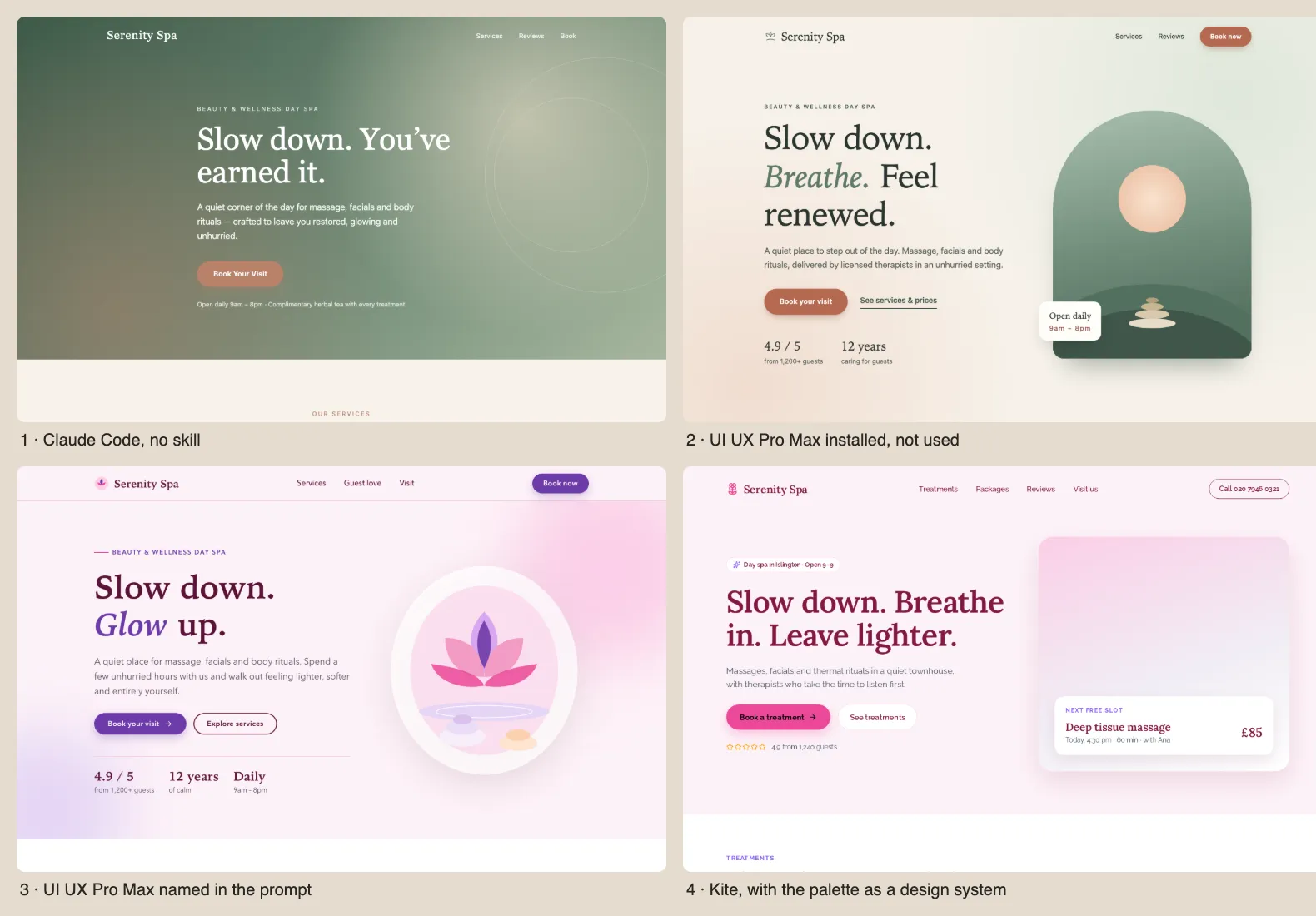
| Run | Skill used? | Time | Tool calls | Input tokens | What you get |
|---|---|---|---|---|---|
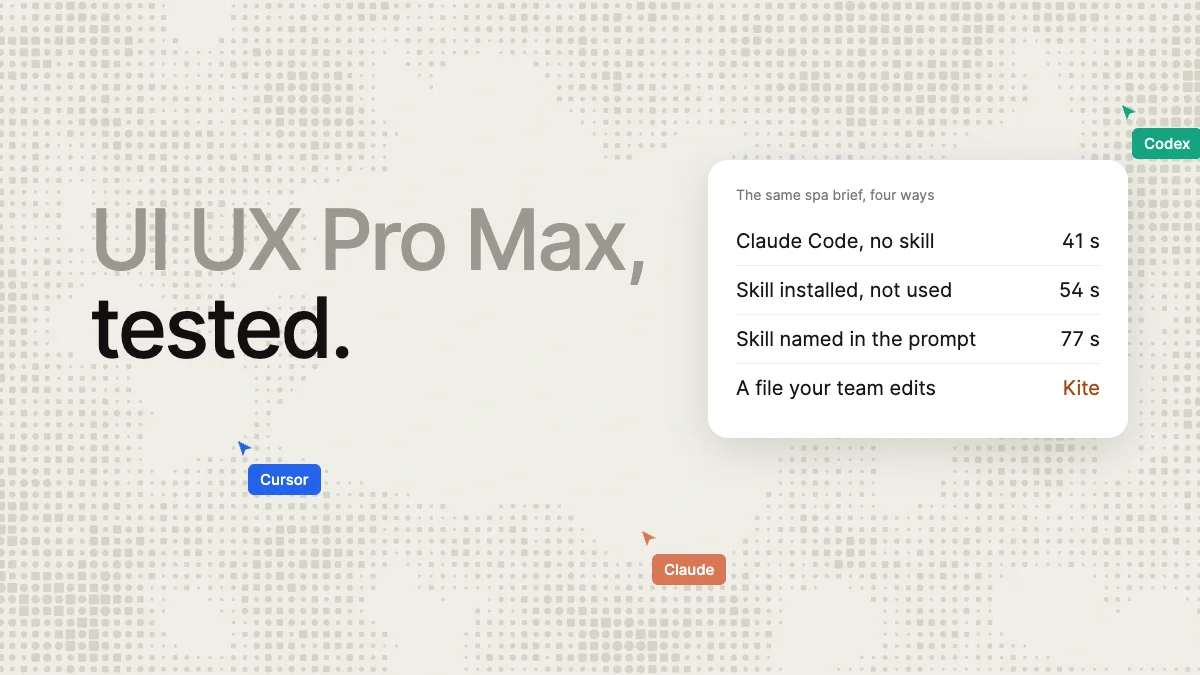
| 1. Claude Code, no skill | No | 41 s | 1 | 43,376 | index.html: sage, sand and clay, Georgia |
| 2. Skill installed, same prompt | No, listed only | 54 s | 1 | 47,215 | index.html: sage, sand and clay again, a serif |
| 3. Skill named in the prompt | Yes, generator run once | 77 s | 3 | 157,956 | index.html: pink and violet, Lora and Raleway, skip link, focus rings |
| 4. Kite, with a design system | Its palette, as variables and a Kite skill | 61.3 s | 3 | Not measured | A Kite file: frames, text layers, icons, every colour a variable |
What the numbers say:
- Automatic activation didn't happen. In run 2 the skill appeared in Claude Code's skill listing, yet Claude generated the entire page in a single write without invoking it. The page came out close to run 1's in its colours and type, the same sage and clay and a serif, with a green arch illustration instead of run 1's gradient hero. Its only measurable effect was about 2,800 more input tokens on the first turn, the seven skills' listing. Claude Code's docs say every listed skill “adds to your context on every turn, whether or not Claude ever uses it”.
- Named, it changed the result. Run 3 ran the generator, took its pink and violet palette and its fonts, and added the accessibility basics its rules ask for: a skip link, visible focus rings, 44 px targets and reduced motion. Claude darkened the violet for contrast on its own.
- Using it was more expensive. Run 3 read 3.6 times the input tokens of run 1 and took 36 seconds longer, at $0.29 against $0.11 in API prices. Claude Code's docs add that a loaded skill “stays in context across turns”, so a long session keeps paying for it.
- Nobody looked at the result. Each of the three Claude Code runs said it hadn't opened the page in a browser, and nothing in the skill renders or inspects the interface it describes. In Kite, every draw returns a picture of the result for the agent to check before it finishes.
In Kite the three calls were: make the design system (the skill's colours and fonts as 13 variables, plus a short skill: one booking button per section, testimonials before the final call, icons not emoji, contrast of 4.5:1), make a file with it, and draw the page, 1440 wide, in one call with no fixes. One flaw stayed: the rating stars drew as outlines. The model differs from the Claude Code runs and each variant ran once, so this is not a speed comparison; it documents the effort each route requires and the deliverable it produces. The scratch file was archived afterwards.
What UI UX Pro Max is good at
- A starting direction in a fraction of a second. The generator turns a product type, for example “fintech dashboard” or “beauty spa”, into a coherent palette, type pair and page pattern locally, without spending tokens on the search itself.
- Accessibility and polish checks. Its rules put contrast, keyboard focus, touch targets and reduced motion first, and our named run applied them without being asked.
- Breadth. 22 stacks and about 25 agents, so a team on mixed tools can share one set of rules in the repository.
- Private and free. MIT-licensed, no account, no network calls from its scripts.
What UI UX Pro Max misses
- No design to look at or change. It produces guidelines for generated code. There is no canvas, no editable file, nothing to rearrange. To inspect the design you run the application, and to adjust one button you prompt the agent again.
- No team review. The design system is a Markdown file in one repository. A designer or a client can't comment on the page, and other people's agents only see it if they work in that repository.
- Rejected ideas aren't kept between sessions.
--persistsaves the accepted design system, but nothing records what you turned down. One user's r/ClaudeAI post on page one, after months of frontend-design, ui-ux-pro-max and custom prompts, is titled “AI-generated landing pages still look generic”; the author's diagnosis is that “Claude has no memory of what I rejected last Tuesday.” - In our run, it had to be named. It only participated when the prompt named it, and then it consumed 3.6 times the input tokens.
- Its own pages disagree. uupm.cc still lists 57 styles and 95 palettes against the README's 80 and 192, and the npm CLI lacks two flags the README documents. The README's sample output for “beauty spa wellness” (soft pink, sage and gold, Cormorant Garamond) isn't what the generator returned for that query: pink #EC4899, violet and Lora.
UI UX Pro Max vs designing in Kite
Kite (kite.new) is a design canvas your agent draws on over MCP, as editable layers your team selects, retypes and comments on. It keeps a design system (variables, styles) and skills of its own, which every agent in the file sees. The two do different jobs, so here they are side by side:
| UI UX Pro Max | Kite | |
|---|---|---|
| What it is | A skill: rules, a database and scripts in your repository | A design tool with a shared canvas, design systems and skills |
| What you get | Code your agent writes, guided by its rules | A design file of real layers; copy any frame as HTML, React or Tailwind |
| Seeing the result | Run the code; in our runs the agent never looked | Every draw returns a picture for the agent to check |
| Your design system | A MASTER.md in one repository | Variables and styles every file and agent uses; reads and writes DESIGN.md |
| Rules for agents | Its SKILL.md, used when named | Skills in the system or the file, listed to every agent; Import reads a SKILL.md |
| Team review | Not built in | Comments on the canvas, unlimited editors |
| Agents | About 25 coding agents | Claude, Codex, Cursor, ChatGPT and others over MCP |
| Runs scripts | Yes, Python on your computer | No: a skill's scripts stay with your agent |
| Price | Free (MIT); Premium paused | Free: 3 files, 200 agent actions a day. Pro: $20 per editor a month |
| Our run | Styled the code once the prompt named it | An editable file in 3 calls, 0 fixes |
Which should you use?
Use UI UX Pro Max when you are coding alone and want your agent's next page to start from a sensible palette, type pair and accessibility checklist instead of its habits. Name it in the prompt, or run its generator and keep the result.
Use Kite when the design has to be seen, changed and agreed before it becomes code: a client to show, a designer to review, several agents on one product. Kite keeps those decisions where everyone works: the variables and skills sit in the design system, shared with every person and agent rather than one repository, and comments on the canvas record what was turned down and why. When the frame is right, copy it as HTML, React or Tailwind.
They also work together, as in our run: let the skill's generator pick a direction, save it in Kite as a design system, and have your agent draw there. Kite is free with unlimited editors, 3 files and 200 agent actions a day; Pro is $20 per editor a month, or $16 a month billed yearly, with unlimited agent actions (pricing). Kite sells no AI credits, and it isn't open source or self-hosted.
How we checked
Methodology: on November 17, 2026 we read UI UX Pro Max's README, SKILL.md and CLI source on GitHub, its site and Premium page, its npm package and download counts, Claude Code's, Codex's and Cursor's skills docs, and the Reddit thread on Google's first page. We installed the skill with npx ui-ux-pro-max-cli@2.15.0 in empty folders for Claude Code, Codex and Cursor, and ran Claude Code (version 2.1.325, Claude Sonnet 5.5) three times with no user settings, plugins or MCP servers; times, tokens and costs come from its own output. The Kite run used Claude Opus 5.5 through Kite's connector in a new scratch file, archived afterwards. We did not execute the skill inside Codex, Cursor or Antigravity, did not test the plugin installation or Premium, and ran each variant once, so treat the results as individual observations, not statistical averages. Kite figures come from Kite's pricing page; prices are in US dollars.
Questions
- What does the UI UX Pro Max skill do?
- It gives a coding agent a local database of UI styles, colour palettes, font pairings, chart types and UX rules, and a generator that turns a product type into a design system: a page pattern, a style, colours, fonts, effects, things to avoid and a checklist. The agent reads that before it writes your interface's code. It doesn't draw anything itself; in the maintainers' words, its results "do not automatically rewrite your app".
- How do I install UI UX Pro Max in Claude Code?
- Two ways. As a plugin, type /plugin marketplace add nextlevelbuilder/ui-ux-pro-max-skill, then /plugin install ui-ux-pro-max@ui-ux-pro-max-skill. Or with the CLI: npm install -g ui-ux-pro-max-cli, then uipro init --ai claude in your project, which writes seven skills into .claude/skills/. You need Python 3 for its search script.
- How do I use UI UX Pro Max in Claude Code?
- Name it in your prompt, for example "Use the ui-ux-pro-max skill. Build a landing page for my spa." The README says it activates on its own for UI work, but in our run Claude Code ignored it until the prompt named it. You can also run its generator yourself: python3 .claude/skills/ui-ux-pro-max/scripts/search.py "beauty spa" --design-system.
- Does UI UX Pro Max work with Codex and Cursor?
- Yes. uipro init --ai codex writes the skills to .agents/skills/, which Codex reads, and uipro init --ai cursor writes them to .cursor/skills/. In Codex, mention it with $ or /skills; in Cursor, type / in Agent chat and pick it. The command-line installer supports about 25 coding assistants altogether.
- How do I install UI UX Pro Max in Antigravity?
- Run uipro init --ai antigravity in your project after installing the CLI with npm install -g ui-ux-pro-max-cli. The CLI puts it in .agents/skills/. We verified the installation folder for Claude Code, Codex and Cursor only, not inside Antigravity itself.
- Is UI UX Pro Max free?
- Yes. The skill is open source under the MIT licence, and its scripts run on your computer with no account. A paid Premium version (brand, logo, banner and slide skills, image generation) exists, but its site says new Premium subscriptions are paused while it is rebuilt, with no relaunch date. Your agent's own subscription still pays for the additional tokens the skill consumes when it is activated.