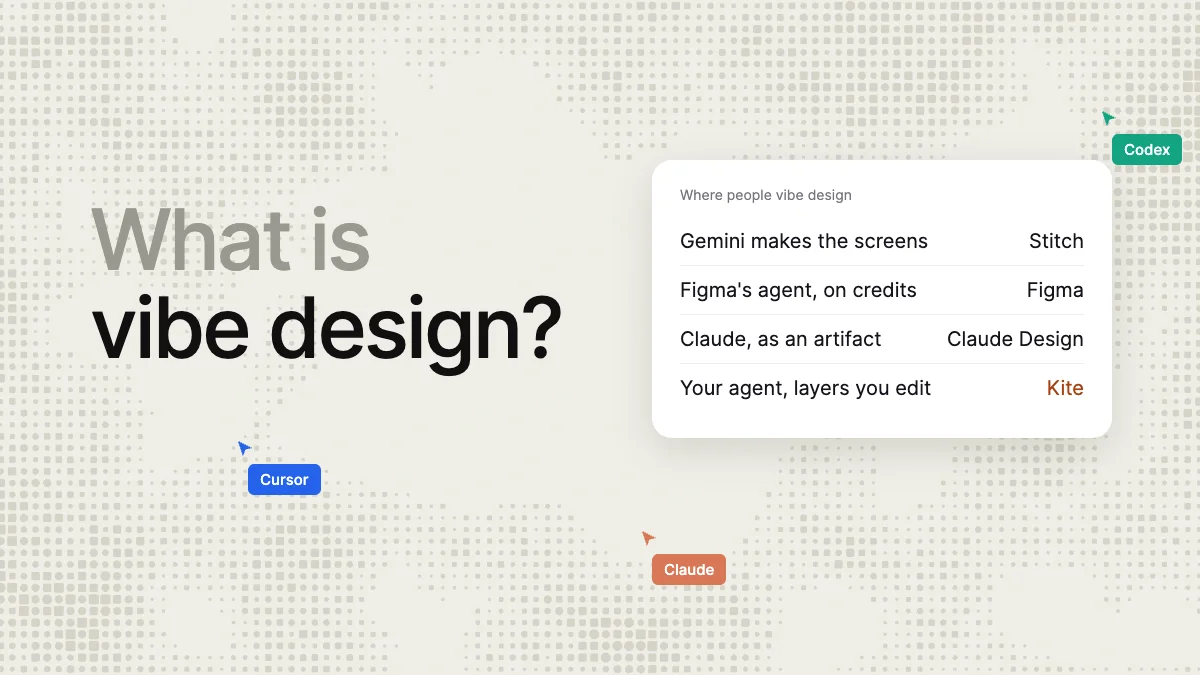
Short answer: vibe design is designing software by telling an AI, in plain words, what you want: the goal, the people it is for and how it should feel. The AI draws the screens, and you steer the result with more plain words instead of moving every pixel yourself. It is the design-side sibling of vibe coding: you get screens to look at and change, not running code. Google made the term a product name on March 18, 2026, when it relaunched Stitch under the headline “Introducing ‘vibe design’ with Stitch” (Google's post).
Key takeaways
- “Vibe coding” came first: Andrej Karpathy coined it in February 2025. “Vibe design” was in use on design blogs in 2025, and Google made it the name of Stitch's redesign in March 2026.
- The loop is the same everywhere: a brief in plain words, screens back in seconds, then refinements in plain words until it is right.
- The tools differ in who draws and what you keep: Stitch's Gemini, Figma's agent, Claude Design, UX Pilot, or your own agent in a Kite file your team edits.
- In our timed session, Claude designed a bakery landing page in Kite from one sentence, then took two refinements: 116 seconds, 10 calls and 2 small fixes in all, the first full page after 38 seconds.
- Its weak spots are well documented: a generic look, details a designer would catch, and drift without a design system. Nielsen Norman Group calls the results “good from afar, but far from good”.
Every outside fact below was read on its source's own page on November 20, 2026 (Stitch's plan on November 14), and is linked where it is stated. We make Kite (kite.new), a design tool AI agents and teams design in, so it is one of the tools covered; the others are named with what they do well.
Where does the term “vibe design” come from?
The phrase grew out of vibe coding. Andrej Karpathy, an OpenAI co-founder and Tesla's former AI lead, coined it on February 2, 2025. He posted: “There's a new kind of coding I call ‘vibe coding’, where you fully give in to the vibes, embrace exponentials, and forget that the code even exists” (quoted in full by Simon Willison). The term spread fast: Merriam-Webster listed it as “slang & trending” in March 2025, and Collins English Dictionary made it its Word of the Year for 2025 (Wikipedia).
Designers borrowed it within months. In October 2025, a Design Bootcamp post described designers focusing “on the emotion or the ‘vibe’ they want a user to feel”, then using “AI tools to quickly build the actual screens” (Medium).
Google gave it a product on March 18, 2026. Its post on Stitch reads: “When ‘vibe designing’ in Stitch, you can explore many ideas quickly leading to a higher quality outcome. Instead of starting with a wireframe, you can start by explaining the business objective you're hoping to achieve, what you want your users to feel, or even examples of what's currently inspiring you” (Google). TechRadar's headline the next day called Stitch a “new ‘vibe design’ tool” (TechRadar), and at Google I/O on May 19, 2026, Google announced “new ways to vibe design with Stitch” (Google).
Interest keeps rising. In Google Ads data we pulled on November 20, 2026, “vibe design” reached about 4,400 searches a month worldwide, up from about 1,900 six months earlier. Framer's glossary now defines it as “the practice of directing the look, feel, and layout of a user interface through natural language prompts and AI-assisted tools instead of manually adjusting every canvas detail” (Framer).
Vibe design vs vibe coding: what's the difference?
Vibe coding is building software mainly through prompts instead of writing the code yourself. Vibe design is the same move for screens. Both start from a plain-language request to an AI; the difference is what comes back. Vibe coding gives you software that runs, while vibe design gives you screens to look at, discuss and change before anything is built. Many tools now cross over, so treat this as a difference of focus.
| Vibe coding | Vibe design | |
|---|---|---|
| Named | Andrej Karpathy, February 2, 2025 | On design blogs in 2025; Google's Stitch, March 18, 2026 |
| You describe | What the software should do | Who it is for, what it shows, how it should feel |
| You get | Running code: an app, a script, a site | Screens: a design file, mockup or prototype |
| You check it by | Running it and pasting back errors | Looking at it, with your team |
| Typical tools | Claude Code, GitHub Copilot, Cursor | Google Stitch, Figma Make and Figma's agent, Claude Design, UX Pilot, Kite |
The two meet at the handoff. Stitch exports HTML and CSS, Claude Design hands a design to Claude Code “with a single instruction” (Anthropic), and in Kite any frame copies out as HTML, React or Tailwind. Vibe design is the step where people still decide what the thing should be, before code makes it expensive to change.
Vibe coding itself has grown up. A year after his first post, Karpathy wrote that programming via LLM agents “is increasingly becoming a default workflow for professionals, except with more oversight and scrutiny”. His new name for it is “agentic engineering” (The New Stack). In Stack Overflow's 2025 survey, nearly 77% of developers said vibe coding was not part of their professional work (Stack Overflow); in 2026, 66% used coding assistants or agents (Stack Overflow). The same shift, from accepting whatever comes back to directing and checking it, is what makes vibe design useful for real work.
Researchers see the same spread. A study of 7 live-streamed vibe-coding sessions (254 prompts), accepted at the ESEC/FSE 2026 software engineering conference, found that “some vibe coders rely almost entirely on AI without inspecting code, while others examine and adapt generated outputs”, and that debugging and refinement were often described as “rolling the dice” (arXiv). Design has the same dice: the same prompt can come back looking different each time.
How does vibe design work in practice?
The loop has three steps, and every tool below follows it:
- Brief. You say what you need in plain words: the page, the audience, the mood and any real content. Stitch's own guide splits a prompt into “Anatomy (Structure)”, “Vibe (Aesthetic)” and “Content (Context)” (Stitch).
- Screens. The AI draws a first version in seconds: layout, type, colour, copy and icons. Some tools return several options at once.
- Refine. You react in plain words, “warmer”, “make ordering the main button”, “add our opening hours”, and the AI changes what is there. Depending on the tool you can also click and edit directly, comment on an element, or move a slider.
What stays after the loop is where tools differ most: a picture, a prototype in the tool's own format, a web app, or layers in a design file that people and agents keep editing.
Which tools do people mean by vibe design?
Here are five tools you can vibe design in today, each described from its own pages, read on November 20, 2026. For a longer list, see the best AI design agents.
| Tool | Who draws | What you keep | Cost to start |
|---|---|---|---|
| Google Stitch | Gemini, prompted by you or your agent | Screens on Stitch's canvas, HTML, Figma export | Free for now, daily credit limit |
| Figma Make and Figma's agent | Figma's AI | A code-backed prototype or app; layers in Figma Design | Figma AI credits |
| Claude Design | Claude | An artifact in Claude; export to PDF, PPTX, HTML, Canva | Every Claude plan, Free included |
| UX Pilot | UX Pilot's AI | Editable screens and flows, Figma export, code | Free plan, then paid |
| Kite | Your own agent: Claude, ChatGPT, Cursor, Codex | Layers in a file your team edits; HTML, React, Tailwind | Free plan (100 agent actions a day), no AI credits |
- Google Stitch describes itself as “the premier AI-powered interface design tool for Vibe Coding and Vibe Design” (Stitch). Gemini generates screens from text, voice, sketches or images, and Google says it is currently free of charge on a daily credit limit (Stitch FAQ). Outside agents reach it over MCP, by prompting Gemini. Compared in Kite vs Google Stitch.
- Figma Make turns prompts into prototypes and apps where “everything you build is code-backed and visually editable” (Figma). Figma's agent designs in Figma Design files; it left beta on October 6, 2026 and now consumes Figma AI credits, from the same budget as Figma Make (Figma's FAQ). See Figma's agent compared.
- Claude Design launched in April 2026: “Describe what you need and Claude builds a first version. From there, you refine through conversation, inline comments, direct edits, or custom sliders” (Anthropic). It now works inside any Claude conversation and comes with every plan, Free included; the standalone site at claude.ai/design closes on December 14, 2026 (Claude Design, Claude Help Center).
- UX Pilot generates “editable product designs with AI, from a single screen to a complete flow”, with export to Figma and code (UX Pilot). It has a free plan (plans), and its MCP server lets Claude, ChatGPT or Cursor ask UX Pilot's AI to design “with credits” (MCP).
- Kite takes the other route: the agent you already use, Claude, ChatGPT, Cursor, Codex or any MCP client, designs in a Kite file. What it draws is real HTML and CSS as layers, words as text and boxes as frames, not a picture, so your team edits, comments and keeps working in the same file, with live cursors. There are no AI credits: the agent runs on its own plan. Free has unlimited editors, 3 files and 100 agent actions a day; Pro is $16 a person a month billed yearly ($20 monthly). Frames copy out as HTML, React or Tailwind, and paste into Figma as editable layers.
A vibe design session in Kite, timed
To show the loop with numbers, we ran one session on November 20, 2026 with Claude (Opus 5.5 in Claude Code, connected to Kite over MCP). It worked in a new, empty file with no design system. We typed one brief and two refinements, each in plain words, and timed it from just before the first call to just after the last answer, including the time the model spent writing.
| Step | What we asked | What changed |
|---|---|---|
| Brief | “A calm landing page for a neighbourhood bakery, warm, two sections.” | A full page in one draw: nav, a hero with a big serif heading and an “out of the oven” card, and four of today's bakes with prices |
| Refinement 1 | “Make the bakes section feel cosier, like the inside of the shop: darker and warmer.” | A dark crust-brown section with cream type and amber prices, edited in place |
| Refinement 2 | “Add where to find us and when we're open, and make ordering for pickup the main thing to do.” | An address and opening hours in the hero card; “Order for pickup” became the main button, and the nav's button was filled to match |
The numbers: 116 seconds and 10 calls to Kite in all. The first full page was there after 38 seconds and 3 calls (read Kite's drawing guide, make the file, draw the page). The two refinements took 7 calls: 3 edits and draws, and 4 reads to find the right layers. One of them was wasted because Claude had given the section the same name as a nav link. Claude made 2 fixes on its own after looking at each result: a bake's name wrapped onto two lines and pushed its price out of line, and after the cards gained a border, a second bake's name wrapped the same way. No AI credits were spent.
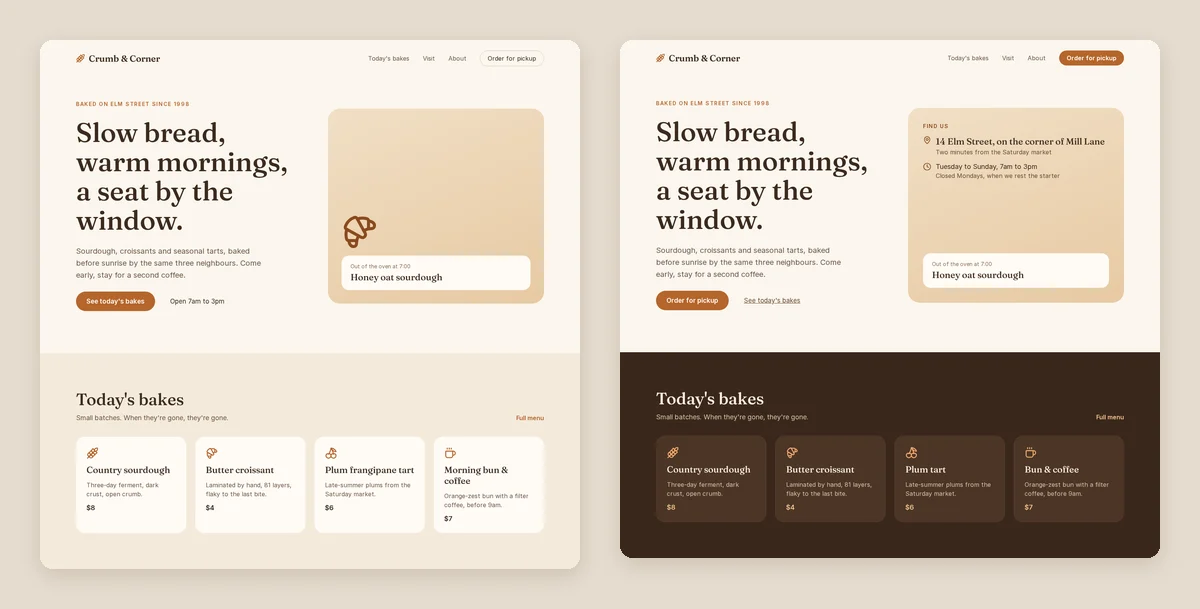
Two things stood out. Each refinement edited the layers that were there instead of redrawing the page. The heading, body copy, bake cards' text and spacing stayed as they were, and only what we asked about moved: the bakes section changed colour, the croissant icon in the hero card was hidden to make room for the address and hours, and “Open 7am to 3pm” beside the main button became a “See today's bakes” link. And the first refinement had to recolour 24 layers one by one, because the brief came with no design system: with the colours saved as variables, it would have been a few changes. This was one run of one brief, so read it as what happened, not a benchmark. The file was a scratch file and is archived.
Where vibe design falls short
The speed is real, and so are the limits. Four come up again and again in the research and showed up in our run:
- A generic look. Without detailed visual direction, Nielsen Norman Group found AI prototyping tools “tend to output designs that share a similar, generic look using sans-serif typeface and minimalistic styling” (NN/g). Figma said the same when it opened its canvas to agents: “so many designs created by AI often feel unfamiliar and generic” (Figma).
- The details a designer catches. Even with a detailed prompt, NN/g saw “a lack of visual hierarchy or grouping among related elements”, “poor color contrast” and “inconsistent margin spacing”. It summed the outputs up as “good from afar, but far from good” (NN/g). Our run's two fixes were exactly this kind: text wrapping that broke a row of prices.
- Consistency without a design system. A design system is the shared set of colours, type, spacing and rules every screen follows. In NN/g's tests, a vague prompt “generated inconsistent and unpredictable outcomes across the board” (NN/g). Screen two drifts from screen one unless colours, type and rules live somewhere the AI reads. That is why Stitch added DESIGN.md (Google), Claude Design builds a design system “by reading your codebase and design files” (Anthropic), Figma lets skills “directly shape how agents build on the Figma canvas” (Figma), and Kite design systems carry variables and skills an agent reads before it draws.
- Handoff and review. NN/g warns that “production has become cheaper than UX evaluation” (NN/g): it is now faster to make a screen than to decide whether it is right. A picture or a prototype in one person's chat is hard to review. A file where the team comments and edits beside the agent keeps that review in one place. Developers feel the gap too: in Stack Overflow's 2026 survey, half found AI useful for design, against 74% for implementation (Stack Overflow).
How to vibe design well
- Say the feeling and the facts. “Calm” and “warm” set the tone in our brief, and “two sections” set the structure. NN/g found a named style such as “neobrutalist” beats asking for something “trendy” (NN/g).
- Give it your real content. Claude invented the bakery's address, prices and hours. NN/g found realistic data produces better-grouped screens; paste in your own menu, plans or copy from the start.
- Set up a design system first. Save your colours, type and a few rules (one main button per screen, which colour is only for errors) as a design system. Our first refinement touched 24 layers that a single variable would have covered. Kite reads a DESIGN.md too, so rules from Stitch carry over.
- Refine in short, plain steps. Each of our refinements was one sentence: the first about the mood of one section, the second asking for two related things, the shop's details and the main action. Small steps like these are easy to check, and easy to undo when one misses.
- Ask for edits, not redraws. A tool that changes the layers that are there keeps what you liked; one that regenerates the screen can lose it.
- Look at every result. Wrapped titles, weak contrast and uneven spacing are quick to spot and quick to fix, and the AI won't always catch them. Then share the file and let the team comment before anything is built.
To try the loop with your own agent, start with your first design with an agent. For where this is heading, see design trends for 2027; to compare tools, Google Stitch alternatives.
How we checked
Methodology: on November 20, 2026 we read Google's first page for “vibe design” and the questions people ask about it. We then fact-checked each line on its source's own page that day: Google's Stitch posts and guide, Karpathy's post, Figma, Anthropic, UX Pilot and Framer's pages, three Nielsen Norman Group studies, an ESEC/FSE 2026 study and Stack Overflow's 2025 and 2026 surveys. Stitch's free plan comes from its FAQ as we checked it on November 14, 2026. Search volumes are Google Ads data we pulled on November 20. The Kite session was one run, timed from timestamps taken just before the first call and after the last. Kite facts come from Kite's own plans and docs.
Questions
- What is vibe design?
- Vibe design is designing software by describing what you want in plain words, the goal, the audience and the feeling, to an AI that makes the screens, and then steering the result with more plain-language requests. Google put the name on a product in March 2026, when it relaunched Stitch with the post "Introducing 'vibe design' with Stitch". It is the design-side sibling of vibe coding.
- What is the difference between vibe design and vibe coding?
- What you get. Vibe coding, a term Andrej Karpathy coined in February 2025, turns prompts into running code. Vibe design turns prompts into screens: a design file, mockup or prototype you look at, change and share before anything is built. Many tools now do both, such as Stitch, which exports HTML, and Kite, which copies a frame as HTML, React or Tailwind.
- Is vibe coding still a thing?
- Yes, though its coiner has moved on from the name. In February 2026 Andrej Karpathy wrote that programming via LLM agents "is increasingly becoming a default workflow for professionals, except with more oversight and scrutiny", and named his favourite term for it "agentic engineering". In Stack Overflow's 2026 survey, 66% of developers used coding assistants or agents; in its 2025 survey, nearly 77% said vibe coding was not part of their professional work.
- How much does vibe design cost?
- It depends on the tool. Google says Stitch is currently free, on a daily credit limit. Claude Design comes with every Claude plan, Free included, and counts toward your plan's usage limits. Figma's agent and Figma Make spend Figma AI credits. UX Pilot has a free plan and paid plans. Kite's Free plan has unlimited editors, 3 files and 100 agent actions a day; Pro is $16 a person a month billed yearly, and your agent runs on the AI plan you already have.
- Is there a free vibe design tool?
- Several. Google Stitch is free for now with a daily limit, Claude Design is on Claude's Free plan, and UX Pilot and Kite have free plans. In Kite you bring your own agent, such as Claude, ChatGPT, Cursor or Codex, and Kite charges no AI credits. Note that "Vibe" is also the name of several unrelated apps and plugins, so check which product a price belongs to.
- Will vibe design replace designers?
- The evidence says no, not soon. Nielsen Norman Group tested AI prototyping tools on a real project and found they "lack the sophistication to weigh design tradeoffs", and that the tools work best "in the hands of people who understand the craft". In Stack Overflow's 2026 survey, half of developers found AI useful for design, against 74% for implementation. The work shifts toward directing, judging and fixing.
- What should a vibe design prompt include?
- Who it is for, what it must do, how it should feel and what goes on it. Nielsen Norman Group found detailed prompts and real content give better screens than vague ones. Google's own guide for Stitch splits a prompt into anatomy (the layout), vibe (the style) and content (the data). Naming a style, such as "neobrutalist", works better than asking for something "trendy".
- Can I vibe design in Figma?
- Yes. Figma Make turns prompts into code-backed prototypes and apps, and Figma's agent designs in Figma Design files, both spending Figma AI credits. You can also vibe design in Kite with your own agent and paste the frames into Figma as editable layers.