Short answer: the frontend design skill is Anthropic's frontend-design, a free 9 KB instruction file. It makes a coding agent plan a look (named colours, typefaces, a layout idea) and check it against your brief before it writes interface code. Install it in Claude Code with /plugin install frontend-design@claude-plugins-official, or in Codex, Cursor and Gemini CLI with one npx skills add command. In our test it switched itself on without being named and moved the page off the usual cream-and-clay spa look. What it gives you is code: the same brief in Kite (kite.new) came back as an editable design file in 3 calls.
Key takeaways
- It is one SKILL.md, 9,390 bytes and 71 lines, with no scripts. The plugin and the copy in Anthropic's skills repository are the same file, byte for byte.
- It was rewritten on September 3, 2026: it no longer bans fonts, and instead lists five looks AI design falls into and asks the agent to avoid them.
- Installed but not named, Claude Code loaded it by itself in our run, and the page changed: no cream, no clay, no ALL-CAPS label.
- Two runs with the skill came out almost the same page, and none of the three Claude Code runs looked at what it built.
- Kite takes the same two-pass method onto a canvas: the plan becomes layers your team can select, edit and comment on.
Every fact about the skill below was read on November 20, 2026 on Anthropic's plugin page, in its skills repository and on the agents' own docs, linked in the text. We installed it in throwaway folders and ran it the same day. Kite publishes this page, and Kite is the design tool it is compared with. For a dozen other design skills side by side, see the best design skills for Claude Code and Codex.
What is the frontend-design skill?
An Agent Skill is a folder with a SKILL.md file of instructions, sometimes with scripts, that a coding agent loads when a task fits its description. frontend-design is Anthropic's skill for the look of an interface. Its SKILL.md describes itself as “guidance for distinctive, intentional visual design when building new UI or reshaping an existing one”. It opens by casting the agent as “the design lead at a design studio known for giving every client a distinct visual identity”.
What the file asks for, in order:
- Ground the design in the subject. If the brief doesn't say what the product is, the agent comes up with “one concrete subject, the design's audience, and the design's primary job, as a proposal”, and takes its colours and type from that world.
- Plan in two passes. First a compact plan: “the core base palette as 4–6 named hex values”, the typefaces and their roles, a layout sketched in ASCII. Then a review of that plan against the brief: any part that reads like a generic default, “revise that part, say what you changed and why”. “Only after” that does it write code.
- Avoid five common looks. It names the clusters AI design falls into. The first is cream with a high-contrast serif and a terracotta accent; it flags #D97757 as “Anthropic's own Claude-interaction accent”. The others: near-black with one acid accent, a broadsheet layout, “the SaaS-card kit”, and “template chrome” such as ALL-CAPS labels over headings and arrows on buttons.
- Keep a quality floor. “Responsive down to mobile, visible keyboard focus, reduced motion respected”; “spend your boldness in one place”; and a short section on interface copy: a button says “Save changes”, not “Submit”.
It is small: 9,390 bytes, 71 lines, plus its licence, with no scripts. That is far under the 500 lines Claude Code's docs advise for a SKILL.md. It names no framework, so it works for plain HTML as well as React or Vue.
It changed this autumn, and many descriptions haven't. The folder's history shows a rewrite on September 3, 2026, “Update frontend-design skill to avoid generic design defaults”. The old version banned fonts like Inter; the new one doesn't mention Inter, Roboto or purple at all. The plugin's own marketplace page still says it “avoids common patterns like generic system fonts, predictable purple gradients”, and one directory on Google's first page says it works “using React and Tailwind CSS”, which the file never says.
It is the most-installed design skill we know of: skills.sh counted 1,139,677 installs through the npx skills command on November 20, between 23,000 and 31,000 a week over the last eight weeks. All three security audits on its page show Pass. Plugin installs aren't in that count. Anthropic's skills repository has 197,642 stars, but stars count the whole repository, not this one skill.
How to install it in Claude Code, Codex, Cursor and Gemini CLI
There are three routes. In Claude Code, it's a plugin in the official marketplace, or part of the “example-skills” bundle from Anthropic's skills repository. For every agent, the skills command copies the folder into your project. We ran the plugin route and the skills command (version 1.9.0) in empty folders, with a separate Claude Code settings folder and npm cache, so nothing reached our real setup.
| Agent | Install | Where it goes | Call it |
|---|---|---|---|
| Claude Code | /plugin install frontend-design@claude-plugins-official. Or npx skills add https://github.com/anthropics/skills --skill frontend-design -a claude-code | The plugin cache; or .claude/skills/ (-g: for all your projects) | By itself, or by name (Claude Code's skills docs) |
| Codex | npx skills add … -a codex | .agents/skills/, which Codex scans from your folder up to the repository root | $frontend-design or /skills (OpenAI's docs) |
| Cursor | npx skills add … -a cursor | .agents/skills/; Cursor also reads .claude/skills/ | Type / in Agent chat (Cursor's docs) |
| Gemini CLI | npx skills add … -a gemini-cli | .agents/skills/ | By itself, after a consent prompt; /skills list shows it (Gemini CLI's docs) |
| Claude.ai | Customize > Skills: toggle it, or upload the folder as a ZIP | Your Claude account, with code execution on | By itself (Anthropic's help) |
The Claude Code plugin route, step by step:
- Start Claude Code in your project and run
/plugin install frontend-design@claude-plugins-official. In a session this opens the plugin's details so you can review it and choose a scope before it installs. - From a terminal or a script, use
claude plugin install frontend-design@claude-plugins-official --scope project. On a fresh setup, first runclaude plugin marketplace add anthropics/claude-plugins-official(see Troubleshooting). - If Claude Code says
Run /reload-plugins to apply., do that, or start a new session.
Three things the installs showed:
- Every route installs the same file. The plugin (version 1.1.1) and the skills command both gave us the 9,390-byte SKILL.md from Anthropic's skills repository, unchanged. The plugin adds a README and a licence; the skills command adds the licence and a
skills-lock.jsonin your folder. - The bundle installs more than you asked for.
/plugin marketplace add anthropics/skills, then/plugin install example-skills@anthropic-agent-skillsis the route in the repository's README; it brings frontend-design with Anthropic's other example skills, each one listed to Claude on every turn. - Cursor and Gemini CLI share Codex's folder. With
-a cursorand-a gemini-clithe skills command wrote to the same.agents/skills/as Codex, so one copy serves all three in a project.
A note on copies: the second result on Google for “frontend design skill” is a different skill with the same name, by an independent author. It swaps Anthropic's method for “eight aesthetic anchors, each locking palette, typography, and texture to specific CSS tokens”, installed with git clone. Check the repository's owner before you install anything called frontend-design.
How to use the frontend-design skill
There are three ways in:
- Just ask for an interface. The plugin's page says “simply ask Claude to build frontend interfaces and this skill activates automatically”. In our run it did: with the skill installed and a plain landing-page brief, Claude Code loaded it before writing a line.
- Name it. Start the prompt with “Use the frontend-design skill.” or type
/frontend-designfor a project copy (a plugin's skills are listed under the plugin's name, as/frontend-design:frontend-design). In Codex, use$frontend-design; in Cursor,/. - Give it a direction. The file says “the brief's own words always win”. If you already know the colours, type or mood you want, put them in the brief: the skill only fills the choices you leave open.
Troubleshooting
The problems we hit or found documented, with their fixes:
- “Plugin 'frontend-design' not found in marketplace 'claude-plugins-official'”. We got this from
claude plugin installon a fresh setup. Claude Code's docs explain that the official marketplace is only registered once someone opens an interactive session; runclaude plugin marketplace add anthropics/claude-plugins-official, then install again. - Installed, but nothing changes. Run
/reload-pluginsor start a new session, then check the plugin's Installed tab in/plugin. For a copied skill, check it landed where your agent looks:.claude/skills/for Claude Code,.agents/skills/for Codex, Cursor and Gemini CLI. - Every page starts to look the same. The most common complaint. A r/claudeskills thread on Google's first page opens with “after lot of artifact all start to look same”, and one reply puts it down to the skill giving Claude no “specific visual direction”. Our two runs with it came out nearly identical. The fix that thread suggests, and the file allows, is to bring the direction yourself: a few words in the brief, or a DESIGN.md with your colours and type.
- Guides that don't match the file. If a page tells you it bans Inter, avoids purple or requires React and Tailwind, it is describing the version before September 3, 2026, or guessing. Read the SKILL.md itself: it takes two minutes.
- Two copies at once. The frontend-design plugin and the example-skills bundle both contain it. Per Claude Code's docs, plugin skills are kept under their plugin's name, so you end up with two listings of the same file. Keep one.
A measured run: the same brief with it, without it, and in Kite
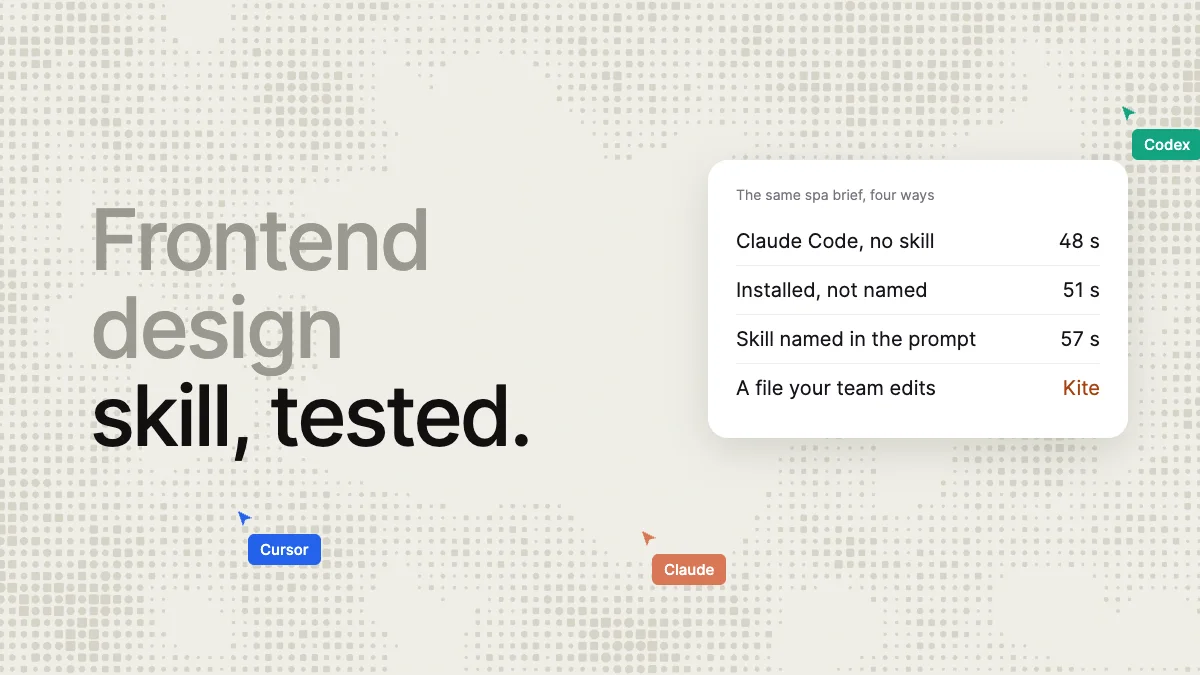
On November 20, 2026 we gave one brief to Claude Code three times, in empty folders, with nothing loaded but Claude Code's own skills and the folder's: “Build a landing page for Serenity Spa, a beauty and wellness day spa: a hero with a booking button, its services with prices, testimonials and a closing call to book. Write it as one self-contained index.html in this folder (inline CSS, no build step, no external images). Desktop first.” It is the brief from our UI UX Pro Max test, chosen because a spa invites exactly the cream, serif and clay look this skill warns about. Each run used Claude Sonnet 5.5, once. Then Claude Opus 5.5 drew the same brief in Kite, following the skill's two passes.
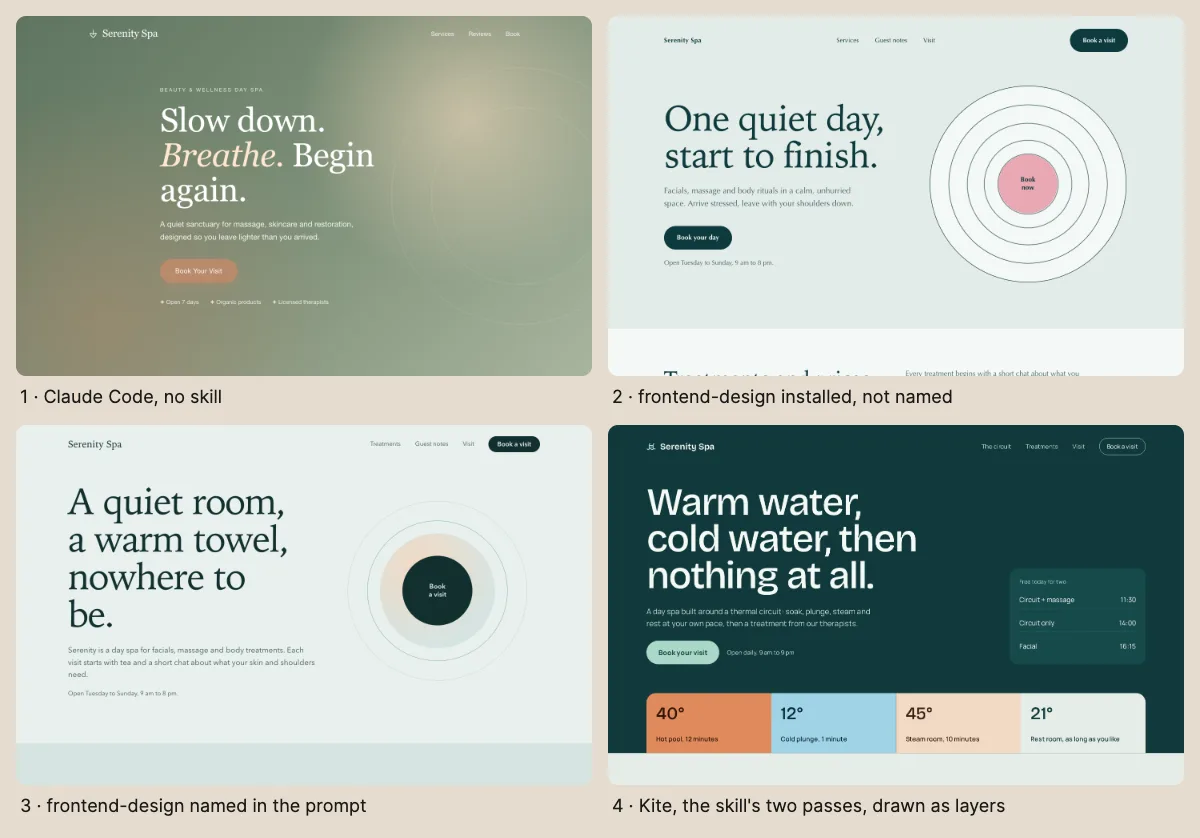
| Run | Skill used? | Time | Tool calls | Input tokens | What you get |
|---|---|---|---|---|---|
| 1. Claude Code, no skill | No | 48 s | 1 | 24,882 | index.html: sage, cream and clay, Georgia, six cards |
| 2. Skill installed, same prompt | Yes, loaded by itself | 51 s | 2 | 40,418 | index.html: pool teal, mint and rose, a price menu |
| 3. Skill named in the prompt | Yes | 57 s | 2 | 41,797 | index.html: much the same page as run 2 |
| 4. Kite, the skill's two passes | Its method, by the agent | 69 s | 3 | Not measured | A Kite file: frames, text layers, an icon, 0 fixes |
What the numbers say:
- Without it, Claude drew the look the skill warns about. Run 1 is a sage gradient on a cream page (#FAF6F0) with a clay-coloured button, Georgia, a tracked ALL-CAPS label over the headline and one word of it set in italic, then six matching service cards. The skill names three of those as tells of generated design: the cream, serif and clay palette, the ALL-CAPS label, and the single accented word.
- Installed, it switched itself on. In run 2 the prompt didn't mention the skill, yet Claude Code loaded it first. Then it wrote a deep pool-teal page on pale mint with one rose accent, a serif and a humanist sans, and a price list set like a menu. It called its ripple “the only animation on the page”, skipped for people who turn motion off. Its own summary said it “steered away from the usual cream-and-terracotta spa look”. That is the opposite of what UI UX Pro Max did in our test of it three days earlier, where Claude Code ignored that skill until it was named.
- Runs 2 and 3 are nearly the same page. Both put the booking button in a circle of ripple rings, both chose Iowan Old Style, both split the prices into four menus, and both titled the reviews “What guests say after their visit”. One brief and one model aren't enough to call that a pattern, but it matches the Reddit complaint above: the skill moves the agent off one default and onto its own.
- It costs little. 15,500 to 16,900 more input tokens than run 1, and 3 to 9 seconds, at $0.13 to $0.15 against $0.11 in API prices. A 9 KB file is cheap to carry.
- Nobody looked. The skill asks the agent to critique its work with screenshots “if your environment supports it”. Our runs had no browser tool, and all three said they hadn't opened the page. In Kite, every draw returns a picture for the agent to check before it finishes.
In Kite the three calls were: read Kite's drawing guide, make a file, and draw the page, 1440 wide, in one call with no fixes. The plan followed the skill: deep pool teal and mint, Bricolage Grotesque with Manrope, no ALL-CAPS labels, and one bold element, a strip of the spa's four rooms, from a 12° cold plunge to 45° steam. That plan also landed on teal and mint, like runs 2 and 3, and its closing band reuses the hot pool's clay orange, close to an accent the skill lists. The model differs from the Claude Code runs and each ran once, so this is not a speed race; it shows what each route asks of you and what you get back. The scratch file was archived afterwards.
What frontend-design is good at
- Breaking the first default. In our test it took Claude Code from cream, clay and an ALL-CAPS label to a palette and layout taken from the subject (water, temperature, a treatment menu), without being asked.
- Light to carry. One 9 KB file, no scripts, no Python, no network, about 15,500 tokens on a whole page. Nothing to audit but text.
- A sound process. Plan, review the plan against the brief, then build, with a quality floor (focus, reduced motion, mobile) and plain-words copy. Those are good instructions for a human designer too.
- Everywhere. Claude Code, Claude.ai, Codex, Cursor and Gemini CLI read the same file, and three of them share one folder.
What frontend-design misses
- No direction of its own. It says what to avoid and how to decide, not what your product looks like. With no brand in the brief, our two runs with it converged on one page, and people on Reddit report the same drift across many artifacts.
- No design system. The file never mentions one. The plan it asks for lives in the agent's reply and is gone next session; the file only suggests jotting notes “if you have a space” for them.
- No look at the result unless your setup has one. Screenshots are optional in its words, and in our runs nothing was opened.
- Code is the only output. There is no file to rearrange, no comment thread, nothing a designer or a client can change without prompting the agent again. Claude Code's own
/designcommand draws editable artboards instead: see Claude Design in Claude Code. - Its descriptions lag it. The marketplace page and skills.sh's summary still describe the version from before September, and one directory says it uses React and Tailwind, which the file never mentions; what you read about it may not be what you install. For more commands, there is Impeccable, which “started from Anthropic's frontend-design skill” (a dev.to roundup) and adds commands such as critique and polish.
frontend-design vs designing in Kite
Kite (kite.new) is a design canvas your agent draws on over MCP, as editable layers your team selects, retypes and comments on. It keeps a design system (variables, styles) and skills of its own, which every agent in the file sees, and its Import reads a Claude SKILL.md, so frontend-design itself can live in a Kite file. The two do different jobs:
| frontend-design | Kite | |
|---|---|---|
| What it is | A skill: one instruction file for your agent | A design tool with a shared canvas, design systems and skills |
| What you get | Code your agent writes, planned first | A design file of real layers; copy any frame as HTML, React or Tailwind |
| Seeing the result | Screenshots if your setup allows; in our runs, none | Every draw returns a picture for the agent to check |
| Your design system | Not mentioned; the plan isn't kept | Variables and styles every file and agent uses; reads and writes DESIGN.md |
| Rules for agents | Its SKILL.md, loaded when the task fits | Skills in the system or the file, listed to every agent; Import reads a SKILL.md |
| Team review | Not built in | Comments on the canvas, unlimited editors |
| Agents | Claude Code, Claude.ai, Codex, Cursor, Gemini CLI and others that read skills | Claude, Codex, Cursor, ChatGPT and others over MCP |
| Price | Free | Free: 3 files, 100 agent actions a day. Pro: $20 per editor a month |
| Our run | Loaded itself; moved the page off cream and clay | An editable file in 3 calls, 0 fixes |
Which should you use?
Use frontend-design when you are coding a page yourself and want your agent's first draft to be a choice rather than a habit. It's free, small and switches itself on; install it and put your brand's words in the brief.
Use Kite when the design has to be seen, changed and agreed before it becomes code: a client to show, a designer to review, several agents on one product. The skill's plan, colours and type become variables in a design system that every person and agent shares, and comments on the canvas keep what was turned down and why, the memory the skill asks for and doesn't have. When a frame is right, copy it as HTML, React or Tailwind.
They work together, as in our run: keep the skill, let your agent draw in Kite, and save the plan there. Kite is free with unlimited editors, 3 files and 100 agent actions a day; Pro is $20 per editor a month, or $16 a month billed yearly, with unlimited agent actions (pricing). Kite sells no AI credits, and it isn't open source or self-hosted.
How we checked
Methodology: on November 20, 2026 we read the skill's SKILL.md and history in anthropics/skills and the plugin in claude-plugins-official. We also read its marketplace page, its skills.sh page and install counts, the skills docs of Claude Code, Claude.ai, Codex, Cursor and Gemini CLI, and the Reddit and dev.to pages on Google's first page. We installed it through the Claude Code plugin route with a separate settings folder, and with npx skills@1.9.0 for Claude Code, Codex, Cursor and Gemini CLI in empty folders. We ran Claude Code (version 2.1.327, Claude Sonnet 5.5) three times with no user settings, plugins or MCP servers, and only file tools plus the Skill tool; times, tokens and costs come from its own output. The Kite run used Claude Opus 5.5 through Kite's connector in a new scratch file, archived afterwards. We did not run the skill inside Codex, Cursor, Gemini CLI, Claude.ai or ChatGPT, and ran each variant once, so treat the results as single observations. Kite figures come from Kite's pricing page; prices are in US dollars.
Questions
- What is the frontend design skill in Claude?
- It's Anthropic's frontend-design skill: one SKILL.md file of about 9 KB. It tells the agent to act as the design lead at a studio and write a short design plan: four to six named colours, typefaces and a layout idea. The agent checks that plan against the brief, and only then writes the interface's code. It has no scripts and no database. It is published in Anthropic's skills repository and as the frontend-design plugin in Claude Code's official marketplace.
- How do I install the frontend-design skill in Claude Code?
- In a Claude Code session, run /plugin install frontend-design@claude-plugins-official and choose a scope. From a terminal, claude plugin install frontend-design@claude-plugins-official works too. On a machine where the official marketplace isn't registered yet, run claude plugin marketplace add anthropics/claude-plugins-official first. Or copy it into your project with npx skills add https://github.com/anthropics/skills --skill frontend-design -a claude-code.
- Does the frontend-design skill work in Codex?
- Yes. It's a plain SKILL.md with no Claude-only settings, and Codex reads skills from .agents/skills. npx skills add https://github.com/anthropics/skills --skill frontend-design -a codex puts it there. Mention it with $frontend-design or /skills, or let Codex pick it when your task matches its description. Anthropic doesn't publish a Codex version itself.
- Does it work in Cursor and Gemini CLI?
- Yes, the same way. Cursor loads skills from .agents/skills and .cursor/skills, and also from .claude/skills, so a copy installed for Claude Code is already visible to it; type / in Agent chat to pick it. Gemini CLI reads .agents/skills too and asks for your consent when it activates a skill. We checked where the files land, not the skill's output in those two tools.
- Can I use the frontend-design skill in ChatGPT or Claude.ai?
- In Claude.ai, Anthropic's skills repository says its example skills are already available on paid plans; any skill can also be uploaded as a ZIP in Customize > Skills, with code execution turned on. For ChatGPT, OpenAI's docs say standalone skills work in the ChatGPT desktop app and Codex, where you pick one with @ or $. We did not test the skill in either chat app.
- Is the frontend-design skill free?
- Yes. The skill is a text file in Anthropic's public repository with a licence file beside it, and the plugin costs nothing to install. You pay only for what your agent already costs: in our run, using it added about 15,500 input tokens to one landing page.
- Does frontend-design still ban Inter and purple gradients?
- No. Anthropic rewrote the skill on September 3, 2026. The current file never mentions Inter, Roboto or purple. Instead it describes five looks AI design keeps falling into, such as cream with a serif and a terracotta accent, and says that where the brief leaves a choice free, the agent shouldn't spend it on one of them. The plugin's own marketplace page and skills.sh's summary still describe the older version.